
I've created a dedicated page with my guide for Multi-Booting Windows 10 and OpenBSD. This supersedes the earlier blog post on this topic. I've been running this setup for a few months now and I seem to have ironed out most of the gotchas, including how to, as elegantly as practicable, deal with Windows' BitLocker shenanigans as well as its tendency to override the rEFInd boot manager.
Showing posts with label bsd. Show all posts
Showing posts with label bsd. Show all posts

2016-01-01
NetBSD 7.0 working on the Raspberry Pi Zero
The NetBSD Wiki has a nice page about Raspberry Pi support, including instructions for finding a nightly snapshot image for Raspberry Pi SBCs.
Trying to boot the latest snapshot (201512311300Z) on my Pi Zero resulted in 8 flashes of the OK/ACT LED (bootcode.bin and/or start.elf problems, according to the documentation). This image boots fine on my Pi B+ and Pi 2.
I over-wrote bootcode.bin, start.elf and start_cd.elf on the freshly imaged NetBSD SD card from the version on my Pi Zero Lapdock (installed from a recent Arch Linux image. NetBSD 7 now boots on the Raspberry Pi Zero. I don't know if these are exactly the correct files, but I suspect they likely require updating in the NetBSD base image.
I've included MD5 sums of the files for your convenience: From the NetBSD Image:
MD5 (bootcode.bin) = 9a4ad6a12ad7dc1aae279888c25d2252
MD5 (start.elf) = a2c4b9ea3ae986f88ea01e05bef46904
MD5 (start_cd.elf) = 85924312c9b51d1ef5b7ca301bb18d54
Files I copied over from Arch Linux that make it bootable:
MD5 (bootcode.bin) = 6cc6560c0178c10928d14b8768969dab
MD5 (start.elf) = f5b2a422d863efe5d47b1ac291ccaa3a
MD5 (start_cd.elf) = f0dfc1462c5d9b003b64428fd52406ed
(I posted a variant of this as a comment on the NetBSD wiki. It hasn't shown up yet. It likely requires approval)
2015-12-31
No more "Hacky GNU Year"
I usually kick off every year with the aforementioned greeting, but 2015 will stand as the year I really got sick of what the GNU/Linux ecosystem has become... in pretty much the same way I have been sick of what the Windows ecosystem has become. The mainstream Linux distributions have all become painful to me in ways that I couldn't have imagined just a few years ago. It's been a long, arduous slog. You can ask any of my nerd friends. I've gotten pretty salty over the state of Linux in the past year. And don't get me started on the nightmares of El Capitan and Windows 10, also making 2015 especially brutal.
This evening, though, Linux is weighing especially heavy on my mind. I'm sure the recent passing of Ian Murdock has something to do with it as well. We really did lose one of the heroes this week.
I will still use Linux and Windows for the tasks that they excel in. I will continue to experiment with and master their secrets in order to figure out how they work -- just as I do with other operating systems.
My new year's resolution is to get more and more of my personal stuff migrated to some kind of BSD.
Best wishes to all of you in 2016 from Ax0n.
2013-07-22
Lots of security content: July 2013 BSD Magazine
Yes, you have to give them your e-mail address. And yes, like many publications, there are a bunch of advertisements. Every once in a while, BSDMag covers a lot of security-related topics, and this is one of those. Click below to get the latest issue.

2013-02-12
Making a bootable USB installer for OpenBSD
Edit (April 24, 2016): A Few years ago, OpenBSD developers started issuing an "installXX.fs" image which was designed to be written to a USB drive with dd(1). This makes the article below mostly obsolete.
From pretty much any unix-like operating system, you should be able to use dd to write the .fs image to the USB stick directly, like this:
sudo dd if=install59.fs of=/dev/rsd2c
(Just make sure you have the right target device specified. You don't want to overwrite the wrong drive!)
---
When I first installed OpenBSD to my netbook, I had tried several ways to get the ISO written to a USB stick including unetbootin, using dd to directly write the image to USB, and a few other tricks. The Googles showed me a workable yet rather complicated way to do it, but that sounded like a pain in the butt. I didn't have an external USB optical drive, but I had the hardware to hack one up. This is really how I did that first OpenBSD install:
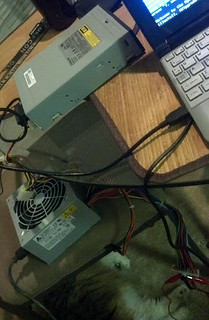
Earlier, I had actually installed OpenBSD to a USB stick, and run the whole system directly from USB, including a swap partition, logs going to /var and the whole nine yards. OpenBSD's gratuitous logging and swap utilization killed that USB stick in a matter of months after daily use, but the thought hit me to use that same method here. By default, the bsd.rd package is installed to the root filesystem to use in a recovery situation. This is an initial ramdisk, a bare-bones userland with just enough tools to install or rescue a system. So that's what we're going to do. The TL;DR goes something like this:
- Boot a desktop from the boot CD
- Insert the USB stick you wish to use
- Choose "Install" from the CD's menu.
- Format the USB stick, and install OpenBSD to it. If it's a 4GB stick or larger, the default partitioning scheme will work great. Otherwise, make one root partition without swap. Install only the base, bsd, bsd.rd and etc packages.
- After install, re-mount the cd and copy the install files to the root partition.
- Create an etc/boot.conf file on the USB stick (mounted to /mnt) with "bsd.rd" as the first and only line.
- Shut down the system. The USB stick will now boot on most servers and netbooks lacking optical drives, and will go directly to the installer. All the OpenBSD install packages will be right there on the USB stick.
I booted up the system, and after the installer menu popped up, I plugged in my USB stick. I did this to make it obvious what its device id is. You can tell it's sd0 in this image. Adjust accordingly. At the menu, I chose "I".
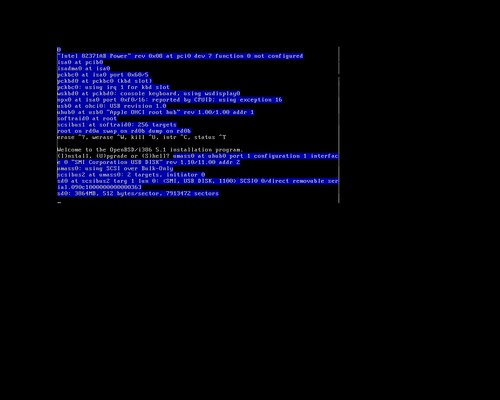
You can see I'm choosing sd0 here. Again, use the right device, or you may damage important filesystems.
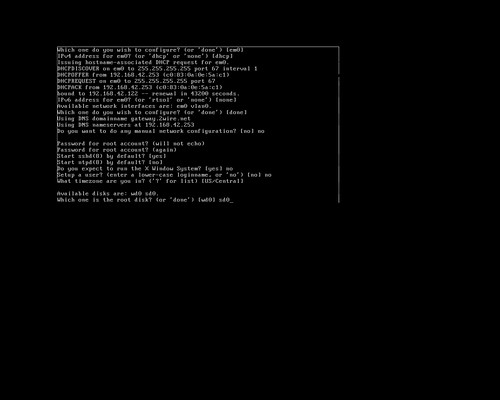
I just rolled with the default partition sizes here. The install files are a little over 100 megs, so they'll fit in the root partition. If you're an avid OpenBSD user, feel free to mess with the disk options here, but the defaults work well on a 4GB stick (the smallest I had laying around).
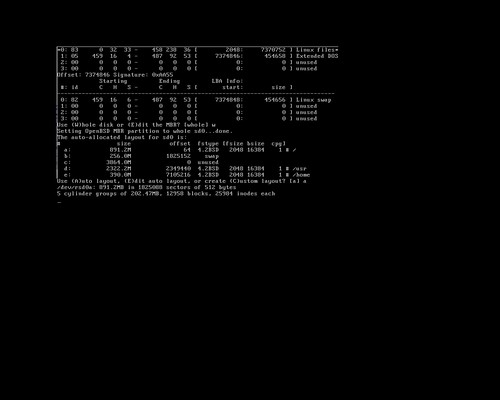
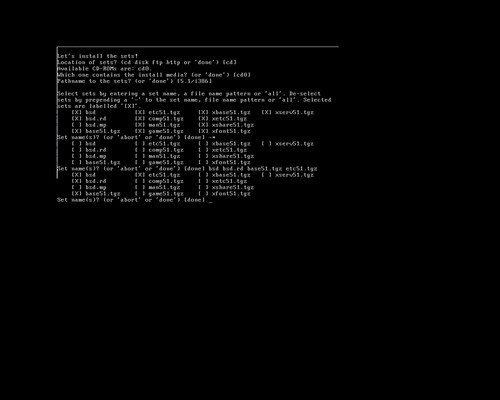
When the time comes to install sets, the only ones you really need to get an installation environment up are bsd, bsd.rd, baseXX.tgz and etcXX.tgz (where XX is the release number) - I had an official OpenBSD 5.1 install set at my desk, so I used it for this example. The numbers will change for each release, but the process works the same.
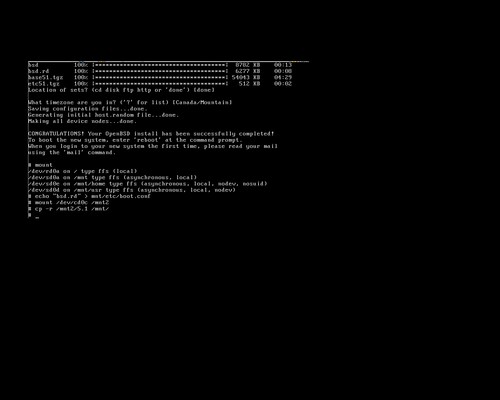
When the installer exits, it will un-mount the CD. You'll want to re-mount it to copy the install sets to USB. Also note that I set mnt/etc/boot.conf to "bsd.rd" - This forces the USB stick to boot directly to the installer ramdisk, so you'll be ready to go!
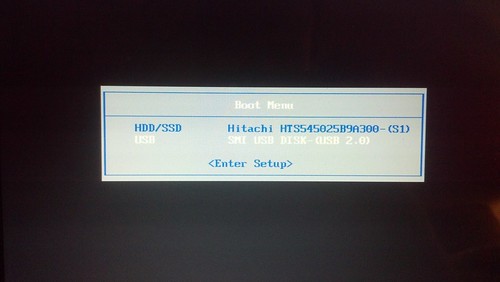
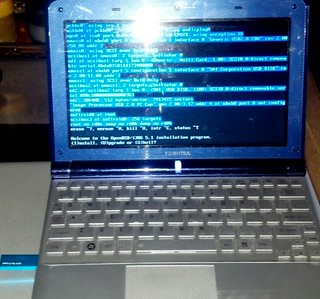
To test, I put the USB stick into my netbook and fired it up.
Voila!
2010-03-23
DNS Tunneling Part 3: Linux, Mac OS X and BSD clients
In the third part of this series, I'll cover using DNS2TCP on unix-like operating systems. DNS2TCP is not written in perl. It's a set of small C programs. It can tunnel multiple types of traffic, as opposed to OzymanDNS which is designed to be used as a Proxy Command for SSH.
Compiling is straight-forward once you download it. This worked on all platforms I tried it on, which includes Ubuntu Linux, OpenBSD, and Mac OS X.
$ tar xvfz dns2tcp-0.4.3.tar.gz
$ cd dns2tcp-0.4.3
$ ./configure
$ make
$ sudo make install
Assuming that you have a valid subdomain nameserver (as outlined in part 1), you just need to edit the configuration file for the "dns2tcpd" server. There's an example file "server/dns2tcpdrc" in the archive that I've modified. Of particular note, make sure to change the "listen" line to 0.0.0.0 or your ethernet interface's IP address. The default configuration will not work because it listens only on localhost. Also, make sure that the "domain" line matches your subdomain. Finally, you must make sure that the chroot directory exists. This is where dns2tcp caches its data. The "ressource" lines are intentionally mis-spelled. The author of this tool lacks proper English grammar skills. That's okay, just keep it in mind. "ressource" lines have the format:
ressources = [resname]:[ip]:[port], ...
My config looks like this, for Squid and SSH:
# config file
listen = 0.0.0.0
port = 53
user=nobody
chroot = /var/empty/dns2tcp/
domain = l33t.h-i-r.net
ressources = ssh:127.0.0.1:22 , proxy:127.0.0.1:3128
Then, run it as follows:
$ sudo dns2tcpd -f /path/to/dns2tcpdrc
or, if you wish to also run it in the foreground for use in a screen session, add the -F flag:
$ sudo dns2tcpd -F -f /path/to/dns2tcpdrc
That's it for the server side.
Now, on the client end, compile and install dns2tcp as well. Configure the "dns2tcprc" file. Unfortunately, it can only be configured with one "ressource" at a time. I am going to use SSH with dynamic proxy again.
#
# configuration :
#
domain = l33t.h-i-r.net
ressource = ssh
local_port = 2222
debug_level=1
I've found that this tunnel software can take a while to fully work. Sometimes up to five minutes. Once it catches on for the first time, though, it seems much more stable and quick than OzymanDNS on the same platforms. Launch it like this:
$ dns2tcpc -f /path/to/dns2tcprc [DNS Server]
Where DNS Server is a DNS server you can access, and probably should be the one you were issued by DHCP.
Activate the SSH tunnel from the CLI:
$ ssh -C -p 2222 -D8080 user@localhost
In the screen shot below, you can see both the SSH session and the dns2tcp client window open.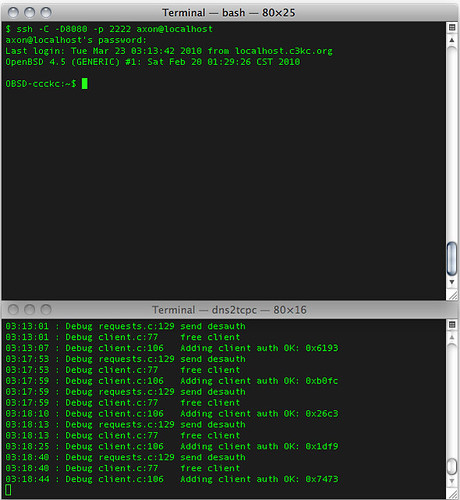
Again, configure Firefox to use the dynamic port you specified above as the proxy on localhost.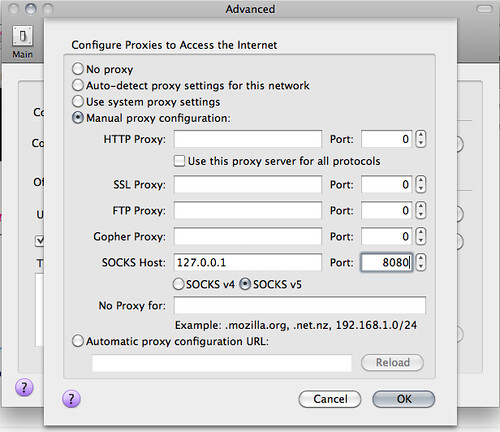
After this, you should be in action!
DNS Tunneling Series:
Part 1: Intro and Nameserver setup
Part 2: Windows Clients (using ozymandns)
Part 3: Linux, BSD and Mac OS X clients (using DNS2TCP)
2010-01-27
Remapping the MacBook Keyboard
I love OS X, and I also have this thing for Apple hardware, especially their laptops. You can rant and rave about "Apple Tax" until you're blue in the face. You won't sway me. One thing that kind of irks me, though, is the keyboard on the MacBook series.
While the sunken, chicklet-style keyboard garnered much criticism in 2006, I like the feel of it. As you can probably tell from the title of this article, my primary complaint isn't in the style of the keyboard. It's in the keys that seem to be missing. In OS X, the MacBook's scant 78-key input device makes sense. Other keys are nice, and are provided on the full-size keyboards for the desktop behemoths, but as a general rule, the slimmed-down laptop keyboard gets things done.
Being an Operating System Junkie, however, I often find a need for some oddball key that's nowhere to be found. In Linux and BSD (or when SSH-ing) from Windows using PuTTY, Shift-Insert pastes text to the terminal. There's no Insert key. In Windows, I'd rather not install vestigial bloatware to grab screen shots. Alt-PrintScreen is the old standby. There's no PrintScreen button, either.
At the same time, there are keys I rarely use in OS X, and they become completely useless on any other platform. They also happen to be near the places that I expect Insert and PrintScreen to be on a full-size keyboard.
There are registry hacks to remap keys on Windows. RandyRants has a great write-up on this, and wrote SharpKeys to help people easily re-map their keyboards. In my case, I wanted to remap F12 to function like PrintScreen, and the Keypad Enter key (next to the arrows, shown prominently in the photo above) to function as the Insert key.
The resulting registry patch is included so that you need not install vestigial bloatware just to remap your MacBook keyboard. Save the text below to a file called "remap.reg" and import it to your Windows Registry -- usually, by double-clicking it. Still, SharpKeys a nice utility to know about, particularly if you have any portable computers lacking a full set of keys.
On Linux and BSD, xmodmap will do the same thing, a lot easier. I didn't bother remapping Print Screen, but getting Enter to function as Insert was important. Create a file called ".xmodmaprc" in your home directory, and add the following content to it:Windows Registry Editor Version 5.00
[HKEY_LOCAL_MACHINE\SYSTEM\CurrentControlSet\Control\Keyboard Layout]
"Scancode Map"=hex:00,00,00,00,00,00,00,00,03,\
00,00,00,37,e0,58,00,52,e0,1c,e0,00,00,00,00
The next time you log in to Ubuntu, you'll get a dialog asking what you want to do with this file:keysym KP_Enter = Insert Insert Insert Insert
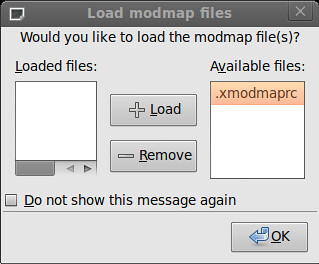
Load the .xmodmaprc file, and if you wish, choose to not show the dialog again. Click OK.
On BSD and perhaps many Linux flavors, you may have to manually edit some files to load xmodmap. You can usually put this line at the beginning of your .xsession or .xinitrc file to load the .xmodmaprc file when X starts. Alternatively, you can run it in an xterm to make sure it works:
These tricks work just as well on bare metal as they do in a virtual machine, or at least as tested in VirtualBox. That's a major annoyance out of the way for me!xmodmap .xmodmaprc
2010-01-12
Flexible operating systems
A while ago, John from TAOSSA mentioned something under his breath (or as much as one can do so with a keyboard) about Gentoo Linux. I replied with the fact that I learned the (very) hard way that if you think you want to play with Gentoo, you actually want to play with Arch Linux.
Gentoo is flexible -- perhaps maybe a bit too much so for most people. And it requires a lot of setup. Arch starts small, but it's not minimalist. There's a specific philosophy to most distribution families. It so happens that Arch Linux' philosophy is similar to that of another OS that I love: OpenBSD.
Arch values code correctness and cleanliness over convenience. They start you out with a small but powerful core that doesn't have a GUI or many fancy apps installed, but they provide you with everything you need in order to have your ideal setup running pretty quickly. While most Linux distributions make broad-sweeping assumptions about what the end-user will want or need to do. Flexible operating systems do no such thing. They might require a little bit more work to get set up, but what you end up with will be precisely what you want, not just something that you can make work.
Also, HiR got about 3.5 seconds of fame via Mubix on Hak 5 Episode 621 (a little after the 3:00 mark). Mubix mentioned most of what he was doing with FreeBSD was shell stuff. All of the BSDs require some work to get all configured and ready to use with a GUI, they don't go too overboard on assumptions.
For example, the things I do first on both ArchLinux and OpenBSD:
- Set up package repositories. In OpenBSD, set PKG_PATH to the URL of a package mirror. In Arch, un-comment some lines in /etc/pacman.d/mirrorlist
- Install sudo and give the %wheel group sudo access.
- Create a user-level account, place it in the wheel group.
- Log off, log on with my user-level account
- Start adding packages and setting things up!
It's up to you to figure out what packages you want. X.org, a window manager, web browser, IM client, a word processor, and your favorite CLI tools are probably the first things you'll want to set up. Or maybe you just want an AMP web server. Flexible OSes do both of these things well and without much fanfare. Truly, you make your own distribution with every install.
Arch Linux is interesting in that there is no "release" schedule. You just perform "pacman -Syu" to upgrade all the packages to the latest stable version. Upgrading OpenBSD can be a bit more of a pain, so I genuinely like how Arch handles it.
Minimalist distributions (DSL, TinyCore and Puppy Linux come to mind) still make too many assumptions. Although they're tuned for systems that have limited resources and they can be tweaked and expanded quite a bit, you may find that the partitions aren't configured the way you want, that the organizer included applications that you don't need, or worse: they compete with the applications you'd rather be using.
2009-11-30
VirtualBox: full-screen resolution for OpenBSD (FreeBSD?)
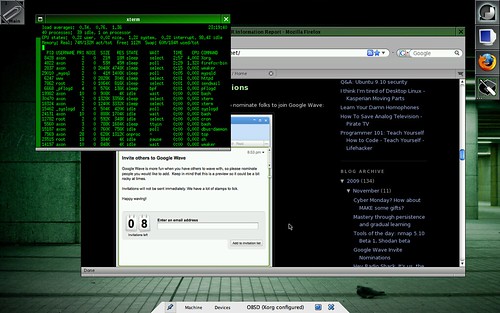
One thing I love about VirtualBox is the Guest Additions package, for Windows and Linux guests. It allows you to resize the window and get an instant resolution change to go along with it. When you start playing with some of the more obscure OSes, though, there's no guest additions. This includes OpenBSD.
To get OpenBSD's guest to run X at full-tilt, I had to do some hacking and tinkering. First, I had to set a custom video mode in VirtualBox. Use the VBoxManage utility on the host platform (VBoxManage.exe on Windows, VBoxManage on Linux, /Applications/VirtualBox.app/Contents/MacOS/VBoxManage on OS X) and do the following where [VM-name] is the name of the VM and [WxHxBPP] is the resolution and bit-per-pixel you're running your host OS at, such as 1280x800x16. In my case, my MacBook's native resolution is 1280x800 and I really don't mind running X.org at 16bpp for a guest OS.
VBoxManage setextradata [VM-name] CustomVideoMode1 [WxHxBPP]
Next, boot OpenBSD or FreeBSD in the VM and use the block of text below as your /etc/X11/xorg.conf file. Backup your existing one if it exists. By default, OpenBSD 4.6 doesn't ship with an xorg.conf file, just using the default config. Be sure to modify the Depth, DefaultDepth and Modes toward the end of the configuration file to match the resolution and BPP you set with VBoxManage. As this will be the only resolution and depth in the configuration file, it should be forced to use this mode if it's supported.
Section "ServerLayout"
 Identifier     "X.org Configured"
 Screen      0  "Screen0" 0 0
 InputDevice    "Mouse0" "CorePointer"
 InputDevice    "Keyboard0" "CoreKeyboard"
EndSection

Section "Files"
 ModulePath   "/usr/X11R6/lib/modules"
 FontPath     "/usr/X11R6/lib/X11/fonts/misc/"
 FontPath     "/usr/X11R6/lib/X11/fonts/TTF/"
 FontPath     "/usr/X11R6/lib/X11/fonts/OTF"
 FontPath     "/usr/X11R6/lib/X11/fonts/Type1/"
 FontPath     "/usr/X11R6/lib/X11/fonts/100dpi/"
 FontPath     "/usr/X11R6/lib/X11/fonts/75dpi/"
EndSection

Section "Module"
 Load  "dbe"
 Load  "dri"
 Load  "extmod"
 Load  "glx"
 Load  "freetype"
EndSection

Section "InputDevice"
 Identifier  "Keyboard0"
 Driver      "kbd"
EndSection

Section "InputDevice"
 Identifier  "Mouse0"
 Driver      "mouse"
 Option     "Protocol" "wsmouse"
 Option     "Device" "/dev/wsmouse"
 Option     "ZAxisMapping" "4 5 6 7"
EndSection

Section "Monitor"
 Identifier   "Monitor0"
 HorizSync    31-80
 VertRefresh  30-100
 VendorName   "Monitor Vendor"
 ModelName    "Monitor Model"
EndSection

Section "Device"
 Identifier  "Card0"
 Driver      "vesa"
 VendorName  "InnoTek"
 BoardName   "VirtualBox Graphics Adapter"
 BusID       "PCI:0:2:0"
EndSection

Section "Screen"
 DefaultDepth  16
 Identifier "Screen0"
 Device     "Card0"
 Monitor    "Monitor0"
 SubSection "Display"
  Viewport   0 0
  Depth     16
  Modes     "1280x800"
 EndSubSection
EndSection
When you launch startx, you should get full screen resolution in a huge window, but may need to use the [HostKey]-F key combo to switch to full-screen mode.
Enjoy!
2009-05-02
Holy War: BSD Vs. Linux
Ah, holy wars. vi vs. emacs. Mac vs. Windows. Marmite vs. starving to death. Who doesn't love a good, old-fashioned battle royale? Today, we're pitting BSD vs. Linux.
Background
Whilst in college, I was living in a bachelor pad with two other hackers. I'd been running Red Hat Linux 5.2 on my new PC for a few months when one of my roomies introduced me to FreeBSD 2.2.8. This single event sparked my love for BSD in general. Later, I'd come to really settle on OpenBSD. Over the last 15 years, I've written quite a bit about various operating systems including the BSDs. I by no means hate Linux. I still have to use it for some things. I simply have my gripes about it.
Leading up to the release of OpenBSD 4.5, I got in a few debates -- holy wars, kind of.
Wednesday, I got into a Linux/BSD debate with Mubix.
Then Ben, the instigator that he is, brought up a decent point in the public info-sec fora that is Twitter:
"... Why should I try [OpenBSD]? What advantages does it have over Linux?"
I, always ready to inject semantics to prove a point, started with the obvious: Linux is a kernel, not an operating system. I also quickly pointed out that Holy Wars are hard to do on Twitter. So here I am. Ben really wanted a comparison of OpenBSD vs. his current solution of Debian Linux.
Really, though, semantics have a lot to do with it. Linux is not a complete operating system.
Lineage of Linux
The Linux kernel itself is maintained by a core of kernel developers. Almost all Linux distributions come with the GNU system -- the so-called "userland environment" -- which was itself designed to replace the proprietary UNIX userland in the 1980s. The GNU system and the Linux kernel are developed independently of one another. In fact, Linus Torvalds was completing work on the Linux Kernel around the same time as The Free Software Foundation was putting the finishing touches on GNU. With these two free software components combined, a truly free operating system could be rolled out. This is, of course, why The Free Software Foundation prefers that people use "GNU/Linux" when talking about Linux as an operating system, rather than simply Linux as a kernel. Debian led the charge in adopting the GNU/Linux name.
This was all unfolding in the early 1990s, with the first distributions accessible to the masses around 1992 and 1993 with the popularity of dial-up Internet in the home and CD-ROM drives and media becoming less expensive and widely used.
Linux Distributions
While GNU and Linux combined make a bare-bones operating system with just enough tools to log in and compile software, it's not enough to be useful to the average person. To that end, groups package the GNU system, the Linux kernel and sometimes up to thousands of third-party packages into distributions. These distributions are complete operating systems: many of them are somewhat secure, stable, and usable for their given purpose.
Ubuntu, one of the more popular distributions, gathers praise for being one of the easiest for non-technical people to use. It also gets criticized by many technical folks who prefer something more svelte and minimalist. Those technical folks often choose Linux distributions that fit their needs: Arch Linux, Debian, or Gentoo. Likewise, corporations often spring for enterprise-supported distributions like SUSE Linux Enterprise Server or Red Hat Enterprise Linux. There are literally hundreds of active distributions, all of which loosely fall under the Linux umbrella. I do not have time to list them all, however I've touched on some of the more popular ones.
Configuration and package management
Package management systems, configuration tools, and other details vary widely between them. A sysadmin that uses SLES at work, for example, will probably have to spend some time figuring out how things with on Arch Linux or Debian GNU/Linux. Most Linux distros use a System V-style init based on runlevels. Configuring services and daemons usually involves messing with files and subdirectories in /etc/init.d/. The automated tools to do this, however, differ between families of Linux distributions.
Popular Linux package-management systems
RedHat Package Manager (Red Hat, SUSE, Fedora)
Debian Package (Debian, Ubuntu)
PacMan (Arch, Frugalware)
BSD-Derived Ports-like systems (Arch Build System, Gentoo)
Lineage of the BSDs
Berkeley Software Distribution (BSD) started as an additional package to go with Bell Labs' Unix Version 6. By the end of 1979, 3BSD was a complete operating system (kernel and userland) designed to run on DEC VAX systems. By late 1983, BSD had implemented TCP/IP. Legal troubles surrounding copyright of the source code held back BSD's development in the early 1990s, but by 1994, a portable, free operating system (4.4BSD-Lite) existed: a kernel and userland wrought from a very mature code-base written by a comparatively small group of developers. Development of BSD at Berkeley win 1995.
A more mature and unified kernel / userland code-base, and smaller development community are two major things that separate BSD-derived operating systems from Linux distributions. All BSD operating systems still package many other open-source tools such as X.org, Apache Web Server and perl. Many of the BSDs come with some or all of the above included by default. To that end, even BSD flavors are similar to Linux Distributions in that the release team can pick and choose what gets rolled in with the base operating system.
BSD Flavors
During the legal battle encumbering official development on BSD, a team of developers ran with some existing free software from the official 4.3BSD release, 386BSD and some GNU code as well. The result was FreeBSD. FreeBSD now focuses on cutting-edge hardware support, performance and scalability. More "liberal" than the other BSDs, FreeBSD isn't vehemently against closed-source binary drivers and allowing developers to sign Non-Disclosure Agreements with hardware vendors in the name of functionality -- practices that Linux developers regularly partake in.
Around the same time, NetBSD was also underway. Today, NetBSD focuses on clean kernel code that is extremely portable and easy to compile across almost every 32-bit computing platform. If your kitchen sink had a CPU, it could probably run NetBSD.
OpenBSD forked from NetBSD shortly after NetBSD's 1.0 release, mostly due to a falling out between Theo DeRaadt and the rest of the NetBSD developers. OpenBSD's primary focus has always been on security and freedom of code. Strict code audits, re-writing open-source replacements for proprietary services, and refusal to use closed-source binary "blob" drivers or sign NDAs are some key factors.
Configuration
FreeBSD and NetBSD have a somewhat "hybrid" init for services and daemons. For the most part, "easy" system configuration tools are only found in the installation tools and scripts. Configuration is typically done by modifying human-readable files and scripts in /etc that are well-documented with comment lines. The syntax of the system tools often varies slightly from the GNU equivalents found in Linux distributions.
Package Management
Binary packages are handled nearly identically across all three major BSD platforms, which borrowed the functionality from FreeBSD.
The Ports Tree is a staple in BSD derivatives. It is a skeletal directory of patches that can automatically fetch, build, and install source code including all dependencies. NetBSD refers to this functionality as "Source packages" because it uses the term "Ports" to describe porting the entire operating system to different architectures.
In praise of Linux
No one had really heard of GNU until the Linux kernel came along. It was the last piece of a huge puzzle. That puzzle was a free operating system that beat BSD to the target market by almost 3 years. It took the Internet by storm, engaging a new wave of passionate coders. As a catalyst, Linux has probably done more for the Free and Open Source Software movement than anything else to date. It also happens to be that Linux's threading is quite efficient, and the kernel scales fabulously from old 386 computers up to bleeding-edge supercomputers. For things where symmetric multi-processing and threading matters, such as databases, Linux can be a very hard competitor to beat.
My Linux gripes
I feel like there are too many cooks in the kitchen sometimes. Updates to the kernel and GNU sources happen fast and frequently from a very, very diverse and loose pool of developers. It's both good and bad. It also seems like every budding techno-junkie has thought that it would be a good idea to learn how to craft their own Linux distribution. There are too many to be useful. Fortunately, there's a relatively small group of distributions that really matter out here in the real world. Still, one has to experience many of them in order to be what I'd consider a Linux expert. When hiring a sysadmin with 3 years of Linux experience you really don't know if they will have any idea what to do with the flavor you've got deployed, without asking. I also dislike the ominous verbiage and forced-open source of the GNU Public License under which most of Linux and all of GNU is licensed. The GPL forces you to share the source code to anything you derive from GPL-licensed work. While it sounds noble, it's actually a restriction on what you can and cannot do. The license itself is incompatable with some other popular licenses, so you may not be able to use code from two different projects if you plan on releasing the end result to the masses.
In praise of BSD
I'm an OpenBSD fanboy, but I like NetBSD and FreeBSD as well. If you've used one, you will probably be comfortable using the others. They are fast and come installed with a fairly minimal set of tools, but it's very east to install the things you want and need in order to build your system up the way you want it. I don't know anyone who's tried BSD coming from another UNIX-like operating system background and not at least liked it. The BSD license has less restrictions on what you can do with the code. While a smaller core of developers generally means the BSDs have less support than Linux for bleeding-edge hardware, I like the fact that the BSD flavors are more mindful of what is allowed into the base operating system. In the case of NetBSD and OpenBSD, I see a lot of benefits that come from a strict code auditing framework. Recently, FreeBSD has been working on scaling CPU performance, but it's taken them a long time to catch up to Linux on enterprise server class hardware.
My BSD gripes
With few exceptions, BSD is usually slow to the game for adding exciting new features and hardware support. Because of this, there are still places where the BSD kernel lacks the performance of Linux. BSD is therefore often playing catch-up with Linux on performance, while Linux is busy adding new features. The BSDs are often a pain in the ass to patch, too. And just like Linux, OpenBSD releases patches as soon as they fix a problem. They don't release binary patches, though, so you have to have a kernel and userland source tree available, manually patch and re-compile components, and move them into place. This is an arduous procedure that's arisen because of the portability of the source code. Still, I wish that official binary patches were released for popular architectures, such as x86. See: OpenBSD FAQ on Patching.
To answer Ben's original questions:
Why should I use OpenBSD?
If you are the kind of person who likes a lean environment for your desktop or servers, you will probably like any of the BSDs. I'd recommend starting with FreeBSD, or if you're a die-hard command-line commando, OpenBSD. If you're serious about security and stability, OpenBSD is a good choice. BSD isn't for everyone, and there are some things that it's simply harder to to on BSD than it is to do on Linux. Running Mozilla with Flashplayer, for example. I honestly don't miss having flash. It's an annoyance to me, most of the time. Exception: When someone sends me a really funny video on YouTube.
What advantages does it have over Linux?
I think I've made plenty of points and counterpoints regarding the technical advantages of Linux and BSD. It's difficult to compare Linux (in general) and all the BSD flavors side-by-side. So my initial comment stands: "Seriously, more geeks should give this operating system a try!" You might just like it!
OpenBSD's philosophy and ease of use are what keep me coming back. Are those advantages over Linux? No. It's about personal preference.
2009-02-10
Mac OS X Geek-Out: Text-mode boot
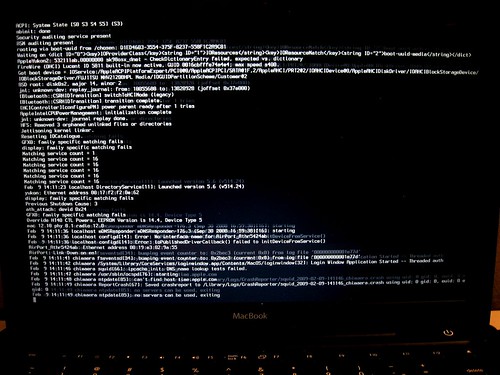
I know plenty of us come from a command-line background and like to see what's happening during the boot-up. By simply running this command inside Terminal on OS X, you get to see the boot messages (appropriately called "verbose mode") instead of a dull, blue screen while your Mac starts up.
sudo nvram boot=args="-v"
There are actually a few other interesting things you can do with the nvram command, but among them are some things that can cause your Mac to not boot. I do know that if you boot with the -s argument, it will go into single-user mode without getting prompted for the root password, but that's typical BSD stuff.
2008-04-10
KC BSD User Group - April 2008
We switched locations this month to the downtown Central Library at 10th and Wyandotte. The meeting rooms are a lot nicer. Remember, the meetings are the second Wednesday of each month.
We discussed a smorgasbord of topics, most of which at least somehow related to BSD in one way or another. This included (but was not limited to):
- SSH Tunneling
- Proxy configuration
- VPN using BSD-built in and third-party software
- Network layout and BSD router configuration
- Programming in various interpreted scripting languages
- Electronics and embedded computing
2008-03-21
iPod touch hack released
iPOD touch hack released.
Check out http://www.ziphone.org/. Zibri found the solution to the iPod touch's in ability to be unjailed. The problem was with the nvram being corrupted.
Here is how to do it.
- Just run the un-corruption utility in the zPhone utility
- Run the jailbreak.
- Install the BSD Subsystem.
- Then Run the 1.1.3 updates for the BSD subsystem terminal for back spacing.
- Then install the SUID Lib Fix .
- Install The Term-VT100 terminal program.
- Install the Cydia package (DEBIAN style package management!) which will replace the BSD subsystem.
- The /Library/LaunchAgent/ folder contains the daemon launch plists. deleting one will prevent it from loading.
- If you still have the BSD subsystem do not change the root password. The BSD passwd utility BREAKS the OS causing you to need to re-install the firmware. The Cydia utility works with out incident.
- The default root password for for the iPOD will be either "alpine" or "dottie".
2008-01-17
Tracing processes with a laugh
I saw this on XKCD yesterday and had a good chuckle:
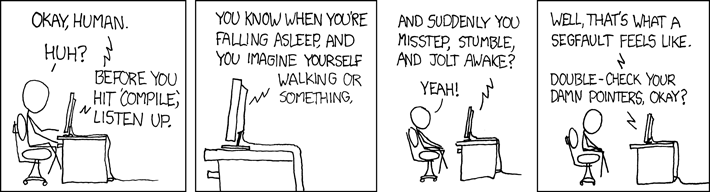
Of course, If I ran into something that was segfaulting, I'd pick up the pieces, and break out the tracer. If you've got a daemon or program that keeps segfaulting for no known reason, tracing is a great place to start.
In these examples, I'll just trace a quick ls command. In our case, ls doesn't have any problems, but the trace will contain all of the system calls that were executed. If you can replicate problems or crashes while tracing, you can spot where they're happening to report the problem to the developer or vendor of the application. Or, you can go back and double-check your damn pointers, human -- lest the computer eat your comp-sci homework.
Solaris
Truss is a command on Solaris that dumps all of the syscalls for a process. In its most basic form, you launch truss around the program you're going to troubleshoot. The below command-line takes truss' output and puts it in ls.truss.out before running ls normally, listing the files.
In these examples, I'll just trace a quick ls command. In our case, ls doesn't have any problems, but the trace will contain all of the system calls that were executed. If you can replicate problems or crashes while tracing, you can spot where they're happening to report the problem to the developer or vendor of the application. Or, you can go back and double-check your damn pointers, human -- lest the computer eat your comp-sci homework.
Solaris
Truss is a command on Solaris that dumps all of the syscalls for a process. In its most basic form, you launch truss around the program you're going to troubleshoot. The below command-line takes truss' output and puts it in ls.truss.out before running ls normally, listing the files.
$ truss -o ls.truss.out lschuser.sh find.truss.out ls.truss.out megascan.sh test.pl
Or you can use truss to get system calls from a running process. For daemons you should launch truss as root or with sudo. -o sshd.truss.out tells it to write the data to sshd.truss.out, whereas -p 3088 tells truss to attach to process ID 3088, the made-up PID for our made-up instance of the ssh daemon.
# truss -o sshd.truss.out -p 3088You can view ls.truss.out to see what it found.
BSD
A little more complicated, you can use ktrace to do something similar. By default, ktrace creates a (non-human-readable) file called ktrace.out. You can specify the output file with -f.
$ ktrace -f ls.ktrace.out lsSimilarly, with the -p option, ktrace accepts a pid:
ls.ktrace.out pkgscripts obsd_pkgscripts-1.00.tar.gz static.key
# ktrace -f sshd.ktrace.out -p 3088
Then, the fun begins. You have to use kdump to read the syscalls from the file.
$ kdump -f ls.ktrace.out > ls.ktrace.txtHave a look at the results, if you wish.
Subscribe to:
Posts (Atom)

 Posts
Posts


