Showing posts with label solaris. Show all posts

2008-12-13

Operating System Junkie

I've talked about the computers in the Lab-O-Ratory before. Today, the laboratory is really, really noisy -- more so than usual. I'm always working on something and I'm coming to realize that I'm pretty much a hopeless operating system junkie.

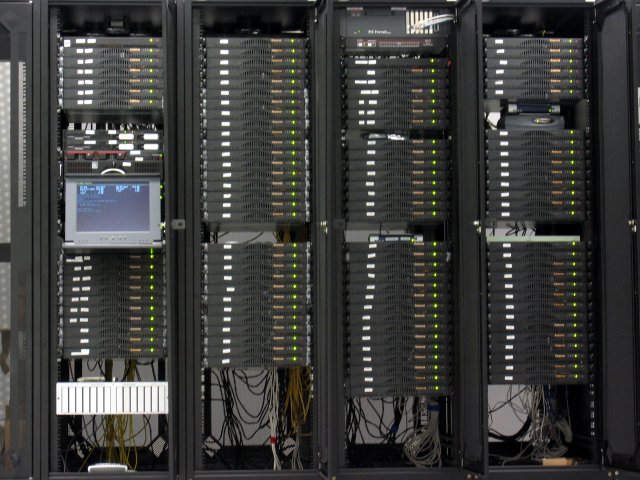
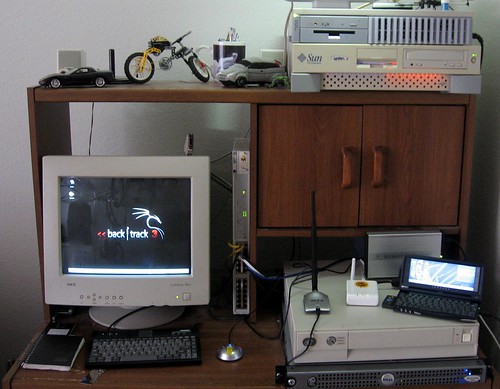
The photo is from a few months ago. The SparcStation 20 on the top of that photo used to be my OpenBSD 4.1 DMZ box until the hard drive died. I shelved it for a while and replaced it with a fresh install of OpenBSD 4.4 on one of the noisy 1U rackmount cluster servers from the startup I worked at in early '06. That 1U now sits in the SS20's old spot on top of the Sun Ultra 5 (which happens to be one of my primary workstations, running Solaris 10)

A few weeks ago, a friend of mine gave me a pile of old SCA-80 hard drives -- 4GB, 9GB stuff that was going to get landfilled. I put some of them in the SS20 again, and decided to try NetBSD. I used this for the SSH Reverse Tunneling article. It's now on the top of the lower stack, below the FON and Jornada and on top of the beige low-profile server.

That's an IBM RS/6000 Model 250 -- 80 MHz (yes, really) with 256MB of RAM and a 36GB SCSI hard drive. Initially made to run IBM's AIX 3.x operating system, it still runs AIX 5.1 quite well as long as you keep the GUI from trying to start. After AIX 5.1, IBM dropped all support for Micro-Channel Architecture. Still, having AIX 5 to tinker with is beneficial to me. I have to deal with AIX (as well as Linux and Solaris) at my real job. Don't forget all the cool freeware that's been ported to AIX and Solaris!

The Dell PowerEdge server below it was going to be an AMP (Apache/MySQL/PHP) server for a client of mine who never ended up needing it. It gets re-purposed whenever I need a reasonably powerful machine or one with a lot of storage to test something on. I just installed FreeBSD 7 on it last night. This one's even more noisy than the 1U cluster server.


My wife bought a 4U rackmount case from Frogman back in the day, and it was originally built up as a telnet MUD server. Now, it's kind of the communal Windows 2000 test box. It's the HiR OpenArena server for the time being.

Then, there's the Dell Optiplex mini-tower out of frame that's still running BackTrack -- although after Mubix wrote about it, I plan on downloading Sumo very soon!

With so many of my own little projects going on and utilizing all these boxes, I'm currently running all of this in my apartment's second-bedroom-turned-laboratory:
  • OpenBSD 4.4 / x86
  • Solaris 10 / ultrasparc
  • jLime Linux (Mongo) / arm
  • Openwrt Linux 7.09 / mips
  • NetBSD 4.0.1 / sparc
  • AIX 5.1 / ppc
  • FreeBSD 7.0 / x86
  • Backtrack Linux 3 / x86
  • Windows 2000 SP4 / x86
That's not even considering that my wife's laptop is running Vista, and I'm running Mac OS Leopard on my own. I'm no stranger to lesser-known OS's either. I've written about OpenSolaris before. I used to run BeOS as my main platform at work. I've used Plan 9 before (in the late 90s) and I even helped a little bit with the now-defunct V2OS project in 2001.

What's next? I think I need to mix it up with ReactOS (Windows clone) or Haiku (BeOS clone) or perhaps try Plan 9 again...

2008-01-24

UNIX Tip: Getting data out of wtmpx on Solaris

I recently had to do an audit and see who was logged in when some performance issues were being reported on one of our Solaris boxes. The problem? The performance issues had been talked about in an email thread for a long time before it fell onto my plate. The only way to find out who was logged in during that time frame was to pull data out of old backups of the wtmpx file.

On Solaris, wtmpx contains data such as what IP address a user connects from, when they logged in, and how long they stayed on. It's a binary, non-human-readable format. I did some research to figure out how to get usable data from it. The fwtmp command converts the wtmpx records to ascii, making it easy to parse them, for instance, with Awk. Unfortunately, this utility isn't in the path, and I don't know why. No matter, though. I'll tell you where it's at. It's a stream converter, so it takes the raw wtmpx file as input, and bars out plain text. This is how I usually run it:

$ /usr/lib/acct/fwtmp < /var/adm/wtmpx > wtmpx-`date +%Y-%m-%d`.txt

This creates an ascii wtmpx file with the current date as part of its filename.

See the man page for fwtmp for more information. It can also be used for importing records into wtmp. With some scripting, a nice log-rotation mechanism can be implemented.

2008-01-17

Tracing processes with a laugh

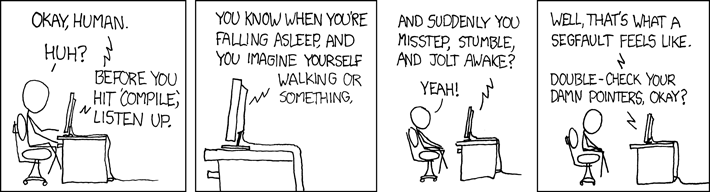
I saw this on XKCD yesterday and had a good chuckle:

Checking whether build environment is sane ... build environment is grinning and holding a spatula.  Guess not.

Of course, If I ran into something that was segfaulting, I'd pick up the pieces, and break out the tracer. If you've got a daemon or program that keeps segfaulting for no known reason, tracing is a great place to start.

In these examples, I'll just trace a quick ls command. In our case, ls doesn't have any problems, but the trace will contain all of the system calls that were executed. If you can replicate problems or crashes while tracing, you can spot where they're happening to report the problem to the developer or vendor of the application. Or, you can go back and double-check your damn pointers, human -- lest the computer eat your comp-sci homework.


Solaris
Truss is a command on Solaris that dumps all of the syscalls for a process. In its most basic form, you launch truss around the program you're going to troubleshoot. The below command-line takes truss' output and puts it in ls.truss.out before running ls normally, listing the files.
$ truss -o ls.truss.out ls
chuser.sh find.truss.out ls.truss.out megascan.sh test.pl
Or you can use truss to get system calls from a running process. For daemons you should launch truss as root or with sudo. -o sshd.truss.out tells it to write the data to sshd.truss.out, whereas -p 3088 tells truss to attach to process ID 3088, the made-up PID for our made-up instance of the ssh daemon.
# truss -o sshd.truss.out -p 3088
You can view ls.truss.out to see what it found.

BSD
A little more complicated, you can use ktrace to do something similar. By default, ktrace creates a (non-human-readable) file called ktrace.out. You can specify the output file with -f.
$ ktrace -f ls.ktrace.out ls
ls.ktrace.out pkgscripts obsd_pkgscripts-1.00.tar.gz static.key
Similarly, with the -p option, ktrace accepts a pid:
# ktrace -f sshd.ktrace.out -p 3088


Then, the fun begins. You have to use kdump to read the syscalls from the file.
$ kdump -f ls.ktrace.out > ls.ktrace.txt
Have a look at the results, if you wish.


2007-04-15

Solaris

So, you've just received your gratis Solaris 10 DVD set and you already know that your hardware works and has basic drivers because you used the
Hardware Check Tool ISO. However, the DVD boots but ends up complaining -- ERROR: The disc you insterted is not a Solaris OS CD/DVD?! Try setting the DVD drive as the slave drive on the main ATA channel with the HDD. It should boot and install fine then.

Target: ECS/PC Chips M963GV mobo w/ SiS 551GX/964L chipset and a 2.8GHz HT P4.

EDIT/UPDATE:

Now that it's installed and booted, you want to move the drive back to the secondary ATA channel, so each drive can have a channel to itself. The problem is that Solaris maintains a hard-set device map. Once booted to the install with the drive back on the secondary channel, a quick run of prtconf from a root terminal shows that ide, instance #1 (driver not attached), drat! With a bit of help from Google and a good blog at blogs.sun.com called PotstickerGuru, we get the command called devfsadm that will allow us to rebuild the device map. So issue devfsadm -r / from that root session, run prtconf again and the second channel should have been recognized and now show ide, instance #1 / sd, instance #1. Reboot, and the drive will be recognized and functional. Now we can stick in a CD-RW with the sfe driver for the SiS900 Fast-Ethernet chip and finally get the system online.