2008-11-19

Metasploit Framework 3.2 released

In a press release issued this morning, the Metasploit team announced the immediate release of Metasploit Framework version 3.2, which boasts significant improvements and additional features from previous versions:


Version 3.2 includes exploit modules for recent Microsoft flaws, such
as MS08-041, MS08-053, MS08-059, MS08-067, MS08-068, and many more.

The module format has been changed in version 3.2. The new format
removes the previous naming and location restrictions and paved the way
to an improved module loading and caching backend. For users, this means
being able to copy a module into nearly any subdirectory and be able to
immediately use it without edits.

The Byakugan WinDBG extension developed by Pusscat has been integrated
with this release, enabling exploit developers to quickly exploit new
vulnerabilities using the best Win32 debugger available today.

The Context-Map payload encoding system development by I)ruid is now
enabled in this release, allowing for any chunk of known process memory to
be used as an encoding key for Windows payloads.

The Incognito token manipulation toolkit, written by Luke Jennings, has
been integrated as a Meterpreter module. This allows an attacker to gain
new privleges through token hopping. The most common use is to hijack
domain admin credentials once remote system access is obtained.

The PcapRub, Scruby, and Packetfu libraries have all been linked into
the Metasploit source tree, allowing easy packet injection and capture.


There are many other improvements listed, so head on over and check it out, or get to the downloading already.

2008-11-18

Rock, Paper, Scissors, Lizard, Spock!

This is just too funny to not share. I saw it on Big Bang Theory last night. Then, I saw the video clip in my Google Reader this morning via Geeks are Sexy.

Watch. Enjoy. What better way to determine which sorry sap has to buy pizza for your next late-night maintenance window?


A more thorough explanation of the concept (which has apparently been around since at least 2005) can be found here. I still can't tell exactly what you're supposed to do to make a "lizard", though.

2008-11-14

R.I.P. Security Bloggers Network (for now)

Alan Shimel just reported that Feedburner networks are going the way of the Dodo, and the beloved Security Bloggers Network RSS feed on FeedBurner is no more.

For those who don't know what SBN was, it was a huge RSS feed with some great security blogs all rolled into one. Drop it into Google Reader or something, and you were all set. HiR just recently got on board. Too bad it had to happen this way.

Don't worry, though. Shimel assures us that there will be another, comparable spliced RSS feed coming soon. Until then, if you were watching the Security Bloggers Network, you might want to start hunting down links for your favorite reads. If you have some favorite information security sites, feel free to post links to them, or a link to an OPML file.

2008-11-13

Simple Pleasures

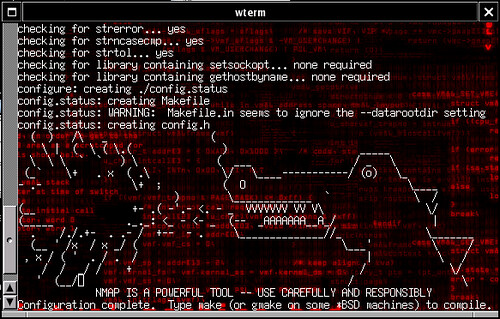
I'm sitting here compiling the latest build of nmap directly from the source tree. I haven't done this in quite a while. I'm lazy and usually make do with whatever binary build I can find. Now that I have a reasonably fast OpenBSD machine (not in a VM) I decided to go for it again and saw this gem at the end of ./configure:


Perhaps I'm easily entertained, or maybe it's just been a heck of a week and I'm ready for Friday. Regardless, it made my day. Thanks, Fyodor!

2008-11-12

UNIX Tip: the tr command, newlines and more

tr is used to translate characters. It can translate all uppercase letters to lowercase. It can delete all occurances of a single character, and much more.

To turn all uppercase letters lowercase (a useful thing when parsing user input from a shell script), use this:

bash-3.2$ echo This Is CrAzY! | tr [A-Z] [a-z]
this is crazy!
Using tr -d, you can remove any characters from a string as well. Here, I remove several punctuation marks:
bash-3.2$ echo "You're right. That *is* crazy." | tr -d \'\*\!\?\.
Youre right That is crazy

One of the best ways to use tr, though, is for converting newline characters to something useful.

When running shell commands or writing shell scripts, most people can quickly adapt to using commands such as cut or awk to manipulate tabular data. See also: more awk recipes. Let's say we have a text file with the following values, and we want this data to be represented in CSV format, all on one line. This is where newlines make things tricky.
0.00
128.00
49.00
7031
4218
tr can tackle it easily, using "\n" to represent the newline character. Just translate newlines to commas, and you're good to go:
bash-3.2$ cat file | tr "\n" ","
0.00,128.00,49.00,7031,4218,
Similarly, you can take large chunks of text and replace all newlines with a space if you wish to un-do old-school text-editor formatting before importing into a word processor.

tr is a somewhat obscure command, but it can save a lot of headache, particularly when trying to format text output. The same result can be achieved (albeit with much more complex commands) with awk or sed, so this is a good one to know about, and it's found on almost every posix-compliant platform (and in cygwin)

2008-11-07

2600 Meetings

It's that time again - The first Friday of the month! The Kansas City 2600 meeting will take place tonight at 5:00 PM (although I might be running a little late) at Oak Park Mall in the food court. Check the 2600 Meetings page to find one near you!

2008-11-06

Crimping Twisted-Pair Ethernet (and Crossover)

In the Geek 100, I said that every geek should be able to Terminate category 5 cable with RJ-45 plugs and make a crossover cable. While home networking isn't nearly as daunting as it used to be with ubiquitous WiFi routers, I stand by my assertion that no geek has a valid excuse for being unable to crimp some cables. It's a useful skill to have and it's quite easy to learn.

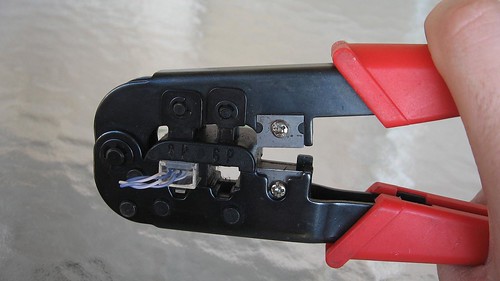
All you need (aside from some Twisted-Pair ethernet cable that has bad ends or no ends) are some crimp-on RJ-45 plugs, a knife and a crimping tool. The plugs are less than $1 each at Radio Shack and cents each in bulk, knives are commodity and crimping tools like the one shown (I've had it for probably 15 years) are available for $20 or less. If your crimping tool doesn't come with a wire cutter, a pair of diagonal pliers might be useful as well. There are some much nicer crimping tools available that get really expensive, but the entry-level ones are probably just fine for the geek who only needs to run wires occasionally.


Take your knife and cut the sheath off about 3/4" of the end of the cable. Inside, there are four pairs: Blue, Orange, Green and Brown. Due to carryover from ye-olde telecom days, the pairs are divided into "Tip" (color striped with white) and "Ring" (solid color). Many cable manufacturers put a nylon strand, string, or tuft inside the sheath as well. This makes stripping a long length of sheath easy, but you can safely cut away whatever of it is exposed without harm.

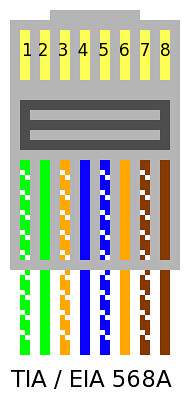
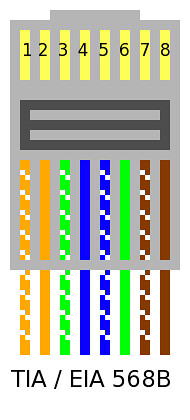
Arrange the wires in either of the two configurations shown below. We'll get to putting the RJ-45 plugs on in a moment. For the time being, focus on the order of the wires.


These days, 568-A is kind of "the standard" but when I was learning, the industry was hell-bent on using 568-B. Honestly, as long as you use the same 568 scheme on both ends of the cable and you crimp the RJ-45 plug properly, it really doesn't make a bit of difference at all. The wires are ordered this way to reduce crosstalk and interference, so I advise you stick with one of the two diagrams above.

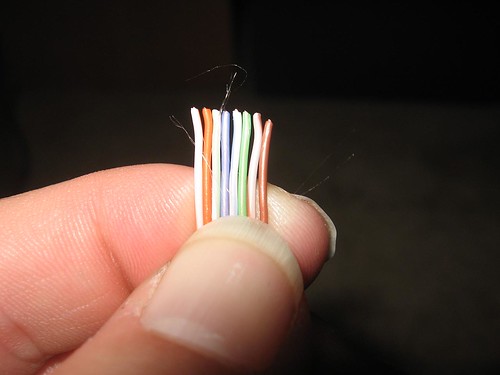
I have the wires ordered 568-B below. The tips (white-striped wires) are hard to determine in the photo, and sometimes they'll be tricky to identify in real life. You may wish to do this under an eye loop or a workbench magnifying lens if your eyesight is sub-par.


Use a wire cutter or a diagonal plier to cut the wires to the same length. It's important to keep the wires held flat and in the right order as shown above.


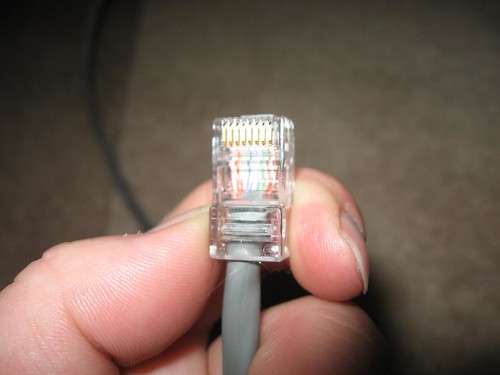
Slide the RJ-45 plug onto the cable end. Make sure the wires are still even and in the right order, and make sure that the sheath goes deep into the plug while still allowing the wires to "bottom out" in the plug. The sheath should be positioned so that the plastic tab that's crimped to hold the wires in place also holds the sheath. The wires should not be exposed out the bottom of the plug. (Thanks for the reminder, Ryan)


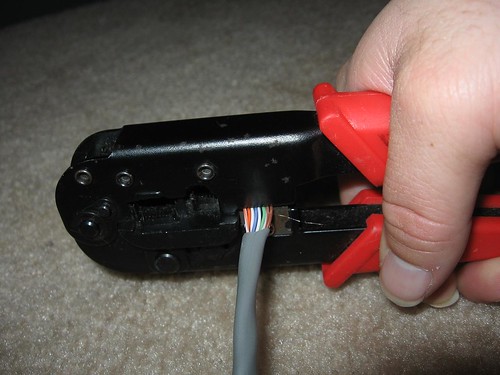
I stole this crimping "action shot" from the Loopback tester tutorial. Crimping the plug should be pretty straightforward. Make sure to give it a few good squeezes to ensure a good connection.


Make sure you wire both ends the same, and make sure the plugs are both installed facing the proper direction (with the metal pins pointed toward you and up). Here's another diagram I found on Wikipedia:


To make a crossover cable that can be used to connect two hubs/switches or two computers together (Without a hub or switch), simply wire one end as 568A and the other as 568B.