2009-06-02

Godwin's Law and Scientology

In the bygone days of usenet's booming popularity, Mike Godwin crafted a theory that's often called Godwin's Law or Godwin's Rule of Nazi Analogies. As originally stated, it ties specifically to Usenet (newsgroups) but it has been applied to almost any form of discussion including Forums, mailing lists, IRC and even Twitter.

As a Usenet discussion grows longer, the probability of a comparison involving Nazis or Hitler approaches 1.
Frogman alerted me to a hilarious Godwin's Law proof Monday involving the Wikipedia ban of edits coming from the Church of Scientology. On May 28th, Wikipedia banned edits from CoS. on the grounds that all CoS wikipedia edits have been self-serving and sometimes downright subversive. On May 30th, David Miscavige (Chairman of the CoS RTC) retorted with this statement, essentially calling Wikipedia's Arbitration Committee a bunch of Nazis:
Blocking the IP addresses of computers located at Scientology's Pac Base, Int Base and Celebrity Centre is just a way to force Scientology parishioners into an undesired beingness. What's next, will Scientologists have to wear yellow, six-pointed stars on our clothing?
Dude. Godwin's Law! Hey, I have to include an xkcd if one is relavent!


On the ranty side -- and this is my personal opinion:
There are very few things that could possibly happen on this planet that will ever come close to the kind of oppression that Hitler was trying to implement. I really wish that people would quit trying to draw parallels to the mother****ing HOLOCAUST when they can't get their way in life. Not only is it irrationally dramatic in most cases, but it trivializes a tragedy the likes of which we will hopefully never have to deal with again.

2009-06-01

kc2600.com is alive and well once again

The old site (a forum) had fallen into a state of disrepair and was eventually abandoned by its previous keepers. Asmodian X has breathed new life into kc2600.com as a place to learn more about what's going on at the 2600 meetings in Kansas City. Hopefully, we'll have updates from other kc2600 attendees as well. Thanks, Asmo! Don't forget, the next meeting is coming up Friday, June 5th. I believe there will be attendees at both Oak Park Mall Food Court and inside Barnes & Noble at Independence Commons. Maps at the bottom of this post.

Greater Kansas City 2600


View Larger Map


View Larger Map

2009-05-31

Sysadmin Sunday, a Response: Are admins developers too?

Lori MacVittie comes up with another one worthy of a response post. This time, she asks if admins are starting to become developers. In a nutshell: I don't think so, but we are definitely programmers.

Ah, there are those damned semantics again!

My opinion here comes from more than the simple fact that my employer has placed a "Systems Programmer" stamp on me despite the fact that my primary job duties do not include programming anything. Programmers make specialized procedural tools, while I feel that developers are a different breed entirely. Developers architect entire solutions and tie together lots of programs: usually functions and routines they've written or borrowed. Developers often collaborate with other developers on a project and usually put together something that will get used by someone other than themselves, from a single client or an internal organization all the way up to public-facing web applications available to anyone on the Internet!

Through the course of my sysadmin and infosec career, I've written literally thousands of tools in varying states of complexity and user-friendliness from object-oriented PHP behemoths to generate large reports from a database down to simple loops that copy shell scripts out to the enterprise before executing them on each system. At any given time, I have scores and scores of these little home-grown scripts and programs laying around.

Administration usually involves repetitive, mundane tasks. Analytical types will usually find a way to automate the things that can be predicted. I wouldn't confuse this process with being a developer, though. I'm not saying developers always create solutions that are more elegant, elaborate or stable. I am saying that developers have a different mind-set than admins, who usually (as Lori points out) create quick tools for themselves or their peers.

2009-05-29

Friday Musings: Redundancy

Sorry for the lack of content lately. Work has been crazy, and I had a lazy five-day weekend that I decided to use for vegging out more than geeking out. Whilst camping over the Memorial Day weekend, I did come to appreciate the redundancy built in to Mag Instrument's AA Mini-Mag (and most other lights of theirs), a spare bulb hiding in the tail cap right below the battery spring:


I got this flashlight almost a decade ago as schwag (and seriously nice schwag at that) from Check Point while working at a Check Point Value-Added Reseller as a support technician and penetration tester. The bulb that burned out over this last weekend was the original. I can't even imagine how many hours of burn-time it had, how many drops to the pavement it's taken, or how many times it saved my ass.


I only wish that this kind of redundancy was more common in everyday life from household appliances to consumer-grade electronics. Parts that are most prone to failure should be included. Some old vacuum cleaners even came with a spare drive belt and a nice place to store it.

Now, it seems you only see redundancy addressed when you're dealing with large-scale Enterprise IT and industrial- or military-grade machinery. Otherwise, it's:
NO USER-SERVICEABLE PARTS INSIDE

Somewhere in history, we've lost our way...

2009-05-28

News Flash: Man figures out how to use a dial-up modem

Via Hack-a-Day:

[phreakmonkey] got his hands on a great piece of old tech. It’s a 1964 Livermore Data Systems Model A Acoustic Coupler Modem. He recieved it in 1989 and recently decided to see if it would actually work. It took some digging to find a proper D25 adapter and even then the original serial adapter wasn’t working because the oscillator depends on the serial voltage. He dials in and connects at 300baud. Then logs into a remote system and fires up lynx to load Wikipedia.
The HiR team loves Old School tech, but where do I even begin with this? The guy found a serial modem (and had to SCROUNGE for an industry-standard serial cable?) and used it exactly as it was designed to be used without any modifications. Where's the hackery here? Why is this even newsworthy?

In the 1980s, I cut my teeth on a similar modem albeit quite a bit newer than 1964. When dial-up Internet became accessible here in Kansas City, I would fire up a GRAPHICAL DOS-Based web-browser (Minuet, if you care) and connect via SLIP or PPP.

I suppose since I'm getting older, it's only going to get worse from here. I'll recall old tech with a certain fondness, and I'll get curmudgeonly whenever it becomes 'news' that someone found out how to use the old hardware as it was designed. Stored properly, well-built electronics don't rot or rust. These relics should simply "just work" and the fact that some standards from the 1960s still exist today should surprise no one. The world has built a vast technology canon of these standards. Some of the very standards we take for granted now are a result of engineering that happened hundreds and hundreds of years ago.

Now get off my lawn, you darn kids!
/me shakes his fist at whippersnappers!

2009-05-11

PHP Editing In The Cloud

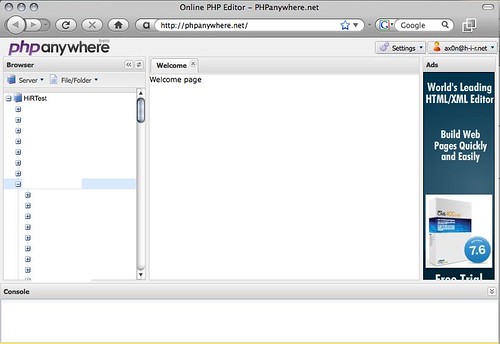
I ran across PHP Anywhere over the weekend. At first glance, it looks as feature-rich as the free version of PHP Designer, a Windows-only tool I use at work when I have to mess with PHP (which isn't too often)

There's just one question I have: who in their right mind would store the FTP password to their web site "in the cloud" like this? In fact, I don't even have FTP access ENABLED on my primary web server. I set up a test instance somewhere else to play with PHP Anywhere. I usually scp my files to their destination. Sadly, that's not an option for PHP Anywhere yet, but if it did, you'd still be storing credentials to modify your website...


I suppose if you are really in a crunch somewhere and lack your usual desktop IDE of choice (and for some reason can't get on the system to edit it locally), it makes for a neat toy.

That's all for today. I'm going to change my password on that FTP account now...

2009-05-10

Sysadmin Sunday: Dealing with OpenBSD's chroot Apache server

Prerequisites
I'm assuming that you have a working OpenBSD/Apache/MySQL/PHP environment working prior to this, or at least have all the packages installed. We will be slightly modifying the MySQL startup process, and changing some stuff on the filesystem to allow the chroot to function properly.

Introduction to chroot
Chroot means "change root", and it's a way to spawn a process so that it has a different apparent root directory. Try as it might, this process cannot get to the "real" root. This has many advantages, especially with web servers.

While an operating system itself might be locked down like Fork Knox, the system's overall security is only as good as the applications that get installed on it. Just take a look at Milw0rm and you'll see that web application vulnerabilities are a dime a dozen. Local file inclusion and other vulnerabilities can sometimes allow an attacker to get to the very heart of the host operating system. With chroot, the attacker is unable to see the real operating system's environment -- in this case, only things within /var/www are visible to Apache and its sub-processes.

Path names that do not have a leading / will automatically use the "ServerRoot" directive (/var/www in OpenBSD) This is why you see lines such as "ErrorLog logs/error_log" in the configuration.

Basically, chroot is awesome. It's also a pain in the ass if you aren't used to dealing with it. Don't worry; I'm here to help.

Why isn't Apache always chrooted then?
There are things in the real operating system environment that the web server relies on. For AMP web applications, PHP needs access to the MySQL Socket (in /var/run/mysql). If you have Sessions enabled and using the filesystem, then /tmp needs to be accessible. Anything else in the "real root" that needs to be accessed must be re-created or hard-linked within /var/www as if it's the root directory.

Anything else in Apache's configuration that calls for path names with a leading / (VirtualHost, UserDir, etc) will be forced to use /var/www as its root as well. I do not recommend creating hard links from inside ServerRoot to external directories for web content. Instead, create subdirectories under /var/www for content (ex: /var/www/virtuals/HiRtest/ ) and grant write permissions for users who need it.

Fixing the broken stuff!
Most AMP packages only need somewhere to store Session information and a way to get to the MySQL socket. Since the real /tmp contains information that is not needed for Apache, we'll just create a new tmp directory specifically for Apache within /var/www and make it world-writable with the "sticky bit" set (exactly like the real /tmp)

sudo mkdir /var/www/tmp
sudo chmod 1777 /var/www/tmp

Next up is the MySQL socket. First, reproduce the directory structure for the MySQL socket under /var/www.
sudo mkdir -p /var/www/var/run/mysql  # -p creates subdirs as needed

Then, make sure the real mysql.sock file gets hard linked into the new directory. If you added the "mysql.server start" line to the end of /etc/rc.local, you can accomplish this pretty easily by adding a hard link command after the mysql server starts. I also added a line to remove the old hard link before starting MySQL. The end of my /etc/rc.local looks like this:
rm /var/www/var/run/mysql/mysql.sock
/usr/local/share/mysql/mysql.server start
ln /var/run/mysql/mysql.sock /var/www/var/run/mysql/mysql.sock

Finally, make sure that you set the httpd line in /etc/rc.conf to look like the line below, unless you really need more options. Just make sure "-u" isn't one of them!
httpd_flags=""  # for normal use: "" (or "-DSSL" after reading ssl(8))

At this point, I would advise rebooting the system. While you can start and stop Apache and MySQL, it's best to make sure that everything will come back up and that the chroot hard link to the MySQL socket will be re-created properly upon reboot. Otherwise, you might find yourself with a problem later on.

After rebooting, Apache web server should have all its components working properly again within its chroot environment. In my case, I installed WordPress 2.7.1 before setting Apache to chroot mode. After simply restarting Apache in chroot mode, WordPress gave only an error message about being unable to connect to the database. After making the other changes above and rebooting, WordPress is back to life. The same should hold true for most other packages.