
OpenBSD 5.1 was released last week, so the update is a bit overdue. HiR's Secure OpenBSD + AMP guide has been updated. OpenBSD 4.x is officially unsupported now, so we've dropped the 4.x parts from the guide and refined the rest. Since we've started covering the setup of an AMP stack on OpenBSD, the process has gotten considerably easier. OpenBSD is a completely viable and stable environment for running almost any PHP/MySQL web app, with a little extra consideration given to the chroot environment and Suhosin hardening patches while you're setting up your applications or programming new ones.
2012-05-07

2012-03-03
Links: Root, Patch and Tether a Droid 2 Global
My wife and I have identical phones. She actually got hers before I got mine. Occasionally, I have to tether for troubleshooting, and I set hers up tonight to do the same.
I encountered a number of stumbling blocks the first time around. Fortunately, other people did all the hard work. Here are links I found helpful.
Download the latest SuperOneClick package. You'll have to root your phone. There's no easier way than this: SuperOneClick - Shortfuse
Get the Android WiFi Tether APK from Google Code.
At this point, if you try to tether, you'll run into a similar issue as I've described in previous tethering posts: the authentication string will cause tethered traffic to bounce up against Verizon's wrath warning page.
You'll need to download RadioComm, and the best way to find that is Google. You'll probably find fresh links to recent versions on XDA Devs or MotorolaFans. Caveat Emptor and all that. Shady download links galore, so be on your guard with good backups and malware protection. Here are the instructions to patch your phone's baseband configuration for tethery goodness.
After that, all should work well.
2012-02-07
Alinco DJ-C1 Hack: Internal Speaker
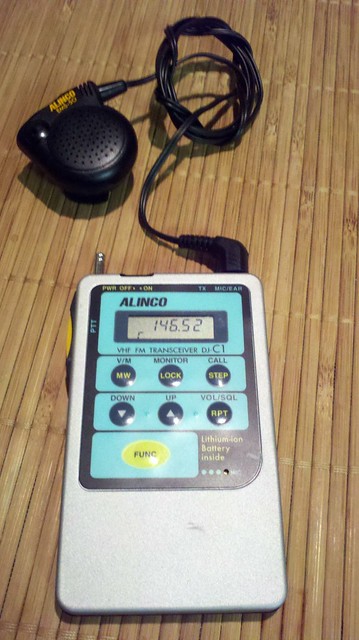
The Alinco DJ-C1 was made in the 1990s and was a groundbreaking ham radio micro-transceiver about the thickness of an iPhone 4 and with a smaller footprint nearly identical to that of a credit card. It was designed to work on the 2m FM Voice band at 300mW. It featured an integrated microphone, but had no internal speaker from the factory; One had to rely on an earphone or an external speaker/microphone unit such as the one shown above.
Over time, these micro radios evolved. The DJ-C4 came out at the same time as the C1, and was made for 440 MHz (70cm FM Voice). The DJ-C5 was a bit thicker and was the first to have an integrated speaker and work on both of the above bands. The latest one, the DJ-C7, lacks resemblance to these tiny relics of the late 90s aside from being smallish.
You can still find these micro-handheld transcievers at hamfests, swap meets and online auctions. I got mine from a friend that's happened upon two C1s and a C4 in the past year. I was immediately somewhat frustrated by the lack of a built-in speaker. I opened it up and found plenty of room in the back for a piezoelectric element, similar to what you find as the alarm speaker in digital wrist watches.
I couldn't find anything to salvage a piezo speaker out of, so I coughed up a couple of bucks at Radio Shack for one. I used a tiny screwdriver to pry the back cover off and to pry the element out of the case.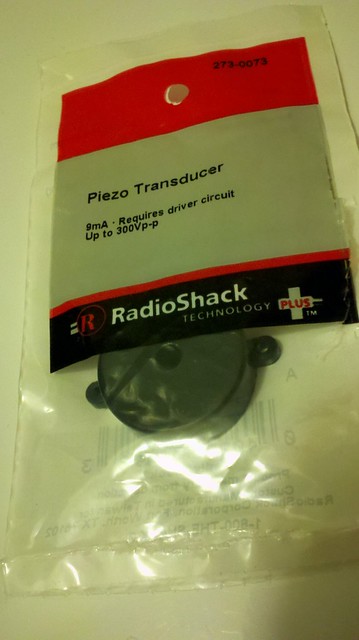
Disassembly of the DJ-C1 initially looks pretty straight-forward. There are three small philips screws on the back which give you access to the battery and the back of the circuit board. You'll have to open the back up and you'll want to disconnect the battery before proceeding. Unfortunately, most of the stuff we need access to is on the other side of the circuit board. You can't get the board out from the back, so leave the screws through the circuitboard attached. To remove the front plate, carefully peel the sticker and membrane buttons off, then remove the three screws found underneath.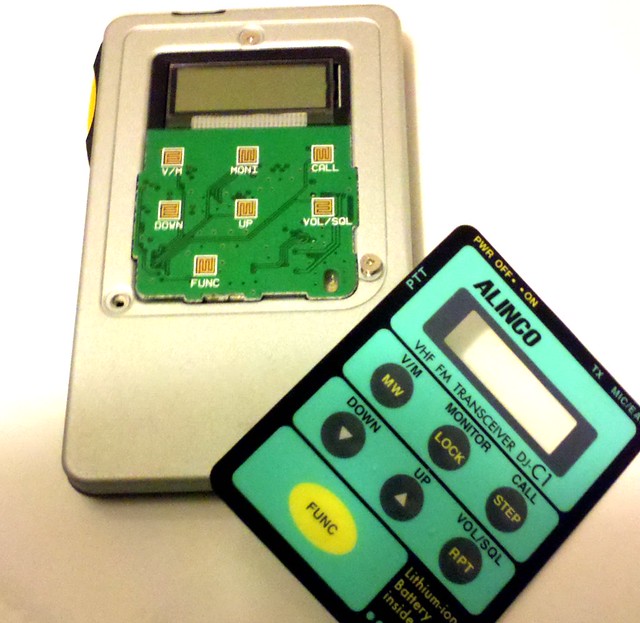
There aren't many places to pass wires from the back of the radio where the speaker will be to the front of the radio where they can attach to the solder pads for the audio jack, so I ran them between the legs of the transmit LED. With the front and back removed, you can slide the circuit board out of the rectangular plastic frame enough to get access to the solder pads with almost any kind of soldering iron. You can see the red and black wires here: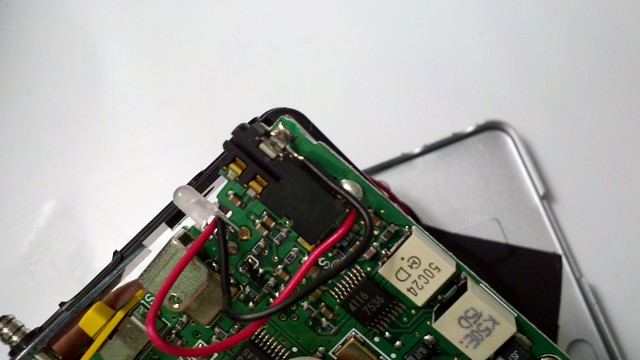
I taped the piezo element to the back case toward the bottom. The copper shield in the middle of the circuit board seen below will sit flush against the back case, so keep the speaker and wires clear of it. The piezo speaker is actually louder when it's taped to the back case than it is when it's hooked up to the audio jack by itself.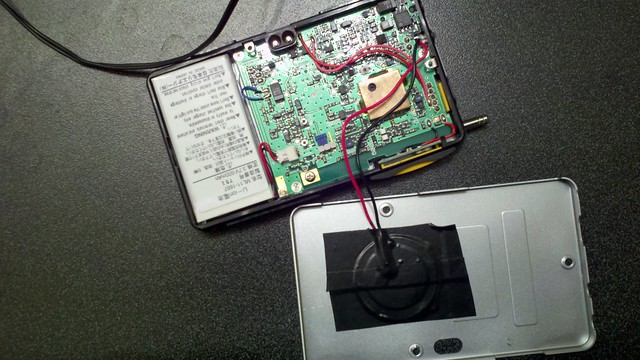
Gently re-assemble everything, making sure everything fits neatly inside. Re-position the speaker and wires as needed. I ended up placing a bit of tape inside to keep the speaker wires from getting in the way. Re-connect the battery, screw the front plate back on, re-attach the membrane buttons to the front, and test it before you button the thing back up.
The resulting speaker works, but isn't terribly loud. It's loud enough to get your attention from the office desk, and if you hold it up next to your ear, you can make out what's being said. This is all I expected from this hack. You'll want to hold on to that earphone or external speaker, though.
Here's some crappy cell phone video of it in action.
2012-02-03
February 2012 KC2600 Meeting
It's that time again! Bring your questions, projects, interesting topics of discussion, war stories and conspiracy theories. As a reminder, the official 2600 meeting start time is 5:00 PM local time, but the Greater Kansas City folks tend to start trickling in at 5:30 or so.
If people are interested, I'll go over some of the common complaints of this lock and how so many people manage to lock themselves out of it forever. I might live stream it on uStream. I might actually lock myself out of this lock forever, too, but hopefully not.
(Crossposted from KC2600)
2012-01-14

2012-01-08
PHP Programming: Clean URLs
I've spent the past two weekends re-writing old, horrible, ugly code that I wrote as a kid. I still have a lot of work ahead of me, and there's still no guarantee that the code I'm writing now will be great, but it'll be better than the stuff I wrote before. I'm not a web developer by any means, but it won't keep me from having some nerdy fun on the weekend. I've learned some tricks, and figured I'd share them here in a few short entries. Today, it's so-called "Clean" URLs.
In most dynamic web scripting languages such as PHP, dynamic pages can be accessed by passing parameters through a query string. As an example: http://foo.somesite.com/article.php?p=42
You've undoubtedly seen dynamic websites that don't pass query strings, but instead generate nice, friendly URLs that look more like this: http://foo.somesite.com/article/Hello_World
Clean URLs are easier to link to, they're better for search engine optimization, and with proper implementation provide a few security features as well. The project I'm working on is a custom CMS that was my very first Apache/PHP/MySQL project. It ended up getting kind of popular among a niche crowd, so I left it online in all its ugly glory. I have an article list script that can filter articles by category, and another script to display the articles. I'll just call them list.php and article.php here for the sake of discussion.
Removing .php from the URL
The first part of the problem is the fact that I'd rather not have ".php" show up in the URL, so that "article" and "list" would appear to be sub-directories of my site.
After playing around with a bunch of promising hacks that tended to work fine, including mod_rewrite, I decided that the most elegant way to tackle this was to rely on Apache's "FilesMatch" directive. I created symbolic links from list.php and article.php to strip the .php extension. You could just as easily rename them, though. Then I added the FilesMatch directive to .htaccess for "article" and "list" as shown below. Make sure "AllowOverride All" is set in your Apache configuration, too.

At this point, pulling up http://foo.somesite.com/list will try to run "list" as a PHP script. In my case, it shows a list of articles.
Parsing URI parameters with PHP
The next part is mostly easy. As far as I know, any PHP script will let you add a bunch of parameters to it with slashes like this: http://foo.somesite.com/index.php/testing/1/2/3/4/5. It may not render well, but it doesn't keep it from executing. Above, we got list to show a list of articles, so now it's time to set up filtering. As you can see below, the last element of the URL (split by /) is considered to be the category. The following URL would show a category of "Widgets": http://foo.somesite.com/list/Widgets
To avoid the problem of getting a category of "list" or "list.php" (remember, I chose to symlink my .php files), I included logic to check to see if the category matches the script name. If so, it assumes that it should instead display the Table Of Contents. You'll also see I am setting the title based on what happens here. As the category types are stored in the database and displayed with spaces, I am using str_replace to replace underscores in the URI with spaces. This means that I have to ensure spaces are turned into underscores elsewhere in the code and in all links to my site. That's beyond the scope of this article, though. What matters is that a URL of http://foo.somesite.com/list/Arts_and_Crafts would pull up a category of "Arts and Crafts".
$category=(end(explode('/', urldecode($_SERVER['REQUEST_URI']))));
if(($category) && ($category != 'list.php' && $type != 'list'))
{
 $rawcat=str_replace('_', ' ', $category);
    $list=getlist($rawcat);
 $title=$rawcat." Articles";
}
else
{
 $toc=TRUE;
 $list=getlist();
 $title="Table of Contents";
}
From here, the rest of my PHP code can query the database for articles. getlist() is a function that I wrote. If its parameter is null, it gets all of them, otherwise it (safely!) queries the database for a category.
I used similar code in the article php script, which queries the database for the title of an article, so I get nice-looking URLs for individual articles as well, such as:
http://foo.somesite.com/article/How_to_narfle_the_Garthok
2012-01-03
Why Ham?
Amateur radio is called "ham radio" by many. Ham isn't an acronym, but the origin of the sobriquet is a topic of debate. The most plausible explanation I heard is that professional telegraph operators considered amateur radio operators to be inferior, ham-fisted tinkerers. In this case, "ham" is actually a derogatory remark. Despite the fact, it's been adopted by the community now and is synonymous with "amateur radio." Amateur doesn't mean neophyte, however. It is the antonym of "professional radio," in that amateur stations are not commercial, and hams cannot recieve compensation for operating their equipment.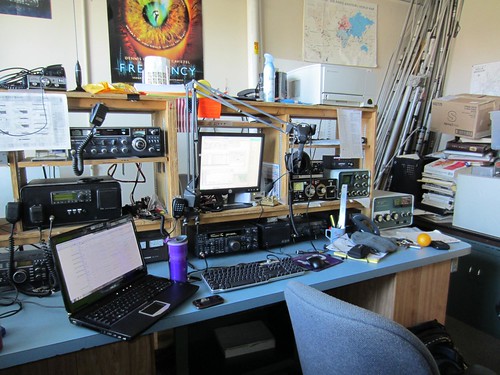
(The ham shack at MST's Amateur Radio Club, W0EEE)
Several co-workers and friends flaunted their amateur radio gear and goaded me into joining their ranks last year. Many hackers carry a ham license, or are getting interested in the hobby. Still, some people occasionally ask me "what's the point? We have smartphones and the Internet now." It's true. The telephone as we know it has indeed enjoyed evolution at a breakneck pace. My co-worker's Nexus LTE sucked 20 megabits per second out of thin air the day he got it. I don't even get that kind of pipe to my home. Still, to me, there's always been something about amateur radio that can't quite be compared with the Internet or mobile phones. I'll explain just a few of those things, from my own novice perspective.
In 1987, I saw an amateur radio demonstration that was given to my scout troop in the middle of Nebraska. With a brick-like walkie-talkie weighing more than a pound and about the size of two Wiimotes side by side (not counting the big rubber antenna on top of it), the presenter was able to communicate with others several counties away, and even place telephone calls. He said that with a bigger antenna and more powerful radio at home, he could talk to people all over the world, all without relying on telephones or even the power grid, because much his radio equipment could be powered by car batteries.
This blew my 8-year-old mind. It was nothing like my little walkie talkies at home. I wanted to be a ham, and even put in some work toward it, but I simply wasn't ready. The urge hit me in waves on occasion. In high school, I experimented with CB. In college, I took some interest in those FRS walkie-talkies that are now ubiquitous in every department store. A few classmates were amateur radio operators, and I got the itch again, but never really got the motivation to get licensed. It would go on like this for many years. For me, it took a friend in California selling me some of his used radios for cheap. At that point, I had the equipment in my hot little hands, but I didn't have a license to use them for anything other than listening. That lit a fire under me.
Aside from their size (owing to advances in surface-mount electronics and battery performance), the most basic hand-held ham radios haven't changed a whole lot in the last 20 years. For reference, my smallest radio is about the size of a closed Motorola StarTAC, but packs nearly as powerful a transmitter as the giant brick radio that had me awestruck more than 20 years ago. Most hand-helds work on the FM Voice part of the VHF band (~144 MHz) or the UHF band (~440 MHz), or both. Some operate on other bands as well. Transmit power from 300mW to 5W is common. Although these smaller radios are most often used to contact a high-power repeater, they can also be used directly between licensed amateurs over shorter distances with some rules and restrictions noted. They have more power and better antennae than FRS radios, and can be connected to an externally-mounted antenna if desired. They're great for highway convoys and outdoor activities. Many hand-held transceivers are capable of tuning in a very wide range of frequencies, so they can be used somewhat like analog non-trunking scanners and frequency counters for finding and listening to public safety, railroad, airport or rent-a-cop chatter. More on that in a separate article.
Repeaters are usually mounted on radio towers, tall buildings or up in mountains. They recieve on one frequency (an input frequency), then transmit what's received in real-time on the output frequency, allowing one-to-many conversations over a relatively large region within a 20-50 mile radius. Radios designed to be used with repeaters are able to automatically switch to a repeater's input frequency when transmitting. Repeaters are often linked together via high-power point-to-point radio links, telephone lines or digitally over the Internet. Some repeaters are actually built into satellites in space, covering extremely wide areas, but those can be a challenge to use as they traverse the sky. Many repeaters have redundant power, via battery and generator backup. And yes, a lot of this stuff is very similar to what existed 30 or more years ago, save for the Internet-connected repeaters.
Hams are often called upon to help where efficient communications are desired. You're likely to find amateur radio operators volunteering behind the scenes helping marathon or charity bicycle ride officials locate event participants in need of assistance, providing the National Weather Service with critical storm data from the ground, or establishing point-to-point radio links with nearby hospitals and participating in relief efforts in communities whose infrastructure has been crippled by floods, tornadoes, hurricanes or earthquakes. All of this is made possible because hams know how to communicate efficiently in groups, and their equipment isn't completely disabled by disruptions of complex infrastructure (although, as noted, infrastructure such as the power grid and telecom is often used when available.)
Many people think of morse code when they think of ham radio. Morse code is still in use, but you no longer need to know it to get licensed by the FCC. Morse code is essentially a human-comprehensible binary mode of communication. There are several other digital modes available, allowing you to blend technologies, and some common modes rely on AX.25 packet data. You can run a packet radio BBS over the air if you like, or transmit your GPS coordinates while hiking through the woods or helping disaster relief efforts. Some of these digital modes are extremely efficient, use very little bandwidth, and can be easily received from long distances, even if they aren't transmitted with much power. Conversely, hams can also enjoy many parts of the amateur bands, including parts of the 2.4 GHz spectrum (with some overlap on WiFi channels) with up to 1500 watts.
Although some hams might seem like retro-grouches with their morse code conversations, technology doesn't stand still with amateur radio! There's a very hearty "do it yourself" spirit here. Many participants might very well be considered radio hackers. They build their own transmitters, recievers and repeaters, and most of them are -- by nature -- gifted problem solvers.
Check out this video from ARRL for some more info.
What's it take to get licensed? There are three classes of amateur radio licenses in the US. In order from lowest to highest, they are Technician, General and Extra class. The exams are multiple-choice quizzes, each coming from a pool of several hundred possible questions. The Technician and General exams have 35 questions each, while the Extra exam is 50 more challenging questions covering material that's ostensibly arcane. The test to get each license requires progressively more depth of knowledge in safety (RF exposure, antenna towers, grounding), electronics, FCC rules, transciever and antenna designs and other information that proves the licensee understands the craft well enough to safely operate their own station. Each higher license class grants access to transmit on more frequencies, usually in the lower frequency bands that are more useful for reliable long-distance communication.
Since the question pools and study materials for licensing are publicly available, I studied the Technician material on my own for a few weeks before acing the technician exam. Most major metro areas have groups that give frequent classes, and all metro areas have volunteer examiners who will administer the test to those who have studied on their own.
I may upgrade to the General class license this year, but I'm honestly a lot more interested in the merge of digital technology with amateur radio. The Technician class license allows me to operate digital and "sideband" voice on the 10 meter band, but there's a lot of digital stuff in the higher frequencies that Technicians are allowed to use.
If you are interested in learning more about amateur radio but can't seem to find anything in your area, post away in the comments and I'll see if I can help you out.
Subscribe to:
Posts (Atom)

 Posts
Posts


