
It's that time again! Bring your questions, projects, interesting topics of discussion, war stories and conspiracy theories. As a reminder, the official 2600 meeting start time is 5:00 PM local time, but the Greater Kansas City folks tend to start trickling in at 5:30 or so.
If people are interested, I'll go over some of the common complaints of this lock and how so many people manage to lock themselves out of it forever. I might live stream it on uStream. I might actually lock myself out of this lock forever, too, but hopefully not.
(Crossposted from KC2600)
Showing posts with label 2600. Show all posts
Showing posts with label 2600. Show all posts
2012-02-03
February 2012 KC2600 Meeting
2009-10-19
2600 Article: Roll Your Own Hive-Mind
Editorial comment: This initially showed up in the Autumn 2009 issue of 2600: The Hacker Quarterly,Volume 26 Number 3, which is on stands now! I wrote it almost a year ago. Today, I would say that Google Reader's new options make it a very important part of my personal hive-mind, allowing me to crowd-source my news by hand-picking a relatively small group of people who reliably share and comment on things that I find pertinent, urgent or fascinating -- often near real-time. At the time of writing, sharing with people in Google Reader wasn't nearly as intuitive so it got a lot less play. In the past few months, though, it has grown up to become far more than just an online RSS aggregator and a web filter evasion tool to me.
While I don't feel like this is my best work, I do make a habit of publishing all of my printed articles here after they've hit the newsstand.
There's no doubt that social networking is all the rage on the Internet these days. Places like MySpace and Facebook have become ubiquitous social hubs that start out as a circle of your real-life friends. Eventually, others join in that you've probably never met and might never meet in your lifetime. Your reasons for befriending them may be many: interesting photos or content, similar interests, or simply because they're a friend of a friend (of a friend of a friend). Maybe, you just like to compete in the popularity contest to see how many e-friends you can collect.
LinkedIn has a business focus. Maybe that's where you keep all of your professional contacts or hunt for job opportunities. Brightkite is a location-aware microblog with photo hosting ability; Like Twitter on steroids. Maybe that's how you find out who hangs out at your favorite local places to try to find new friends. Friendfeed can aggregate most content from your other social network accounts. Maybe that's where you go to get your 50,000 foot view of your online social sphere.
What if you wanted to craft a specialized hive-mind, though? I'm interested in security, and I've found that online, quite a few security geeks have blogs, twitter accounts, facebook profiles and the like.
Instead of just looking for your existing friends online, you can leverage microblogging services like Twitter to find and follow like-minded strangers. Obviously, self-described social media addicts have no problem finding their cliques, but everyone from World of Warcraft Gamers to Bacon-lovers can find a niche in most social networks. Security nerds like me have SecurityTwits.
The people you follow will frequently ask or answer questions of other folks. You can follow them as well, and pretty soon you end up with a news-feed of data you're interested in. Assuming enough of them follow you back, you will have a powerful hive mind at your fingertips: This collective will give input on ideas from within itself. It will refine, disprove, or validate answers given to questions within the collective. It will link to fascinating content elsewhere on the web that other members might not otherwise find. It will challenge you to participate by giving as much as you get.
I've found that this hive-mind functionality works best on lightweight services like the aforementioned Twitter, or with link-sharing tools like Delicious, Digg, and Google Reader. Facebook and MySpace are far too cumbersome and broad-sweeping in their content to be used efficiently. Plus, most of the services I mentioned have easy-to-use RSS feeds that can be indexed, processed, aggregated, and searched later.
Of course, if you want people in your niche to acknowledge your existence on these social networks, you need to establish your presence with relevant content that's as equally interesting to them as their content is to you. Jumping onto Twitter and following every single member of SecurityTwits, for example, won't immediately integrate you into the hive. By lurking, however, you can learn a lot.
There's no doubt that social networking is all the rage on the Internet these days. Places like MySpace and Facebook have become ubiquitous social hubs that start out as a circle of your real-life friends. Eventually, others join in that you've probably never met and might never meet in your lifetime. Your reasons for befriending them may be many: interesting photos or content, similar interests, or simply because they're a friend of a friend (of a friend of a friend). Maybe, you just like to compete in the popularity contest to see how many e-friends you can collect.
LinkedIn has a business focus. Maybe that's where you keep all of your professional contacts or hunt for job opportunities. Brightkite is a location-aware microblog with photo hosting ability; Like Twitter on steroids. Maybe that's how you find out who hangs out at your favorite local places to try to find new friends. Friendfeed can aggregate most content from your other social network accounts. Maybe that's where you go to get your 50,000 foot view of your online social sphere.
What if you wanted to craft a specialized hive-mind, though? I'm interested in security, and I've found that online, quite a few security geeks have blogs, twitter accounts, facebook profiles and the like.
Instead of just looking for your existing friends online, you can leverage microblogging services like Twitter to find and follow like-minded strangers. Obviously, self-described social media addicts have no problem finding their cliques, but everyone from World of Warcraft Gamers to Bacon-lovers can find a niche in most social networks. Security nerds like me have SecurityTwits.
The people you follow will frequently ask or answer questions of other folks. You can follow them as well, and pretty soon you end up with a news-feed of data you're interested in. Assuming enough of them follow you back, you will have a powerful hive mind at your fingertips: This collective will give input on ideas from within itself. It will refine, disprove, or validate answers given to questions within the collective. It will link to fascinating content elsewhere on the web that other members might not otherwise find. It will challenge you to participate by giving as much as you get.
I've found that this hive-mind functionality works best on lightweight services like the aforementioned Twitter, or with link-sharing tools like Delicious, Digg, and Google Reader. Facebook and MySpace are far too cumbersome and broad-sweeping in their content to be used efficiently. Plus, most of the services I mentioned have easy-to-use RSS feeds that can be indexed, processed, aggregated, and searched later.
Of course, if you want people in your niche to acknowledge your existence on these social networks, you need to establish your presence with relevant content that's as equally interesting to them as their content is to you. Jumping onto Twitter and following every single member of SecurityTwits, for example, won't immediately integrate you into the hive. By lurking, however, you can learn a lot.

2009-07-08
Network programming and distributed scripting with newLISP
I'm not sure why I never re-posted this here, but alas, better late than never. I should have an article published in the Summer 2009 issue of 2600 as well, but I haven't seen it yet.
This initially showed up in 2600: The Hacker Quarterly Volume 23 Number 4 (Winter 2006-2007)
newLISP is everything that old-school LISP languages are, with a lot of modern features. First off, it's a scripting language that's extremely fast. It has networking ability that's powerful enough to write TCP or UDP client or server applications. Then, to top that off, it has a command called net-eval which makes newLISP stand out from the crowd by giving it the unique ability to easily distribute tasks to other nodes over a network connection.
Binaries (under 200 kilobytes) are available for Windows, BSD, Linux, Mac OS X, Solaris and a host of other platforms. It is released under the GPL. Performance is also second to none. newLISP has been topping the charts on script interpreter benchmarks in several categories thanks to it's small size (under 200 kilobytes) and efficient C code. It outruns php, perl, and even ruby.
newLISP also has some other tricks up its sleeve that make it an excellent system administration scripting language. It has decent filesystem support, so it can see if files or directories exist, determine if a file's permissions are acceptable for reading or writing, and it has very powerful text processing ability using PCRE (perl compatible regular expressions). Finally, it's also worth mentioning that newLISP can easily import whole functions from dynamic libraries such as libmysqlclient (instant MySQL access from within newLISP!), tcl/tk (for creating graphical applications in newLISP) and zlib (for compression and decompression) just to name a few. This makes newLISP one of the most robust and flexible languages around. As you can tell, newLISP is a formidable choice for hackers, geeks, network admins or security professionals wishing to create scripted programs to do network operations or distributed computing with minimal effort
I am lucky to have been able to work directly with Lutz, the founder and creator of newLISP. I got a few direct lessons from him, and from there, started tinkering with it on my own. With that, the first thing I did was create a makeshift port scanner. I learn easiest by example, so here is what I came up with.
Click to see port.lsp
The first part simply assigns the command line arguments into a list called params, then makes sure that 4 parameters were given (program name, host, begin port and ending port). If not, it displays a usage tip before exiting. The second part assigns elements of the list to appropriate variables, then uses a for loop to iterate through the ports, displaying open port numbers that are open. Note that on machines with packet filters that "drop" packets, this port scan will take a very long time. nmap is a much more robust port scanner, however this little script demonstrates the power of newLISP's network commands. We'll run this as a test just for fun:
$ ./port.lsp 192.168.0.105 1 200
21 open
22 open
23 open
25 open
79 open
111 open
Now, let's look into distributed computing, shall we? The core command behind newLISP's distributed computing power -- called "net-eval" -- operates on a list of lists (similar to a 3 dimensional array). The inner-most list is a list of host, port, and a string representing the command(s) you wish to run on the remote node. The outer-most list can contain as many host-port-command lists as your heart desires, allowing you to run many distributed processes at once, and get the results back all at the same time. Then, outside those lists is a timeout in milliseconds. If a result isn't returned in the timeout period, the operation returns "nil" (that is, false). To clarify, net-eval syntax is as follows:
Now, let's look into distributed computing, shall we? The core command behind newLISP's distributed computing power -- called "net-eval" -- operates on a list of lists (similar to a 3 dimensional array). The inner-most list is a list of host, port, and a string representing the command(s) you wish to run on the remote node. The outer-most list can contain as many host-port-command lists as your heart desires, allowing you to run many distributed processes at once, and get the results back all at the same time. Then, outside those lists is a timeout in milliseconds. If a result isn't returned in the timeout period, the operation returns "nil" (that is, false). To clarify, net-eval syntax is as follows:
(net-eval (list (list "host" port-number command-string)) timeout)
On each remote node, you must have a newLISP listener, which is simply started by running "newlisp -c -d port-number" from the command line. On UNIX environments, you may put an ampersand (&) at the end to launch it in the background, or you may even wish to use "set NOHUP" and log off to leave it running in the background indefinitely. In my example, I went to my Solaris box and launched it, listening on port 31337 as follows:
$ newlisp -c -d 31337 &
I also launched newLISP listeners on various other machines on my home network, including a few OpenBSD machines, and my wife's MUD/BBS server running Windows Server 2003 with the "Services for UNIX" tools installed.
Now, care must be taken. It is a bad idea to have a newLISP listener running on a public IP address, because commands like process or exec can launch shell processes on the newLISP node, which is just as good as giving away an unprotected shell account on your network. I advise using newLISP listener nodes only behind a NAT or firewall, or on a segregated network.
Let's run a test script, shall we? In LISP, boolean and math operations are always performed by placing the operator first, followed by the symbols to apply it to. In addition, the symbols are numbers, but they could easily be strings or lists with some operations. Adding 1 + 2 in LISP is as simple as (+ 1 2) I will start by running a quick addition operation on 1 remote node with a 3000ms (3 second) timeout.
Click to see net-eval-test.lsp
When we run it, we get the answer to this mind-boggling math problem:
$ ./net-eval-test.lsp
(3)
Now, to expand this even more, I have added three other nodes into the mix, which shows more clearly how the nested list syntax of net-eval works, and I'll demonstrate remote command execution at the same time, using the "exec" command. Notice how the quotes around the command to be run is escaped with backslashes. This is needed to keep from confusing the interpreter. To put quotes inside a quoted string, you need to escape them. This is almost universal to all programming languages. On UNIX-like platforms, uname is used to get information about the operating system and architecture. uname -s -n -m will list the OS that's running, the hostname, and the machine architecture.
The result is a newLISP list of strings, containing the results of running the command:
$ ./uname.lsp
(("SunOS sparky sun4u") ("OpenBSD compy386 i386") ("OpenBSD bouncer sparc") ("Windows mudbbs x86")) NewLISP.org Newlisper Blog ((now unbalanced-parentheses) (you see what I did there?) Norman's code Snippets
The online documentation for newLISP is very extensive, and features a few rather advanced demonstration scripts, including a working web server written entirely in newLISP. While learning a new programming language is never easy, newLISP is more than mature enough in both implementation and documentation to make it a pretty easy language to add to your list.
Links:
NewLISP Website, full of demonstration newLISP programs, documentation, binaries for many platforms, and newLISP source code:
(newLISPer) is a journal, or blog, written by a guy who was just learning newLISP. It's turned into a bunch of newLISP tutorials with some philosophy tossed in as well:
Norman's code snippets is a website full of newLISP programs and snippets for Linux (not tested on other platforms). There is a lot of really interesting applications and widgets available to download:
2008-10-01
A Peek Inside A Simple ATM Machine
This article is a derivative of an article I wrote a while back ago, which was published in 2600: The Hacker Quarterly 22:3 (Autumn 2005). If it looks familiar, that's why.
In [2600 Magazine] issue21:4, I discussed the workings and "unofficial" reset method for
LaGard ComboGard vault locks. [Also archived on HiR] This time, I've got a whole ATM to work with.
The ATM I scored is a Diebold CashSource+ 100. This is one of those smaller
indoor ATMs that you would find inside a convenience store. It features a
monochrome LCD, eight option keys beside the screen, a number pad with four
function keys (Shift, Cancel, Clear, and Enter) receipt printer, slots for
one cash box and one "reject" box. The card slot is a horizontal swipe-through
under the screen. There's a single five-tumbler lock on the front door. Once
opened, you're given access to 3 things: The combination dial, the vault door
bolt control, and a pair of buttons that let you swing the top compartment
upwards.
Once you squeeze the buttons together and swing the top compartment open,
you're given access to the printer, the main power switch, the modem, and some
Macintosh-style serial cables plugged into the backside of the LCD/Keypad.
The printer uses standard thermal receipt paper, and there's only one printer,
so there's no "live" paper audit trail. I'd imagine it's stored in memory, but
it may not keep an audit trail at all. The modem in my ATM is a generic 33.6k
serial modem. When I power the unit on, it attempts to dial the mother ship,
but I am not curious enough to hook it up to a phone line to see what happens.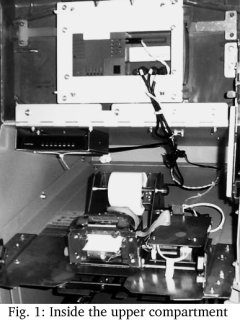
Of course, all the interesting stuff is held within the vault. On my CSP-100,
the vault lock was a LaGard 3332-3, which is a 3-number (0-100) mechanical
combination lock with wires that can be used for sensing bolt position and
a "duress" combination. These wires on my ATM were simply wire tied and un-
used. A duress combination is the combination you dial in when you're being
forced against your will to open the vault. To activate duress mode, you dial
in the combination normally, except the last digit, you dial to the "change"
index, which is another mark about 20 degrees to the left of the "open" index.
This causes a plastic arm inside the lock to trigger the duress switch.
The duress wiring (white and blue wires) can be used in combination with a
silent alarm or telephone dialer to notify the police or an alarm monitoring
company. The bolt position switch that I mentioned (red and black wires)
operates in the same way, but is triggered whenever the lock is opened
regardless of duress mode. This can also be used with an alarm system or
with a buzzer so that an audible alert is heard when the vault is opened.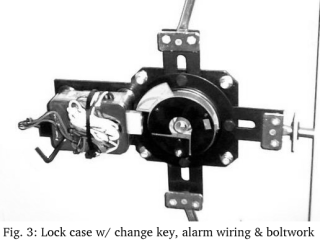
This lock can be easily replaced with one of many combination locks on the
market, including electronic combination locks such as the LaGard ComboGard
I wrote about in 21:4, Kaba Mas (or Mas Hamilton) Cencon S2000 or Auditcon.
The combination on the existing mechanical lock can also be changed, provided
you have a change key, which my ATM came with, taped to the vault door.
Detailed combination changing instructions are available from LaGard, I found
them by Googling for: change combination instructions group 2m
Once the correct combination (or the duress combination) has been entered,
the other knob will turn, which retracts the locking bolts that hold the door
shut. Once that knob is turned, the door opens, and you've got full access to
the cash boxes, reject box, the main power supply, control board, combination
lock housing (for changing the combination using a change key) and the
conveyor belt that moves the money around. The reject bin is where money goes
that comes out of the cash box "out of spec", that is, multiple bills stuck
together, comes out at an angle, folded, or damaged. There are several kinds
of cash boxes. The one that came with my CSP-100 was a locking cash box that
had a red/green tamper indicator on it. The locks on my reject box and cash
box were both operated by the same 7-pin cylinder key. The tamper indicators
will trigger at almost any sign of forced entry including simply removing them
from the ATM. The boxes can not be re-inserted when the indicator is red, and
the key is needed in order to clear the indicator.
The ATM knows what kind of cash boxes are inserted by means of an array of
buttons inside the ATM that are operated by plastic nubs on the back of the
cash box. I do not know what the coding is, but the reject box had its
plastic nubs in a different pattern than the $20 cash box that my ATM came
with. Most cash boxes can hold upwards of 2,000 bills (2,500 if they're
fresh, crisp, new bills), so a fully loaded cassette of $20 bills could store
up to $50,000. It's doubtful that you would see an ATM of this puny stature
loaded with more than a few thousand dollars at any given time, though.
Pressing the small blue button on the lower front of the inside frame of
the ATM allows allow you to firmly yank the innards out on a rolling rail
system. This gives you better access to the money conveyor belt system,
the main system board, the sides of the cash box area, and the main power
supply.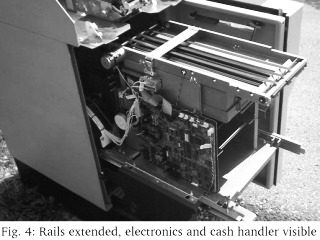
The vault is made of heavy guage steel, which probably is the main reason that
this thing is so heavy. I certainly see why not very many ATM's get stolen.
They might look small and easy to manage, but you would need 2 or 3 men and
a pickup truck to make a successful and timely getaway with this small ATM,
and good luck getting the vault opened up. It would certainly be more
trouble than it's worth.
I have not even tried to get into the ATM's diagnostics or settings yet. There
are no power outlets in the storage unit I'm keeping the ATM in, so I'll have
to move it somewhere else to continue tinkering beyond the mechanical realm.
Given the severe lack of external controls (and a user or installer manual),
I am thinking that the setup/maintenace process needs to happen either over
the on-board modem, or with an external device such as the ATM programmers
I've found in the dumpster before. I can't see where I'd hook such a device
up, though.
That's the mechanical breakdown of a simple ATM. As I experiment some more,
look for another article on programming, setup, auditing, and diagnostics.
2008-02-18
Tinkering with the ComboGard 2
This article is a derivative of an article I wrote a while back ago, which was published in 2600: The Hacker Quarterly 21:4 (Winter 2004-2005). If it looks familiar, that's why.
The LaGard ComboGard series of digital combination locks (Model 33E) is a mainstay of the vault lock industry. It was designed to be a drop-in, high-tech replacement for the old dial-type combination locks for safes and vaults. The actual lock mechanism has the same dimensions as most run-of-the-mill group 1 or group 2 combination locks. The spindle that connects the keypad to the lock mechanism (to retract the bolt of the lock) is in the same location as the spindle that connects the dial to the lock mechanism on old combination locks, and the keypad will mount using similar mounting hardware and at the same location as an old combination lock. Quite literally, you can use a ComboGard lock to replace an aging mechanical lock on an otherwise good vault.
Safe and vault manufacturers can also buy these locks and install them from the factory. You can find one of these in use at many restaurants, stores, and businesses. They're not all that expensive, so their widespread popularity is no mystery. Are they more secure? Arguably, yes. A typical mechanical lock has about 27 million possibilities, whereas a 6-digit combination lock such as the ComboGard has a mere 1,000,000 possibilities. Mechanical locks have other weaknesses though. Many of them can be manipulated and listened to. Digital locks cannot be easily manipulated. Digital locks can also enforce a lock-out policy much like networked systems, where no further combinations can be tried until a penalty time has expired. This limits attacks to 3 tries per penalty period, with a 5 minute penalty, only 36 combinations can be tried per hour. At this pace, it would take years to go through every possible combination.
Lock Parts:
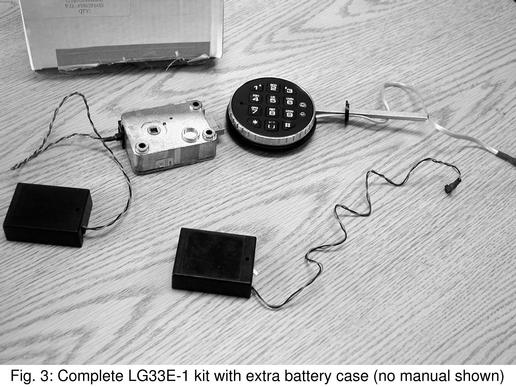
The lock's main electronics board is housed inside the lock assembly, which is secured within the vault itself. There's a single 9-volt battery that powers the whole thing, which can last for years if it's opened daily. It's contained within a small plastic box, connected to the lock assembly through a proprietary connector. The keypad has an identical connector, and they're easy to confuse, and they will plug into the wrong ports. The keypad is a circuitboard with a membrane touch pad, with an LED and speaker, covered with rubber keys and housed in a metal case with a plastic bezel. In the event that the owner fails to act on the lock's low-battery warnings, there are terminals located on the keypad so that an emergency battery can be attached to operate the lock temporarily. The lock case and keypad are connected via a square-shaped brass spindle which can be cut to the proper length to accommodate different thicknesses of vault doors. The keypad electronics connects back to the lock case with standard-issue two-pair phone cable, with the same proprietary connector on the end.
Operating:
When you enter the correct combination, the keypad is allowed to rotate counter-clockwise, retracting the lock bolt. There are numerous other features that are programmable, either with a special tool that service personnel have, or via the keypad for owners. The online manual at LaGard's website has all this information. What if you forget the combination? As far as I know, there is no master combination. You're left to do what a locksmith would do to a mechanical lock that can't be opened: drill it. Unless drilled in a very precise location, the lock will never open. On some revisions of the case, there is a raised circular area that designates the optimal spot to drill.
Dumpster Diving for Locks!
For some reason, a local place has been discarding these locks, and I've managed to find a few in a dumpster. Some have been opened up and no longer have the factory warranty. Some of them have had their spindles cut and have been installed and uninstalled. One thing holds true though, none of them have the default combination (1-2-3-4-5-6) and none of them have been reset by a technician (in which case the combo would be 5-5-5-5-5-5). Lately, I've been seeing several of them turn up on eBay and other auction sites, some selling for $50 or less. This is definitely a bargain. I called LaGard and asked them if they knew how to reset a lock, and they informed me that I needed to call the people I bought the lock from. Well, since I found it by dumpster diving, that was out of the question. I called the place whose dumpster I've been finding them in, and they informed me that I needed to call some company in Kansas, as they service all of their ComboGard locks. They were of little assistance. After a bit of social engineering and a call back to LaGard, I had a fax in my grubby little hands that outlined in great detail exactly how to reset these gems.
Resetting (without any fancy tools)
I've since lost the actual fax, but the process remains engrained in my head. Whether it's exactly the same as the fax I received, I can't remember, but I do know that it works! It also voids the warranty, since it involves breaking the tamper-resistant seal tape (hint: a razor blade and a hair dryer does wonders.) On with resetting the lock. I've included some photos to help with the process.
1) Remove the keypad and battery from the lock case.
2) Cut or otherwise remove the tamper seal tape. This is the only thing that holds the back plate onto the lock case.
3) Remove the back plate of the lock
4) Locate the reset jumper holes. There's a central DIPP IC. If you hold the lock with the bolt facing away from you, the jumper holes are directly to the left of that IC. They're larger holes than the rest, and they have exposed tinning around them. They're about 1/4 inch apart.
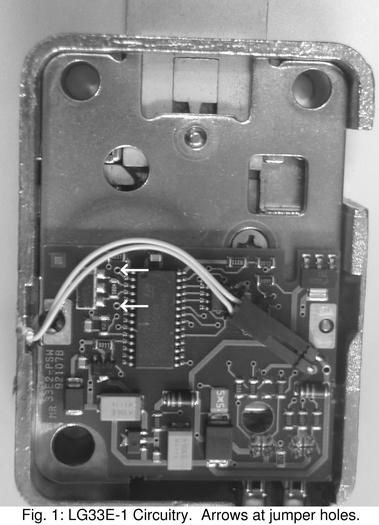
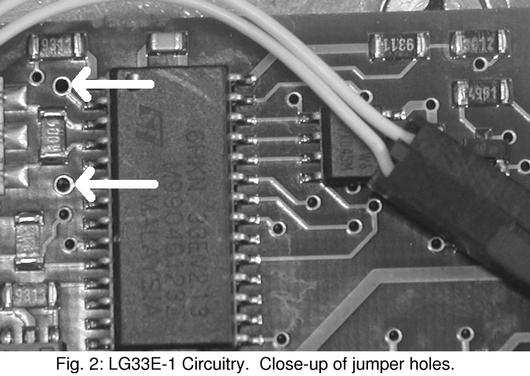
5) Place a jumper wire into the two reset jumper holes.
6) Attach the keypad. It goes into the port closest to the corner of the case.
7) With the jumper wire still attached, connect the battery.
8) Within 5 seconds, press the "5" key on the keypad.
9) Wait 60 seconds, then disconnect the battery and remove the jumper wire. Test the lock with the combination "5-5-5-5-5-5". If it doesn't work, start over again. Timing is critical, and the jumper wire must be secure and connected for the duration of the procedure. Changing the combination: 0-0-0-0-0-0, Old Combination, New combination
Subscribe to:
Posts (Atom)

 Posts
Posts


