A few folks asked how I put together the password hash checker yesterday. Understand that I was sick and in bed most of the day, and did most of this from my Motorola Droid 4. It was really ugly.
A local KC2600'er found a link to the hash dump on a shady Russian website. If you really want the dump of hashes and haven't found it yet, look for combo_not.zip and/or combo_not.txt. I downloaded the file via wget on one of my OpenBSD web servers.
The text file was likely made from a Windows environment because it has telltale CR/LF line breaks. The first thing I did was fix the line breaks with sed. This cute little one-liner replaces all CR/LF line breaks with traditional UNIX line breaks so that command-line wizardry will work on it.
sed -i "" 's/.$//' combo_not.txt
Then, I figured I should cram it all into MySQL to make queries against the data less of a pain in the ass. I created a database and user named lihash, then created the DB with only an auto-incrementing ID and a hash column:
create table lihash (id int primary key auto_increment, hash varchar(40));
And then I used some more sed stuff to turn each hash into an "insert" line for MySQL. Here's what the output looks like (limited to the first 10 lines with head):
$ sed 's/^/insert into lihash values (NULL,"/;s/$/");/' combo_not.txt | head
insert into lihash values (NULL,"000000a94d47b9ca82c58a3b092a50263b40f66e");
insert into lihash values (NULL,"000000a9876203148923f97c6f1a0635472e1e38");
insert into lihash values (NULL,"000000a9bf60e7f17fcac444a54791af780743a3");
insert into lihash values (NULL,"000000a97e734e7ed9766d1ce08ebc68d3e93ab2");
insert into lihash values (NULL,"000000a9b4b1b3497aac51e212ac9efdb00e7f4e");
insert into lihash values (NULL,"000000a9affc26ed1b0ef2956825e85f9a2567ff");
insert into lihash values (NULL,"000000a93c829bab8c40f805bd3adec3302edf06");
insert into lihash values (NULL,"000000a9e3686034e4f7a1f5b8d6de92679dba5c");
insert into lihash values (NULL,"000000a966dd229cbdd0c4ccc524f0aff6c0fc31");
insert into lihash values (NULL,"000000a9317a995cb16dec71edf0d3aa4b918de6");
With that looking all fine and proper, I piped all that straight into MySQL.
$ sed 's/^/insert into lihash values (NULL,"/;s/$/");/' combo_not.txt | mysql lihash
It took several minutes to munch through the data and created many megabytes of MySQL binary logs. While that was processing, I scoured the web looking for a decent javascript SHA-1 hashing method so that I didn't have to worry about handling peoples' passwords via my site. You can simply view the source of this page to see how that works. It was mostly copypasta.
Finally, there's the PHP that drives it on the back-end. You can see the PHP Source HERE. When I was testing, I had it displaying the hash that was passed. I got rid of that part to keep XSS shenanigans at bay. I'm probably doing all sorts of things wrong with the SQL queries, but I copied some of that database code from another project on that server (I was using a phone for this, remember?)
By now, you may have heard that a list of 6.5 million hashes have been posted to the Internet, and that they appear to be password hashes from LinkedIn. CNet has some of the deets, but there's a great thread on YCombinator Hacker News where some observations are made. Namely, SHA1 hashes for easily-guessed passwords (such as "linkedin" or "password") do not show up in the list, but if you replace the first five characters of the hash with "00000", then hashes do match for simple passwords. This leads to speculation that the attackers have already cracked some of the easy ones and truncated them in the list.
I've made a really quick and dirty web page that will help you check if your password is on the list. It features a nifty javascript SHA-1 digest hash generator so that the password you check never gets sent over cleartext. It will check hash and truncated hash against the dump. If it detects the entire hash, then your LinkedIn password hash is now in the wild, and it's likely only a matter of time until it's cracked. If the truncated version is in the password dump, it's almost certain your password is compromised.
OpenBSD 5.1 was released last week, so the update is a bit overdue. HiR's Secure OpenBSD + AMP guide has been updated. OpenBSD 4.x is officially unsupported now, so we've dropped the 4.x parts from the guide and refined the rest.
Since we've started covering the setup of an AMP stack on OpenBSD, the process has gotten considerably easier. OpenBSD is a completely viable and stable environment for running almost any PHP/MySQL web app, with a little extra consideration given to the chroot environment and Suhosin hardening patches while you're setting up your applications or programming new ones.
My wife and I have identical phones. She actually got hers before I got mine. Occasionally, I have to tether for troubleshooting, and I set hers up tonight to do the same.
I encountered a number of stumbling blocks the first time around. Fortunately, other people did all the hard work. Here are links I found helpful.
Download the latest SuperOneClick package. You'll have to root your phone. There's no easier way than this: SuperOneClick - Shortfuse
At this point, if you try to tether, you'll run into a similar issue as I've described in previous tethering posts: the authentication string will cause tethered traffic to bounce up against Verizon's wrath warning page.
You'll need to download RadioComm, and the best way to find that is Google. You'll probably find fresh links to recent versions on XDA Devs or MotorolaFans. Caveat Emptor and all that. Shady download links galore, so be on your guard with good backups and malware protection. Here are the instructions to patch your phone's baseband configuration for tethery goodness.
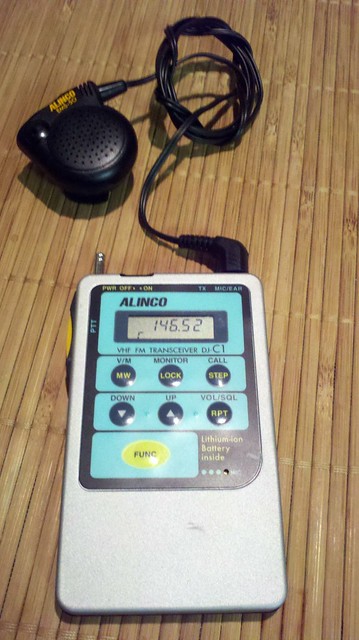
The Alinco DJ-C1 was made in the 1990s and was a groundbreaking ham radio micro-transceiver about the thickness of an iPhone 4 and with a smaller footprint nearly identical to that of a credit card. It was designed to work on the 2m FM Voice band at 300mW. It featured an integrated microphone, but had no internal speaker from the factory; One had to rely on an earphone or an external speaker/microphone unit such as the one shown above.
Over time, these micro radios evolved. The DJ-C4 came out at the same time as the C1, and was made for 440 MHz (70cm FM Voice). The DJ-C5 was a bit thicker and was the first to have an integrated speaker and work on both of the above bands. The latest one, the DJ-C7, lacks resemblance to these tiny relics of the late 90s aside from being smallish.
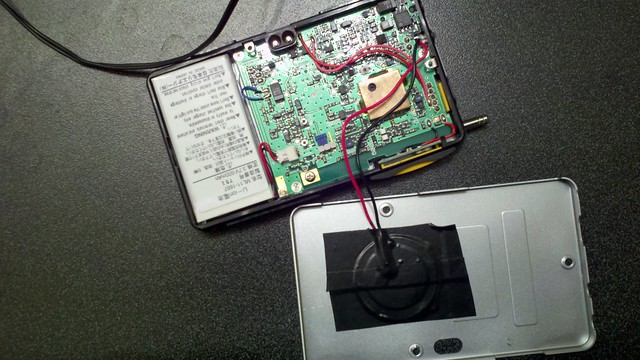
You can still find these micro-handheld transcievers at hamfests, swap meets and online auctions. I got mine from a friend that's happened upon two C1s and a C4 in the past year. I was immediately somewhat frustrated by the lack of a built-in speaker. I opened it up and found plenty of room in the back for a piezoelectric element, similar to what you find as the alarm speaker in digital wrist watches.
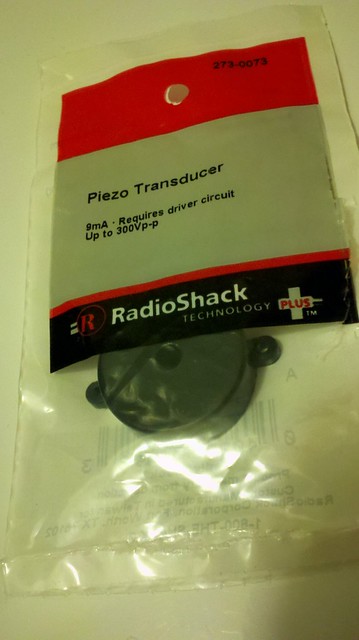
I couldn't find anything to salvage a piezo speaker out of, so I coughed up a couple of bucks at Radio Shack for one. I used a tiny screwdriver to pry the back cover off and to pry the element out of the case.
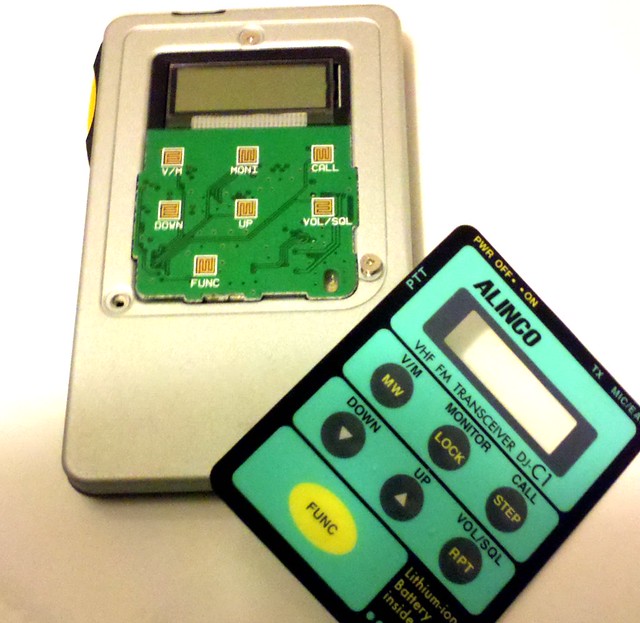
Disassembly of the DJ-C1 initially looks pretty straight-forward. There are three small philips screws on the back which give you access to the battery and the back of the circuit board. You'll have to open the back up and you'll want to disconnect the battery before proceeding. Unfortunately, most of the stuff we need access to is on the other side of the circuit board. You can't get the board out from the back, so leave the screws through the circuitboard attached. To remove the front plate, carefully peel the sticker and membrane buttons off, then remove the three screws found underneath.
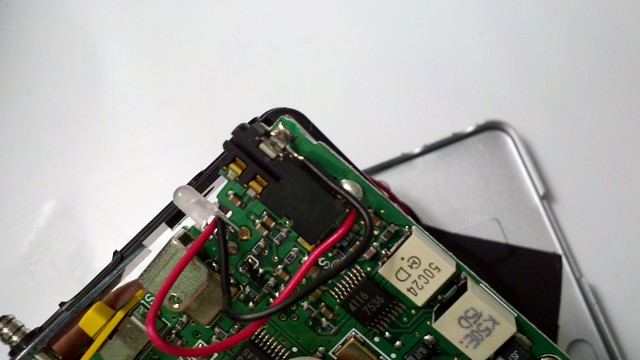
There aren't many places to pass wires from the back of the radio where the speaker will be to the front of the radio where they can attach to the solder pads for the audio jack, so I ran them between the legs of the transmit LED. With the front and back removed, you can slide the circuit board out of the rectangular plastic frame enough to get access to the solder pads with almost any kind of soldering iron. You can see the red and black wires here:
I taped the piezo element to the back case toward the bottom. The copper shield in the middle of the circuit board seen below will sit flush against the back case, so keep the speaker and wires clear of it. The piezo speaker is actually louder when it's taped to the back case than it is when it's hooked up to the audio jack by itself.
Gently re-assemble everything, making sure everything fits neatly inside. Re-position the speaker and wires as needed. I ended up placing a bit of tape inside to keep the speaker wires from getting in the way. Re-connect the battery, screw the front plate back on, re-attach the membrane buttons to the front, and test it before you button the thing back up.
The resulting speaker works, but isn't terribly loud. It's loud enough to get your attention from the office desk, and if you hold it up next to your ear, you can make out what's being said. This is all I expected from this hack. You'll want to hold on to that earphone or external speaker, though.
Here's some crappy cell phone video of it in action.
It's that time again! Bring your questions, projects, interesting topics of discussion, war stories and conspiracy theories. As a reminder, the official 2600 meeting start time is 5:00 PM local time, but the Greater Kansas City folks tend to start trickling in at 5:30 or so.
If people are interested, I'll go over some of the common complaints of this lock and how so many people manage to lock themselves out of it forever. I might live stream it on uStream. I might actually lock myself out of this lock forever, too, but hopefully not.
HiR is what happens when 1990s-era e-Zine writers decide to form a blog. Most of us hail from the Great Plains region of the United States.
Ax0n, HiR founder and editor-in-chief is an information security specialist currently working in the luxury goods industry.
Asmodian X joined HiR in December 1997 and currently works as a web developer and SysAdmin in the education industry.
Frogman has been on board since May 1998 and has many technical passions. When not experimenting with obscure hardware, he can be found leaping from one rooftop to the next, making the world his office.
TMiB has also been helping since 1998. Also our resident Physicist and go-to guy for xkcd jokes we don't get, The Man in Black currently works in the Internet industry in an east-coast data center.