
via Engadget
If you've been under a rock for the past 50 years you might not have realized how much the visions of this man have changed your life. The most prominent would be the geosynchronous com satellite. There is a very high probability that nearly all of the cable TV you watch is from sat feeds, and of course DSS is all sat. Your GPS unit works via geo-sync sats. So does your sat-phone, if you've got some spendy need for one.
2008-03-18
Arthur C. Clarke dead at 90

2008-03-15
HiR Reading Room: Postfix: The Definitive Guide
Postfix is my favorite MTA right now. Various authentication and mail store options, a "security first" development cycle, and great performance are just a few of the reasons. Gone are the days of Sendmail. Qmail is feature-packed but kludgy (and I don't really care for djb's antics nor his hubris, so maybe it's a little personal). Postfix is king, as far as I'm concerned.
This 278-page guide is svelte, but remains packed with useful tips, configuration examples, and advice on Internet mail infrastructure. Whether you just want to build a mail server for yourself or a small company, or you're looking at revamping the way your corporate e-mail is handled, this book is worth a look.
You don't need to know a lot about MTAs in general to get started. I'd argue that intricate familiarity with Sendmail might even hurt you a little. You can get a ground-up lesson on mail infrastructure from Postfix: The Definitive Guide. A little functional UNIX knowledge is a bonus, though.
2008-03-14
Observations from this week
This has been a crazy week for me. Most of this is related to work and personal life. I have a few observations and it's going to sound like a rant.
Someone I do work for is testing a new SSL VPN solution. This is a VPN that just uses the web browser. I was looking forward to ditching the Windows VM which I pretty much use only for VPN. This particular VPN has been configured to require Windows. What the hell is up with that?
We had the BSD User Group meeting yesterday. Somehow, the meeting room got double-booked between us and the Commodore 64 Club. I say club because no one actually USES Commodore 64 computers for anything anymore. They just look at them and play text adventures on them. At first, I was excited to see the C64 laptop there, figuring someone may have actually installed NetBSD on it, but no. It was just a C64 laptop (there's a model name or number for it but I don't care enough to look it up). Then, I got to thinking about NetBSD. You probably could get it working on a C64. I co-worker of mine suggests that you could probably put a dead hamster in a shoe box and get it to run NetBSD. I don't think that's too much of a stretch.
The C64 club had KCBug outnumbered 3-to-1. This pains me. Had it been a PerlMongers or KC Linux UG meeting I wouldn't have been so hurt, but seriously, KC guys. This was a a disgrace. Get with the program and come to KCBug next month. Please? Thanks. Meeting details will probably get posted to the KCBug Mailing List.
The PHP user's group is tomorrow. I'll probably be there. So will Asmo.
2008-03-12
Electric Skies.
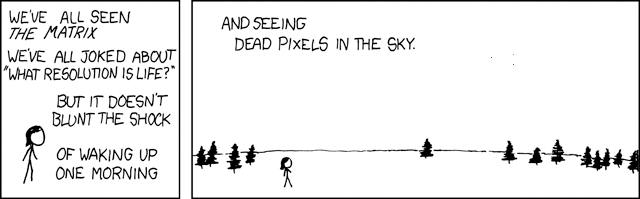
This reminded me of the opening line to Neuromancer: The sky above the port was the color of television, tuned to a dead channel. Anyone have more links to literature (in all of it's forms) using the meme of an electric description for the sky?
2008-03-11
Shared Links
I'm not sure if I'm ready to go putting del.icio.us daily RSS feed splices in the HiR RSS Feed yet, but for the time being, we're taking interesting links that show up in our Google Reader feeds and sharing them via the navbar on the right under HiR Shared Links. You can also add our shared items to your RSS reader. We'll probably still write commentary on interesting newsworthy articles that we find, but this is a way for us to show you some of what's keeping us interested.
Thanks for reading!
--ax0n
HiR Editor
UNIX Tip of the day: shell math with bc
bc is "an arbitrary-precision calculator language" which so happens to be nearly ubiquitous across all UNIX platforms that I've ever run across.
Why on earth would you want to do math on the command-line? Well, that's a good question. I often find myself using it when I have a terminal window open and don't feel like finding a calculator or firing up the calculator program just to do some basic division or multiplication. Remember, I suck at doing math in my head unless it's stupidly simple stuff.
What does "arbitrary precision" mean, exactly? Well, it means that bc will only be as precise (with floating points) as you are with your input. Integers in, integers out!
bc 1.06
Copyright 1991-1994, 1997, 1998, 2000 Free Software Foundation, Inc.
This is free software with ABSOLUTELY NO WARRANTY.
For details type `warranty'.
491003798 * 2
982007596
This is important when doing division:
5/2
2
5 divided by 2 is obviously not 2. Set the scale to 2 to make it precise to two decimal points, and try again:
scale=2
5/2
2.50
Much better.
Like shells, you can combine multiple commands on one line with a semicolon between commands: FYI: sqrt(x) gives you the Square Root of x and x^y gives you x to the power of y. This is similar to how many scientific calculators or Google Calculator works. In fact, most of Google Calc's syntax works quite well in bc.
scale=0; sqrt (982007596); 16^2
31337
256
Since bc operates on standard input, you can use any of the below methods to do non-interactive math from the command-line or shell scripts:
Pipe:
axon$ echo "2008 * 42" | bc
84336
Here Document:
axon$ bc << EOF
> (2008 * 42) + 65535
> EOF
149871
Use bc if you are writing a shell script that requires floating-point operations, as most shells don't handle math too well. You can even use shell variables.
axon$ export gallons=12.5
axon$ export price=3.879
axon$ echo "A tank of gasoline costs \$`echo "$gallons * $price" | bc`"
A tank of gasoline costs $48.487
Note that while bc exists as part of most UNIX installations (I think it's part of the Single UNIX Specification), that the supported syntax varies between platforms a little bit. When in doubt, check the man page.
84336
Here Document:
axon$ bc << EOF
> (2008 * 42) + 65535
> EOF
149871
Use bc if you are writing a shell script that requires floating-point operations, as most shells don't handle math too well. You can even use shell variables.
axon$ export gallons=12.5
axon$ export price=3.879
axon$ echo "A tank of gasoline costs \$`echo "$gallons * $price" | bc`"
A tank of gasoline costs $48.487
Note that while bc exists as part of most UNIX installations (I think it's part of the Single UNIX Specification), that the supported syntax varies between platforms a little bit. When in doubt, check the man page.
2008-03-09
Sysadmin Sunday: LogCheck
I've been using LogCheck in its various incarnations for quite a while. When I started using it (it feels like a decade ago but it may have been a little less) it was called LogSentry. While it's still pretty simple, it gets the job done. LogCheck's been passed around many times, and I'm relatively sure that the package I downloaded has remained for the most part unchanged for at least 5 years. For a small group of servers you wish to keep tabs on, this tool is great. For an enterprise, you might want something more heavy duty such as a database-driven centralized logging server.
Note that by itself, LogCheck only does two things:
- Looks through all the log files shown for suspicious or "hackish" activity
- E-mails the report
Installation:
I'll be doing the install on FreeBSD. LogCheck is just a script, so it will run on pretty much anything that isn't Windows.
$ sudo pkg_add -r logcheckConfiguration:
Fetching ftp://ftp.freebsd.org/pub/FreeBSD/ports/i386/packages-6.3-release/Latest/logcheck.tbz... Done.
To see what LogCheck thinks is "hackish", check out logcheck.hacking and logcheck.violations (in /usr/local/etc/ when installed from FreeBSD's packages) Those contain a list of regular expressions (one per line) that will be used to gather reporting information from the logs. Similarly, logcheck.ignore and logcheck.violations.ignore contain regular expressions that can filter certain results from the report. I recommend looking at these files but not editing them at first. Let LogCheck run for a week or so (daily) to get a feel for it. Then, start adding or removing expressions to the lists to fine tune your reports.
To change what e-mail address the report is sent to, find logcheck.sh (it's also in /usr/local/etc/ when installed from FreeBSD's packages) and modify this block of text as appropriate:
# Person to send log activity to.Look at the other variables, too. By default, the log files and configuration will likely be workable, but it's a good idea to make sure.
SYSADMIN=root
Adding the following line to the system's crontab will launch LogCheck every hour. This isn't a big deal because it will only mail you if there is something suspicious. If you would rather have a daily log, read the man page on crontab to figure out how the schedule options.
00 * * * * root /bin/sh /usr/local/etc/logcheck.sh
Subscribe to:
Posts (Atom)

 Posts
Posts


