Showing posts with label privacy. Show all posts

2011-01-20

Introduction to encrypted Internet chat

In the middle of a discussion about IRC chat, I mentioned SILC, which apparently, quite a few people haven't heard about yet. It's not terribly surprising. Once quite popular, IRC is now a fringe communications platform in the wake of instant messaging. If IRC users represent the fringe of Internet society, then SILC users are the consummate outliers.

This post was made mostly to go along with a quick presentation I'm doing for Cowtown Computer Congress this evening. This is a quick and dirty rough draft that will likely be edited for speling and grammer err0rz.

SILC is Secure Internet Live Conferencing, and it borrows many things directly from Internet Relay Chat, fixing some of the weaknesses of IRC by using certificates, key exchange algorithms, digital signatures and encrypted connections. The end result is a chat platform capable of being used by groups or one-on-one communication where you can be absolutely sure you are communicating with the person you think you're communicating with. With the appropriate measures, you can also be certain that messages can't be trivially intercepted or forged by outsiders, even if the SILC server or network has been compromised. When talking in public groups (equivalent to IRC channels), only those in the group can see the messages due to a shared session key. People sniffing your local network segment won't know what's being said or with whom you're communicating.

While on the topic of encrypted chat, I'll also discuss Off-The-Record, a cryptographic plug-in that sits on top of certain instant messaging platforms (like AIM) by sending strong-crypto messsages over base64-encoded strings between users. To this end, it's usually easy for someone monitoring the network to tell with whom you're communicating, but nearly impossible to determine the actual contents of said communication.

Of course, some of these things have been recently been addressed, albeit not nearly as thoroughly, by using SSL/TLS. Several modern IM protocols rely on SSL/TLS, and certain IRC implementations also can use SSL now. These are beyond the scope of this article, but worth mentioning in passing.

There are two actively-developed clients that I will cover:

  • A SILC plugin for irssi, a popular IRC client, which works best on Linux
  • Native SILC support in Pidgin IM, which works on Mac OS X, Linux and Windows. Pidgin plugins for Off-The-Record exist for Mac OS X, Linux and Windows as well.
Irssi
Irssi is my favorite IRC client. It's a curses-based program that runs in the terminal. The SILC plugin for irssi can be found in many package repositories. For example, installing it (and all dependencies, including irssi itself) in Ubuntu is as easy as:

$ sudo apt-get install irssi-plugin-silc
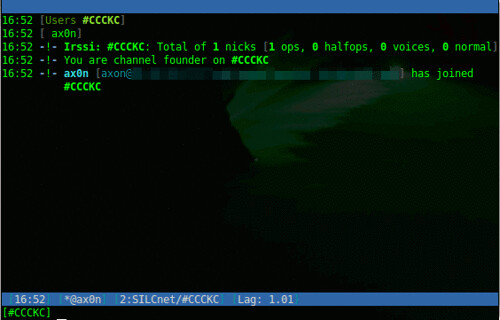
irssi-silc

If you're familiar with IRC, it uses some familiar derivatives of commands:

Load the SILC plugin, prompts for your private key passphrase
/load silc

Connect to a SILC server
/connect -silcnet SILCnet [silc-server]


Join a group (or channel)
/join [group]


Grant operator status to a user in a group you control
/cumode [group] +o [user]

Send a one-on-one message to another user
/msg [user] [message]

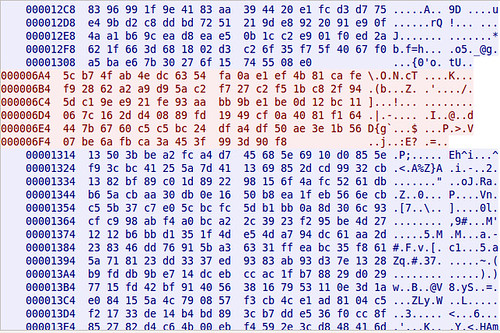
To compare, this is a screen shot of captured traffic from plain-text IRC, followed by one from SILC.
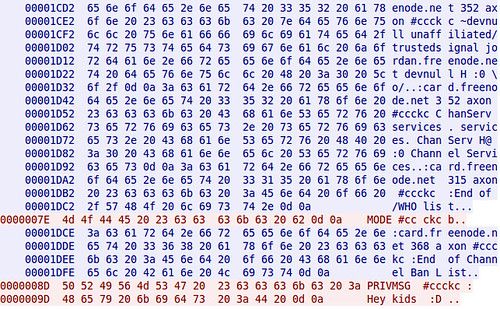
Hexdump showing cleartext IRC Chat

Hexdump showing encrypted SILC Chat

Pidgin

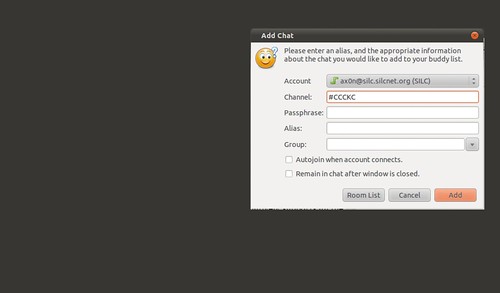
Pidgin is a cross platform open source chat application that natively supports all the major Instant Messaging protocols, including AIM, SILC and IRC. Once you've added a SILC server (via Accounts), you simply go to the Buddy List and select "Add chat" to join a group.
pidgin-silc

Off-The-Record
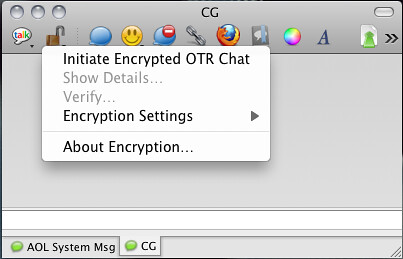
Adium, the Pidgin port for Mac OS X comes with OTR built right in!
Screen shot 2011-01-20 at 5.42.36 PM

Installing on Ubuntu is easy, as this will install Pidgin and the OTR plugin and all dependencies.
$ sudo apt-get install pidgin-otr

To get it up and running on Windows, first install Pidgin, then run the OTR plugin installer.

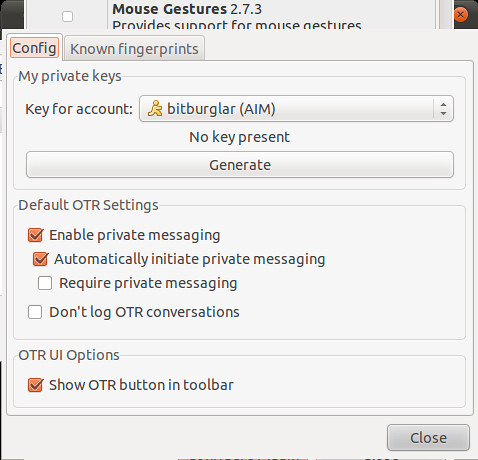
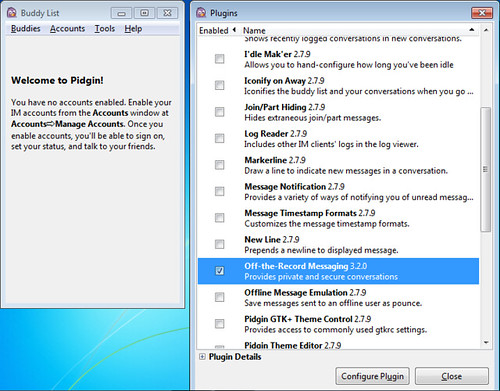
On Linux and Windows, you'll have to enable the plugin and generate a key before you can use it.
Pidgin-OTR-Windows

Generate OTR fingerprint

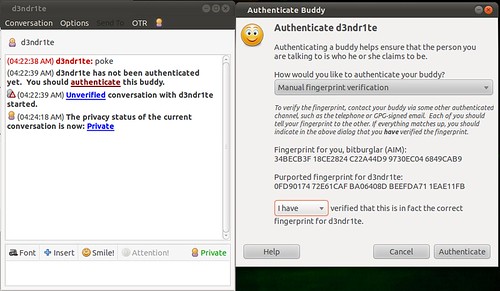
And then, once you initiate a chat with someone who also has OTR, you will need to verify their key. The best way to do this is in person or over a trusted communications platform. If you know their voice well enough, a phone call would probably work just fine.
Pidgin OTR authenticate fingerprint

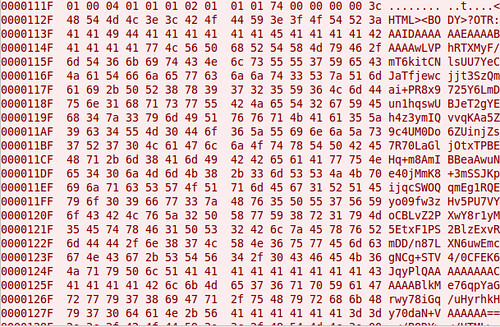
Although AIM uses SSL by default these days, it's not uncommon to see AIM go across the wire in cleartext. Here's a screen shot comparing packet captures from a cleartext AIM session and one using OTR. You can't see it in the screen shots because of how large the OTR message is, but the OTR session only encrypts the message content itself. You can still see the names of the parties communicating.
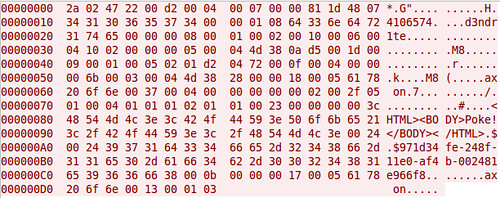
Hexdump of cleartext AIM Chat

Hexdump of encrypted AIM+OTR Chat

That's all I've got for now.

2010-10-18

The ultimate simple guide to Internet privacy

People are making a big fuss about privacy and how companies are invading it. Without further delay, here is my all-encompassing guide to Internet privacy.

  1. Think about what you're going to post.
  2. If you can concoct any situation in your mind where it would be bad for any one specific person to see it (e.g., your boss, your parents or even the person you're making fun of,) either now or for the foreseeable future, then do not post it on the Internet.
Your mother probably said something along the lines of "If you don't want it on the front page of the newspaper, then don't do it!" She was on to something, you know.

Also, if you're using someone else's bandwidth, server resources and infrastructure for free, then the service they provide to you is not their product. Their product is the data you willingly give them, which they're more than happy to monetize in any number of ways.

2010-09-17

Evil WiFi: Subversive Wireless & Self Defense (BSidesKC)

I'm used to talking among smaller groups of people around a table, but that was the extent of my public speaking experience until my presentation at B-Sides KC. Thanks for all who participated. It was a pleasure interacting with you today!

I think the presentation went pretty well. B-Sides seems like a great place for shy security nerds to practice their presentation and speaking skills. Predictably, I think I said "Um" quite a bit. I'll get better, I'm sure.

When my original Evil WiFi rig left a trail of dead newbs in its wake at DefCon last year, I decided I should probably refine it a little bit. A presentation was in the back of my mind. When I got laid off at the beginning of this year, I started playing with it in earnest again. I even drew up a quick outline that I was thinking of submitting to Black Hat and DefCon. I'm honestly still not 100% happy with the setup. I'd bet I could get most of this running on a single netbook, and use some of the newer features of Metasploit.

I wish we would have been able to record the talks. The audience added a lot of insight. I also had a big pile of notes to go with these slides. I deleted them, entirely on purpose, so I could wing it during the presentation. I know the material.

The ongoing theme of the talk was that wireless technology is helplessly broken for all but a few savvy users. Of course, most of the people who attended my presentation were savvy users themselves: hackers, penetration testers, sysadmins and mostly highly-technical folks that "get it" - I'm hoping they can take this back to their day jobs and use it wisely. Not all hope is lost if you need WiFi in the enterprise, though. You just have to know the threats and use your head.


I also demonstrated the effectiveness of my current Evil WiFi rig with its new captive portal functionality, and explained how the mechanics of the system work. It surprised me that the audience enjoyed watching me fumble my way around, but the demo seemed effective enough considering parts of it were somewhat staged for display purposes (browsing to my captive portal from localhost just to show how it looks and what firewall rules it adds) but once I enabled Karma, we started seeing a few folks get tangled up in in.

I didn't demonstrate Hamster & Ferret for a few reasons. Complete strangers using my access point, 18 U.S.C. § 1030 (and related codes) and the presence of FBI agents in the room had something to do with it.

2010-04-09

Clever phishing attempt

My phone just rang. It was a call from +1-817-688-7853. The other end was an Interactive Voice Response script.


Me: "Hello?"

IVR: "Hello. For security purposes, your Visa debit card has been deactivated for debit and ATM use..."

First reaction on my end was "oh, great. Somewhere, someone got my details..."
I listened through the prompts and there was no option to speak to a real human. I tried "0" "*" and "#" multiple times, to no avail. It just kept playing the short prompt menu over and over again. I chose option 1, to "re-activate" my card, suspecting a ruse. On cue, it asked me for my 16-digit card number, followed by #. I entered "00#" figuring it would error out. But it asked me if that was correct. It prompted me for my expiration date (0000) and CVV code (000) as well. Then, it came back:

IVR: "Thank you. Your Visa card has been re-activated. Goodbye."

Me: "F*** you." *click*

Calling the number back got me some boilerplate error message.

Be careful out there, folks. Banks will de-activate your card if they suspect it has been compromised, but they will never give you the option to re-activate it over the phone like this, especially with an automated IVR system. Typically, they issue you a new card, sometimes with the exact same account number and expiration date, but with a different CVV code.

2010-02-21

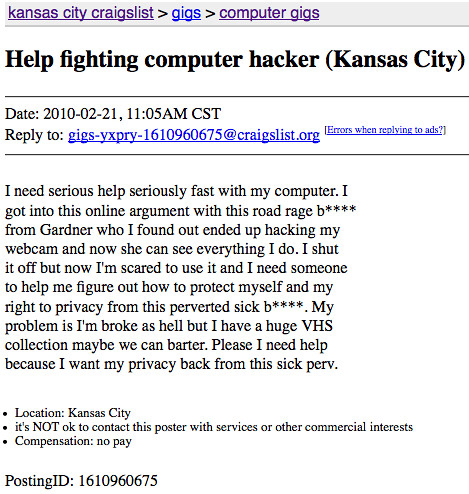
Nominated for Best Of Craigslist


Someone want to help him out? You could get a whole bunch of VHS tapes. Hahah.

I'll pass.

2010-02-11

Oh noes! Google Buzz FUD!

Silicon Valley Insider came up with this wonderful sensationalist FUD piece: WARNING: Google Buzz has a huge privacy flaw!


Please.

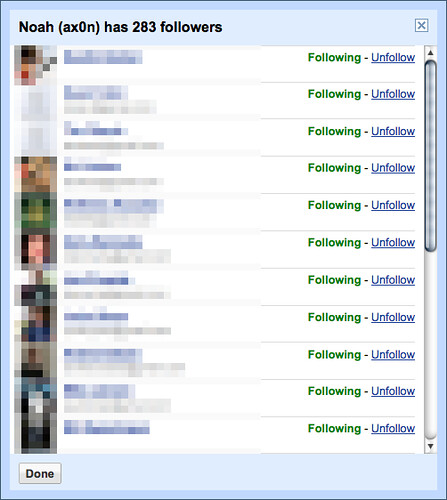
They recommend shutting off Buzz completely, or un-following your automagically-generated "friends" that Google "chose" for you (i.e. other Google Profiles that you exchange e-mail, Google Reader, or GTalk with). This isn't really a Buzz issue at all, though. It's been a "problem" since Google Profiles came out, it's just a lot more intuitive to see who people interact with in Google Buzz, since it's built into GMail directly now.

UPDATE: It looks like contact sharing *IS* enabled only once you sign up for Buzz. So, shame on Google? If you don't sign up for Buzz, these options won't even show up (and neither will your contacts on your Google Profile) - Thanks, Genesiswave, for pointing this out.

Oh noes! Ph34r!!!

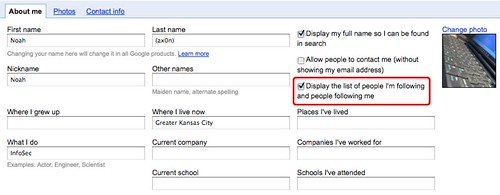
Or, you could think rationally, and simply un-check the option to make public the list of people you interact with. Imagine that?

So, take a deep breath, log in to some google service, then click this link to edit your profile if you're really that worried. Again, this option is only displayed once you opted in to Google Buzz.

Relief. Whew.

Now, the followers/following links are only visible to myself. I verified this through Google Buzz and by looking at my profile page from a different google account.

2009-11-04

Schrödinger's Hacker

Apparently, it started here, then spread like wildfire through the security mailing lists and twitterverse. str0ke, of Milw0rm, was no longer among the living.


I had my doubts. One entry on a blogspot blog doesn't usually constitute breaking news, and there was no more authoritative source. Some people who saw my skepticism told me that it'd be pretty screwed up to fake a death of someone like str0ke. All I can say? Madoff. Lori Drew. Fake Facebook deaths. Bonnie Sweeten. There are some f'd up people in the world, and a lot of them do f'd up things over the Internet.

Str0ke is still alive and well. Or is he?


Related:
Rehi, Milw0rm

2009-10-21

Viral marketing

As seen in my Facebook notifications. Facebook apps in general are shady business, but this just seems downright predatory.


For those who don't know, any application you add potentially gives the author carte blanche access to anything you can see on Facebook. Friends' updates, list of friends' friends, not to mention almost anything you've bothered to fill out about yourself. Think about that before you go handing the keys to the kingdom over to LivingSocial or any of the other application developers.


2009-09-18

Verizon Wireless customers: Privacy Fail

I got this lovely IED of Privacy Fail in my inbox this morning. See the circled text. It looks like we get opted-in by default! If you don't want to be sold and traded at Verizon's every whim, you should probably try to hunt this down or access the setting in your VZW account.


Update: According to Mike Fratto (@mfratto) it's old news. How long have we been opted in, anyways!? He points out in your account, go to VZW→My Profile→View/Edit Privacy(CPNI) Settings to change