
But it's sweet once it works with all the drivers installed
Let me step back a bit. I already had a license for Win7 Home Premium upgrade. That means I had to install it on top of Windows XP or Vista. So, I had to install XP Home first, which I also had a license for. Getting XP up and running was the root of my issues.
A while back ago, Apple pushed out an EFI update that supposedly removed the necessity to use BootCamp to install Windows or any other OS, really. With a spare partition on my hard drive, I decided to clobber Ubuntu, and install Windows XP over it. That ended up trashing the entire partition table, and bricking my MacBook.
Time Machine to the rescue. 3 hours later, I had restored my OS X partition from bare-metal to a point-in-time backup where the only thing I lost was 30 minutes of browser history. In other words: it worked perfectly. 45 minutes later, XP was installed, but the boot.ini file was pointing to the wrong partition. Using the XP recovery console to attempt a repair, I had whacked my partition table. AGAIN. Wash, Rinse, Repeat.
You need XP SP2 or higher, as it turns out. I guess I should have read the entire Boot C(r)amp manual first. I used BootCamp Assistant to create the partition this time, instead of partitioning it during restoration with the OS X install CD. Once XP Home SP2 was installed, I was without any drivers. The OS X CD supposedly contains them, but it was showing up as a blank disk when inserted. I wasn't worried about video drivers, or audio, or anything other than getting it on the network so I could activate Windows and commence the upgrade to Windows 7. For that, I ended up using a Linksys USB wireless adapter (and the driver CD). Then it was home-free.
Windows 7 installed fine without a lot of problems. It had many of the drivers already built-in, including the wireless. The audio and touch-pad drivers were sub-par, though. Other things like the iSight had non-existent support. Again, the OS X DVD I have wasn't showing the drivers under Windows 7 either and the BootCamp download from Apple wouldn't even run. I finally found a BootCamp driver download on the Digiex forum. Of course, you will want to use third-party supplied drivers at your own risk, but it seems to be working pretty well.
All in all, I burned almost an entire waking day attempting to get Win7 installed on my MacBook. A good part of that was the initial install of XP. Going straight to Win7, at least once you have the drivers, is probably not too bad. I can't stress enough how important it is to have a good Time Machine backup before you start, though.
End result:
Let it never be said I'm completely bigoted when it comes to Microsoft. My wife has been using 7 for a few months, and I'm already digging it. This may be Microsoft's best Windows release since Windows 2000, which I also had plenty of good things to say about.
Time will tell as I put it through its paces, but usability is just as good as OS X now that all the drivers are working properly, and this is a rather comfortable operating system for daily use.
2009-12-28
Windows 7 on a MacBook: Kind of a pain to install
2009-11-02
Windows 7: Is its success really a surprise?
I've been messing with Windows 7 since the beta, and my wife has the Ultimate edition installed on her laptop (having replaced Vista, for the most part).
- Windows XP, a decade-old platform that's been patched to hell
- Vista, a chubby three-year-old toddler replete with nagging, resource-hogging character flaws
- Windows 7, the shiny hotness built after pay-to-participate beta testers shook out Vista's worst features and bugs over the course of 3 years
2009-09-23
Booting Linux and Windows on separate drives
 Normally, installing Windows isn't something I'd do. Not for friends. Not for family, and not for myself. My wife dual-boots Ubuntu and Vista on her laptop -- Vista because that's what shipped with it, and World Of Warcraft runs fine under it. She's plenty competent to keep it cleaned up, secure, and able to restore her stuff from backups if something goes wrong. She's probably better at Windows (at least Vista) than I am, and certainly doesn't need my help very often. As for me, I just didn't think I NEEDED Windows for much...
That is, until I found out how much better my employer's VPN works from Windows. It doesn't work well from MacOS, barely works under Ubuntu, and oddly, works okay under Solaris 10, but it's far from perfect. A few days ago, I logged into the VPN from the Corporate-mandated Windows XP Work PC in the office and was kind of in awe. We're talking an order of magnitude better, on a logarithmic scale. Figures, right? With all the after-hours remote work I'm finding myself doing more and more often these days, it looks like I'm installing Windows!
As a self-proclaimed Operating System Junkie, I suppose it wouldn't hurt to dabble in Windows just a little. After all, my wife's already running a game server on Win2k. What can it hurt?
The only machine I have laying around that I felt would do Windows justice is an old Dell PowerEdge tower server, which spends most of its time running Ubuntu. I didn't feel like re-partitioning or re-installing everything, so I unplugged the Ubuntu hard drive, scared up an old 20GB drive for Windows, bolted it into place, then went to town installing Windows. My goal was to move the Windows hard drive to the secondary IDE controller once installed, then figure out how to get GRUB to boot Windows.
From here, I'm assuming that:
- You have a Linux distro installed on the first hard drive booting with GRUB
- You have swapped the Linux hard drive out for a fresh one (also the first hard drive) and installed Windows to it.
- Afterward, you have put both hard drives in, with Linux as the Master on the Primary IDE controller (or the first SATA drive)
hd0 - Primary Master: 80GB HDD, Linux
hd1 - Primary Slave: Optical drive (DVD±RW, etc)
hd2 - Secondary Master: 20GB HDD, Windows
Next, I made certain that Linux booted properly. This, as expected, worked just fine. I rebooted, and paused GRUB's boot process and entered CLI mode to try to boot Windows. Initially, I tried this, which I thought should work:
grub> rootnoverify (hd2,0)  # Select partition, don't mount it
grub> chainloader +1        # Calls the first sector, should be Windows loader
grub> boot                  # What do you think?

Starting up ...
Yeah, right. It locks up. Doesn't even try.
Reading up on the GRUB documentation, I found the map command. Score! This tricks the BIOS into swapping drives around.
grub> map (hd0) (hd2) # Maps hd2 (as above) to hd0Amazingly, map did the trick and Windows started booting. It thinks it's running on C: and that Linux is on the secondary Master. Now, to take this and make a "Windows" option in the GRUB menu. Boot into Linux and add these lines to the end of /boot/grub/menu.lst:
grub> map (hd2) (hd0) # ... and vice versa ...
grub> rootnoverify (hd2,0)
grub> chainloader +1
grub> boot
title WindowsWhile you're in there, you may want to look for the Timeout line as well, and increase it. I chose not to, because I'll be booting to Windows very rarely.
map (hd0) (hd2)
map (hd2) (hd0)
rootnoverify (hd2,0)
chainloader +1
Then, update GRUB's configuration, since it has to write data to the boot sector on the Linux drive. On debian-based systems, it's:
$ sudo update-grubNow, give it a reboot and make sure that both Windows and Linux boot from GRUB as expected. This little project actually went easier than I'd expected, mostly thanks to GRUB's documentation. While extensive and technical, it is well-organized.
By the way, I tested the VPN for about 9 hours today and it was rock solid the whole time. Better than I can say for the other operating systems I've tried it with. At least I got some benefit from using Windows. If only I had awesome coffee, an IBM Model M and my MX Revolution mouse at the office every day. And if I could work in my pajamas.
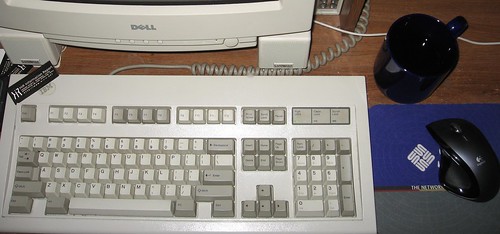
Now, if you'll excuse me, I need to go take a shower with concentrated chlorine bleach and a cheese grater to get rid of all this Microsoft residue.

2009-02-11
Patch-O-Rama: Microsoft, Blackberry and AIX, Oh My!
First up, Microsoft issued four patches yesterday:
- MS09-002: IE (Critical)
- MS09-003: Exchange (Critical)
- MS09-004: SQL Server
- MS09-005: Visio/MS Office
Also, there's a new Blackberry bug in town.
Tip of the hat to Kevin's Infosec Ramblings for some of these.
2008-12-31
Zune doesn't like leap years
GenesisWave pointed this out on the Cowtown Computer Congress mailing list.
Q: Why did this occur at precisely 12:01 a.m. on December 31, 2008?
There is a bug in the internal clock driver causing the 30GB device to improperly handle the last day of a leap year.
What a riot. Well, your Zune will work tomorrow. In the meantime, check out i-Hacked.com's Zune Fix. They had the first working walk-through I saw.

 Posts
Posts


