
See the whole series: The Geek 100
This post contains a poll within an iFrame. If you don't see it in your RSS reader, visit HiR Information Report and take the poll, located on the right side of the site.
See the whole series: The Geek 100
2008-11-01
The Geek 100: How'd you do? (Poll)

The Geek 100 Pt. 5: Science and Electronics
See the whole series: The Geek 100
This is a list of 100 basic things and skills every geek should have. I've broken this series up into five parts. Let's face it: a list of 100 things would be tedious to wade through. Over the rest of the week, look for twenty more skills to show up daily. The skills assume you have done it in the past and can remember how to do it right now (or, like a good Geek, you've jotted it down in one of your notebooks). Having it in your personal notebook is okay. Scrambling to the Internet means you don't have the skill... yet.
Science. Every geek should be able to:
- Build a dry-ice bomb
- Build a gas-turbine engine from junkyard parts
- Build a usable battery from household materials
- Build an electric motor/generator from household materials
- Build some form of a rocket motor
- Comprehend and express orders of magnitude
- Make a non-Newtonian "Oobleck" fluid
- Make an explosion using only a few plastic containers, electricity and water
- Know how to make hot-packs or cold-packs with simple chemical reactions
- Use the Scientific Method
Electronics. Every geek should be able to:
- Access debug mode on a mobile phone (preferably your own)
- Build a simple FM transmitter
- Build logic gates with discrete components
- Burn an (E)EPROM
- Calibrate and read an oscilloscope
- Program a microcontroller
- Properly use a digital multimeter to measure electric current
- Solder surface-mount components
- Use a logic probe
- Use a schematic diagram to assemble a simple circuit from parts
See the whole series: The Geek 100
2008-10-31
Oh noes! They be stealin' our garage doors! (Misc)
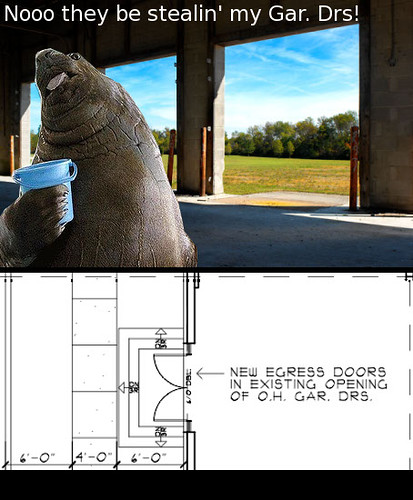 A few things:
First, Cowtown Computer Congress finally got blueprints of the building our hacker space will be located in. That's good news. The bad news? The awesome garage door we thought we'd have might be on the chopping block according to the blueprint -- as shown below the lolrus (which is actually a huge seal since it doesn't have tusks) Not cool. We're gonna try to have them leave the garage door.
Also, CCCKC will be thowing a "build it for them to throw it" party on Nov. 22, a few days before the Plaza Lighting Ceremony. This event for CCCKC members will get a bunch of geeks together to build LED Throwies. The plan is to use the throwies for the fund-raiser on the 26th. What better time of year to lob magnetized LEDs at things than the official kick-off of Kansas City's Holiday Season? Become a member of CCCKC, come out and help us build some throwies, and then kick it with all of us at the next fund raiser.
Also, CCCKC will be thowing a "build it for them to throw it" party on Nov. 22, a few days before the Plaza Lighting Ceremony. This event for CCCKC members will get a bunch of geeks together to build LED Throwies. The plan is to use the throwies for the fund-raiser on the 26th. What better time of year to lob magnetized LEDs at things than the official kick-off of Kansas City's Holiday Season? Become a member of CCCKC, come out and help us build some throwies, and then kick it with all of us at the next fund raiser.
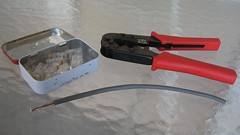
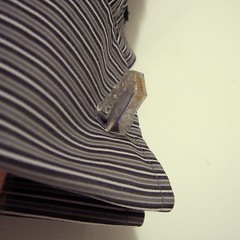
Last but not least, I posted a fun project over at i-Hacked today. Not many people knew that my RJ45 cuff links at DefCon were actually functional ethernet loopback testers. I walk you through the steps to build your own ethernet loopback tester that you can keep on your keychain or use as cuff links (if you make two). Photos below:

OpenBSD 4.4 is hitting the mirrors now!
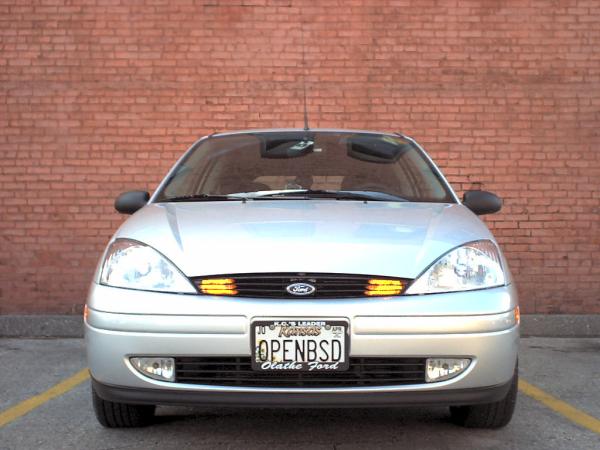 OpenBSD 4.4 is scheduled to be officially released November 1, 2008 (that would be tomorrow as of writing). It's already on some of the FTP mirror sites, though.
I am installing this TONIGHT. I may try Ubuntu Intrepid Ibex that was released this week as well, but I'm really more excited about OpenBSD. I'm a little bit of a fanboy, if you can't tell.
The Geek 100 Pt. 4: Development and Cryptography
See the whole series: The Geek 100
This is a list of 100 basic things and skills every geek should have. I've broken this series up into five parts. Let's face it: a list of 100 things would be tedious to wade through. Over the rest of the week, look for twenty more skills to show up daily. The skills assume you have done it in the past and can remember how to do it right now (or, like a good Geek, you've jotted it down in one of your notebooks). Having it in your personal notebook is okay. Scrambling to the Internet means you don't have the skill... yet.
Props to my friend Joshua Kriegshauser for help with the Software Development skills. I'm not a coder. He's the Technical Director of the EverQuest II team at SCEA. That makes him more than qualified to help me out here.
Software Development. Every geek should be able to:
- Competently program in a compiled language
- Competently program in a script-interpreted language
- Create dynamic web pages that are resistant to XSS, CSRF and Injection
- Display at least casual knowledge of assembly language
- Describe endianness and which endians are used on popular platforms
- Have a firm understanding of object oriented programming
- Integrate a captcha into a web form
- Reverse-engineer and debug software
- Use a hex editor
- Use a revision-control system
Cryptography. Every geek should be able to:
- Analyze a substitution cipher
- Encrypt and tunnel arbitrary traffic
- Explain both strengths and weaknesses of asymmetric encryption
- Explain the significance of hash functions
- Explain Enigma (Fun Link)
- Implement a quick, secure symmetric cipher algorithm
- Implement steganography
- Set up full-drive-encryption
- Set up SSH with public keys
- Use an effective manual encryption scheme
See the whole series: The Geek 100
2008-10-30
The Geek 100 Pt. 3: Attack and Defense
See the whole series: The Geek 100
This is a list of 100 basic things and skills every geek should have. I've broken this series up into five parts. Let's face it: a list of 100 things would be tedious to wade through. Over the rest of the week, look for twenty more skills to show up daily. The skills assume you have done it in the past and can remember how to do it right now (or, like a good Geek, you've jotted it down in one of your notebooks). Having it in your personal notebook is okay. Scrambling to the Internet means you don't have the skill. Yet...
Today, I focus more on physical security and infosec. Let's see how well you do!
Attack. Every geek should be able to:
- ARP-poison a network segment
- Bypass the Windows XP login screen without rebooting
- Crack WEP
- Enumerate all hosts and running services on a network
- Identify the weakest point in almost any security scheme
- Replay a TCP session
- Scan for wireless networks
- Spoof/Change your MAC address
- Use a password cracking tool
- Use lockpicking tools to open an inexpensive lock
Defense. Every geek should be able to:
- Harden an operating system
- Implement an IDS
- Install burglar alarm sensors (motion, breakage, window, door)
- Install CCTV cameras
- Know where to find information on Common Vulnerabilities and Exposures
- Lock down a wireless network
- Re-key a lock cylinder
- Set up a log analysis tool
- Set up a packet filter or firewall
- Set up a VPN (not just an SSH tunnel)
See the whole series: The Geek 100
2008-10-29
The Geek 100 Pt. 2: Sysadmin and Network Skills
See the whole series: The Geek 100
This is a list of 100 basic things and skills every geek should have. I've broken this series up into five parts. Let's face it: a list of 100 things would be tedious to wade through. Over the rest of the week, look for twenty more skills to show up daily. The skills assume you have done it in the past and can remember how to do it right now (or, like a good Geek, you've jotted it down in one of your notebooks). Having it in your personal notebook is okay. Scrambling to the Internet means you don't have the skill. Yet...
This one is for all your Information Technology geeks, although it's a bit UNIX biased.
Systems Administration. All geeks should be able to:
- Compile a kernel
- Set up a file/print server that works across most operating systems
- Set up RAID on a server
- Set up an AMP server
- Set up an Internet mail server that won't get RBL'd
- Set up an RDBMS
- Use a Logical Volume Manager
- Use find with xargs
- Use sed and awk effectively
- Use sysctl
Networking. No, not Social Networking. All geeks should be able to:
- Explain the difference between PAT, NAT and a DMZ
- Flash new firmware to routers and switches
- Make an ethernet crossover cable
- Run cable through walls without tearing them up
- Set up port security on a network switch
- Terminate a fiber optic cable by hand
- Terminate a punch-down patch panel
- Terminate category 5 cable with RJ-45 plugs
- Trace cables
- Use a network sniffer or protocol analyzer
See the whole series: The Geek 100
Subscribe to:
Posts (Atom)

 Posts


