
 Next time you have a can of your favorite caffeine-packed beverage in a boring staff meeting, try this and see what the reaction is.
The two rims found on the bottom of most 12oz soda cans makes them easy to stack, but also gives you an area to balance the can on. If the can is full, center of gravity will be on the outside of this rim and it will fall on its side. If the can is empty, there will be more weight (from the tall part of the can) outside this rim as well. However, if the can has just the right amount of liquid in it, the center of gravity will actually shift to the area between the two rims, allowing the can to balance, and even roll around in a circle if you're careful! This is because the aluminum itself is relatively light compared to the can's contents.
2008-03-07
Balancing Hack: Amaze your co-workers!

2008-03-06
Shutting off wireless auto-config in Mac OS X
As a matter of security and simply less annoyance, I prefer my computers to not connect willy-nilly to just any wireless network in range. OS X currently doesn't connect to random open networks, but it does always look for them, and by default it prompts you to connect to new ones. In OS X, all you have to do is un-check the "Ask to join new networks" on the AirPort adapter in Network preferences to stop this behavior. 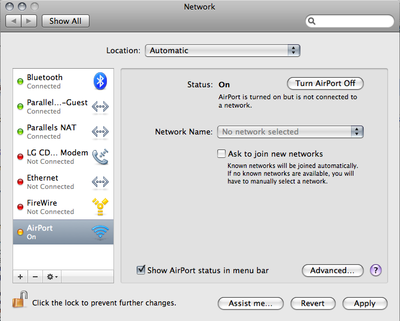
Once you do that, go into the Advanced preferences and remove all those random access points that you've connected to in the past, leaving only the ones you know and trust on the list. If your access point has a default-ish name (like WLAN, Default, linksys, etc) you should probably change it so that your computer doesn't join up to the first "linksys" network it runs across.
On Linux and BSD, it's easy. You simply have to try -- and mean it -- to get on a wireless network. You don't just accidentally connect.
Also, it's a cold day in hell. Last week, I bought my wife a new computer that came loaded with Windows Vista Home Premium. I can only use it for a few minutes at a time before I have the urge to go take a shower with a steel wool pad to try to get Vista off of me, but I can't for the life of me figure out how to kill Vista's auto-join feature while letting it connect to preferred networks only. If you have any tips, drop us a line. It definitely isn't like XP. The only thing I saw told me to kill the Wireless Autoconfig service (maybe called something a little different) and all that did was completely disable wireless access on Vista.
2008-03-04
IP Subnetting - more fun with newLISP
I decided it would be fun to try to make an IP subnet calculator with newLISP.
Thanks to Elica and Lutz on the newLISP discussion boards. I needed some help with the logic. There's probably a way to compact this code down to about 3 lines somehow, but I'm still a newLISP n00b. I stuck with the logic examples that I have a firm understanding of, but the discussion yielded some interesting results.
Here's what I came up with
#!/usr/bin/newlisp
# newLISP IP Address calculator by ax0n
# ax0n (at) h-i-r.net
(define (iptostr ip4)
# Converts an integer to an IP in dotted decimal notation
(string
  (mod (/ ip4 0x1000000) 0x100) "."
  (mod (/ ip4 0x10000) 0x100) "."
  (mod (/ ip4 0x100) 0x100) "."
  (mod ip4 0x100))
)

(define (iptonum ip4str)
# Converts an IP string to an integer
 (map set '(one two three four) (parse ip4str "."))
 (+ (* 0x1000000 (float one)) (* 0x10000 (float two))
  (* 0x100 (float three)) (float four))
)

(cond(
 (< (length (main-args)) 3)
 # Display usage if no args passed
 (println "usage: ipcalc.lsp ip-address/maskbits")
 (println "ex:    ipcalc.lsp 192.168.1.20/24")
 )
 (true
  (set 'ipstr (last(main-args)))
  (map set '(ipaddr bits) (parse ipstr "/"))
  (set 'binip (iptonum ipaddr))
  (set 'netmask (& 0xffffffff ( << 0xffffffff (- 32 (int bits)))))
  (set 'netaddr (& binip netmask))
  (set 'bcast (& 0xffffffff (| binip (~ netmask))))
  (println "host IP:    " ipaddr )
  (println "netmask:    " (iptostr netmask) )
  (println "network:    " (iptostr netaddr) )
  (println "broadcast:  " (iptostr bcast))
  (println "Host range: " (iptostr (+ netaddr 1))" - "(iptostr (- bcast 1)))
 )
)
(exit)
Running it by itself gives you a syntax help page.
-bash-3.2$ ./ipcalc.lsp
usage: ipcalc.lsp ip-address/maskbits
ex: ipcalc.lsp 192.168.1.20/24
You have to provide an IP Address and mask in CIDR Notation. It does the rest!
-bash-3.2$ ./ipcalc.lsp 192.168.0.49/24
host IP:    192.168.0.49
netmask:    255.255.255.0
network:    192.168.0.0
broadcast:  192.168.0.255
Host range: 192.168.0.1 - 192.168.0.254
You can download the script here:
http://stuff.h-i-r.net/blogstuff/ipcalc.lsp
HiR Reading Room: AIX 5L Administration
While AIX 6.1 is the new hotness, it's mostly feature additions. If you know AIX 5, you can get around AIX 6 without a problem -- you just might be missing out on cool things like enhanced RBAC and workload partitions.
The writing, grammar and editing of this book leaves a little bit to be desired, but the concepts covered in AIX 5L Administration are vitally important for any AIX sysadmin to be familiar with. This book is great for people who have a casual working knowledge of the UNIX command line (linux, solaris or BSD) who want to expand their horizons all the way up to seasoned intermediate AIX users, who will find new things and helpful tips within these pages.
I personally bought this book while I was job hunting. I had some rusty familiarity with AIX 4, but was looking at the prospect of landing a job that required working, functional knowledge of Solaris 8, Solaris 10, and AIX 5.3. It was a great refresher course for AIX, and gave me the information I needed to confidently blaze through a pre-employment AIX knowledge test. Now, more than a year later, this book sits next to my desk and is occasionally referenced when I need to do something on AIX that I'm not too familiar with.
Whether for reference, for job advancement, or for the fun of tinkering around with something new, this book comes highly recommended for anyone dealing with AIX, either daily or occasionally.
2008-03-03
IP subnetting
This really isn't that hard, but I had someone ask for help on one of the forums I participate in, and thought I'd share the answer here.
The person needed to determine the following given an IP/Mask of 146.141.219.47/18
- Subnet Mask
- Network Address
- First usable host address
- Last usable host address
/18 means there is an 18 bit subnet mask on that IP address. This is neither a Class C (24 bit subnet mask) or Class B (16 bits). Although, "Classes" are kind of obsolete these days. It's just an 18 bit subnet mask. Straightforward.
In binary, it looks like this (decimal underneath):
11111111 11111111 11000000 00000000
    255      255      192        0
To get the network address, you take the IP Address in binary, and do a boolean AND against the subnet mask. A boolean AND will only return a 1 where both numbers have a 1, and return a 0 everywhere else.
11111111 11111111 11000000 00000000 <-- subnet mask      255.255.192.0
10010010 10001101 11011011 00101111 <-- IP Address       146.141.219.47
======== ======== ======== ========
10010010 10001101 11000000 00000000 <-- Network Address  146.141.192.0
The first usable host IP address is always the first IP after the network address, in this case, 146.141.192.1.
To get the broadcast address, you simply change all of the non-masked bits from the network address (in this case, the last 14 bits) to 1.
10010010 10001101 11111111 11111111 <-- Broadcast 146.141.255.255
You need to know the broadcast address to come up with the last usable host IP address, which is always one IP below the broadcast address. The last usable IP in the network for this example is 146.141.255.254.
2008-03-02
Sysadmin Sunday: Encrypted Swap Space in FreeBSD
New research shows that cold boot attacks can compromise encryption by giving you access to the RAM's contents. This even applies to full-disk encryption that encrypts swap space and whatnot. We'll probably talk more about that in our podcast.
Physical access almost always means that a total compromise of security is somehow possible. Sensitive data could be at risk long after the data in RAM decays into oblivion. Encryption keys, large documents, and other files containing data you don't want falling into the wrong hands will almost certainly see their fair share of time in virtual memory. That means pages of RAM will be written, for better or worse, to the hard drive.
Encrypting just your swap space can be easier than switching to full-disk encryption and makes it more difficult for an attacker to obtain sensitive data as it gets shuffled in and out of RAM.
OpenBSD encrypts swap by default without any further action. To the best of my knowledge it's alone in that fact. I can't outline how to encrypt swap space in every operating system, but since FreeBSD's the flavor-du-jour, I'll show you how easy it can be.
First, disable swap:
[axon@floaty-fbsd ~]$ sudo swapoff -aWhoops! If there's too much stuff running to fit in RAM without swap, you'll need to cut back. Close your applications, stop the X Window system or whatever you have to do. Let's try that again.
swapoff: /dev/ad0s1b: Cannot allocate memory
[axon@floaty-fbsd ~]$ sudo swapoff -aNow, find the swap partition and over-write it using dd(1) to stream /dev/urandom to it. It could take a while depending on the size of the swap partition. Yes, this is a paranoia countermeasure and nothing more. Keep in mind that only freshly-used parts of swap will be encrypted once we're finished. Right now, there could be (ab)usable data out there. Not for long!
[axon@floaty-fbsd ~]$ grep swap /etc/fstabTo enable GEOM ELI on your swap partition, edit /etc/fstab and add ".eli" to the end of the swap device.
/dev/ad0s1b none swap sw 0 0
[axon@floaty-fbsd ~]$ sudo dd if=/dev/urandom of=/dev/ad0s1b
dd: /dev/ad0s1b: end of device
464657+0 records in
464656+0 records out
237903872 bytes transferred in 88.835558 secs (2678025 bytes/sec)
[axon@floaty-fbsd ~]$ sudo vi /etc/fstabYou have to reboot for this to take effect. Once it comes back online, use kldstat and swapinfo to verify that the geom_eli.ko module is loaded and that the new swap device is being used.
change this line:
/dev/ad0s1b none swap sw 0 0
to this:
/dev/ad0s1b.eli none swap sw 0 0
[axon@floaty-fbsd ~]$ kldstatVoila!
Id Refs Address Size Name
1 10 0xc0400000 7b2d2c kernel
2 1 0xc0bb3000 6974 snd_ich.ko
3 2 0xc0bba000 239a8 sound.ko
4 1 0xc0bde000 5c304 acpi.ko
5 1 0xc1f19000 e000 geom_eli.ko
6 1 0xc1f27000 19000 crypto.ko
7 1 0xc1f40000 a000 zlib.ko
8 1 0xc21ec000 2000 warp_saver.ko
[axon@floaty-fbsd ~]$ swapinfo
Device 1K-blocks Used Avail Capacity
/dev/ad0s1b.eli 232328 0 232328 0%
2008-03-01
Lying kids are smart kids
What's this got to do with anything? Lying is, in essence, social engineering.
A child who is going to lie must recognize the truth, intellectually conceive of an alternate reality, and be able to convincingly sell that new reality to someone else. Therefore, lying demands both advanced cognitive development and social skills that honesty simply doesn’t require.Continue reading: Are Kids Copying Their Parents When They Lie? -- It's worth a read, especially for those of you with kids. Via [Schneier on Security]

 Posts
Posts


