
Click for high-res: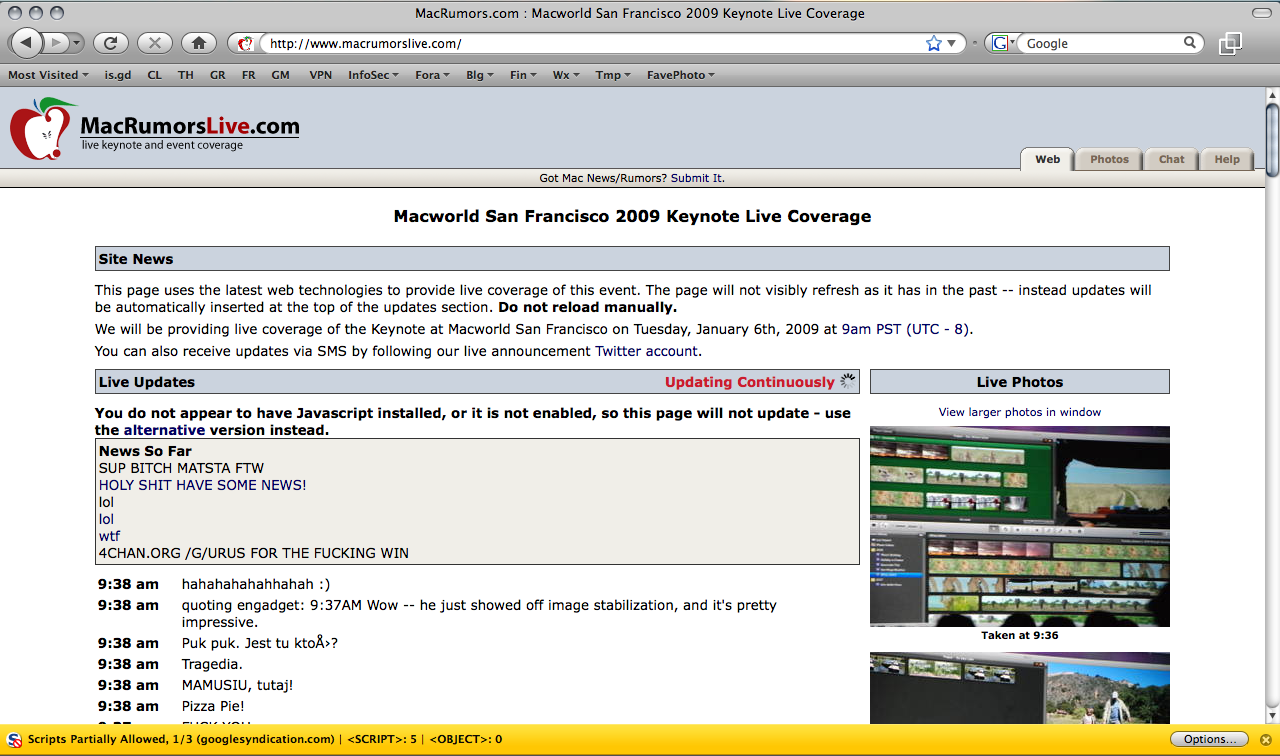
Yesterday, it was Twitter's admin tools (potentially by Digital Gangster members according to PC World) and today, MacRumors' to-the-second outlet for live events, MacRumorsLive.com bites the dust. 4Chan's /g/ board is mentioned but it's unclear if they have anything to do with the attack directly. Both MacRumors and Live are currently down (in a redirect loop) as of writing.
[Hat-Tip: Dangerboy]
Showing posts with label MAC. Show all posts
Showing posts with label MAC. Show all posts
2009-01-06
MacRumorsLive Hacked?

2008-07-04
MacBook random "deep sleep" fix
I've had very few complaints about my MacBook C2D 2.0. Leopard, on the other hand, has been nothing but trouble. I kind of figured Leopard was part of the problem behind my MacBook randomly going into deep sleep mode.
What happens is randomly, I'd open my MacBook and it wouldn't wake up. Pressing the power button, it would act almost like it was booting cold, but then a progress meter would show up and then it would resume where I left off. It started happening shortly after the upgrade from OS X 1.4 "Tiger" to OS X 10.5 "Leopard". Fortunately, it was just a little hardware glitch.
First, shut down your MacBook and invert it. Use a coin to open the battery compartment.
Notice that there are several metal tabs, but the ones on the end are embedded in plastic. These two are the ones we're looking for. Only one is visible in this picture.
Get under the metal part of the tab with a sewing needle, precision screwdriver or knife blade and bend it just enough to give it some more tension.
I did this a few weeks ago and I haven't had the problem since. be careful not to break any of the metal or plastic tabs. I'm pretty sure these parts aren't replaceable.
What was happening is that one or both of these connections were occasionally jostling loose when I'd pick up the laptop, put it in a backpack, or even move it around on a table. Now, the connections are a little more firm. Other options might include a little dielectric grease, but that may not work well, either. I tried cleaning the contact surfaces quite a while ago and it had no result. I'm glad this worked, as the problem was starting to get out of control.
2008-06-15
HiR Reading Room: Mac OS X Security Configuration
 I can't remember where I stumbled on it, I think it came across on Twitter from John Gruber of Daring Fireball. Apple recently published a guide for securing Mac OS X Leopard appropriately named Mac OS X Security Configuration [PDF]. It's definitely not aimed at casual Mac-Heads, but seasoned veterans of the command-line, administrators of Mac OS X desktop and server environments and power-users will all benefit from this guide, which takes you through security from the ground up, recommending a fresh install from scratch even on systems that come with a pristine installation from the factory on a new Mac.
The reading is somewhat dry, and it's basically a very long step-by-step guide with a brief explanation of why certain settings are being used. If you're looking for security theory, look elsewhere. If you want to know what default settings are secure and which are not, feel free to browse. It's logically organized. If you're a security-savvy Mac geek, this guide is worth the time to review.
2008-03-28
Mac OS X: Pwned in two minutes flat - CanSecWest
Coverage like this might seem somewhat odd given the fact that most of the HiR crew are Mac users. As it turns out, this is likely an issue with Safari, which I've been known to hate on very frequently. Safari and I just don't get along. Never mind the fact that FireFox is tied up with something else and I'm making this post from within Safari (much to my chagrin, given Safari's lack of compatibility and frequent crashes with Blogger).
This year, the PWN 2 OWN hacking competition at CanSecWest was over nearly as quickly as the second day started, as famed iPhone hacker Charlie Miller showed the MacBook Air on display who its father really was. Apparently Mr. Miller visited a website which contained his exploit code (presumably via a crossover cable connected to a nearby MacBook), which then "allowed him to seize control of the computer, as about 20 onlookers [read: unashamed nerds] cheered him on." Of note, contestants could only use software that came pre-loaded on the OS, so obviously it was Safari that fell victim here.
Full story on InfoWorld
2008-03-06
Shutting off wireless auto-config in Mac OS X
As a matter of security and simply less annoyance, I prefer my computers to not connect willy-nilly to just any wireless network in range. OS X currently doesn't connect to random open networks, but it does always look for them, and by default it prompts you to connect to new ones. In OS X, all you have to do is un-check the "Ask to join new networks" on the AirPort adapter in Network preferences to stop this behavior. 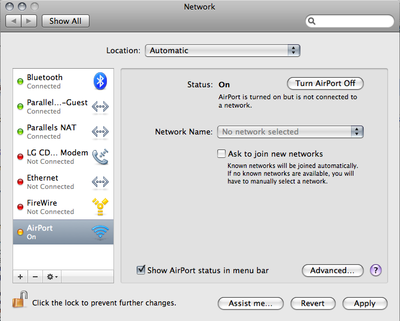
Once you do that, go into the Advanced preferences and remove all those random access points that you've connected to in the past, leaving only the ones you know and trust on the list. If your access point has a default-ish name (like WLAN, Default, linksys, etc) you should probably change it so that your computer doesn't join up to the first "linksys" network it runs across.
On Linux and BSD, it's easy. You simply have to try -- and mean it -- to get on a wireless network. You don't just accidentally connect.
Also, it's a cold day in hell. Last week, I bought my wife a new computer that came loaded with Windows Vista Home Premium. I can only use it for a few minutes at a time before I have the urge to go take a shower with a steel wool pad to try to get Vista off of me, but I can't for the life of me figure out how to kill Vista's auto-join feature while letting it connect to preferred networks only. If you have any tips, drop us a line. It definitely isn't like XP. The only thing I saw told me to kill the Wireless Autoconfig service (maybe called something a little different) and all that did was completely disable wireless access on Vista.
2007-02-07
Zero Configuration IP
*** Note from Asmodian X : This was written over a year ago but the
information is still viable from an educational standpoint. ***
HiR
Zero Configuration IP
-=-=-=-=-
Introduction
-=-=-=-=-
Welcome Back! It is good to be writing again after the 5+ year hiatus. The target audience of this article are people who are of intermediate experience with networking. Almost all certificates and IT related programs have TCP/IP as a goodly sized chunk of their curriculum, therefore I should expect that a reader would know what TCP/IP was and how it works. For more general information on TCP/IP see: http://en.wikipedia.org/wiki/TCP/IP.
Shout outs to Axon, Frogman and Methodic.
-=-=-=-=-
ToC
-=-=-=-=-
0x01 ................... Objective
0x02 ................... Definition of Zero Configuration Networking
0x03 ................... How ZCN works
0x04 ................... The who's who of implementations
0x05 ................... Works Cited
-=-=-=-=-
----Part 0x01 Objective
The objective for this discussion is to gain familiarity with a part of the TCP/IP implementations called Zero Configuration Networking. Most notably Apple's newest operating system (OS 10) contains Apple's implementation of ZCN called Bonjour (also known as "Rendezvous"). Bonjour allows apple computers or any other computer using the Zero-Conf standard to immediately be able to use a network with out the use of manual network configuration or some form of DHCP http://en.wikipedia.org/wiki/DHCP). Windows XP implements some form of Zero-Conf networking for their wireless applications. Even MacOS 9 had this automatic configuration feature. The goal for Apple was to replace their Appletalk protocol with something that is more scalable. Zero configuration networking also has a specification for service broadcasting using parts of the DNS protocol called multi-cast-DNS and unicast-DNS.
----Part 0x02 Definition of Zero Configuration networking
Zero configuration networking is the ability for an un-administrated network node to be able to auto negotiate a network configuration requiring little or no user configuration. This configuration system is optimal for Ad-Hoc wireless networks, home networks and for emergency relief stations (Williams, 2002). A zero configuration network system should include the ability to configure itself in a fashion that allows it to talk to other similar hosts using the TCP/IP protocol. The randomly chosen addresses are checked to make sure that nodes do not collide with one another on the network. Part of this networking structure is to implement a service location capability. The reasoning for using a service location protocol is that the end user does not know what address the zero configuration system has chosen and therefore cannot easily find shared resources (Guttman, 2001)(Cheshire, Kochmal, 2004). Other networking protocols which require auto configuration are Multicast IP and IPv6 (Octavian, 2002).
----Part 0x03 How ZCN works
ZCN in most cases consists of a default behavior of a network interface. (Though some OS's have a separate utility for doing it which is not a fail-over condition.) The behavior first starts with the interface being in an automatic mode, such as either DHCP being selected or zero Conf mode being enabled. The interface shall then try to configure itself via DHCP. IF that fails then it will default to zero configuration mode that chooses an IP address on the 169.254/16 subnet. The 169.254/16 subnet being a private address space reserved for ZCN. If ARP detects an address collision (using an ARP broadcast) then it will back off and choose another random place on the network until it has found a suitable unused address. Assuming all hosts on this network follow the same procedure every one is now able to talk to each other. If at any time the interface is configured to use a rout-able address it must leave the link-local addressing scheme (Cheshire, et al. 2004). There are, of course, exceptions such as Un*x's virtual networking interface but because this is a link-local addressing system the addresses used are not rout-able unless something like network address translation (NAT) is used.
The catch at this point is that each computer is now able to speak to each other, but no one at this point realizes that any one else is on the network. In order to find resources on this new improvised network requires some form of advertisement protocol. There are many was to do service location, one way to do service location is NetBIOS. Microsoft originally used NetBIOS, to facilitate the creation of local area networks. Apple computers came from a similar desire to make local area networks and they called their protocol set Appletalk. Both NetBIOS and Appletalk broadcast over a subnet to advertise services. Both Apples Appletalk protocol and NetBIOS had issues when scaling into a large network with its high overhead (Cheshire, Stuart. Krochmal, Marc., August 2004). The newest method for ZCN service location consists of each workstation transmitting a special Multicast DNS broadcast to advertise its services to all of the other connected clients. Aggressive caching of these requests and responses keeps the overall service location traffic low (Cheshire, et al. 2004).
Multicast service broadcasting relies on several key items. Each station must have a mDNS responder that listens for requests and responds with a list of applicable services. The response is via Multicast so that all stations on a given subnet may hear and record this service. Unicast DNS can also be used to do this when crossing subnets. Since this system is designed for small implementations the need for routability is not acute. Recently a draft is being worked on by Apple that defines a NAT-Portmaping protocol so that a router can be added in a ZCN environment and all users can auto-magically gain access to that Internet connected device.(Apple, "Network Address Translation ...", 2004)(Apple, "Rendezvous FAQ", 2005).
----Part 0x04 The who's who of implementations
First and foremost the Apple Computer Corporation has an advanced implementation of zero configuration networking called "Bonjour." ZCN is implemented in various forms since Mac-OS 9 in whatever extent it's full implementation may be found as a part of Mac-OS 10.1 and newer. Apple has released C source for use on any other platform including windows.
(http://developer.apple.com/macosx/rendezvous/index.html)
A sketchy implementation for Linux and the BSD's called "HOWL"
is available for almost all flavors via source.
(http://www.porchdogsoft.com/products/howl/)
The sourceforge ZCN implementation for the link-local addressing
portion is the Zero-Conf project at sourceforge. It does not have the
Multicast DNS portions in working order, instead suggesting the use of
OpenSLP. (http://www.openslp.org/) (http://zeroconf.sourceforge.net)
Avahi Multicast DNS client.
http://avahi.org/
One of the stronger Linux/BSD implementations currently implemented in
many distributions including Ubuntu and more.
----Part 0x05 Works Cited
Apple Corp. (December 2004). Rendezvous
http://developer.apple.com/macosx/rendezvous/index.html
Apple Corp. (January 2005). Rendezvous FAQ.
http://developer.apple.com/macosx/rendezvous/faq.html
Apple Corp. (July 2004). Network Address Translation Port Mapping
Protocol. http://files.dns-sd.org/draft-nat-port-mapping.txt
Cheshire, Stuart. Aboba, Bernard. Guttman, Erik. (July 2004).
Dynamic Configuration of IPv4 Link-Local Addresses.
http://files.zeroconf.org/draft-ietf-zeroconf-ipv4-linklocal.txt
Cheshire, Stuart. Krochmal, Marc. (February 2004). DNS-Based Service
Discovery
http://files.dns-sd.org/draft-cheshire-dnsext-dns-sd.txt
Cheshire, Stuart. Krochmal, Marc. (August 2004).
Requirements for a Protocol to Replace AppleTalk NBP.
http://files.dns-sd.org/draft-cheshire-dnsext-nbp.txt
Guttman, Erik. (July 2001). Zero-Conf Host Profile Applicability
Statement.
http://files.zeroconf.org/draft-ietf-zeroconf-host-prof-01.txt
Octavian, Catrina. Thaler, Dave. Aboba, Bernard. Et al. (October 2002).
Zero-Conf Multicast Address Allocation Protocol (ZMAAP).
http://files.zeroconf.org/draft-ietf-zeroconf-zmaap-02.txt
Open SLP Website. (January 2005).
http://www.openslp.org/
Porchdog software inc. (January 2005). Howl Project Website.
http://www.porchdogsoft.com/products/howl/
Williams, A. (September 2002) Zero Configuration Networking.
http://files.zeroconf.org/draft-ietf-zeroconf-reqts-12.txt
Zero-Conf sourceforge website. (January 2005).
http://zeroconf.sourceforge.net
Subscribe to:
Posts (Atom)

 Posts
Posts


