Windows Defender Antivirus has hit a new milestone: the built-in antivirus capabilities on Windows can now run within a sandbox. With this new development, Windows Defender Antivirus becomes the first complete antivirus solution to have this capability and continues to lead the industry in raising the bar for security.
Sandboxes isolate processes in such a way as to prevent them from causing systemic harm, and because of the way modern antiviruses work, many of them have proven vulnerable to targeted arbitrary code execution attacks -- that's right, proof-of-concept malware exists that can exploit the antivirus suite! This is a major step toward improving the security of the Windows platform, and as far as I can tell, Defender is the first in its class to adopt this sort of fortification.
Right now, It's not set up by default. I'd imagine that may change in the near future.
Users can also force the sandboxing implementation to be enabled by setting a machine-wide environment variable (setx /M MP_FORCE_USE_SANDBOX 1) and restarting the machine. This is currently supported on Windows 10, version 1703 or later.
I have been running across malware like this lately.
It appears to be a local infection that appends some VBScript to HTML files on
the webmaster's computer, spreading to the Internet when it's uploaded.
Alternatively, it could be an infection on a Windows IIS server.
At any rate, WriteData is a hex string that goes on and on for a good couple of screen lengths, followed by some more VBScript to open a file handle, write binary data to it, then execute the dropped binary.
Since it appears this HTML file has been infected multiple times, I use uniq to get only one copy of the WriteData line. I split it with cut based on the double quotes to get only the hexadecimal part. I decided I'd try to use xxd to decode it. xxd can create or read hex dumps. I save xxd's output to svchost.exe (which is what the VBScript would have called it).
Finally, I use file to determine what kind of file svchost.exe is, presuming it'll be a Windows executable file.
No surprises there. I uploaded it to VirusTotal, and it looks like we have a ZBot (ZeuS) on our hands.
Why bother decoding this stuff? Because encoded within this mess is
another URL. Depending on the source of the obfuscated code it may be a
link to a page full of exploit payloads or something similarly sinister.
Unwrapping the layers of malware allows researchers to find out where
the bad guys are actually hosting their stuff, and helps us identify
providers who are willing to help with or at least turn a blind eye to
cybercrime operations.
Lately, I've become more determined to handle javascript de-obfuscation outside the browser. Over the last year or so, I've been experimenting with a bunch of techniques to make sense of blocks of code that look like this:
I think it goes without saying that this looks like a monumental pain in the ass. The truth is, it's not as bad as it appears, but I didn't say it was going to be easy.
First, the basics. In JavaScript, FromCharCode() turns a decimal number between 0 and 255 into its ASCII character counterpart. You've all seen the ASCII table, right? Same thing.
I found a way to use printf in most shells to create a similar behavior, and I called this function "chr". So let's start really simple. Here's a file containing a message encoded with CharCodes, and a quick way to decode it. It simply reads each number in (by replacing , with a space and using a for loop, then prints each character one at a time.
This is the basis for the rest of what we're about to do. Let's break down that obfuscated javascript:
The yellow highlighted area is a bunch of numbers separated by the letter w. This is stored in an array labeled "f". If you look after the yellow, you can see that the code uses the letter w to split it.
The blue highlighted area is the loop that handles decoding the numbers into characters. This is obfuscated code, so by definition they've made it a bit confusing, but the end result is that they keep appending each character to the end of the "s" variable.
The bulk of the conversion of number to charcode (ascii decimal number of the character to be rendered) is here: (w[j]*1+41)
This gets us to the essence of the article: You'll need to use some brain power. The first thing I do is turn the data block into a string of comma-separated numbers so they're easier to work with, and I put these in their own file, like so. You can do this inside a text editor with search/replace, or on the CLI if you like.
Then you need to figure out the math. In our example code, what is w? what is j? You'll probably run into a bunch of bizarre variable reassignment when trying to make sense of obfuscated code like this. Looking above, you can see between the yellow and blue blocks, w=f. So w is now a copy of that array full of numbers. Inside the blue block of code, you can see that j=i. So, w[j] points to the current number in the array. But this number isn't the CharCode. There's still the "*1+41" part to deal with. Manually, we can see what's going on here. This is a very simple algorithm. The first 3 numbers are -32,-32,64.
-32*1+41 = -32+41= 9 - CharCode 9 is a tab.
64*1+41 = 64+41 = 105 - CharCode 105 is a lowercase "i"
Doing this manually would suck. The algorithm here is obvious. The CharCode is the number, plus 41. That's it. Let's decode it with my script:
So what happened here? This is the source of my relatively simple script.
#!/bin/sh
# Obfuscated JS Decoder
# Ax0n - 2013-03-22
# ax0n@h-i-r.net
#
if [ -z "$1" ]
then
  echo "$0 codefile algorithm"
  echo "c = placeholder for each number"
  echo "i = iterator"
  exit 1
fi

chr() {
  # http://mywiki.wooledge.org/BashFAQ/071
  # Turns a charcode into the ASCII byte
  printf \\$(printf '%03o' $1)
}
count=0
file=$1
shift
algo="$*"
for code in `cat $file | tr "," " " `;
do
  chr `echo "$algo" | \
    sed -e s/"i"/"$count"/g -e s/"c"/"$code"/g | \
    bc | cut -f1 -d\.` | tr -d "\r"
  count=`expr $count + 1`
done
echo
echo "----- done ----"
At the heart of the above script is a nifty function I found in the Bash FAQ. And then, I used a pair of sed expressions to replace the "i" and "c" placeholders within the loop that handles the output. We call on the "bc" command-line calculator to work all the math magic. tr -d "\r" fixes some broken newlines found in some of the samples I decoded. Let's see it in action:
Now, let's look at the one in the video. It has a much more complicated algorithm than simply adding 41 to each digit before converting it to the ASCII byte! It's hard to read in the video, so here it is:
Fortunately, this one already separates the codes with commas, so we can pretty much just copy and paste the numbers into a text file for decoding. As you can see on the 3rd-to-last line, the algorithm it uses for each character is this:
((w[j]*1+e(x+3)+11))
Let's tear into it, shall we?
w[j] starts out just like the last example. We can see they set j=i and w is a copy of the array, so for each iteration, this is the digit. We can replace this with "c" in our algorithm expression.
That leaves us to figure out what e and x are. Also like the last example, e is set to "eval" at the end of the second line. We'll ignore it. Let's look for x= in the code.
There it is! j% - and remember, j = i, so it's the iterator. % is a mathematical modulus operator. -- that is, it divides two numbers and the output is the remainder. Example: 17 divided by 4 is 4 with a remainder of 1.
$ echo "17 % 4" | bc
1
(x+3) becomes essentially, (i % +3) and +3 just means "positive 3" in this context. We don't even need the +.
((w[j]*1+e(x+3)+11)) becomes ((c * 1 + ( i % 3 ) + 11)) or simply "c + ( i % 3 ) + 11"
I am by no means an expert on this stuff. A few weeks ago, I ran across some suspicious links in spam and decided to see where they led. Some of them claimed to be from financial institutions that I have absolutely no connection to, and claimed that some transaction had failed to occur. Others were variants of shipping confirmation scams, pharmacy junk, etc. I wish I could say that I have no idea how people fall for these, but the fact is that some people will literally click on anything that shows up in their inbox, open any attachment and follow any link, no matter how blatantly fake we professionals think these scams are.
What lay at the tail end of all the script="http://some-site/whatever.js" includes and document.location redirects? A webpage that'd been owned, filled with a huge pile of nonsensical jibberish that could barely pass as javascript, which happened to be part of the Blackhole Exploit Kit.
I've done my share of picking apart obfuscated javascript before, but it had been a while. I gave a presentation of this same thing at KC2600 a few weeks ago. Then, this week, a colleague of mine who missed the meeting ran into the same thing in the wild. I passed on what I'd learned, and decided it might be time to write it up with a little more detail than I did a few weeks back. He made this quick video that covers how he was able to de-obfuscate this particular sample:
By now, I've seen several different obfuscation schemes for BlackHole, but once it's decoded, it all looks about the same.
The introductory basics are simple. Minimize the potential of infection by using a non-privileged account (and perhaps an OS other than Windows) and/or minimize the impact of a successful infection by running a virtual machine that you can blow away or revert to a snapshot of a known clean state. For the malware I'm using in this example, either (or both) of the above criteria will be ample to keep things from getting out of control. Other malware may be more insidious or may target non-Windows platforms. I have a few friends that have unwittingly infected their own workstations while trying to analyze things. Play safe.
Once you have a safe lab environment, your goal is to examine a suspicious link and dissect it.
In my case, I was able to find a few links to malware in my personal mail's spam folder. For the demo at KC2600, I used Malware Domain List to find some Blackhole samples.
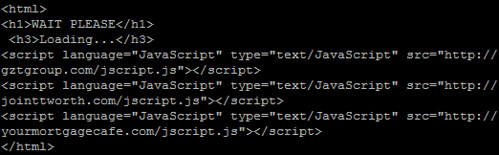
In the wild, there may be any number of redirects ahead of the malware. You may see a shortened URL (through goo.gl, tinyurl, etc) which goes to a sparse HTML page with several calls to javascripts hosted on various sites, and those javascripts may simply be a document.location pointing to the malware. I usually stick with curl or wget to pull down suspicious links, and then I keep looking at the content and following the redirects until I strike gold.
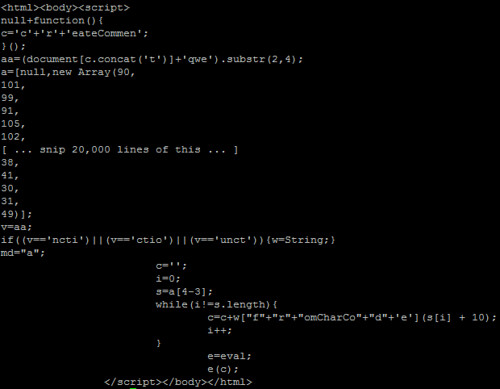
The javascript itself is ugly once you get to it. Sometimes, the byte array is only a few (really long) lines. Other times, like this sample, each byte of the obfuscated data is on a new line, like this:
You'll see a few interesting things. There's an "e=eval;" line near the bottom, and then "e(c);" after that. It doesn't take a coding genius to realize that this is a way to call eval(c) without triggering some IDS signatures that look for "eval(". Many samples I saw weren't quite this obvious. In fact, the script in the video has the eval alias in a different part of the script and varies in several other ways if you look closely.
To turn this cryptic payload into something that resembles actual javascript, there's a post on SANS ISC from several years ago covering a few methods. I went with the so-called Tom Liston Method, essentially trying to wrangle the decoded stuff that was destined for the eval function into a document.write within a textarea box instead. Note: I ran into one sample of BlackHole that has a /textarea tag near the beginning, which would keep someone from using this trick to easily view the code with this trick, but I don't think it will eval the stuff behind it since it's been changed to a document.write.
In the above example (and in the video), the content that is destined for eval is stored in variable "c", so you simply replace "e(c);" with:
document.write("<textarea cols="150" rows="100">" + c + "</textarea>");
But obviously, you need to use some brain power here to figure out what trickery they're using to call eval, and what the variable is that needs to be wrapped up in the above document.write command. You may also wish to mess with the rows and columns on the textarea. I know on my netbook, that textarea size is far too unweildy. On my desktop, it's almost perfect.
Make sure the file is renamed as a .html, then load it up in your safe lab environment's browser, just in case something goes wrong.
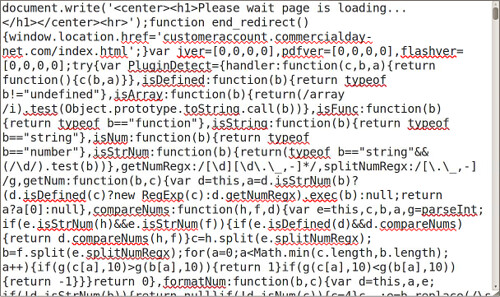
Voila. If you scroll through recent versions of BlackHole Exploit Kit, you'll see that it tries to load an embedded java applet and a PDF, both of which are designed to exploit recent vulnerabilities in JRE and Adobe Reader. Since I don't have Windows running in a VM environment (and I'm not keen on actually infecting any of my Windows boxes) I'm not entirely sure what gets loaded from there. I'm guessing the carberp trojan, given most of what I've read lately. If that's the case, a successful infection would likely block access to anti-malware sites, try to sabotage existing security software, and start gathering sensitive data such as card numbers and online banking credentials.
I'm not a huge proponent of anti-virus. It's not that I think I won't get one. It's just that I'm usually running an OS that's not a big target for viruses. I can't even list one AV tool specifically for OS X, BSD or Linux, but I'm sure something exists. I just stick with NoScript and RequestPolicy on FireFox to keep the browser malware at bay.
With Windows 7, I figured it might be time to look into AV if for no other reason rhan to get rid of the nagging system tray icon warning me that my computer might be at risk. Then, just today, Keith posted a list of free AV solutions for Windows. I went with MS Security Essentials. It stays out of the way for the most part from what I've seen, but it's not like I've tried pulling up a bunch of Russian Serialz, Crax & w4r3z sites or any crap like that -- A move I'd consider to be asking for trouble.
I know plenty of readers are Windows users, by choice or by force (employer?)
What have you had the best luck with? What other anti-malware tools are you using for yourself or for others who already hosed their systems up?
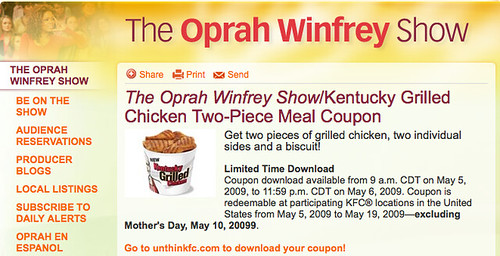
Oprah Winfrey. She mentions something, it turns to gold. Seemingly, any book, service or gadget she endorses immediately spreads like wildfire. Yesterday, it was KFC's new "Kentucky Grilled Chicken"
Oprah isn't giving away squat. Oprah's site links to unthinkfc.com (not linked), a site telling you to "unthink what you thought about KFC" (unsurprisingly owned by KFC), which links to Coupons.com. Coupons.com doesn't give you graphic representations of coupons. They install software that is supposed to keep ne'er do wells such as ourselves from printing off thousands of copies of these coupons. Obviously with the advent of cheap color copy/fax/print machines, this really doesn't stop us. But that's not the point.
Does this raise any red flags for you? It does for me!
Coupons.com installs its "coupon printer" application with classic spyware-like traits such as failing to actually uninstall itself when asked, tracking you and even printing information onto these coupons to correlate not only which coupons you print, but which ones get used and where. [Reference: Wired]
So congratulations, Oprah. Regardless your knowledge of the situation and likely without any ill will, you just pwnt almost all of your computer-owning sheeple. 9,000 Internets to you!
Update: unkinkfc.com now links to a PDF coupon download. Kudos to them!
HiR is what happens when 1990s-era e-Zine writers decide to form a blog. Most of us hail from the Great Plains region of the United States.
Ax0n, HiR founder and editor-in-chief is an information security specialist currently working in the luxury goods industry.
Asmodian X joined HiR in December 1997 and currently works as a web developer and SysAdmin in the education industry.
Frogman has been on board since May 1998 and has many technical passions. When not experimenting with obscure hardware, he can be found leaping from one rooftop to the next, making the world his office.
TMiB has also been helping since 1998. Also our resident Physicist and go-to guy for xkcd jokes we don't get, The Man in Black currently works in the Internet industry in an east-coast data center.





 Posts
Posts


