2008-11-30

Reverse Tunnel with SSH

Inspired by a thread on the Hak5 Forums...

Sometimes, you might find yourself wishing you could poke arbitrary holes through a NAT or firewall. The potential uses (both good and evil) are nearly limitless. Perhaps you want to be able to log in to the computer in your dorm room while you're a thousand miles away on vacation with family.

You will need a few things before we start:

  1. Physical access to a computer on the "inside" of the network
  2. Access and permission to install software on that computer
  3. A system on the "outside" that can accept SSH connections from the Internet
It helps if the 2 computers involved are running Linux, Mac OS X, BSD or some UNIX variant, but you could probably use PuTTy on Windows for the "inside" computer in a pinch.

I'll be using NetBSD on my SparcStation 20 on the inside of the HiR Lab, and one of my web servers with a public IP address on the outside.

SSH Tunneling
is the process of encapsulating some other protocol within an SSH session. There are many advantages to this. Essentially, if you can get out of a network with SSH, you can get to almost any TCP service on the outside world, even if it's blocked.

Reverse SSH Tunneling is a similar process. If you can get out of the network with SSH, you can use that SSH tunnel to spawn a listening process on the outside of the network, from which you can get to anything internal.

Step One: Deploy SSH keys without a password
This has to be done from the "inside" computer. You can use your personal desktop system or a server where you have an account. It must be able to SSH out to the Internet.

I don't like to use public keys without passwords, but they do come in handy, particularly for tunneling. The un-protected public key should only be placed into the authorized keys list for UN-TRUSTED accounts that aren't in the wheel group or sudoers file.

I wrote about using passwordless SSH keys before. If you're using a UNIX variant, just follow the first few steps on generating and distributing the ssh keys. If you're using Windows, install PuTTy and follow the steps that Steve Friedl put together.

Step Two: Create and test your tunnel
I wrote a little about tunneling (forward and reverse) back in February. In this case, I'm going to tunnel SSH over a reverse SSH connection -- that is, I'm going to SSH from my inside box (NetBSD) to the web server (betaweb.h-i-r.net), and tell SSH to open a reverse tunnel port (2222) on the web server that connects to the SSH port on the NetBSD box (localhost:22). The -g option allows any remote host to use the tunnel. Otherwise, it will bind only to the localhost interface.
[axon@NetBSD]$ ssh axon@betaweb.h-i-r.net -g -R 2222:localhost:22
Last login: Sun Nov 30 14:13:08 2008 from netbsd.labs.h-i-r.net
[axon@betaweb.h-i-r.net]$
Now, from anywhere in the world that can access port 2222 on betaweb.h-i-r.net, I can SSH through my home NAT to get to the internal NetBSD box:
Chimera:~ axon$ ssh -oPort=2222 axon@betaweb.h-i-r.net
Password: [my password]
Last login: Tue Oct 14 19:01:57 2008 from localhost
NetBSD 4.0.1 (GENERIC) #0: Wed Oct 8 01:06:02 PDT 2008
Welcome to NetBSD!

[axon@NetBSD]$
You don't need to reverse tunnel to localhost, and you could just as easily use this trick to reverse-tunnel your e-mail (POP/IMAP), VNC to a Windows/Mac desktop or even to an internal web proxy server.

Step 3: Automate!

If you just leave the SSH tunnel up and running, it won't likely last too long because of session timeouts. You'll need some process to start the tunnel. Here's where you can get creative. Obviously, a process involving the use of cron or at would be one way of going about it. A script running in the background (with nohup) or in a screen session could also take care of things nicely. One idea I had was to set up fetchmail to check a dummy e-mail account every 5 minutes or so. If there's new mail, it initiates the tunnel. Send mail. Wait. Tunnel. Another way would be to upload a file to a web or ftp site to trigger it. You could even make it read information from that file to create the tunnel for different protocols. I opted to create a configuration file on the web server that would be downloaded and used.

On the "inside" box, I created this script and called it tunnel.sh:
#!/bin/sh
ssh betaweb.h-i-r.net rm .tunnel
args=`cat .tunnel`
rm .tunnel
ssh $args
Then, I added this to my crontab:
*/5 * * * * scp axon@betaweb.h-i-r.net:.tunnel ~/.tunnel && ~/scripts/tunnel.sh
Every five minutes, it will try to scp a file called ".tunnel" from the "outside" box. If it was successful, it runs the tunnel.sh script.

The tunnel.sh script removes the .tunnel file from the remote box (so that it doesn't try to spawn multiple tunnels every 5 minutes) and then uses the contents of .tunnel as the arguments for ssh.

I create a file on my laptop named ".tunnel" and add the following:
axon@betaweb.h-i-r.net -g -R 2222:localhost:22 sleep 600
Then, I upload it to the location and wait about 5 minutes. Then, I ssh to port 2222 of betaweb.h-i-r.net. The "sleep 600" is executed on the remote end, which means it will only stay connected for 10 minutes (600 seconds).

Tada!
chimaera:~ axon$ scp .tunnel axon@betaweb.h-i-r.net:
axon@betaweb.h-i-r.net's password:
stdin: is not a tty
.tunnel 100% 58 0.1KB/s 00:00

[ wait 5 minutes ... cue Jeopardy theme song ]

chimaera:~ axon$ ssh -oPort=2222 axon@betaweb.h-i-r.net
Password: [my password]
Last login: Tue Oct 14 23:24:10 2008 from localhost
NetBSD 4.0.1 (GENERIC) #0: Wed Oct 8 01:06:02 PDT 2008
Welcome to NetBSD!

[axon@NetBSD]$

Considerations and Risks:
I've already stated that using public keys without a password is risky business.

The other shady business is directly executing anything using arguments pulled from some file on a remote server. All it would take is "; [insert evil command here]" added to the .tunnel file and havoc can potentially be wreaked on that internal box.

If you can get away with it, BY ALL MEANS use separate accounts that are not used for anything other than this tunneling process. Lock them down as best you can and be mindful of local privilege escalation attacks.

See? This is why admins put firewalls up in the first place. And don't go pointing your finger at me if you get in trouble for unauthorized tunneling.

2008-11-28

We've got cards, yo! (and 2600 This Friday)


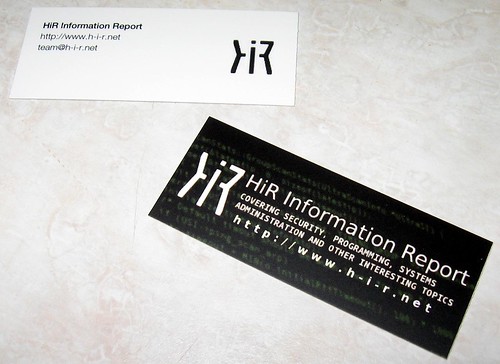
It's hard to tell, but there's green source code in the background of the front of the card. These are MiniCards by Moo.com. They've got a nice finish. I'll be handing them out to the HiR crew soon. We were all sick of being at conventions and events without being able to hand anyone some contact info. The e-mail address on the back will spam the whole team (so please don't abuse it?) Note: AsmodianX@, Frogman@, tmib@ and ax0n@ will get to individual writers at h-i-r.net.

Also, the KC 2600 meeting is coming up in one week. Same time and place. Oak Park Mall food court at 5:00PM.

2008-11-25

Capacitor Plague

"Capacitor Plague" is the colloquial term for a vast range of electrolytic capacitor failures, most often used when several capacitors on a circuit board are bulging or have burst. The following photo shows the cooked acidic residue that sprayed out from several capacitors hiding under the mechanical part of one of my DVD players.


In my case, the residue had been cooked onto the backplane and corroded several surface mount components. This cheap DVD player is a write-off. I could probably fix it, but it would be more trouble than it's worth.

Capacitor plague is common on older motherboards and video cards, as well as in other chintzy consumer electronics. When it happens, there's usually a hiss or a pop from the device. If you catch it (and clean up the electrolyte using flux cleaner or high-grade isopropyl alcohol if any leaked) before it ruins something else, you can usually buy and solder in replacement capacitors of equal value. Remember, though, that many capacitors are polarity sensitive.

Electronics repair tips:

  • If polarity is marked on a component (by a colored band down the side of a capacitor or a band around the positive end of a diode), mark the positive terminal on the board before removing the component. I usually just put a black dot near the positive terminal on the solder side of the board using a permanent marker.
  • Avoid confusion of parts by replacing only one failed component at a time.
  • Use a grounded work mat and a wrist strap to avoid a static discharge that could damage the part you're working on.

2008-11-21

Security Bloggers Network is back online

SBN is now powered by lijit networks. Here's the RSS Feed for SBN as well.

As of right now, Security Bloggers Network is the combined buzz of about 180 different blogs, all of which have at least partial focus on information security. Drop it into your RSS aggregator and start getting fed.

Update: Security4All has pointed out that the SBN site and feed aren't working right now. They were a bit ago. Keep your eyes on the links. It'll probably be back this weekend.

Okay, looks like it's online at www.securitybloggers.net now.

2008-11-20

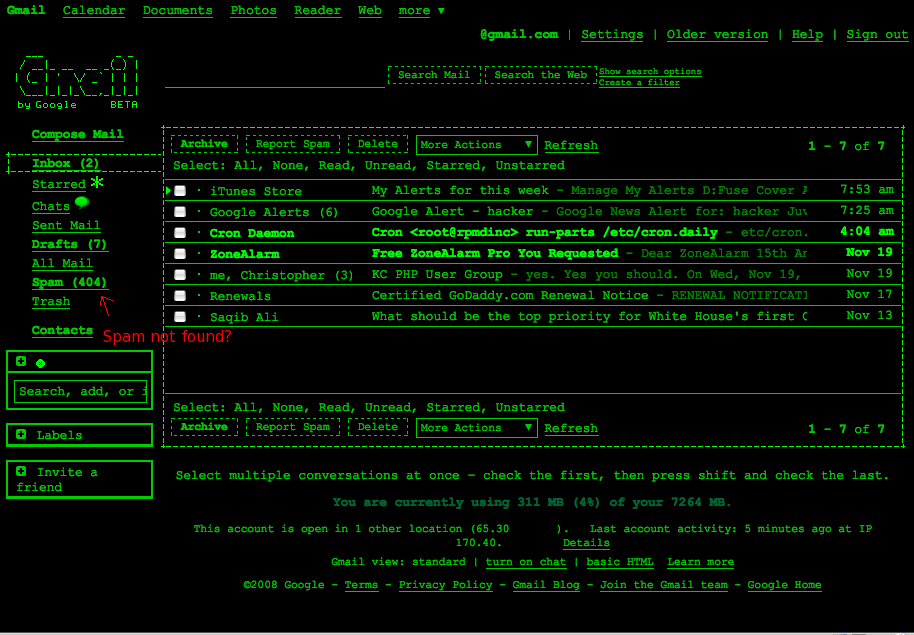
GMail In Terminal Mode - Really (with Links-SSL)

Sorry to make a second post about this, but I got all nostalgic about the Terminal theme for GMail, and it reminded me that you can actually access GMail with a text-only browser.

It's been a while since I've done it this way, but Gmail actually plays along quite nicely with the Links (not lynx) browser, as long as you have it compiled with SSL support. If you use Links in X11, you can even use the mouse to click on things.

GMail Themes? Terminal Mode!

GMail recently enabled a Theme feature. I couldn't resist using the new "Terminal" theme. I'm such a nerd.

2008-11-19

Open-Source HDR photography with CHDK and qtpfsgui

Often, one photograph might have regions that are overexposed and others that are too dark. Details are lost in these regions. Explained simply, HDR is about taking over-exposed photos to get the detail from the dark areas and under-exposed photos to capture textures in the brighter areas, then tone-mapping them together into one high-contrast composite image. Here's what you need to make tone-mapped HDR images:

  • Tone-mapping software
  • A set of photographs. Not just any photographs:
  1. All taken from exactly the same perspective.
  2. Varied exposure. It's recommended you have at least 3: one underexposed, one "normal" exposed, and one overexposed.
  3. The more photos, the better (to an extent)
  4. Take the highest quality photos possible. That means cranking up the resolution, using the lowest ISO you can get away with, and shooting in RAW if your camera can handle it.
The tricky part, as you guessed, is getting those photos. Professional photographers with high-end rigs have autobracketing, burst mode and a host of other features that make it easier to obtain the kinds of photographs needed to make a tone-mapped HDR image. Where's that leave people (like me) with cheap point-and-shoot cameras?

I've written a little about The Canon Hacker's Development Kit, and even demonstrated CHDK at a 2600 meeting a while back ago.

CHDK is a firmware patch for Canon digital cameras. On inexpensive point-and-shoot Canons such as the PowerShot A530 my wife bought me for Christmas a while back ago, the firmware gets revamped, unleashing the ability to shoot in lossless RAW format, view live-updating histograms on-screen, run scripts, and even play games. You can obviously read more about it on the CHDK wiki, but Lifehacker had a decent write-up that you should check out.

Using CHDK to get a set of bracketed photos
While CHDK has a decent bracketing script on the wiki, you don't even need that. The default "Allbest" firmware has bracketing built-in. Read the CHDK installation instructions first. In fact, I recommend that if you haven't played with CHDK before, you bookmark this page, get CHDK installed, and play with it for a while first. Just to get used to it.

If you're local to Kansas City, I'd be more than happy to help you get up to speed. The script functionality is worth looking at. I'll cover it in a later article.

Pardon my "Screen shots" - I had to take them with a camera phone, so I hooked my Canon A530 up to the TV screen so that I could take photos of the menu without trying to focus on the tiny screen of my camera through the tiny screen on my phone.

Once CHDK is installed and started, fire up the Alt menu. Select:
Extra Photo Operations
--Bracketing in continuous mode
----TV bracketing value


Set that to at least 1/3 Ev as shown above (click for higher res). The bigger this number is, the fewer photos you'll need for a good range, but keep in mind that the more photos you get, the better. 2/3 or 1 Ev is a good compromise if you choose 5-7 photos. With 1 1/3 Ev or higher, you could try 3 or 5 photos.

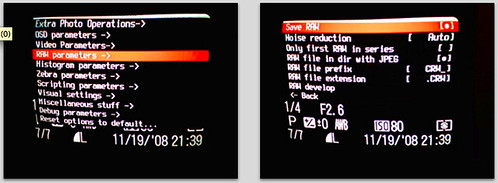
To enable RAW (if supported)
RAW parameters
--Save RAW


Select that, but keep in mind that it will take a few extra seconds per photo to save the image, and the RAW image will take up a lot of space on the memory card. For this demo, I won't be using RAW mode. If you choose to use RAW, they can be processed with UFRaw, a freeware tool that turns RAW photos into high-quality JPEG images.

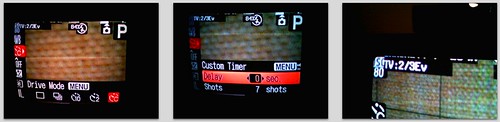
Bail out of the Alt menu and if it's not already in photo mode (instead of play/view mode), switch it over. In the Function menu, switch to Custom Timer drive mode. Hit the Menu button, and select the delay you want (a few seconds is a good idea, to avoid the jiggle as you hit the shutter) and the number of photos. I had 0 seconds delay in this photo, but you should probably go for 2 seconds or so. The camera should be on a tripod or stable surface.


Notice that in the last frame, CHDK has noted that bracketing is enabled for 2/3 Ev.

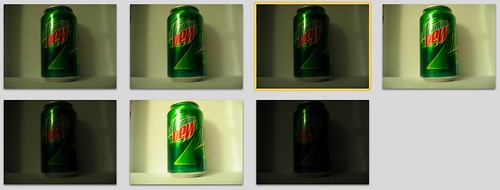
I then shot 7 bracketed photos of a Mt. Dew can. I used iPhoto to import these, but if you're an open-source zealot, I've had good luck using gtkam on FreeBSD and Linux with my Canon camera.


The hard part is done.

Tone-Mapping with qtpfsgui
A lot of the software for HDR is expensive, too. Photomatix is one of the more popular tools, and it's $99. qtpfsgui is an open-source tool based on QT. It runs on Linux, Windows and Mac OS X with little fanfare. While not as intuitive or easy to use as Photomatix, you still get more than you pay for with qtpfsgui. It's free, after all.

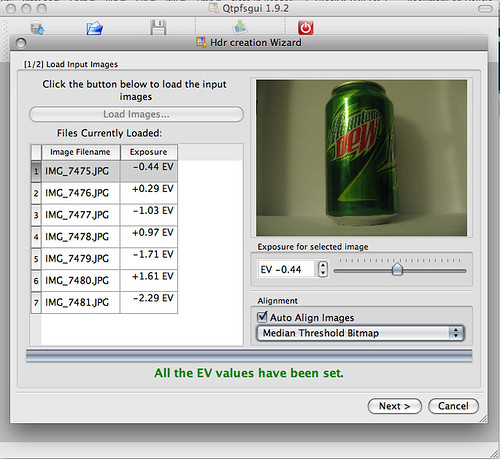
Load the images in, and select the option to automatically align them.


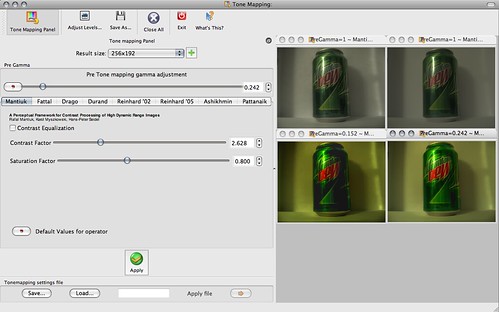
Click through the wizard and you'll have an HDR composite. Feel free to tinker with the values in the wizard to get the effects you want, but it's not needed if you just want to get started. In the resulting window, click "Tonemap the Hdr", then have fun exporting the images and playing with the values in the new window. Clicking "Apply" here will give you a composite with your settings. By default, it's a thumbnail size that renders quickly. You can see 4 different ones I did below with different settings.


Once you've got a thumbnail that you really like, bump the Result size up to something usable and apply it again. Then use File - Save As to export the shiny, HDR image. Wow and amaze your friends.

Notice how the brightest and darkest areas retain a lot of detail. Click here for full size.


Here's a more extreme example of HDR that I took this morning: