
First, this was Friday's XKCD comic: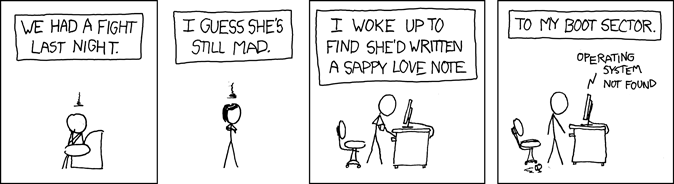
Then today, I ran across someone who decided to actually pull it off, with a nifty how-to. Obviously, tweaking the MBR can render your system unbootable, so it's not recommended to do it unless you really know what you're doing, or if you're going to format and re-install anyways.
I laughed, which is always a good way to get an early start to the work week.
2007-11-11
The MBR Love Letter

Sysadmin Sunday: Logical Volume Management on Linux
I'm starting a series of articles that are handy for system administrators -- mostly Linux, BSD, AIX, and Solaris. I'll be releasing the series over the next few weeks, and I've aptly named the series "Sysadmin Sunday." The first topic is on setting up and using the built-in logical volume manager in Linux. This is going to be a long article, so I apologize in advance. Let's dive in!
Introduction
LVM2 is the new Logical Volume Manager for the Linux 2.6 kernel. Logical volume management has been a key part of enterprise UNIX installations (such as AIX) for quite a while, but is a relatively new feature to Linux. LVM1 had some severe limitations. Many of them have been overcome with LVM2, but a few key features found in other operating systems are still missing. That said, Linux is really coming into its own these days, and this is a major step in the right direction. Once you've mastered the concepts of logical volume management, you will be able to understand it on other platforms as well, and learn it quickly.
Benefits of LVM
Logical volume management gives you a lot more flexibility in how you utilize storage on a system. For instance, If you're unsure how much space to allocate for various partitions on a new server, LVM provides a way to simply change the sizes of partitions, even if it means that a single logical partition is spread out across multiple hard disks. This is useful for casual LAMP server systems as well as large enterprise hosting installations.
There are two basic ways to set up a new system with LVM. The first philosophy is to simply partition the system the way that you would without an LVM. If the storage needs change later, a partition with excessive free space can be shrunken so that space can be added to the partition that needs it. The other philosophy is to partition the space to meet the immediate needs of the system. Only allocate what you know you will need, and leave room to grow. It's no problem if you need more room for software, databases, file server storage, or website content.
Hardware/Software Configuration
My staging environment for this project is an old Dell Optiplex GX150 Desktop which I've named "silence." It's got a 20GB EIDE drive and a plain old CD-ROM drive. I added a pair of 80GB EIDE drives to demonstrate how LVM handles physical volumes.
I'm using Ubuntu 7.10 Gutsy Gibbon Server Edition. During installation, I chose to manually partition the 20GB drive. You could simply choose the "Use full disk and configure LVM (guided)" installation option.
The reason I did a manual partition was to make an LVM setup that has room to grow. This is clearly the second philosophy. Partitioning is set up as follows, if you're interested:
- 128MB was allocated as /boot (ext3)
- 256MB was allocated as swap
- The remaining 19GB or so was set up as one big LVM Physical volume
- Within the LVM, I allocated 4GB as the root partition.
- Within the LVM, I allocated 7GB as the home partition.
LVM structure
Each system can have one or more volume groups. The volume groups hold physical volumes and logical volumes. Physical volumes are simply disk space which has been allocated for LVM use. Logical volumes are actual formatted space that the system can use. One could say that physical volumes provide space to the volume group, and logical volumes are partitions of the whole volume group.
LVM Command-line tools
There are four sets of commands for using the LVM system. First, there are general LVM (lvm*) commands. Next, there are commands for manipulating the volume groups (vg*). Another set for managing the physical volumes (pv*). Then, a final set for logical volumes (lv*, minus the lvm commands, of course).
The lvm command is an interactive command environment which can be used instead of calling all of the other programs from within your shell. I usually launch lvm from sudo, then I don't need to use sudo prior to each LVM command, nor do I need to login as root. Also, typing "help" within lvm lists all of the LVM commands and a short description, which can come in handy if you're just getting started. Preceding each command with help gives you access to a quick help description for each command.
Let's see what the LVM configuration looks like:
axon@silence:~$ sudo lvm

lvm> vgs
VG         #PV #LV #SN Attr   VSize  VFree
silence_vg   1   2   0 wz--n- 18.29G 7.23G

lvm> pvs
PV         VG         Fmt  Attr PSize  PFree
/dev/sda3  silence_vg lvm2 a-   18.29G 7.23G

lvm> lvs
LV           VG         Attr   LSize Origin Snap%  Move Log Copy%
silence-home silence_vg -wi-ao 7.05G
silence-root silence_vg -wi-ao 4.00G
As you can see, I have about 7GB free on my 18GB volume group The other drives in my system haven't been partitioned for use as LVM physical volumes yet, so they don't show up with the "pvs" commands.
Preparing new drives for LVM
After installing new hard drives, you should first partition them with type 8E (Linux LVM)
I'm going to use cfdisk to create lvm partitions on the two drives (/dev/sdb and /dev/sdc). There's an animation below to help you with partitioning if you need it.
axon@silence:~$ sudo cfdisk /dev/sdb
axon@silence:~$ sudo cfdisk /dev/sdc

Once the drives have been partitioned as LVM, you can initialize them with pvcreate.
axon@silence:~$ sudo lvm
lvm> pvcreate /dev/sdb1
 Physical volume "/dev/sdb1" successfully created

lvm> pvcreate /dev/sdc1
 Physical volume "/dev/sdc1" successfully created

lvm> pvs
 PV         VG         Fmt  Attr PSize  PFree
 /dev/sda3  silence_vg lvm2 a-   18.29G  7.23G
 /dev/sdb1             lvm2 --   74.53G 74.53G
 /dev/sdc1             lvm2 --   74.50G 74.50G
Now there are now three physical volumes present. The 80GB drives show up as only having 74GB free because a certain percentage of blocks are set aside to use in the place of any bad sectors that might be found. I haven't added the new drives to a volume group yet.
Creating a new volume group and logical volume
I'm going to create a new volume group for my web root files, and add sdb1 to it. This way, I can easily export the web data, take snapshots for backups, and all the other great things that LVM affords a sysadmin. Once I add the webroot_vg, I'll create a 20GB logical volume and format it with ext3. This should leave about 60GB free on the new volume group.
lvm> vgcreate webroot_vg /dev/sdb1
 Volume group "webroot_vg" successfully created

lvm> lvcreate --size 20GB -n webroot webroot_vg
 Logical volume "webroot" created

axon@silence:~$ sudo mkfs.ext3 /dev/webroot_vg/webroot
mke2fs 1.40.2 (12-Jul-2007)
... output truncated ...
Once that's complete, I have to create a place to mount it, and tell the system to mount it on boot up.
axon@silence:~$ sudo mkdir /webroot
axon@silence:~$ sudo vi /etc/fstab
I added the following line to fstab with vi:
/dev/webroot_vg/webroot /webroot ext3 defaults,errors=remount-ro 0 1
I mounted it.
axon@silence:~$ sudo mount /webroot
axon@silence:~$ df -h

Filesystem            Size  Used Avail Use% Mounted on
/dev/mapper/silence_vg-silence--root
                     4.0G  504M  3.3G  14% /
varrun                 61M   40K   61M   1% /var/run
varlock                61M     0   61M   0% /var/lock
udev                   61M   80K   61M   1% /dev
devshm                 61M     0   61M   0% /dev/shm
/dev/sda1             122M   24M   93M  21% /boot
/dev/mapper/silence_vg-silence--home
                     7.0G  138M  6.6G   3% /home
/dev/mapper/webroot_vg-webroot
                      20G  173M   19G   1% /webroot
Resizing logical volumes
So, what happens when the space starts to get a little cramped? Add more space and resize it!
Unfortunately, this isn't something that can be done while the filesystem is mounted. You'd have to stop the web server, umount the directory, and do the resizing stuff. Here we go.
axon@silence:~$ df -h /webroot/
Filesystem            Size  Used Avail Use% Mounted on
/dev/mapper/webroot_vg-webroot
                       20G   19G  390M  98% /webroot
Ooops! 98% full! I'll umount it and use lvresize to add another 10GB from the webroot_vg to it.
axon@silence:~$ sudo umount /webroot/

axon@silence:~$ sudo lvresize -L +10G /dev/webroot_vg/webroot
  Extending logical volume webroot to 30.00 GB
  Logical volume webroot successfully resized
After that, we need to tell the filesystem about it with resize2fs. It's a good idea to run fsck first, though, to make sure that the filesystem is in a good, clean state before we go messing with stuff.
axon@silence:~$ sudo fsck -f /dev/webroot_vg/webroot
fsck 1.40.2 (12-Jul-2007)
e2fsck 1.40.2 (12-Jul-2007)
Pass 1: Checking inodes, blocks, and sizes
Pass 2: Checking directory structure
Pass 3: Checking directory connectivity
Pass 4: Checking reference counts
Pass 5: Checking group summary information
/dev/webroot_vg/webroot: 14/2621440 files (7.1% non-contiguous), 4880972/5242880 blocks

axon@silence:~$ sudo resize2fs /dev/webroot_vg/webroot
resize2fs 1.40.2 (12-Jul-2007)
Resizing the filesystem on /dev/webroot_vg/webroot to 7864320 (4k) blocks.
The filesystem on /dev/webroot_vg/webroot is now 7864320 blocks long.
Voila! 30 Gigs.
axon@silence:~$ sudo mount /webroot/
axon@silence:~$ df -h /webroot/
Filesystem            Size  Used Avail Use% Mounted on
/dev/mapper/webroot_vg-webroot
                       30G   19G  9.8G  66% /webroot
Similarly, if you had a reason to need to borrow space from an existing logical volume, lvresize and resize2fs would work for shrinking a filesystem, too.
Spanning multiple physical volumes with one logical volume
Let's try something different. There's about 7GB of free space on the main volume group, and there's still one 74GB physical volume in this system that we haven't done anything with yet. I'm going to go ahead and add it to silence_vg with vgextend.
axon@silence:~$ sudo vgextend silence_vg /dev/sdc1
  Volume group "silence_vg" successfully extended
Taking a look at silence_vg, we can see that there is now 81GB of free space in the volume group.
axon@silence:~$ sudo vgs silence_vg
  VG         #PV #LV #SN Attr   VSize  VFree
  silence_vg   2   2   0 wz--n- 92.79G 81.73G
I'll create another logical volume and take up the entire remaining amount of free space in silence_vg. Then, I'll put a filesystem on it, of course.
axon@silence:~$ sudo lvcreate -l100%FREE -n test-lv /dev/silence_vg
  Logical volume "test-lv" created

axon@silence:~$ sudo lvs
  LV           VG         Attr   LSize  Origin Snap%  Move Log Copy%
  silence-home silence_vg -wi-ao  7.05G
  silence-root silence_vg -wi-ao  4.00G
  test-lv      silence_vg -wi-a- 81.73G
  webroot      webroot_vg -wi-ao 30.00G

axon@silence:~$ sudo mkfs.ext3 /dev/silence_vg/test-lv
mke2fs 1.40.2 (12-Jul-2007)
... output truncated ...
A quick look shows that I've created a filesystem that is actually larger than any of the drives in the system!
axon@silence:~$ sudo mount /dev/silence_vg/test-lv /backup

axon@silence:~$ df -h /backup
Filesystem            Size  Used Avail Use% Mounted on
/dev/mapper/silence_vg-test--lv
                       81G  184M   77G   1% /backup
Snapshots and backups
Snapshots are temporary time-frozen views of a logical volume. They appear as a copy of the logical volume, but don't change. Instead, you allocate space for any changes that will happen on the live volume, so that there's space to hold copies of the changed blocks as they were at the time of the snapshot. This is great for taking hot backups of data that is subject to frequent changes, without a service interruption. Passing the -s flag to lvcreate tells the LVM system that you're creating a snapshot. In this case, after the -n [name] option, you tell it which LV to create a copy of. Simple as that.
While a snapshot is active, the system needs to make two writes for every block it changes. This creates a slight performance impact. Also, if the space you allocate for tracking changes gets filled up, there's a good chance that your snapshot will fail, automatically un-mount itself, or have unreliable data within it. For this reason, I created a backup script that automatically creates and mounts the snapshot, gets a backup, then gets rid of the snapshot. I've pasted it below, although it's just a mock-up and I'd probably use something a little more resilient than a simple tar command in real life.
#!/bin/sh
lvcreate -L1G -s -n webroot-backup /dev/webroot_vg/webroot
mount /dev/webroot_vg/webroot-backup /snaps/webroot/
cd /snaps/
tar czf /backup/`date +%Y%m%d`-webroot-backup.tar.gz webroot
umount /snaps/webroot
lvremove -f /dev/webroot_vg/webroot-backup
Closing
Hopefully, this gives you enough to start with when it comes to configuring and managing LVMs on Linux.
2007-11-08
AIX 6 goes General Availability
AIX 6.1 was released earlier this week. During the initial beta phase, they were considering calling it AIX 5.4. There was no AIX 5.4, nor was there a 6.0. They're debuting AIX 6 as version 6.1.
AIX is IBM's enterprise UNIX offering for their pSeries servers, which replaced the old RS/6000 line years ago. New features include:
- Improved RBAC (Role Based Access Control) functionality
- Workload Partition (WPAR) virtualization - multiple virtual environments within one AIX instance, versus Logical Partition (LPAR) virtualization, which is multiple AIX instances on one system.
- Support for Encrypted Journaling file systems (JFS2/EFS)
- Trusted Computing Base - An optional secure-by-default installation
- AIX Security Expert - a template-based console for setting up security options
- Concurrent kernel updates - no reboot needed for certain types of kernel upgrades
- First-failure data capture functionality to aid in troubleshooting or reproducing obscure faults
- System routines that can gracefully recover from certain kernel crashes
I've had some time to use AIX 6 while it was in beta, and I must say that I'm impressed by the enhancements that I've been able to use so far. Built-in virtualization is slick and seems to be working well in the general available release of AIX 6.1 now that it's out of beta. You won't likely be playing with AIX on your next workstation, but you'll start to see it rolling out to an enterprise environment near you.
2007-11-07
ArsTechnica reviews Ubuntu Gutsy Gibbon
Finally, there's a really good technical overview of Gutsy, thanks to Ryan at Ars. Read on to get the skinny on the next iteration of the so-called perfect desktop Linux distribution.
2007-11-05
Leopard is cheesing me off.
Just a quick update.
The in-place upgrade I did to MacOS X 10.5 Leopard simply wasn't working as well as I had planned. Never before have I encountered problems upgrading major versions of OS X.
The first thing I noticed is that operating system stability was hindered. The OS would go flaky for a few seconds at a time or just hang indefinitely with the "spinning beach ball o' DOOM!" Then, I started encountering problems with applications that would crash. GIMP wouldn't even start up. I installed a fresh version, which would start but would crash as soon as I even tried to modify images. Firefox would go non-responsive or just simply crash and exit disgracefully. A fresh install of Firefox including deleting its profile information didn't help. My Last.fm agent hasn't worked properly at all since the upgrade. This is just a smattering of the problems I've had in the last week.
With that, I went ahead and did a fresh install last night, completely formatting and erasing the drive. I wanted a mulligan. I finally bought a new external enclosure for my backup hard drive (my wife borrowed my old enclosure) and went to work backing up only what I really, really needed. I didn't use Time Machine or anything. I just salvaged my virtual machines from Parallels, my photos, my music, and my documents. I wrote down a list of the apps I use most often, and went to work.
After the fresh install, my MacBook feels much more lucid and rich. Now, I'm disappointed because I didn't realize that iLife doesn't come with Leopard. It came pre-installed on my MacBook when I got it back in December, so I'm hoping beyond hope that the iLife packages are on the disc that came with my MacBook and that they weren't just installed at the factory as a one-time thing. I rely heavily on iPhoto and GarageBand, as amateur photography and music composition are two hobbies of mine.
FireFox seems to be stable for a change, but GIMP still doesn't run properly. I haven't gotten the rest of my applications installed yet, so only time will tell what works and what fails miserably.
For the time being, I am a little miffed. I don't quite regret installing Leopard yet, but it definitely wasn't the smooth transition that I'm used to.
2007-11-03
Technical OS review round-up
I ran across some awesome, highly technical reviews on some of the recently released operating systems. Both go in-depth with the new features, and are definitely a step up on the geek scale from the reviews written for mere mortals.
OnLAMP did a thorough interview of some developers to get information on the new features, performance enhancements and bug fixes that went into OpenBSD 4.2.
ArsTechnica is a great source of hardware and software reviews. Their coverage of the new stuff in Leopard is second to none.
Both are excellent reading material for those of us who are really interested in the more technical aspects of operating systems.
2007-11-02
Operating systems out the wazoo!
In a matter of two weeks, we've seen a plethora of new OS releases:
- Ubuntu Linux 7.10 (Gutsy Gibbon) (Oct 18th, 2007)
- MacOS X 10.5 (Leopard) (Oct 26th, 2007)
- OpenBSD 4.2 (Nov 1, 2007)
I'm currently working with a fresh, clean install of Gutsy Server, building an end-all, be-all shared host for a client of mine who wishes to give dozens of end-users their own web space and e-mail domains. I haven't messed with Gutsy on the desktop yet. In due time.
I did an in-place upgrade to Leopard on my MacBook, and it's everything I expected and then some. There are a few minor annoyances, but I'll chalk them up to Apple making an attempt to match and/or exceed Vista's user-interface flair. Unfortunately, I feel that the UI changes in Leopard traded friendliness and clarity for sex appeal. It looks slick, but the graphical changes are skin deep. Functionally, Leopard is still lean and mean. I don't feel like it took a performance hit, and there are boat-loads of new feaures - some of them long overdue (like Spaces, and QuickLook which I'm already a fan of). Things I'm looking forward to testing out: ZFS Support (which requires a developer download to fully implement on Desktop Leopard), Time Machine, and the new "Firewall."
I also did an in-place upgrade to OpenBSD on the virtual machine that I use most often. At first glance, it's the same deal as usual. More hardware support, more robust drivers for certain devices, and some new functionality. I haven't gotten to test it yet, but I'm eager to see the new features in pkg_add, which has never, ever worked the way I would like -- so much so that I actually wrote (and released) a set of scripts to make installing software a breeze in OpenBSD. Finally, I'm interested in seeing how sensorsd works in its new zero-configuration mode on my 1U servers, which have always given OpenBSD's sensorsd some trouble.
I'm sure that HiR will revisit some of these in more detail after really giving them a good shake down.
If you're in or around Kansas City, come join us at the 2600 meeting tonight, Friday October 2nd, 2007 in the Food Court at Oak Park Mall - half a mile east of I-35 on 95th street. The "Official" start time is 5:00PM, but people generally show up as their schedule allows. Look for laptops. That will be us.
Subscribe to:
Posts (Atom)

 Posts
Posts


