In the third part of this series, I'll cover using DNS2TCP on unix-like operating systems. DNS2TCP is not written in perl. It's a set of small C programs. It can tunnel multiple types of traffic, as opposed to OzymanDNS which is designed to be used as a Proxy Command for SSH.
Compiling is straight-forward once you download it. This worked on all platforms I tried it on, which includes Ubuntu Linux, OpenBSD, and Mac OS X.
$ tar xvfz dns2tcp-0.4.3.tar.gz
$ cd dns2tcp-0.4.3
$ ./configure
$ make
$ sudo make install
Assuming that you have a valid subdomain nameserver (as outlined in part 1), you just need to edit the configuration file for the "dns2tcpd" server. There's an example file "server/dns2tcpdrc" in the archive that I've modified. Of particular note, make sure to change the "listen" line to 0.0.0.0 or your ethernet interface's IP address. The default configuration will not work because it listens only on localhost. Also, make sure that the "domain" line matches your subdomain. Finally, you must make sure that the chroot directory exists. This is where dns2tcp caches its data. The "ressource" lines are intentionally mis-spelled. The author of this tool lacks proper English grammar skills. That's okay, just keep it in mind. "ressource" lines have the format:
ressources = [resname]:[ip]:[port], ...
My config looks like this, for Squid and SSH:
# config file
listen = 0.0.0.0
port = 53
user=nobody
chroot = /var/empty/dns2tcp/
domain = l33t.h-i-r.net
ressources = ssh:127.0.0.1:22 , proxy:127.0.0.1:3128
Then, run it as follows:
$ sudo dns2tcpd -f /path/to/dns2tcpdrc
or, if you wish to also run it in the foreground for use in a screen session, add the -F flag:
$ sudo dns2tcpd -F -f /path/to/dns2tcpdrc
That's it for the server side.
Now, on the client end, compile and install dns2tcp as well. Configure the "dns2tcprc" file. Unfortunately, it can only be configured with one "ressource" at a time. I am going to use SSH with dynamic proxy again.
#
# configuration :
#
domain = l33t.h-i-r.net
ressource = ssh
local_port = 2222
debug_level=1
I've found that this tunnel software can take a while to fully work. Sometimes up to five minutes. Once it catches on for the first time, though, it seems much more stable and quick than OzymanDNS on the same platforms. Launch it like this:
$ dns2tcpc -f /path/to/dns2tcprc [DNS Server]
Where DNS Server is a DNS server you can access, and probably should be the one you were issued by DHCP.
Activate the SSH tunnel from the CLI:
$ ssh -C -p 2222 -D8080 user@localhost
In the screen shot below, you can see both the SSH session and the dns2tcp client window open.
Again, configure Firefox to use the dynamic port you specified above as the proxy on localhost.
After this, you should be in action!
DNS Tunneling Series:
Part 1: Intro and Nameserver setup
Part 2: Windows Clients (using ozymandns)
Part 3: Linux, BSD and Mac OS X clients (using DNS2TCP)
2010-03-23
DNS Tunneling Part 3: Linux, Mac OS X and BSD clients


2009-04-25
Personal backups for the win!

After two and a half years of what I can only describe as abuse, my MacBook's hard drive gave up the ghost last night. This thing has traveled over 5,000 miles with me on my bicycle in my panniers, been slung hither to yon on buses, subways, planes and trains. Until recently, it was even my primary workstation at home.
It came with little surprise: my hard drive died mostly due to shock. Not one brute-force blow, by any means. It was just its time. As I sit here letting Time Machine restore my old stuff, I can say I'm thankful that I was at least somewhat diligent about backups. I probably only lost a few photographs that were on my hard drive for the past few days, and some of those got uploaded to Flickr anyway. The only lump in my throat was from having to explain to my wife why I'll need to lay out a Benjamin for a 320GB SATA drive this coming paycheck. It's amazing how much laptop storage you can get for $100. It's too bad I have to do this now, because it looks like the 500GB drives are going to be there soon.
You can read all kinds of reviews about Time Machine as a bare-metal restore tool as well as recovering from accidental data removal. I won't dwell on that here. All I can say is that when the time came, I wasn't sweating any bullets about my lost data. I can simply fork over some cash next week, and everything will be back the way I left it.
However you get your backups done, consider this a reminder to remain diligent. You never know when you'll need to restore, and the backup you made 8 months ago, while better than nothing, probably will leave you with a bit of regret.
2009-02-10
Mac OS X Geek-Out: Text-mode boot
I know plenty of us come from a command-line background and like to see what's happening during the boot-up. By simply running this command inside Terminal on OS X, you get to see the boot messages (appropriately called "verbose mode") instead of a dull, blue screen while your Mac starts up.
sudo nvram boot=args="-v"
There are actually a few other interesting things you can do with the nvram command, but among them are some things that can cause your Mac to not boot. I do know that if you boot with the -s argument, it will go into single-user mode without getting prompted for the root password, but that's typical BSD stuff.

2009-01-06
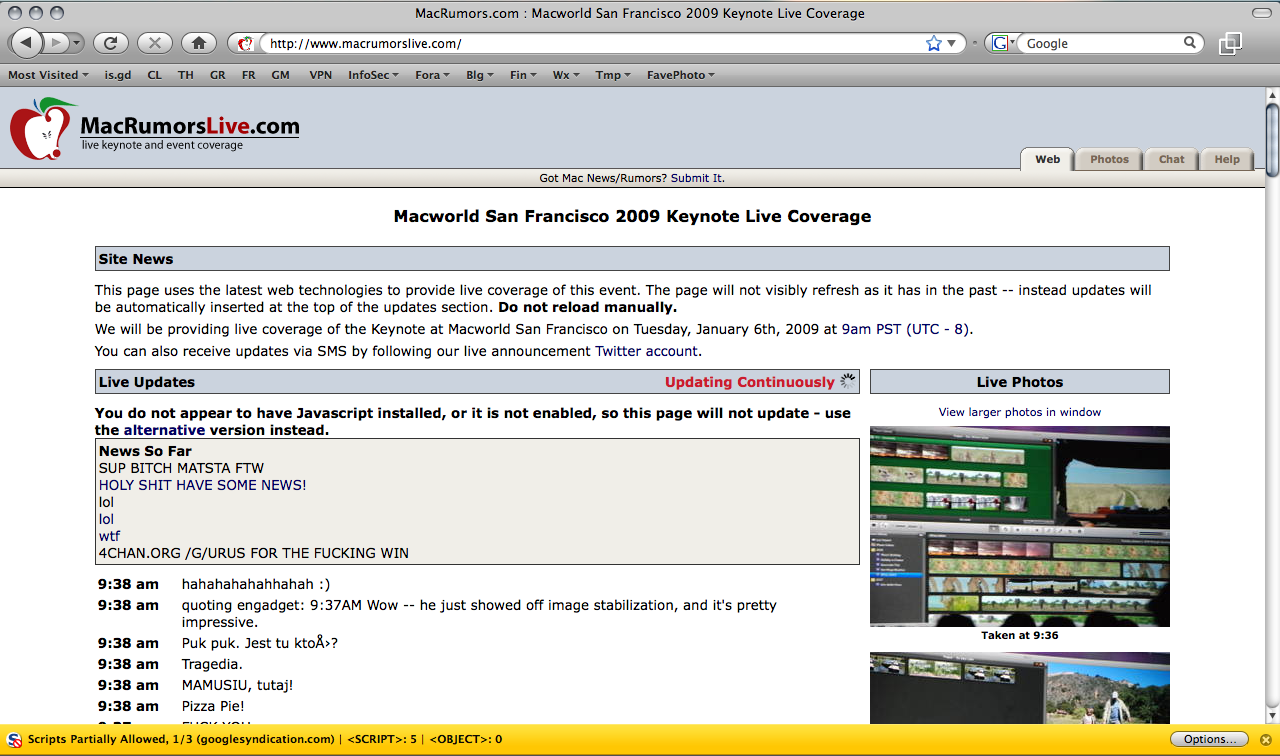
MacRumorsLive Hacked?
Click for high-res:
Yesterday, it was Twitter's admin tools (potentially by Digital Gangster members according to PC World) and today, MacRumors' to-the-second outlet for live events, MacRumorsLive.com bites the dust. 4Chan's /g/ board is mentioned but it's unclear if they have anything to do with the attack directly. Both MacRumors and Live are currently down (in a redirect loop) as of writing.
[Hat-Tip: Dangerboy]
2008-12-19
Asmodian's Workbench: The archive sorter
In the past when I have done backups for home computers, I used a cd-rom burner and dumped everything in a tarball. The problem is that the archive is full of stuff I don't need, want or remember anything about.
So to aid in figuring out whats what I turned to the wonderful unix command FILE.
The file command spits out what file format it thinks a given file is. Its does this through magic numbers.
#!/bin/bash
TEMP_DIR1=`mktemp -d -q /tmp/TMP1.XXXXXX`
TEMP_DIR2=`mktemp -d -q /tmp/TMP2.XXXXXX`
DATE=`date "+%m_%d_%y"`
ARC_FILE=$1
TF=`mktemp -q /tmp/TF.XXXXX`
cp $ARC_FILE $TF.tgz
tar -zx -C $TEMP_DIR1 -f $TF.tgz
NUM1=1
find=`find -X -P $TEMP_DIR1/. -type f`
for FILE in $find; do
  TYPE=`file -b $FILE|tr [:space:][:cntrl:] \_`
  FILTERED=`basename $FILE|tr [:space:][:cntrl:][:punct:] \.`
  FILEFILTERED=`echo $NUM1$FILTERED`
  mkdir -p $TEMP_DIR2/$TYPE
  cp $FILE $TEMP_DIR2/$TYPE/$FILEFILTERED
  echo $FILE >> $TEMP_DIR2/md5_file_list.txt
  md5 $FILE >> $TEMP_DIR2/md5_file_list.txt
  NUM1=`expr $NUM1 + 1`
done
mv $TEMP_DIR2 ~/recovered$DATE
rm -rf $TEMP_DIR1
rm $TF.tgz
rm $TF
This code has been tested on Mac OS X 10.5 . Linux handles the find and file commands differently. OS X either classifies it as a file (well gee now I know its a normal file... Thanks OS X, you were very helpful there...) or it responds with everything up to and including the picture size. Linux responds with some basics about the file or the whole mime-type, which comes in handy if you want to sub categorize. And I made use of the kick ass TR command (which Ax0n based a previous article about). The find command was useful too but once again there is a syntax difference between OSX and Linux.
Interesting Facts:
Wikipedia: Magic Numbers in files
Apple Man pages
2008-12-13
Operating System Junkie
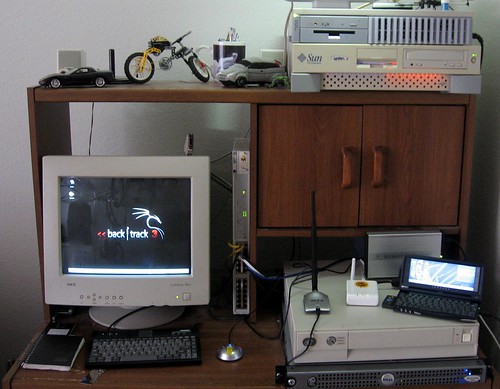
The photo is from a few months ago. The SparcStation 20 on the top of that photo used to be my OpenBSD 4.1 DMZ box until the hard drive died. I shelved it for a while and replaced it with a fresh install of OpenBSD 4.4 on one of the noisy 1U rackmount cluster servers from the startup I worked at in early '06. That 1U now sits in the SS20's old spot on top of the Sun Ultra 5 (which happens to be one of my primary workstations, running Solaris 10)
A few weeks ago, a friend of mine gave me a pile of old SCA-80 hard drives -- 4GB, 9GB stuff that was going to get landfilled. I put some of them in the SS20 again, and decided to try NetBSD. I used this for the SSH Reverse Tunneling article. It's now on the top of the lower stack, below the FON and Jornada and on top of the beige low-profile server.
The Dell PowerEdge server below it was going to be an AMP (Apache/MySQL/PHP) server for a client of mine who never ended up needing it. It gets re-purposed whenever I need a reasonably powerful machine or one with a lot of storage to test something on. I just installed FreeBSD 7 on it last night. This one's even more noisy than the 1U cluster server.
With so many of my own little projects going on and utilizing all these boxes, I'm currently running all of this in my apartment's second-bedroom-turned-laboratory:
- OpenBSD 4.4 / x86
- Solaris 10 / ultrasparc
- jLime Linux (Mongo) / arm
- Openwrt Linux 7.09 / mips
- NetBSD 4.0.1 / sparc
- AIX 5.1 / ppc
- FreeBSD 7.0 / x86
- Backtrack Linux 3 / x86
- Windows 2000 SP4 / x86
2008-09-11
OS X: Deleting unwanted files from Time Machine
I was a goofball when I installed VirtualBox. I forgot to disable backups of my VM's. Some might want their Virtual Machines backed up, but as they're mostly just test environments, I consider them disposable. Anything important in the VM gets replicated and synced through Subversion.
The problem is when my virtual machines change, Time Machine suddenly tries to back up the entire virtual drive, gobbling as many as a few gigs of data as one file, and seriously cramping my old backups. Once I told Time Machine not to back up the VirtualBox directory, the old backups (hogging many gigs of backup space) remained on my external hard drive. Trying to get rid of them from the command-line wasn't working, as OS X puts some kind of restrictions on the file system.
The filesystem layout is pretty nifty, as shown below:
Chimera:chimera axon$ cd /Volumes/Time\ Machine\ Backups/Backups.backupdb/chimera/
Chimera:chimera axon$ ls -la
total 8
drwxr-xr-x@ 10 root  staff  374 Sep  9 22:03 .
drwxr-xr-x+  3 root  staff  102 Jul 29 19:53 ..
drwxr-xr-x@  3 root  staff  204 Jul  5 18:52 2008-07-05-185224
drwxr-xr-x@  3 root  staff  204 Jul 29 22:00 2008-07-29-220053
drwxr-xr-x@  3 root  staff  204 Aug  5 21:50 2008-08-05-215007
drwxr-xr-x@  3 root  staff  204 Aug 30 16:53 2008-08-30-165311
drwxr-xr-x@  3 root  staff  204 Sep  5 23:26 2008-09-05-232659
drwxr-xr-x@  3 root  staff  204 Sep  6 11:42 2008-09-06-114242
drwxr-xr-x@  3 root  staff  204 Sep  6 21:38 2008-09-06-213829
drwxr-xr-x@  3 root  staff  204 Sep  9 22:03 2008-09-09-220316
lrwxr-xr-x   1 root  staff   17 Sep  9 22:03 Latest -> 2008-09-09-220316
We won't get too deep into that, though, because it doesn't matter. The answer, oddly, was staring me right in the face... in the graphical Interface... The "Delete All Backups" option shows up under the gear menu, but only when you're browsing your time machine backups.

2008-09-10
Extended Filesystem Attributes: OS X
In the case of OS X, in addition to supporting BSD Filesystem Attributes (which we've covered before), there are extended attributes.
Chimera:DMG axon$ ls -la audacity-macosx-intel-1.2.5.dmg
-rw-r--r--@ 1 axon  staff  3483297 Aug 24 16:09 audacity-macosx-intel-1.2.5.dmg
Notice the @ after the permissions. In OS X, that means that there are extended attributes. Have you ever run into a warning like this?

That's the com.apple.quarantine flag talking. We use the xattr command to view and manipulate these attributes.
Chimera:DMG axon$ xattr audacity-macosx-intel-1.2.5.dmgTo view the contents of an attribute, use the -p flag. I had already removed the com.apple.quarantine attribute from Audacity's DMG file, so I'll use the TrueCrypt DMG for this example:
com.apple.diskimages.recentcksum
com.apple.quarantine
Chimera:DMG axon$ xattr -p com.apple.quarantine TrueCrypt\ 6.0a\ Leopard.dmg
0000;4898626d;Firefox;|org.mozilla.firefox
The contents of this attribute don't matter much, it's simply meta-data. Likely a time stamp and obviously some information about which application created the file. The mere existence of this attribute is causing the warning.
Chimera:DMG axon$ sudo xattr -w secret.message "all your base are belong to us" \
audacity-macosx-intel-1.2.5.dmg
Password:
Chimera:DMG axon$ xattr -p secret.message audacity-macosx-intel-1.2.5.dmg
all your base are belong to us
To remove the attribute, use the -d [attribute] flag.
Chimera:DMG axon$ sudo xattr -d com.apple.quarantine audacity-macosx-intel-1.2.5.dmg
Password:
Chimera:DMG axon$ xattr audacity-macosx-intel-1.2.5.dmg
com.apple.diskimages.recentcksum
secret.message
Mac OS X Internals covers many more of the attributes that are officially recognized by the operating system, as well as a wealth of other tricks with the kernel, sysctl etc, and is worth a read if this kind of stuff fascinates you.
2008-07-04
MacBook random "deep sleep" fix
I've had very few complaints about my MacBook C2D 2.0. Leopard, on the other hand, has been nothing but trouble. I kind of figured Leopard was part of the problem behind my MacBook randomly going into deep sleep mode.
What happens is randomly, I'd open my MacBook and it wouldn't wake up. Pressing the power button, it would act almost like it was booting cold, but then a progress meter would show up and then it would resume where I left off. It started happening shortly after the upgrade from OS X 1.4 "Tiger" to OS X 10.5 "Leopard". Fortunately, it was just a little hardware glitch.
First, shut down your MacBook and invert it. Use a coin to open the battery compartment.
Notice that there are several metal tabs, but the ones on the end are embedded in plastic. These two are the ones we're looking for. Only one is visible in this picture.
Get under the metal part of the tab with a sewing needle, precision screwdriver or knife blade and bend it just enough to give it some more tension.
I did this a few weeks ago and I haven't had the problem since. be careful not to break any of the metal or plastic tabs. I'm pretty sure these parts aren't replaceable.
What was happening is that one or both of these connections were occasionally jostling loose when I'd pick up the laptop, put it in a backpack, or even move it around on a table. Now, the connections are a little more firm. Other options might include a little dielectric grease, but that may not work well, either. I tried cleaning the contact surfaces quite a while ago and it had no result. I'm glad this worked, as the problem was starting to get out of control.
2008-06-15
HiR Reading Room: Mac OS X Security Configuration
 I can't remember where I stumbled on it, I think it came across on Twitter from John Gruber of Daring Fireball. Apple recently published a guide for securing Mac OS X Leopard appropriately named Mac OS X Security Configuration [PDF]. It's definitely not aimed at casual Mac-Heads, but seasoned veterans of the command-line, administrators of Mac OS X desktop and server environments and power-users will all benefit from this guide, which takes you through security from the ground up, recommending a fresh install from scratch even on systems that come with a pristine installation from the factory on a new Mac.
The reading is somewhat dry, and it's basically a very long step-by-step guide with a brief explanation of why certain settings are being used. If you're looking for security theory, look elsewhere. If you want to know what default settings are secure and which are not, feel free to browse. It's logically organized. If you're a security-savvy Mac geek, this guide is worth the time to review.
2008-04-11
ApacheFriends XAMPP makes Apache setup easy
 I've been using XAMPP on Windows (which I'm forced to use at work) for a few years. I write a lot of custom PHP stuff to help me with my day job, and I also like to test functions or classes I write before I push it out to production. ApacheFriends XAMPP is an easy way to get a basic Apache installation up and running with some of the most popular add-ons including PHP and MySQL. It installs in OS X and many Linux distributions as well.
While nothing can replace a streamlined, custom-compiled AMP Stack set up just the way you need it, XAMPP affords busy sysadmins (and web developers that don't want to be sysadmins!) the ability to get a functional web dev environment up and running with ease.
Go ahead, give XAMPP a shot!
2008-03-28
Mac OS X: Pwned in two minutes flat - CanSecWest
Coverage like this might seem somewhat odd given the fact that most of the HiR crew are Mac users. As it turns out, this is likely an issue with Safari, which I've been known to hate on very frequently. Safari and I just don't get along. Never mind the fact that FireFox is tied up with something else and I'm making this post from within Safari (much to my chagrin, given Safari's lack of compatibility and frequent crashes with Blogger).
This year, the PWN 2 OWN hacking competition at CanSecWest was over nearly as quickly as the second day started, as famed iPhone hacker Charlie Miller showed the MacBook Air on display who its father really was. Apparently Mr. Miller visited a website which contained his exploit code (presumably via a crossover cable connected to a nearby MacBook), which then "allowed him to seize control of the computer, as about 20 onlookers [read: unashamed nerds] cheered him on." Of note, contestants could only use software that came pre-loaded on the OS, so obviously it was Safari that fell victim here.
Full story on InfoWorld
2008-03-06
Shutting off wireless auto-config in Mac OS X
As a matter of security and simply less annoyance, I prefer my computers to not connect willy-nilly to just any wireless network in range. OS X currently doesn't connect to random open networks, but it does always look for them, and by default it prompts you to connect to new ones. In OS X, all you have to do is un-check the "Ask to join new networks" on the AirPort adapter in Network preferences to stop this behavior.
Once you do that, go into the Advanced preferences and remove all those random access points that you've connected to in the past, leaving only the ones you know and trust on the list. If your access point has a default-ish name (like WLAN, Default, linksys, etc) you should probably change it so that your computer doesn't join up to the first "linksys" network it runs across.
On Linux and BSD, it's easy. You simply have to try -- and mean it -- to get on a wireless network. You don't just accidentally connect.
Also, it's a cold day in hell. Last week, I bought my wife a new computer that came loaded with Windows Vista Home Premium. I can only use it for a few minutes at a time before I have the urge to go take a shower with a steel wool pad to try to get Vista off of me, but I can't for the life of me figure out how to kill Vista's auto-join feature while letting it connect to preferred networks only. If you have any tips, drop us a line. It definitely isn't like XP. The only thing I saw told me to kill the Wireless Autoconfig service (maybe called something a little different) and all that did was completely disable wireless access on Vista.

2008-02-11
Apple Releases OS X Tiger 10.5.2 Update
Just in case you haven't read it anywhere else (or everywhere else, as the case may be), Leopard users can now get Mac OS X 10.5.2, the much-awaited update to Apple's latest operating system.
2007-11-05
Leopard is cheesing me off.
Just a quick update.
The in-place upgrade I did to MacOS X 10.5 Leopard simply wasn't working as well as I had planned. Never before have I encountered problems upgrading major versions of OS X.
The first thing I noticed is that operating system stability was hindered. The OS would go flaky for a few seconds at a time or just hang indefinitely with the "spinning beach ball o' DOOM!" Then, I started encountering problems with applications that would crash. GIMP wouldn't even start up. I installed a fresh version, which would start but would crash as soon as I even tried to modify images. Firefox would go non-responsive or just simply crash and exit disgracefully. A fresh install of Firefox including deleting its profile information didn't help. My Last.fm agent hasn't worked properly at all since the upgrade. This is just a smattering of the problems I've had in the last week.
With that, I went ahead and did a fresh install last night, completely formatting and erasing the drive. I wanted a mulligan. I finally bought a new external enclosure for my backup hard drive (my wife borrowed my old enclosure) and went to work backing up only what I really, really needed. I didn't use Time Machine or anything. I just salvaged my virtual machines from Parallels, my photos, my music, and my documents. I wrote down a list of the apps I use most often, and went to work.
After the fresh install, my MacBook feels much more lucid and rich. Now, I'm disappointed because I didn't realize that iLife doesn't come with Leopard. It came pre-installed on my MacBook when I got it back in December, so I'm hoping beyond hope that the iLife packages are on the disc that came with my MacBook and that they weren't just installed at the factory as a one-time thing. I rely heavily on iPhoto and GarageBand, as amateur photography and music composition are two hobbies of mine.
FireFox seems to be stable for a change, but GIMP still doesn't run properly. I haven't gotten the rest of my applications installed yet, so only time will tell what works and what fails miserably.
For the time being, I am a little miffed. I don't quite regret installing Leopard yet, but it definitely wasn't the smooth transition that I'm used to.
2007-11-03
Technical OS review round-up
I ran across some awesome, highly technical reviews on some of the recently released operating systems. Both go in-depth with the new features, and are definitely a step up on the geek scale from the reviews written for mere mortals.
OnLAMP did a thorough interview of some developers to get information on the new features, performance enhancements and bug fixes that went into OpenBSD 4.2.
ArsTechnica is a great source of hardware and software reviews. Their coverage of the new stuff in Leopard is second to none.
Both are excellent reading material for those of us who are really interested in the more technical aspects of operating systems.
2007-11-02
Operating systems out the wazoo!
In a matter of two weeks, we've seen a plethora of new OS releases:
- Ubuntu Linux 7.10 (Gutsy Gibbon) (Oct 18th, 2007)
- MacOS X 10.5 (Leopard) (Oct 26th, 2007)
- OpenBSD 4.2 (Nov 1, 2007)
I'm currently working with a fresh, clean install of Gutsy Server, building an end-all, be-all shared host for a client of mine who wishes to give dozens of end-users their own web space and e-mail domains. I haven't messed with Gutsy on the desktop yet. In due time.
I did an in-place upgrade to Leopard on my MacBook, and it's everything I expected and then some. There are a few minor annoyances, but I'll chalk them up to Apple making an attempt to match and/or exceed Vista's user-interface flair. Unfortunately, I feel that the UI changes in Leopard traded friendliness and clarity for sex appeal. It looks slick, but the graphical changes are skin deep. Functionally, Leopard is still lean and mean. I don't feel like it took a performance hit, and there are boat-loads of new feaures - some of them long overdue (like Spaces, and QuickLook which I'm already a fan of). Things I'm looking forward to testing out: ZFS Support (which requires a developer download to fully implement on Desktop Leopard), Time Machine, and the new "Firewall."
I also did an in-place upgrade to OpenBSD on the virtual machine that I use most often. At first glance, it's the same deal as usual. More hardware support, more robust drivers for certain devices, and some new functionality. I haven't gotten to test it yet, but I'm eager to see the new features in pkg_add, which has never, ever worked the way I would like -- so much so that I actually wrote (and released) a set of scripts to make installing software a breeze in OpenBSD. Finally, I'm interested in seeing how sensorsd works in its new zero-configuration mode on my 1U servers, which have always given OpenBSD's sensorsd some trouble.
I'm sure that HiR will revisit some of these in more detail after really giving them a good shake down.
If you're in or around Kansas City, come join us at the 2600 meeting tonight, Friday October 2nd, 2007 in the Food Court at Oak Park Mall - half a mile east of I-35 on 95th street. The "Official" start time is 5:00PM, but people generally show up as their schedule allows. Look for laptops. That will be us.
2007-02-07
Zero Configuration IP
*** Note from Asmodian X : This was written over a year ago but the
information is still viable from an educational standpoint. ***
HiR
Zero Configuration IP
-=-=-=-=-
Introduction
-=-=-=-=-
Welcome Back! It is good to be writing again after the 5+ year hiatus. The target audience of this article are people who are of intermediate experience with networking. Almost all certificates and IT related programs have TCP/IP as a goodly sized chunk of their curriculum, therefore I should expect that a reader would know what TCP/IP was and how it works. For more general information on TCP/IP see: http://en.wikipedia.org/wiki/TCP/IP.
Shout outs to Axon, Frogman and Methodic.
-=-=-=-=-
ToC
-=-=-=-=-
0x01 ................... Objective
0x02 ................... Definition of Zero Configuration Networking
0x03 ................... How ZCN works
0x04 ................... The who's who of implementations
0x05 ................... Works Cited
-=-=-=-=-
----Part 0x01 Objective
The objective for this discussion is to gain familiarity with a part of the TCP/IP implementations called Zero Configuration Networking. Most notably Apple's newest operating system (OS 10) contains Apple's implementation of ZCN called Bonjour (also known as "Rendezvous"). Bonjour allows apple computers or any other computer using the Zero-Conf standard to immediately be able to use a network with out the use of manual network configuration or some form of DHCP http://en.wikipedia.org/wiki/DHCP). Windows XP implements some form of Zero-Conf networking for their wireless applications. Even MacOS 9 had this automatic configuration feature. The goal for Apple was to replace their Appletalk protocol with something that is more scalable. Zero configuration networking also has a specification for service broadcasting using parts of the DNS protocol called multi-cast-DNS and unicast-DNS.
----Part 0x02 Definition of Zero Configuration networking
Zero configuration networking is the ability for an un-administrated network node to be able to auto negotiate a network configuration requiring little or no user configuration. This configuration system is optimal for Ad-Hoc wireless networks, home networks and for emergency relief stations (Williams, 2002). A zero configuration network system should include the ability to configure itself in a fashion that allows it to talk to other similar hosts using the TCP/IP protocol. The randomly chosen addresses are checked to make sure that nodes do not collide with one another on the network. Part of this networking structure is to implement a service location capability. The reasoning for using a service location protocol is that the end user does not know what address the zero configuration system has chosen and therefore cannot easily find shared resources (Guttman, 2001)(Cheshire, Kochmal, 2004). Other networking protocols which require auto configuration are Multicast IP and IPv6 (Octavian, 2002).
----Part 0x03 How ZCN works
ZCN in most cases consists of a default behavior of a network interface. (Though some OS's have a separate utility for doing it which is not a fail-over condition.) The behavior first starts with the interface being in an automatic mode, such as either DHCP being selected or zero Conf mode being enabled. The interface shall then try to configure itself via DHCP. IF that fails then it will default to zero configuration mode that chooses an IP address on the 169.254/16 subnet. The 169.254/16 subnet being a private address space reserved for ZCN. If ARP detects an address collision (using an ARP broadcast) then it will back off and choose another random place on the network until it has found a suitable unused address. Assuming all hosts on this network follow the same procedure every one is now able to talk to each other. If at any time the interface is configured to use a rout-able address it must leave the link-local addressing scheme (Cheshire, et al. 2004). There are, of course, exceptions such as Un*x's virtual networking interface but because this is a link-local addressing system the addresses used are not rout-able unless something like network address translation (NAT) is used.
The catch at this point is that each computer is now able to speak to each other, but no one at this point realizes that any one else is on the network. In order to find resources on this new improvised network requires some form of advertisement protocol. There are many was to do service location, one way to do service location is NetBIOS. Microsoft originally used NetBIOS, to facilitate the creation of local area networks. Apple computers came from a similar desire to make local area networks and they called their protocol set Appletalk. Both NetBIOS and Appletalk broadcast over a subnet to advertise services. Both Apples Appletalk protocol and NetBIOS had issues when scaling into a large network with its high overhead (Cheshire, Stuart. Krochmal, Marc., August 2004). The newest method for ZCN service location consists of each workstation transmitting a special Multicast DNS broadcast to advertise its services to all of the other connected clients. Aggressive caching of these requests and responses keeps the overall service location traffic low (Cheshire, et al. 2004).
Multicast service broadcasting relies on several key items. Each station must have a mDNS responder that listens for requests and responds with a list of applicable services. The response is via Multicast so that all stations on a given subnet may hear and record this service. Unicast DNS can also be used to do this when crossing subnets. Since this system is designed for small implementations the need for routability is not acute. Recently a draft is being worked on by Apple that defines a NAT-Portmaping protocol so that a router can be added in a ZCN environment and all users can auto-magically gain access to that Internet connected device.(Apple, "Network Address Translation ...", 2004)(Apple, "Rendezvous FAQ", 2005).
----Part 0x04 The who's who of implementations
First and foremost the Apple Computer Corporation has an advanced implementation of zero configuration networking called "Bonjour." ZCN is implemented in various forms since Mac-OS 9 in whatever extent it's full implementation may be found as a part of Mac-OS 10.1 and newer. Apple has released C source for use on any other platform including windows.
(http://developer.apple.com/macosx/rendezvous/index.html)
A sketchy implementation for Linux and the BSD's called "HOWL"
is available for almost all flavors via source.
(http://www.porchdogsoft.com/products/howl/)
The sourceforge ZCN implementation for the link-local addressing
portion is the Zero-Conf project at sourceforge. It does not have the
Multicast DNS portions in working order, instead suggesting the use of
OpenSLP. (http://www.openslp.org/) (http://zeroconf.sourceforge.net)
Avahi Multicast DNS client.
http://avahi.org/
One of the stronger Linux/BSD implementations currently implemented in
many distributions including Ubuntu and more.
----Part 0x05 Works Cited
Apple Corp. (December 2004). Rendezvous
http://developer.apple.com/macosx/rendezvous/index.html
Apple Corp. (January 2005). Rendezvous FAQ.
http://developer.apple.com/macosx/rendezvous/faq.html
Apple Corp. (July 2004). Network Address Translation Port Mapping
Protocol. http://files.dns-sd.org/draft-nat-port-mapping.txt
Cheshire, Stuart. Aboba, Bernard. Guttman, Erik. (July 2004).
Dynamic Configuration of IPv4 Link-Local Addresses.
http://files.zeroconf.org/draft-ietf-zeroconf-ipv4-linklocal.txt
Cheshire, Stuart. Krochmal, Marc. (February 2004). DNS-Based Service
Discovery
http://files.dns-sd.org/draft-cheshire-dnsext-dns-sd.txt
Cheshire, Stuart. Krochmal, Marc. (August 2004).
Requirements for a Protocol to Replace AppleTalk NBP.
http://files.dns-sd.org/draft-cheshire-dnsext-nbp.txt
Guttman, Erik. (July 2001). Zero-Conf Host Profile Applicability
Statement.
http://files.zeroconf.org/draft-ietf-zeroconf-host-prof-01.txt
Octavian, Catrina. Thaler, Dave. Aboba, Bernard. Et al. (October 2002).
Zero-Conf Multicast Address Allocation Protocol (ZMAAP).
http://files.zeroconf.org/draft-ietf-zeroconf-zmaap-02.txt
Open SLP Website. (January 2005).
http://www.openslp.org/
Porchdog software inc. (January 2005). Howl Project Website.
http://www.porchdogsoft.com/products/howl/
Williams, A. (September 2002) Zero Configuration Networking.
http://files.zeroconf.org/draft-ietf-zeroconf-reqts-12.txt
Zero-Conf sourceforge website. (January 2005).
http://zeroconf.sourceforge.net

 Posts
Posts