Showing posts with label OpenSolaris. Show all posts

2009-10-26

Giving OpenSolaris another shot


I've got Planet Solaris in my RSS reader, as you probably see some of the content from there in the semi-frequent Delicious Links RSS entries (or on the sidebar). I also follow a few of the Planet Solaris folks on twitter. As such, I read a lot about OpenSolaris.

I've tried it before, in a Parallels VM on my MacBook, but never really gave it a go of things on a decent desktop system until tonight. The system I'm using isn't wired, so I was pleased to see that OpenSolaris picked up my USB WiFi adapter and had no problems connecting to my encrypted network (although there's that network manager annoyance where you, for some reason, have to type in your network key TWICE).

I'm currently running it in Live CD mode, and it's pretty responsive. Granted, I'm running it on 2GB of RAM, so that probably helps a great deal. When I get a chance to swap out hard drives, I'll likely install it permanently to see how it goes.

Daily, I use Solaris, AIX, Windows XP, and Linux. The gnome desktop environment within OpenSolaris is familiar, with a very Ubuntu-inspired default configuration. It's certainly much different than my Solaris 10 "Java Desktop" interface at the office. The default theme is pretty slick, and doesn't make me want to search for ways to cast out the demons of angry fruit salad.

I'll have another update in a while after I settle in with OpenSolaris a little more.

2008-12-13

Operating System Junkie

I've talked about the computers in the Lab-O-Ratory before. Today, the laboratory is really, really noisy -- more so than usual. I'm always working on something and I'm coming to realize that I'm pretty much a hopeless operating system junkie.

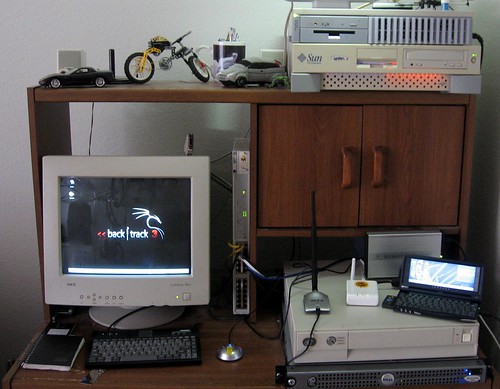
The photo is from a few months ago. The SparcStation 20 on the top of that photo used to be my OpenBSD 4.1 DMZ box until the hard drive died. I shelved it for a while and replaced it with a fresh install of OpenBSD 4.4 on one of the noisy 1U rackmount cluster servers from the startup I worked at in early '06. That 1U now sits in the SS20's old spot on top of the Sun Ultra 5 (which happens to be one of my primary workstations, running Solaris 10)

A few weeks ago, a friend of mine gave me a pile of old SCA-80 hard drives -- 4GB, 9GB stuff that was going to get landfilled. I put some of them in the SS20 again, and decided to try NetBSD. I used this for the SSH Reverse Tunneling article. It's now on the top of the lower stack, below the FON and Jornada and on top of the beige low-profile server.

That's an IBM RS/6000 Model 250 -- 80 MHz (yes, really) with 256MB of RAM and a 36GB SCSI hard drive. Initially made to run IBM's AIX 3.x operating system, it still runs AIX 5.1 quite well as long as you keep the GUI from trying to start. After AIX 5.1, IBM dropped all support for Micro-Channel Architecture. Still, having AIX 5 to tinker with is beneficial to me. I have to deal with AIX (as well as Linux and Solaris) at my real job. Don't forget all the cool freeware that's been ported to AIX and Solaris!

The Dell PowerEdge server below it was going to be an AMP (Apache/MySQL/PHP) server for a client of mine who never ended up needing it. It gets re-purposed whenever I need a reasonably powerful machine or one with a lot of storage to test something on. I just installed FreeBSD 7 on it last night. This one's even more noisy than the 1U cluster server.


My wife bought a 4U rackmount case from Frogman back in the day, and it was originally built up as a telnet MUD server. Now, it's kind of the communal Windows 2000 test box. It's the HiR OpenArena server for the time being.

Then, there's the Dell Optiplex mini-tower out of frame that's still running BackTrack -- although after Mubix wrote about it, I plan on downloading Sumo very soon!

With so many of my own little projects going on and utilizing all these boxes, I'm currently running all of this in my apartment's second-bedroom-turned-laboratory:
  • OpenBSD 4.4 / x86
  • Solaris 10 / ultrasparc
  • jLime Linux (Mongo) / arm
  • Openwrt Linux 7.09 / mips
  • NetBSD 4.0.1 / sparc
  • AIX 5.1 / ppc
  • FreeBSD 7.0 / x86
  • Backtrack Linux 3 / x86
  • Windows 2000 SP4 / x86
That's not even considering that my wife's laptop is running Vista, and I'm running Mac OS Leopard on my own. I'm no stranger to lesser-known OS's either. I've written about OpenSolaris before. I used to run BeOS as my main platform at work. I've used Plan 9 before (in the late 90s) and I even helped a little bit with the now-defunct V2OS project in 2001.

What's next? I think I need to mix it up with ReactOS (Windows clone) or Haiku (BeOS clone) or perhaps try Plan 9 again...

2008-02-27

It's official: Leopard = No network for OpenSolaris Indiana VMs

Lukas got it working on Parallels 3.0 under OS X Tiger, but two different HiR guys failed to get networking to work on OpenSolaris Indiana DP2 on parallels 2.5, 3.0 and VMWare Fusion when running Mac OS X Leopard.

Oh well. Like I said, maybe I'll give it a crack on a real computer when I have a lab machine ready to use.

2008-02-15

Indiana + Parallels 2.5 = No Network For You!

I know, I should probably fork over the cash for Parallels 3.0. The reasons I have not are as follows:

  1. As far as I can tell, there won't be much difference with OpenBSD as a guest OS which is primarily what I use Parallels for.
  2. Windows 2000, which I use only for VPN access to work a few times per month, works fine under Parallels Desktop 2.5.
  3. I don't like spending money.
With that out of the way, here's my OpenSolaris Indiana experience in a nutshell:
  • The Live-CD functionality is a breeze. Once it's up, it's fairly responsive considering the fact that it's running Gnome. I really don't like Gnome, but it gets the job done.
  • Installation is a breeze if you are willing to dedicate a whole hard drive to it. No word on how easy a multi-boot system is to configure.
  • Once installed, it's surprisingly nimble and smooth, with the caveat that it doesn't like NE2000-based ethernet cards (or their emulated analog via Parallels)
Now, Parallels Desktop comes with a CD image full of useful stuff just for this occasion. Included are drivers (Solaris 10 binary as well as source code) for the NE2000 card. As this release of Indiana doesn't ship with a compiler, I followed these instructions for installing the binary drivers on Developer Preview 1, but to no avail. "Network Auto-Magic" did nothing, and a reboot didn't bring the interface to life, either.

This was my first real brush with OpenSolaris. I use Solaris daily as part of my job, and one of my main desktops at home is a Sun workstation running Solaris 10 (I opted for the CDE interface at home due to the slower processor). As such, I'm certainly no stranger to Solaris. Despite being unable to bring the network to life, I can honestly say that OpenSolaris looks, feels, and smells an awful lot like Sun's enterprise UNIX operating system. If you know Solaris, you know OpenSolaris.

On the workstation, Solaris 10 is actually very feature-rich out of the box. OpenSolaris takes this a step further. Until you hit the command-line interface, it feels very much like an older version of Ubuntu Linux. I haven't bothered to see if Java is as deeply integrated into OpenSolaris as it is in the commercial OS, but if it is, that's yet another boon.

I may have another HiR writer check out OpenSolaris on a newer build of Parallels to see if we can get the network up and running. Otherwise, I'll probably shelve Indiana for a bit until I have somewhat capable lab machine available to test it on. Preferably, I'd like to test it as a desktop system (not as a server host), which means that I'll need an extended period of a month or so to really give it the kind of attention it needs.

2008-02-13

OpenSolaris Indiana (Developer Preview 2) Available

OpenSolaris Indiana is a project that's creating a binary distribution based on OpenSolaris source code that's both easy to install and use. It's worth checking out. I'm currently installing it within Parallels Desktop on my MacBook, and will also be playing with it some more when I get the free time to do so. Developer Preview 2 was released this week. A Live-CD distro similar to Ubuntu Desktop Edition is available. You can use it from the Live-CD or install it on a hard drive once the interface is up and running.