
A story just popped up in my RSS feed on /. with a comment that mentions the XKCD comic about real programmers. I had a good chuckle. I never gave EMACS much of a try, as I like the simplicity of stuff like vi(m). Maybe now we can have him turn an OS (Hurd) into a decent text editor...
2008-02-23

Fire: Improvised fire starter and tripwire
It's no secret that HiR absolutely loves fire and explosives as evidenced by almost a decade's worth of traditional pilgrimage out to the fringe of society every Independence Day to partake in massive amount of blowing stuff up.
In my more mischievous and adventurous youth, I made these fire starters in batches. The one drawback is that when these are fully assembled, they may be set off unintentionally if they're crushed or subjected to significant shock. I'll cover storage and transportation tips later on.
Disclaimer: Arson is illegal. Fire isn't a toy. Making improvised incendiaries is an act of "terror" in the US. Don't be a moron. HiR won't be held responsible for random acts of stupidity.
You will need the following materials to make a basic backpacking fire starter:Why Bother?
- If waxed, these igniters are immune to temporary exposure to water splashes and rain.
- They start things on fire quickly.
- The intense flame is resistant to high winds while the igniter material is burning.
- In many situations, they burn for more than 10 seconds after the match heads finish.
- They're inexpensive to make.
Backpacking/Survival Uses:
- Start kindling quickly to build a fire for warmth, light, or cooking.
- Use as a bright, temporary flare signal in the dark.
Defense Uses:
- A trip-wire igniter with a fuse and road flare can to alert you to and illuminate intruders
- A remote pull trigger can be used to activate a fire (pile of leaves, flammable substances) as a distraction for egress or ambush.
Other uses:
- Use as an improvised remote trigger where distance from the fuse or fire is desirable.
- I'm sure plenty others come to mind.
Materials:
- Scissors or knife
- Some kind of tape
- A book of matches
Optionally:
- Paraffin wax or candles you can melt
- Small tin can
- Cooking pot
- a heat source (stove top)
- Yarn, thread, twine, string or fishing line (for a remote igniter)
Take apart a book of matches and throw away the staple. Pardon the generic matches. I don't smoke nor do I make a habit of picking up match books from various places.
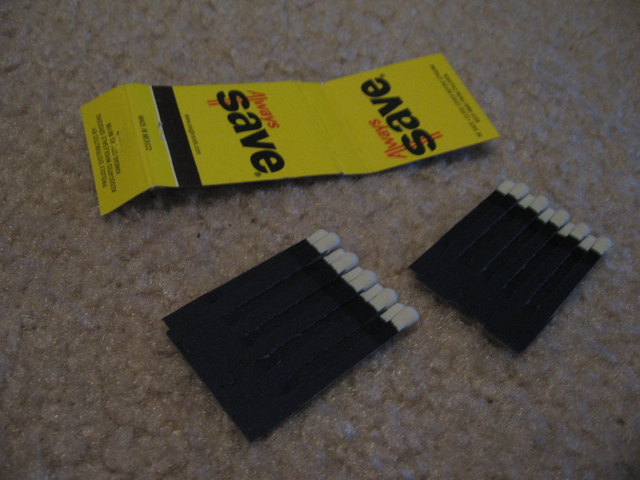
Take one of the sets of matches and roll it tightly, then tape the bottom to hold it tight.
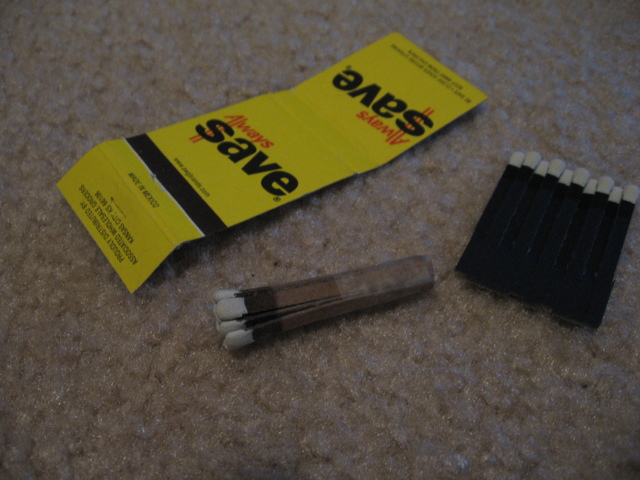
Carefully wrap the match book cover around the igniter tightly with the striker touching the igniter, but don't let the igniter rub on the striker or it will go off in your hand! Keep a bowl of water handy just in case.
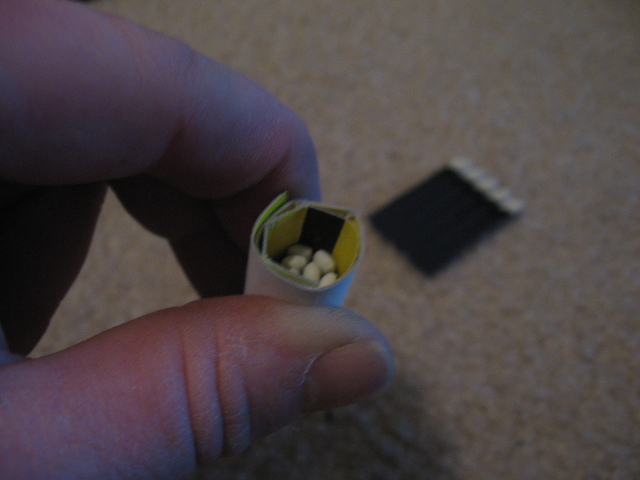
Wrap tape around the cover, and you have a pull igniter. Just yank the igniter out through the tube and you'll get a hot, brilliant flame. You can make a second igniter out of the other set of matches as well. The striker tube is re-usable.
Making a tripwire
Make a slip knot in fishing line or string and use it to bind the rolled matches. You really don't need to use tape for the rolled matches if you go about it this way. Leave a few feet of fishing line attached to the igniter, so that you can tie it around a sapling or another anchored object.
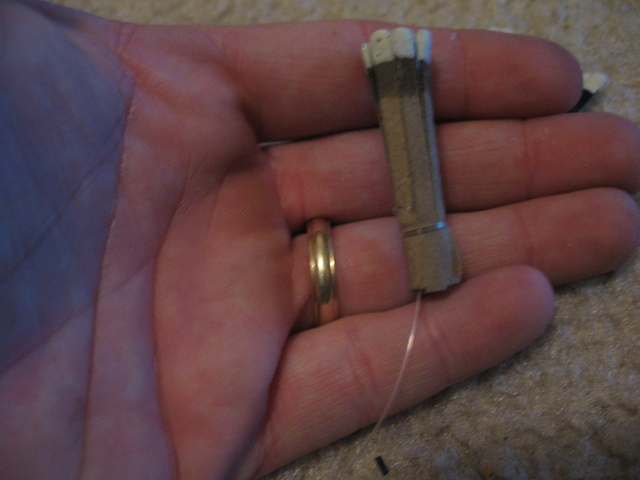
Take the striker tube and tie fishing line around it and tie it off. You will want a lot of fishing line to spare, because you will want to be able to string it across a fairly wide path if need be. I usually give it about 12 feet.
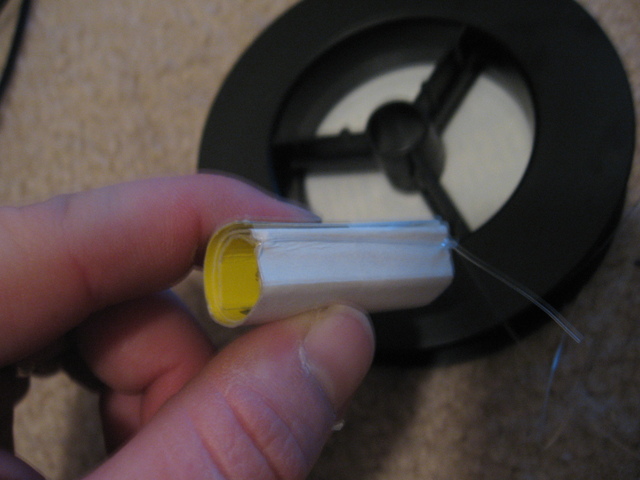
Assemble much like you put the last one together (that is, very carefully!). To set the trip wire, tie the igniter to a stationary object, then string the longer wire across a path. Jam a fuse deep into the striker tube with the igniter to activate a flare or other payload.
Waterproofing
Carefully melt some wax in an old tin can set in a pot of boiling water. Dip the igniter in wax a few times to coat it.
Transporting and storage
Wrap paper around the igniter before storing it in the striker tube to keep the igniter from going off in transit.
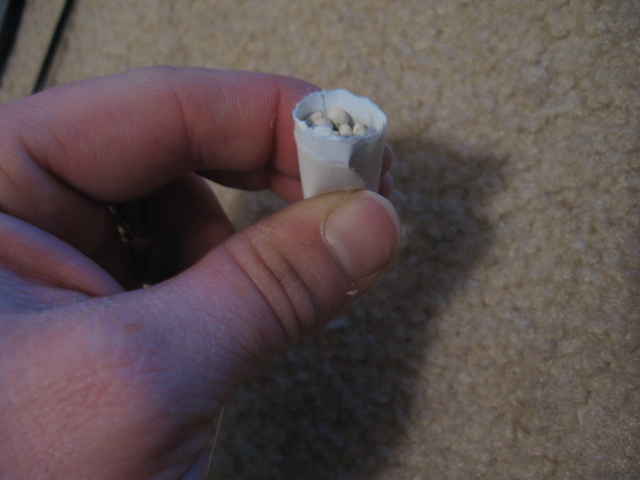
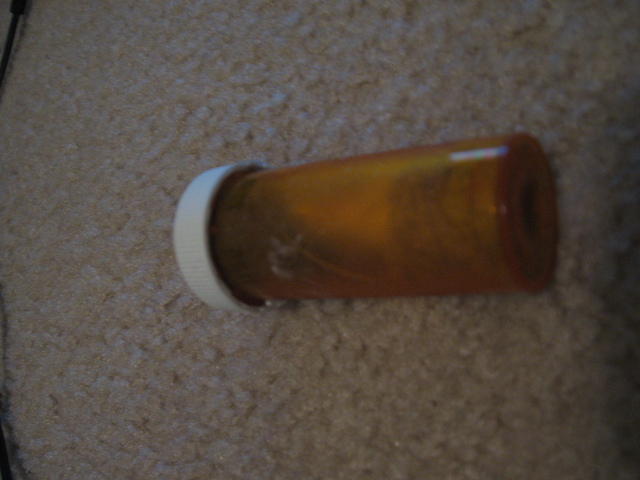
I recommend keeping these in a 35mm film canister or orange pharmacy pill bottle. Both of these are relatively water-tight. Add some old dryer lint for padding. Lint also ignites easily and makes good kindling for starting a larger fire when you're camping or backpacking.
2008-02-22
More FreeBSD love and some fun stuff
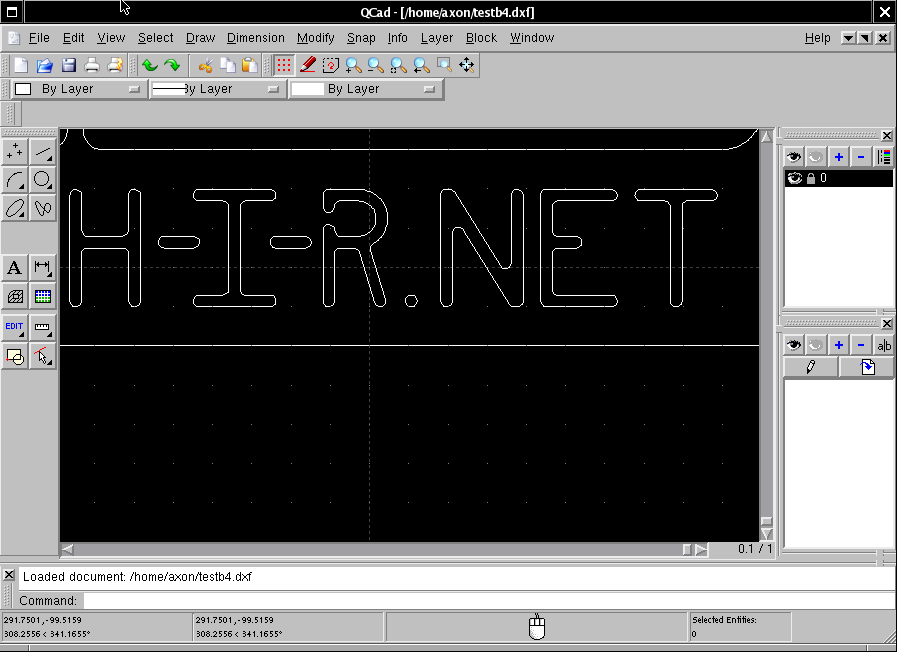
RibbonSoft claims that QCAD is usable right out of the gate even by people who have never used CAD before. I haven't touched CAD since I tinkered with AutoCAD Lite back in 8th grade shop class. I'd like to think I'm technically minded as well. QCAD is NOT easy to get the hang of. Maybe compared to AutoCAD or CADKey, but you can ask my wife and she'll tell you I've spent the better part of three whole days just getting my bearings straight with QCAD. I think I've got it mostly figured out now, though.
By the way, QCAD is available as a binary package or in the Ports tree for both FreeBSD 6.2 and OpenBSD 4.2. I've been using it on both platforms. FreeBSD works really well with QCAD despite my somewhat anemic workstation. My Logitech Revolution VX is a life-saver for precision CAD work. With its smooth-scrolling wheel and high-resolution laser optical tracker, it fits the bill perfectly. I'm really glad that FreeBSD and XOrg play nice with this mouse.
As for the project I'm working on, I'll just say it's mischievous and delightfully fun. I'll release the .DXF file for this project when the time comes.
2008-02-20
FreeBSD 6.3 on the desktop - Update
This is part of an ongoing series of reviews of FreeBSD 6.3 on the desktop.
Well, FreeBSD isn't as peppy as I originally thought. It's no worse than any other Desktop OS would be on this kind of hardware. AJAX-based web pages and applications are sluggish. Heavy media applications like VideoLAN VLC and Amarok run fine as long as they're the only things running. I'll admit, the slowness keeps sending me back to my happy MacBook on occasion. This might be easily resolved by building a new(er) computer from parts that aren't about 5 years old.
Yesterday, I got to spend some quality time with FreeBSD, though. Still enamored with the simplicity of Free's package management, I got gtkam to work quickly and easily to get some photos off of my Canon PowerShot A540 with ease. That surprised me quite a bit, but gtkam is definitely no replacement for my beloved iPhoto. FreeBSD had some trouble with one of my SD card readers, but I managed to get it worked out by making sure the card was inserted before attaching the reader.
I had to build VLC from source via the ports tree, and that took several hours but worked without any problems. Amarok is a slick audio player, almost as nifty as iTunes or Windows Media Player for my MP3 collection. It's just terribly bloated.
I'm also disappointed that secure shell isn't enabled by default. I needed to get some data from this machine earlier today, and was unable to reach it. It's alive, but SSHd isn't up and running. I guess I'm all for leaving as many services disabled as possible, but even OpenBSD asks if you want to enable SSH during the installation. That's not so much a gripe about FreeBSD on the desktop as it is about its network services out of the box, though.
I'm pleased, but I wish I had a little better machine to throw at the project. My relatively powerful notebook has spoiled me.
2008-02-19
HiR Reading Room: Hakin9 Magazine

I first ran into Hakin9 at the local Border's Book Store when looking for Make magazine about a year ago. I usually subscribe to magazines I like, so you won't find me perusing the periodicals too often.
The first issues of Hakin9 I found were a little rough around the edges. I've mentioned hakin9 in passing before, but it seems to be maturing (just a little bit). Of note, the overall grammar in the publication seems to be improved. This is partially, I'd suspect, because more writers seem to be from English-speaking countries.
Hakin9 always comes with a CD-ROM of goodies. For the past several issues, this has been Hakin9 Live, a slightly modified release of BackTrack 2 with some extra content related to the magazine. The most recent issue of Hakin9 Live comes with two decent video tutorials, some demonstration software, and simply by way of building on BackTrack 2, a LOT of security tools ready to use if you boot a system up from the CD. Both of the video demonstrations show how to use tools right from within BackTrack.
Additionally, this issue's hardcopy content is juicy. The article count is pretty low, but it makes up for it with a great level of detail, rich illustrations, and some epic profiles of big names in the industry: Gary McGraw -- who I mentioned a few weeks ago, and Eugene Kaspersky.
Always rounding out the pages are overviews of the extra software included on the CD, frequent book reviews, and product reviews and recommendations.
While Hakin9 obviously still carries a strong bias from the "Attack" side of things, it has enough defense-centric advice to keep it relevant to the task at hand for people in the information security biz. As such, it's never a bad thing for white hats to understand how the back hats think or what they're up to -- and we're all just various shades of grey anyways. There's obviously a verbose disclaimer about how the information within Hakin9's pages are for use on your private network and machines. We know. ;) I do think it's cool that they publish in several different languages, though.
Link:
Hakin9 - Hard Core IT Security Magazine (English)
2008-02-18
Tinkering with the ComboGard 2
This article is a derivative of an article I wrote a while back ago, which was published in 2600: The Hacker Quarterly 21:4 (Winter 2004-2005). If it looks familiar, that's why.
The LaGard ComboGard series of digital combination locks (Model 33E) is a mainstay of the vault lock industry. It was designed to be a drop-in, high-tech replacement for the old dial-type combination locks for safes and vaults. The actual lock mechanism has the same dimensions as most run-of-the-mill group 1 or group 2 combination locks. The spindle that connects the keypad to the lock mechanism (to retract the bolt of the lock) is in the same location as the spindle that connects the dial to the lock mechanism on old combination locks, and the keypad will mount using similar mounting hardware and at the same location as an old combination lock. Quite literally, you can use a ComboGard lock to replace an aging mechanical lock on an otherwise good vault.
Safe and vault manufacturers can also buy these locks and install them from the factory. You can find one of these in use at many restaurants, stores, and businesses. They're not all that expensive, so their widespread popularity is no mystery. Are they more secure? Arguably, yes. A typical mechanical lock has about 27 million possibilities, whereas a 6-digit combination lock such as the ComboGard has a mere 1,000,000 possibilities. Mechanical locks have other weaknesses though. Many of them can be manipulated and listened to. Digital locks cannot be easily manipulated. Digital locks can also enforce a lock-out policy much like networked systems, where no further combinations can be tried until a penalty time has expired. This limits attacks to 3 tries per penalty period, with a 5 minute penalty, only 36 combinations can be tried per hour. At this pace, it would take years to go through every possible combination.
Lock Parts:
The lock's main electronics board is housed inside the lock assembly, which is secured within the vault itself. There's a single 9-volt battery that powers the whole thing, which can last for years if it's opened daily. It's contained within a small plastic box, connected to the lock assembly through a proprietary connector. The keypad has an identical connector, and they're easy to confuse, and they will plug into the wrong ports. The keypad is a circuitboard with a membrane touch pad, with an LED and speaker, covered with rubber keys and housed in a metal case with a plastic bezel. In the event that the owner fails to act on the lock's low-battery warnings, there are terminals located on the keypad so that an emergency battery can be attached to operate the lock temporarily. The lock case and keypad are connected via a square-shaped brass spindle which can be cut to the proper length to accommodate different thicknesses of vault doors. The keypad electronics connects back to the lock case with standard-issue two-pair phone cable, with the same proprietary connector on the end.
Operating:
When you enter the correct combination, the keypad is allowed to rotate counter-clockwise, retracting the lock bolt. There are numerous other features that are programmable, either with a special tool that service personnel have, or via the keypad for owners. The online manual at LaGard's website has all this information. What if you forget the combination? As far as I know, there is no master combination. You're left to do what a locksmith would do to a mechanical lock that can't be opened: drill it. Unless drilled in a very precise location, the lock will never open. On some revisions of the case, there is a raised circular area that designates the optimal spot to drill.
Dumpster Diving for Locks!
For some reason, a local place has been discarding these locks, and I've managed to find a few in a dumpster. Some have been opened up and no longer have the factory warranty. Some of them have had their spindles cut and have been installed and uninstalled. One thing holds true though, none of them have the default combination (1-2-3-4-5-6) and none of them have been reset by a technician (in which case the combo would be 5-5-5-5-5-5). Lately, I've been seeing several of them turn up on eBay and other auction sites, some selling for $50 or less. This is definitely a bargain. I called LaGard and asked them if they knew how to reset a lock, and they informed me that I needed to call the people I bought the lock from. Well, since I found it by dumpster diving, that was out of the question. I called the place whose dumpster I've been finding them in, and they informed me that I needed to call some company in Kansas, as they service all of their ComboGard locks. They were of little assistance. After a bit of social engineering and a call back to LaGard, I had a fax in my grubby little hands that outlined in great detail exactly how to reset these gems.
Resetting (without any fancy tools)
I've since lost the actual fax, but the process remains engrained in my head. Whether it's exactly the same as the fax I received, I can't remember, but I do know that it works! It also voids the warranty, since it involves breaking the tamper-resistant seal tape (hint: a razor blade and a hair dryer does wonders.) On with resetting the lock. I've included some photos to help with the process.
1) Remove the keypad and battery from the lock case.
2) Cut or otherwise remove the tamper seal tape. This is the only thing that holds the back plate onto the lock case.
3) Remove the back plate of the lock
4) Locate the reset jumper holes. There's a central DIPP IC. If you hold the lock with the bolt facing away from you, the jumper holes are directly to the left of that IC. They're larger holes than the rest, and they have exposed tinning around them. They're about 1/4 inch apart.


5) Place a jumper wire into the two reset jumper holes.
6) Attach the keypad. It goes into the port closest to the corner of the case.
7) With the jumper wire still attached, connect the battery.
8) Within 5 seconds, press the "5" key on the keypad.
9) Wait 60 seconds, then disconnect the battery and remove the jumper wire. Test the lock with the combination "5-5-5-5-5-5". If it doesn't work, start over again. Timing is critical, and the jumper wire must be secure and connected for the duration of the procedure. Changing the combination: 0-0-0-0-0-0, Old Combination, New combination

Asmodian's Workbench
Whats on Asmodian's workbench?
============================================
Google mini
============================================
The Google-mini is an Internet search appliance. It is essentially a 1u Intel server with Googles search engine with a simple web based interface to specify what sites it should index. The mini lacks the capability to access anything but web or samba based resources. To this end they have a feature called a Onebox.
A Onebox module is an XML profile describing what to do if a certain set or format of keywords are encountered during a query. The definition then tells Google to access a certain collection or an external script which then is sent the query and any applicable authentication information and expects back an XML response. The response is pared with an XSLT style sheet and displayed with the search results.
The Onebox can search queries by key words, Perl regular expressions or on every search.
The example they made was an employee directory which searched by lastname and returned basic contact information in a formated box with a graphic.
Informative resources:
Google Inc. "One Box Guide". Accessed 2-18-2008
http://code.google.com/enterprise/documentation/oneboxguide.html
============================================
Pure-FTPd Follow up.
I am working on an adaptation of my previous article on Pure-FTP using Mysql as the user database and creating an automated user web space system, or adapting an existing one.
I am in a situation where I have user information sitting in LDAP (via Novell NDS) however I cannot implement my own schema so I must use a Mysql back end to store the user information.
So what I plan on doing is setting up the interface to poll LDAP for user info and import it into the authentication database.
============================================
iPOD Touch Hassle
It seems I am cursed to buy the one technological widget which is resistant to modification.
It appears that the new iPOD's purchased since December 2007 are resistant to Jail breaking.
Worst yet, information on this is buried amongst a deluge of you tube videos and un-readable Interweb BLAG's with a crap ton of advertisements so that searching for helpful information is an all night task. I'll tell you what doesn't work:
Upgrading to the 1.1.1 firmware via Itunes 7.5+ (Mac and PC)
Though it has been a learning experience:
The iPOD touch /iPhone uses a Arm processor some where around 500Mhz.
You can access the media folders on the iPOD via iPHUC. However on a standard iPOD this dumps you into a chrooted folder (/var/root/media)
The downgrade/jailbreak process goes like this 1.) Get the old firmware 2.) Put it into recovery mode(see above) 3.)Use iTunes to load the old firmware 4.)on your ipod goto the site with the giant tiff with the overflow info and payload. 5.) It will load the program installer.
Then theres some tricks to upgrade the iPOD back to the latest firmware while keeping the ability to load 3rd party software.
Like I said, this has not been working.
You can resurrect a "bricked" iPOD or iPhone by holding in the Sleep button and the home button then letting go of the sleep button when you see the apple logo. Then you should see the iTunes logo and the iPOD cable symbols. Attach it to iTunes and then restore the firmware. (This wipes out EVERYTHING).
I understand that if the boot loader is corrupted or overwritten with an incompatible version there is a way to reload it too but I haven't seen any articles with sufficient details on this.
Informative Resources:
ARM web page. "ARM Powered Products". Accessed 2-18-2008 http://www.arm.com/markets/mobile_solutions/armpp/18665.html
Johnstone, Jeremy. "Howto: Run custom apps on iPhone (Part #1)" Accessed 2-18-2008
http://www.jeremyjohnstone.com/blog/archives/2007/08/05/howto-run-custom-apps-on-iphone-part-1/
*This describes a utility called iPhuc and has little to do with the iPOD touch
ilounge.com. "white screen lockup", Accessed 2-18-2008
http://forums.ilounge.com/archive/index.php/t-209541.html
*This references a couple of Youtube videos on updating the firmware.
iPHUC Homepage, "iPHUC" Accessed 2-18-2008
http://code.google.com/p/iphuc/
*iPhuc gives you an interactive (albet chrooted) shell to your iPhone or iPOD.
True, Nathan. "ibrickr" Accessed 2-18-2008
http://cre.ations.net/creation/ibrickr
*The iBrickr application is very handy in even though it's meant for the iPhone.
============================================
Subscribe to:
Posts (Atom)

 Posts


