
Sorry folks, no Sysadmin Sunday this week. But here's an interesting tidbit from Breach Security Labs: Their analysis of the significant web hacking events in 2007 show that almost 70% of web hacking incidents were performed for profit. Check out the press release here. The full report [PDF] is available here. It requires a free registration, but reliable sources (that's me) say that you can just use a dummy account.

2008-02-16
Bypassing merchandise display locks

Shown above is a popular security device that simply clamps around a display hook, locking all of the products onto that hook until it's deactivated. Another common one you'll see is a big grey brick stuck on the end of the display hook. They both work the same way, though.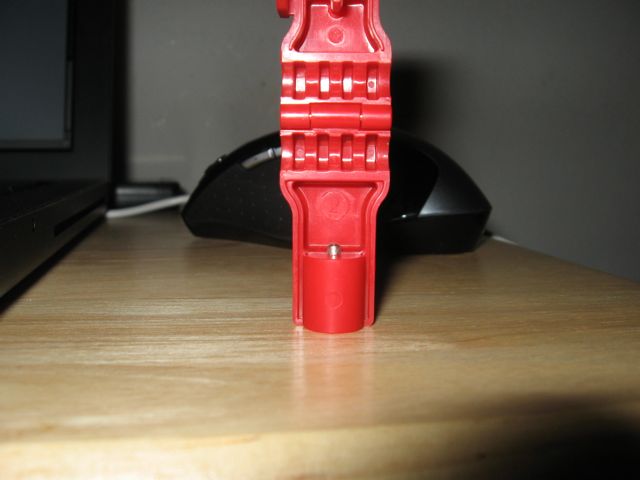
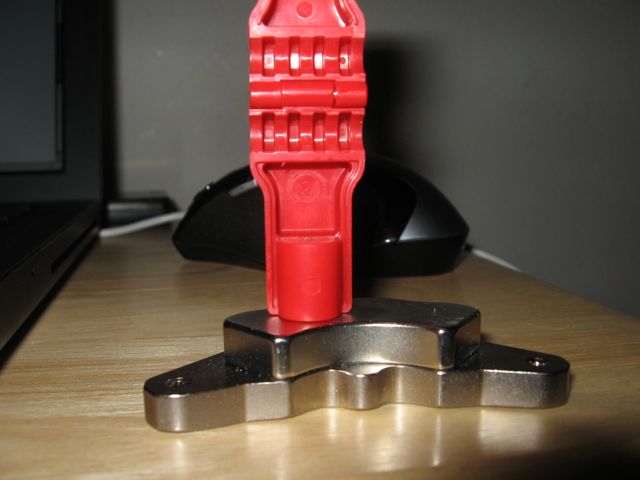
Other security devices, for example Blockbuster DVD locks, use two or more spring-loaded metal actuators. Behind the counter, the unlocking device has magnets already spaced apart just right to open them up. These systems are a little more secure.
So next time you see some kid messing around with rare earth magnets in the electronics aisle, know that it's probably not so he can corrupt hard drives or make pretty gauss patterns on CRT displays.
2008-02-15
FreeBSD 6.3 - Initial Impact
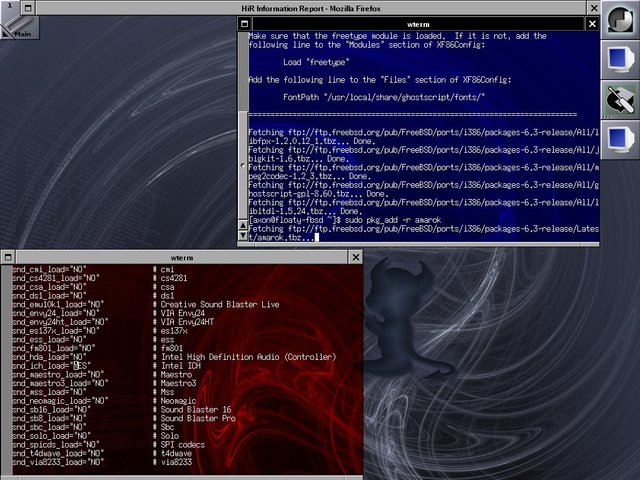
The Good:
- The package management woes I had with 5.0 are completely gone. pkg_add -r [package-name] (ex: bash, firefox, windowmaker, nmap, etc) just works right out of the box. The problem I was having before was that they had converted to bzipped packages (.tbz) however pkg_add was still, for some reason, expecting gzipped packages (.tgz). That's all over now, and probably has been for a long time.
- The installation is a breeze. I mentioned this before as well, but the textmode-driven menu really does just work. No, it's not as intuitive as a GUI installer, but it's not as sluggish as GUI, either.
- The OS and Xorg find my snazzy wireless Logitech VX Revolution mouse and all the major features (left, right, center click and vertical scrolling) work without any configuration changes at all. Mouse setup used to be a bit of a chore with FreeBSD.
- It is oh-so-peppy. As lean and mean as I remember it, I'm not exactly running FreeBSD on a powerhouse workstation. It's a lowly Pentium 3 desktop with a mere half-gigabyte of RAM. Compared to Kubuntu, which was installed prior to this, FreeBSD simply hauls ass.
- Where in the hell is xorgcfg, the graphical Xorg configuration tool? And why isn't there a somewhat working xorg.conf file installed by default? OpenBSD handles Xorg by default just fine. Playing with FreeBSD 6.2, I know I used xorgcfg to get Xorg up and running, but it's nowhere to be found in 6.3 (at least the way I installed it!) Fortunately, I'm good with xorgconfig, the text configuration tool for Xorg, and got X up and running on my lab machine on the second try.
- Mozilla Firefox, when installed from binary packages, for some reason creates the .mozilla directory in your homedir owned by root the first time you run it, and then can't start. The easy fix, of course, is to change the owner back to yourself before starting Firefox again, but this boggles my mind. What's more peculiar is that after creating a second user to test this with, Firefox starts fine. Hmm...
- I really, really miss OpenBSD's monolithic kernel and on-the-fly reconfiguration. FreeBSD forces you to enable kernel modules to get a lot of "optional" hardware to work.
To get sound working, I had to go into /boot/defaults/loader.conf and set the proper sound module to "YES" (in my case, it was the snd_ich_load line) The "proper" way to do this would be to add snd_ich_load="YES" to /boot/loader.conf, but I am lazy and this works. I cheated again and just manually loaded the module from the command-line (kldload snd_ich) and voila! My MP3 player software worked like a charm. To get a guess as to what sound driver you'll need, run pciconf -lv and look for your sound device. Then look through the nondescript driver files (/boot/GENERIC/snd_*.ko) to see if there's a logical choice. Experimenrt if needed.
Despite what a pain in the butt it is, it's little things like this that remind me why I chose FreeBSD in the first place. It really is back to basics. At the same time, projects like OpenBSD are certainly just as minimalist but without the same kind of impact on out-of-box usability. Unfortunately, I've been spoiled, and OpenBSD is now the gold standard by which I measure things of this nature. It's not looking too good for FreeBSD with that minor exception of truly elegant binary package management. And oh, their package management is slick. It's admittedly low-tech, even. But it simply works well, and that's all I ask of it.
With what seems to be all of the major out-of-box problems solved (graphical interface, sound, boot options), I'm hopefully free of any more show-stoppers. Stay tuned next week to see how things are progressing.
Indiana + Parallels 2.5 = No Network For You!
I know, I should probably fork over the cash for Parallels 3.0. The reasons I have not are as follows:
- As far as I can tell, there won't be much difference with OpenBSD as a guest OS which is primarily what I use Parallels for.
- Windows 2000, which I use only for VPN access to work a few times per month, works fine under Parallels Desktop 2.5.
- I don't like spending money.
- The Live-CD functionality is a breeze. Once it's up, it's fairly responsive considering the fact that it's running Gnome. I really don't like Gnome, but it gets the job done.
- Installation is a breeze if you are willing to dedicate a whole hard drive to it. No word on how easy a multi-boot system is to configure.
- Once installed, it's surprisingly nimble and smooth, with the caveat that it doesn't like NE2000-based ethernet cards (or their emulated analog via Parallels)
This was my first real brush with OpenSolaris. I use Solaris daily as part of my job, and one of my main desktops at home is a Sun workstation running Solaris 10 (I opted for the CDE interface at home due to the slower processor). As such, I'm certainly no stranger to Solaris. Despite being unable to bring the network to life, I can honestly say that OpenSolaris looks, feels, and smells an awful lot like Sun's enterprise UNIX operating system. If you know Solaris, you know OpenSolaris.
On the workstation, Solaris 10 is actually very feature-rich out of the box. OpenSolaris takes this a step further. Until you hit the command-line interface, it feels very much like an older version of Ubuntu Linux. I haven't bothered to see if Java is as deeply integrated into OpenSolaris as it is in the commercial OS, but if it is, that's yet another boon.
I may have another HiR writer check out OpenSolaris on a newer build of Parallels to see if we can get the network up and running. Otherwise, I'll probably shelve Indiana for a bit until I have somewhat capable lab machine available to test it on. Preferably, I'd like to test it as a desktop system (not as a server host), which means that I'll need an extended period of a month or so to really give it the kind of attention it needs.
2008-02-13
OpenSolaris Indiana (Developer Preview 2) Available
 OpenSolaris Indiana is a project that's creating a binary distribution based on OpenSolaris source code that's both easy to install and use. It's worth checking out. I'm currently installing it within Parallels Desktop on my MacBook, and will also be playing with it some more when I get the free time to do so. Developer Preview 2 was released this week. A Live-CD distro similar to Ubuntu Desktop Edition is available. You can use it from the Live-CD or install it on a hard drive once the interface is up and running.
Giving FreeBSD another shot
I fell in love with FreeBSD for the first time around the early part of 1998. Although I'd heard of FreeBSD before, my roommate, Xeroline, introduced me to it formally. I'd been tinkering with Red Hat Linux and had grown tired of both the wild-goose-chase of RPM dependencies as well as the patchwork of software compiles that often had their own dependency problems. FreeBSD seemed, at the time, to be the answer to my prayers.
FreeBSD 2.2.8 was lean, mean, and very basic. It also brought with it the concept of the Ports system: a skeletal tree of software directories where one could simply utter the words "make install" and then sit back -- often for a very long time -- and watch software compile automatically and usually error-free. Initially, that's all I wanted. It was FreeBSD that pried me away from my Linux addiction, and I'd say that it's also FreeBSD that shaped much of what I've come to expect from a UNIX desktop OS. In short, I didn't want an easy, graphical install. I wanted an OS that would get up and running quickly, be quick on its toes, and give me as clean of a slate as possible from which to begin my adventures. I wanted a system that could be wrought from bare metal.
As time passed, FreeBSD got better, then worse. I had been using OpenBSD for servers since early 1999, and Shortly after the 5.x series came out, I got sick of FreeBSD and switched to OpenBSD 3.2 on the desktop and some of my laptops. That was more than 5 years ago. I seriously haven't touched FreeBSD since February of 2003. Until now.
I almost messed with FreeBSD 6.2 a few months ago. I downloaded the ISO images but never got around to burning them. The target install environment was going to be my Pentium 3 lab box, but at the time I was using it to do research for my Linux LVM2 article. The very same machine, in fact, kept getting re-purposed for various HiR research projects. The time has come, though, for me to square off against my quondam favorite desktop OS.
I've only been tinkering with it for about a day now, so I still have a way to go before I'm ready to give this a full review. All I can say is to stay on the lookout for some more FreeBSD love. I can immediately tell that they've worked out some of the major kinks in their package installation tools. The installation doesn't seem like it's changed much since the 4.x releases. For that, I'm thankful. It's just friendly enough for almost anyone to figure out, but not made of bloated graphics like the Ubuntu installer that takes forever to load.
I have a feeling I might start really liking FreeBSD again. Did anyone else feel alienated by the 5.x series, only to come back and try 6.2 or 6.3 and really like it?
2008-02-12
Old tech that I still love
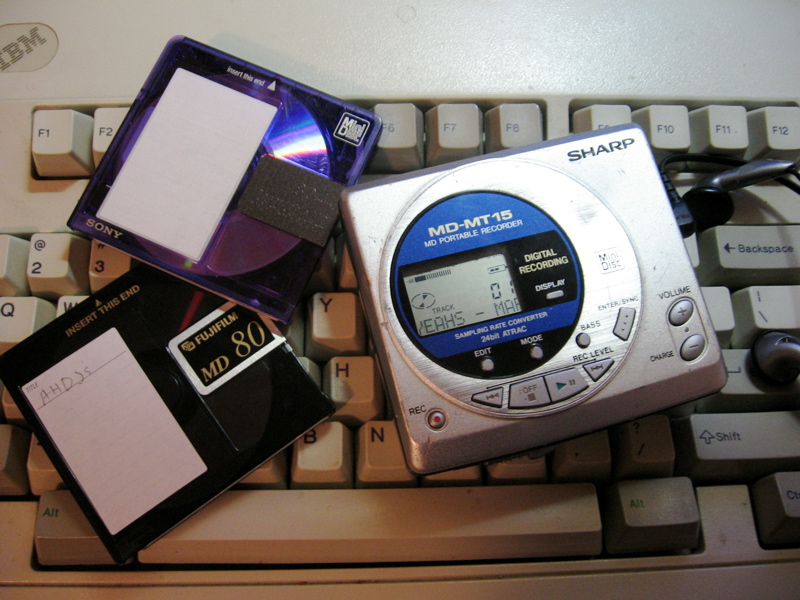
The IBM Model-M is practically a tank, the mother of all ultra-durable keyboards. They're almost impossible to break or wear out. They have a springy tactile feel, and make a lot of noise when you type on them. Many people see this as a horrible turn-off, but there's a certain subset of people who really, really like it. I'm one of them.
MiniDisc is a somewhat failed experiment of the early 1990's, at least in the US. You can still buy MiniDisc players and recordable media, but they're getting increasingly difficult to find. One thing that I really enjoy about MiniDisc aside from the size is the fact that many of the portable MD recorders have optical S/PDIF ability as well. I actually use the MiniDisc player shown above quite often. I don't have a modern MP3 player with the exception of the CD-MP3 player in my car.
I could go on and on for quite a while about old-school stuff that I still love and use, but I'll save it for another day.
What are some old-tech things that you still love?
Subscribe to:
Posts (Atom)

 Posts


