Just in case you haven't read it anywhere else (or everywhere else, as the case may be), Leopard users can now get Mac OS X 10.5.2, the much-awaited update to Apple's latest operating system.
2008-02-11
Apple Releases OS X Tiger 10.5.2 Update
Labels: Apple, Operatingsystems, OSX, unix
YE OLDE MAINFRAMES ARE SCREAMING AT ME
As one who works in the financial services industry, I get the vituperation privilege of working with a mainframe on what seems to be at least a weekly basis, if not daily for weeks at a time.
As I fire up certain programs that are required for my job, I'm confronted with the following woes:
- Certain software doesn't know what lower-case letters are or how to utilize them. This, to me, comes off as THE MAINFRAME SCREAMING AT ME.
- Version 2.08 of some program no one cares about anymore is now Y2K Compliant! Oh, the joy!
- A typoed query can easily ABEND certain applications, jettisoning the user back out to the ISPF or TSO prompt. I jokingly call this "Crashing the mainframe" however I'm really just crashing a poorly written (non-mission-crtitical, mind you) application.
- These insidious machines have somehow leveraged the ability to use electronic mail. Simply not logging into the mainframe does not spare me from its wrath. Occasionally, I will get e-mail from one of the nodes, again, tactfully crafted IN ALL CAPITAL LETTERS just so that I get the point.
2008-02-10
Sysadmin Sunday: Pure-ftpd configuration on Ubuntu Server Edition
0. Introduction
There are tons of ftp servers out there. Some are leftovers from the stone age others are fairly up to date with SSL capability and virtual user support. In this case I have chosen Ubuntu server and Pure-ftpd.
Why: Ubuntu comes out of the box unencumbered by unnecessary bloat that many server editions are forced to install out of a spider web of software dependencies. It at the same time has a very mature package management system which allows for easy software updates.
I'll stop there because I don't intend this to be a flame war on what Linux is best. An important difference that the Ubuntu installation has versus its native configuration is that it uses a configuration wrapper instead of modifying a start-up script. Which is why I am writing this article.
This article assumes that you have an intermediate or advanced knowledge of command line based UNIX operating systems.
-=-=-=-=-=-=-=-
Table of contents:
-=-=-=-=-=-=-=-
0.........Intro
1..........System setup and overview on what needs to be done
2..........Package installation
3..........Wrapper configuration with virtual users and SSL
4..........Access control via virtual users and iptables and or pure-ftp
5..........Informative resources
-=-=-=-=-=-=-=-
1.System setup and overview on what needs to be done
-=-=-=-=-=-=-=-
We will be needing an Ubuntu server edition installation. Preferably with a firewall in place.
In this case I have a pile of users who need to use dreamweaver to edit their web sites. Preferably they need to have their own logins, those logins need to be chrooted to their directory. Secondly, the users have no earthly reason to have a system user account.
For security sake I want the option for them to use encryption (once we can get licenses for the newer version of Dreamweaver which supports it). Lastly having these virtual users have disk space quotas so some idiot doesn't up load a ton of the family pictures that were taken with a 10 Megapixel camera and are like 20 Mb a piece causing the storage array to !#*& itself.
Pure-Ftpd can use arbitrary file paths for virtual user home directories. You can assign a local system user account and group for each virtual user or group of virtual users.
You can make a system user and group called webadmin who owns the "sites" folder under "/data/sites". All of the virtual users from a system standpoint are doing business as "webadmin". Pureftp does the job of doing access control and permissions on its end and keeping people in their home folders.
-=-=-=-=-=-=-=-
2.Package installation
-=-=-=-=-=-=-=-
Run the command: apt-get install pure-ftpd
There is a GUI configuration tool but by default Ubuntu does not have a GUI so I leave that to you.
Once installed the wrapper configuration folder is on "/etc/pure-ftpd". The folder contains a structure like so:root@stage:/etc/pure-ftpd# ls -al
total 32
drwxr-xr-x 5 root root 4096 2008-02-20 01:32 .
drwxr-xr-x 133 root root 12288 2008-02-20 01:32 ..
drwxr-xr-x 2 root root 4096 2008-02-20 01:32 auth
drwxr-xr-x 2 root root 4096 2008-02-20 01:32 conf
drwxr-xr-x 2 root root 4096 2007-06-21 19:01 db
-rw-r--r-- 1 root root 230 2007-06-21 19:01 pureftpd-dir-aliases
Under Auth you will find the following symlinks:root@stage:/etc/pure-ftpd/auth# ls -alF
Delete all of these and make a symlink to "../conf/PureDB":
total 8
drwxr-xr-x 2 root root 4096 2008-02-20 01:32 ./
drwxr-xr-x 5 root root 4096 2008-02-20 01:32 ../
lrwxrwxrwx 1 root root 26 2008-02-20 01:32 65unix -> ../conf/UnixAuthentication
lrwxrwxrwx 1 root root 25 2008-02-20 01:32 70pam -> ../conf/PAMAuthenticationroot@stage:/etc/pure-ftpd/auth# ln -s ../conf/PureDB
Go to the conf directory and edit the "PAMAuthentication" file to say NO insted of YES.
Add a new file called "ChrootEveryone" and edit it and add the word "YES".
Now lets make a user!pure-pw useradd test -u webadmin -g webadmin -d /data/sites/localhost/ -N 25
Where -N is a 25 Mb quota and -u and -g is the userid and groupid of the corresponding system user. -d is the folder that the user is chrooted in. The command "mkdb" creates the binary password database.
pure-pw mkdb
Now we have our chrooted ftpd environment finished we just need to configure the ssl option.
now it is possible to FORCE users to use ftp-SSL however thats out side of the scope of this article.
(from the pure-ftpd documentation)
mkdir -p /etc/ssl/private openssl req -x509 -nodes -newkey rsa:1024 -keyout \
/etc/ssl/private/pure-ftpd.pem \
-out /etc/ssl/private/pure-ftpd.pem
chmod 600 /etc/ssl/private/*.pemThen go into "/etc/pure-ftpd/conf" and edit the file named "TLS" and add the number "1".(0 disables encryption, 1 makes it optional and 2 makes it mandatory).
Now restart the service :
/etc/init.d/pure-ftpd restart
And login to your new ftp server!
-=-=-=-=-=-
4.Access control via virtual users and iptables and or pure-ftp
-=-=-=-=-=-
It pisses me off to read the logs and see all of the automated Interweb
exploit scripted attacks. So here are some suggestions to keep the
automated attacks down.
1. Hosts.deny doesn't work. Use Ip tables filtering.
2. Grab a blackhole ip list (BBL) from http://www.unixhub.com/block.html.
3. Determine your scope of service, if your users work only within the continental United States then blocking AP-NIC and any other non-local IP ranges in their entirety would be a good idea.
If you want to tie it down on a per-user basis try this:
pure-pw usermod testuser \where -r is allowed IP ranged and -R is denied ranges (Example: -R 200.0.0.0/8 -r 192.168.0.0/16)
-r IP-ADDRESS-RANGE\
-R IP-ADDRESS-RANGE
-=-=-=-=-=-
5.Informative resources
-=-=-=-=-=-
Barnes, Robert. "Bad IP addresses/Bob's Block List (BBL)", (Accessed Feb, 2008)
http://www.unixhub.com/block.html
Denis, Frank. "Pure ftpd", (Accessed Feb, 2008)
http://www.pureftpd.org
http://download.pureftpd.org/pub/pure-ftpd/doc/README.TLS
Hornburg, Stefan (Racke). "Debian pure-ftpd-wrapper man page", (Accessed Feb, 2008)
http://www.penguin-soft.com/penguin/man/8/pure-ftpd-wrapper.html
2008-02-08
FART on Windows
No, I'm not asking you to unleash a batch of cheek-flapping flatulence upon Vista. Although I wouldn't mind if you did.
FART is an open-source Find And Replace Tool for the Windows command-line. It's much like a mash-up of grep and sed, and capable of easily converting text files from UNIX to Windows/DOS style newlines among other things.
Via HacksZine. Thanks, [Eric]
Surveillance with old CCTV Cameras
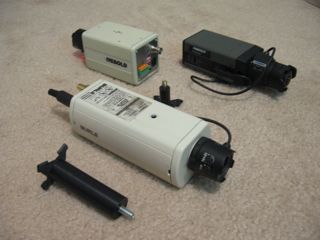
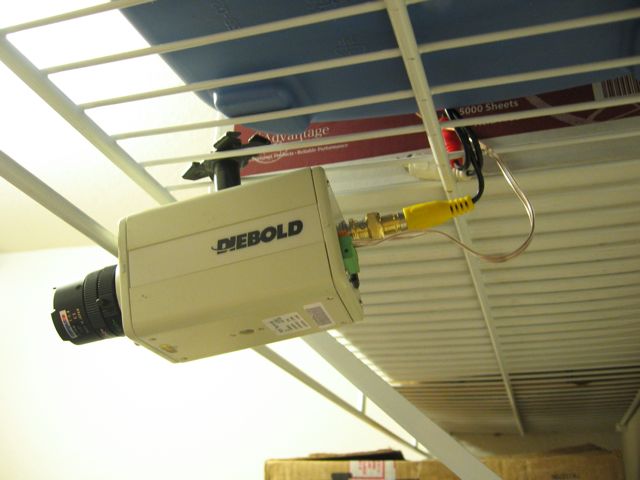
It seems that most of the time I go dumpster diving, I find a CCTV (Closed-Circuit Television) camera or two. Or three. I've picked up quite a few, and left many, many more to rot in the landfill. Some have worked well. Others haven't. We're going to have some fun with them. As more and more companies go high-tech with snazzy digital recording systems, you can often find older CCTV cameras on eBay and Craigslist for cheap. Or in dumpsters for free.
The Broken Ones
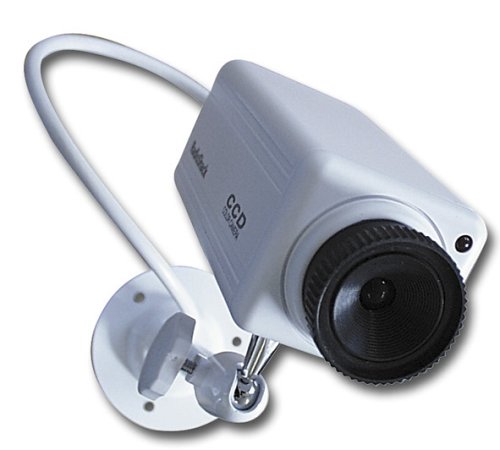
There are always broken ones. You can get them for cheap or free as mentioned above. Surf eBay for "Parts only" when looking at CCTV cameras and you'll find a suitable one. The easiest thing to do is to make it look like a real CCTV to give would-be bad-guys the impression that they're being recorded. While this is much akin to security through obscurity, making a fake camera out of one that used to work is a lot more convincing than this:
Compare that piece of crap to my finished product at the end of this section.
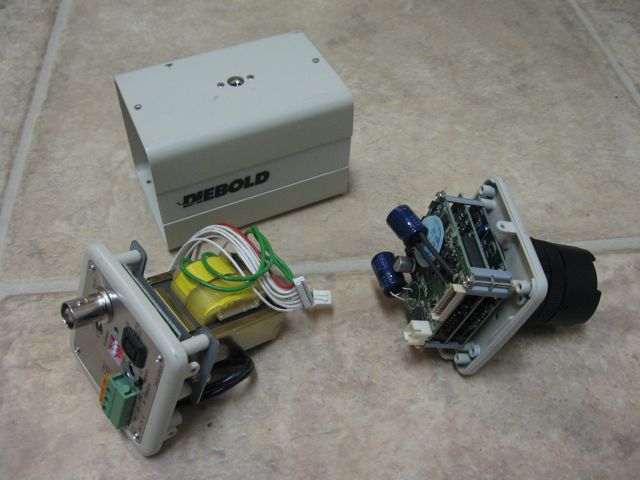
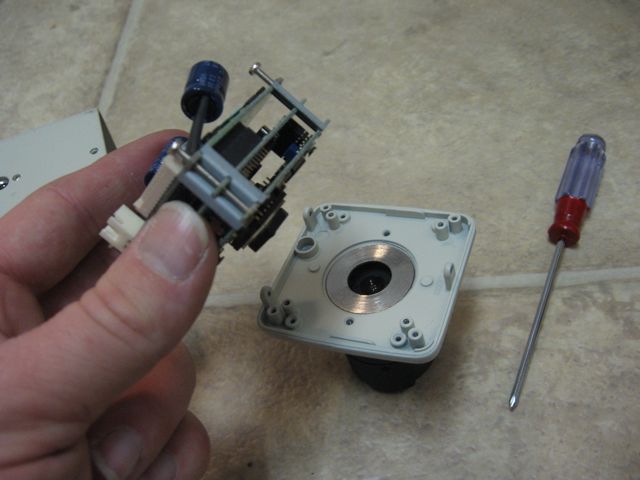
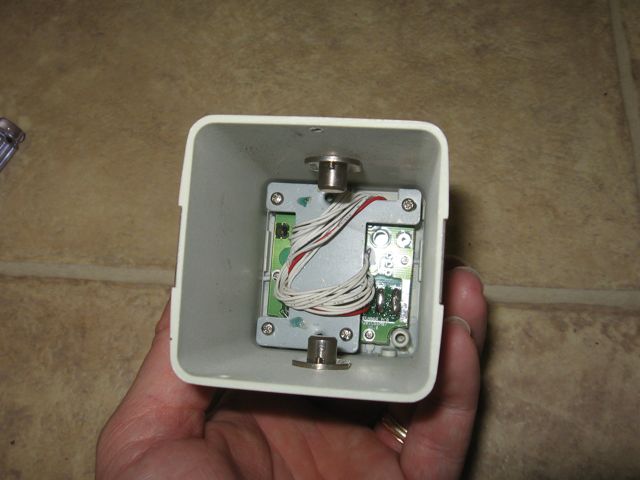
First, take the old, broken CCTV apart and gut it to make room for a battery and LED. See the following photos.
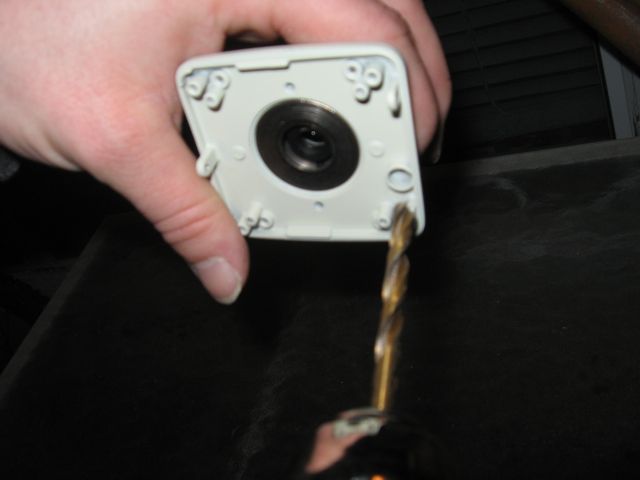
Then, drill a hole in the front plate for the LED.
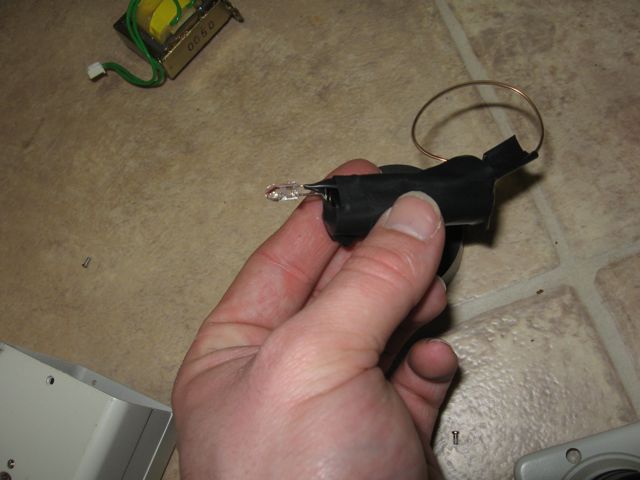
For the next part, I taped a low-brightness 1.7v red LED to a AA battery. Let's face it, this whole fake camera idea is pretty shifty. There's no point in putting a whole lot of finesse into it. LEDs like this one usually drain between 10 and 20 mA, so a plain old AA battery without a resistor should keep this LED lit up for more than a week.
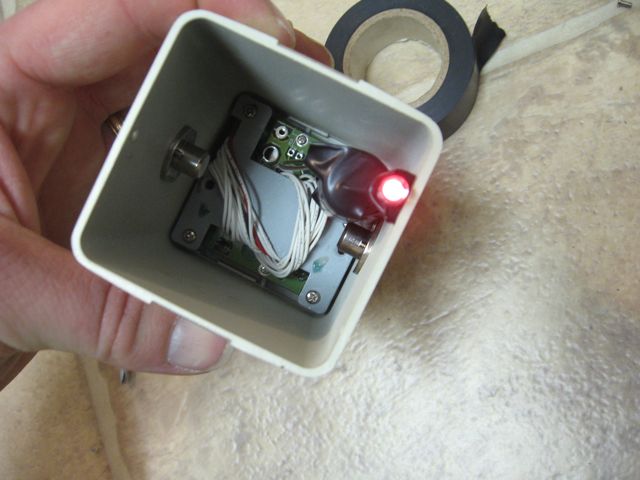
Then, tape the battery/LED down inside the chasm left in the camera and re-assemble it so that the LED sticks out.
It looks real because it IS REAL (well, it used to be!)
Hang it up somewhere and hook all the cables up. They don't have to be actually hooked up to anything on the other end, just tuck them into the ceiling or run them to a wall plate. No one could tell this isn't real by just looking.
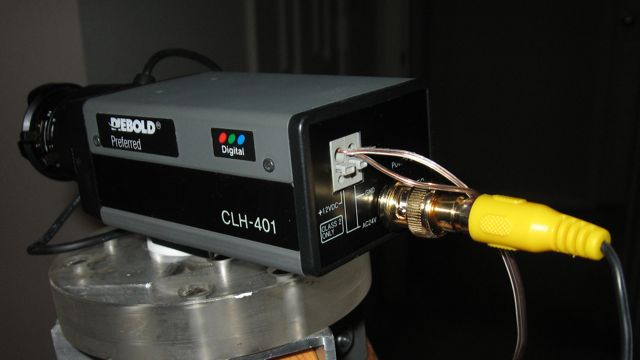
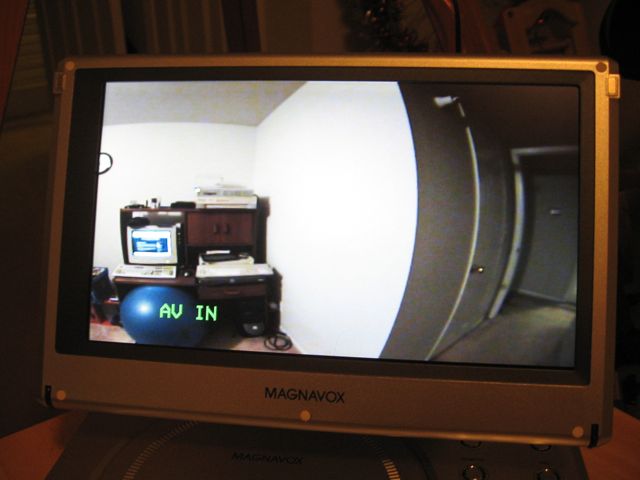
The working onesAlthough these cameras all have BNC connectors on the back, the signal they put out is typical composite NTSC -- The same thing most VCRs put out. You need a BNC-to-RCA adapter (shown left) and then an RCA video cable and a monitor to view it on. This can be an RFU-adapter hooked up to a TV, or in my case a portable DVD player with A/V inputs. You could just as easily get a video capture card or USB adapter to record the video straight to your hard drive if you felt so inclined.
First, hook up the RCA adapter, RCA cable, and power cables to the camera and mount it somewhere.
Then, hook the other end of the RCA cable up, and enjoy your working CCTV system!
Labels: CCTV, Electronics, physicalsecurity, Surveillance
2008-02-07
Exploiting Online Games
Kansas City native game hacker, tinkerer and developer Josh Kriegshauser discussed Greg Hoglund and Gary McGraw's book, Exploiting Online Games. Josh is an old friend, former co-worker, and former classmate to various HiR writers. He went from tinkering with Ultima Online while he was in school, to being a big name in the MMO industry in the last decade.
UNIX tip of the day: More awk recipes
Awk, as we have mentioned before, is a ridiculously handy utility that often goes under-appreciated by systems administrators and UNIX geeks alike.
A few days ago, a colleague of mine told me about some complex awk magic that he'd implemented in order to acquire not only the matching line of an input stream (in this case, a log file), but the two lines prior to that matching line which contained some useful information as to what was going on. It was an elaborate solution that worked well, but I swooped in with a much simpler recipe to do the same thing. This prints the two lines prior to the matching expression as well as the line containing the expression. Certain incarnations of grep can do the same thing, but this way you can also format the lines if you know your awk-fu.
$ awk '/some-regex/{print two "\n" one "\n" $0};{two=one};{one=$0}' /some/file.log
I actually keep a bunch of handy commands and UNIX tips written down. These are things that I know I won't need to use very frequently, but know I'll eventually need again.
I'll share some more awk magic with you from within its pages.
Get only the last field of a line that matches a regex:
$ awk '/some-regex/{print $NF}' /some/file
This works because NF contains the number of fields found in the line. $NF, then, contains the value of that last field. Just like $1 would contain the value of the first, if NF is 5, $NF would have the value of the 5th (and last) field. I love this one.
Example:
I'll set the field separator to a / and use awk to get only the last entry from the directory structure with find:
Raw find output:
$ find .
.
./.localized
./images
./images/apache_pb.gif
./images/gradient.jpg
./images/macosxlogo.png
./images/web_share.gif
./index.html
Now with awk:
$ find . | awk -F/ '/images/{print $NF}'
images
apache_pb.gif
gradient.jpg
macosxlogo.png
web_share.gif
If you're into AIX, a lot of the configuration files are in "Stanza" format. That is, a label, followed by a bunch of data and then a blank line between records. Awk can get just the one stanza you want from a stanza file. Example here is the /etc/security/user file on AIX, which tracks security profile information for every user on the system. The "default" stanza is an important one, as anything within it gets propagated to all users first, then any deviations from the default happen in the users' own stanzas:
# awk '/^default/,/^$/ {print}' /etc/security/user
Truth be told, stanza format and some of its variants are popular in other operating systems, but this particular awk recipe works best on AIX.
Have any awk-fu? Let's see some of your favorites. The comments are open!