
We're taking a few weeks off to spend the holiday season with our friends and families, so postings might be sparse. We'll pick Sysadmin Sunday back up after the new year.
2007-12-22

2007-12-21
Kansas Citians: KC BSD User Group starting in '08
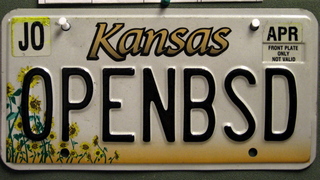
With that, it should come as no surprise that I'm excited to announce KCBUG: A *BSD user group meeting here in town. Thanks to Frogman for tipping me off. Right now, it looks like KCBUG's inaugural meeting is going to be Wednesday, Jan 9 2007 at 6PM located at the Plaza Library at 48th and Main.
I'm going to try to make it to the first meeting. Hopefully we'll see you there!
2007-12-16
Sysadmin Sunday: Fun with find
Introduction
find is a ubiquitous utility found on every single UNIX variant known to man. It is fast, efficient, and extremely powerful. Its main purpose is to locate files on the system based on criteria passed to it in the command-line arguments.
This week in Sysadmin Sunday, I'll extol find in all it's glory... or most of it, anyways.
Basics of find
find requires a path and nothing more. find . would show all files in the current directory, while recursing all the way through every subdirectory. There are a great many options to find, though. We'll work through some of them.
Find's syntax is usually as follows:
find [path] [options] [actions]
Actions
-print
Simply prints the matching filenames to standard output. -print is implied if no action is specified. You could, in theory avoid using -print, and on most modern implementations of find, it would be fine.
-print0
Separates each returned file with a null character instead of a carriage return. This is useful when the list of files returned may have spaces or other unusual characters in the filenames which may cause inconsistency in how files are handled. This works primarily with xargs, and I'll cover it at the end of the article.
-exec
I generally don't recommend using find's "exec" flag, simply because it's easier to make errors with it. You'll get more predictable results using xargs or shell escapes. See "Acting on output" later on in this article.
-prune
Stops recursion in the current directory if the option is matched.
-o (OR) allows you to perform some other option/action combination. This is particularly useful when you do a ! (NOT) operator for an option.
Options
-name
If you know the name of a file (or part of it) but you have no idea where in the hell it is on your system, find -name is here to save you. On my webserver, I know there's this absolutely hilarious gif animation of a guy trying to get out of a room. The sign next to the door says "pull to open" in some asian script. Or that's what someone told me, since I can't read it myself. I remember naming it "pulltoopen.gif" but I can't remember where I buried it, though -- and I have gigs of pictures and other random stuff on my web server.
$ find ~axon -name pulltoopen.gif -print
/home/axon/public_html/temp/pulltoopen.gif
There it is! Hey, you guys have to see this:
Okay, enough goofing around.
-follow Instructs find to follow symbolic links when recursing through subdirectories. Usually, you won't need this functionality, but occasionally it comes in handy.
-mtime, -ctime, -atime [days ago]
mtime, atime, and ctime are modification, access and change to the file respectively. What's the difference between modification and change? Well, modification means that the file's contents were altered. Change means that the permissions and/or ownership have been updated. Access times are obvious. Any time the file is read, atime gets altered. Find can tell you when a file was last looked at, modified or changed. To see what files I've modified (including newly created files) in the last day, I use -mtime 0. You can see the screenshots I uploaded for the Google Spreadsheets article which were uploaded the same day I wrote this article:

$ find public_html -mtime 0 -printThe key here is that these will only show things in 24-hour slices of time. -mtime 3 would only show stuff that's changed 36-47 hours ago. If you wish to see everything that's changed in the last 3 days, you can use a minus in front of the argument. find [path] -mtime -3 would show everything that's changed not only 3 days ago, but from now until 3 days ago. This comes in handy for use in making backup scripts, or finding something that you know you recently downloaded.
public_html/hir
public_html/hir/gs-explore.html
public_html/hir/gs-explore.phps
public_html/hir/gse-1-login.png
public_html/hir/gse-2-sslist.png
public_html/hir/gse-3-wslist.png
public_html/hir/gse-4-cells.png
-user [username], -group [groupname], -nouser and -nogroup
-nouser and -nogroup are great for locating stray files on the filesystem that no longer have an owner or a group associated with them. This can happen when you extract a tar file as the root user, or if you remove a user from the system without cleaning up all of their files first. Similarly, -user and -group can be used to limit find to only files owned by a specific entity.
-type [x]
Type will locate only a specific type of file. Values for [x]:
b block specialFor example, if you wanted to find all symbolic links in /etc:
c character special
d directory
f regular file
l symbolic link
p FIFO
s socket
$ find /etc/* -type l -print
/etc/aliases
/etc/localtime
/etc/resolv.conf
\!
Any option can be preceded by \! (also called "NOT") to return the opposite of an option.
Acting on output
In the end, find merely creates a list of files. In and of itself, find is pretty useless unless -- like my examples -- you're just looking for a few files among gigabytes of content. By its very nature, UNIX relies on the flexibility of other utilities, command-line construction, piping and redirection of output to really get things done.
xargs method
Find and xargs go together like two peas in a pod. xargs is a little-known utility that takes piped input and builds a huge command-line argument out of the contents. When you have thousands and thousands (or just a few dozen) of files listed from find, and wish to do something with them all at once, xargs is a great utility to have around. For example, if I wanted to create a backup of all of my files including my crontab, mail, and temporary files, this would work nicely:
# find / -user axon -print | xargs tar czf axon.tgzcommand-line construction (quick 'n' dirty shell escape) method
You can directly use find's output by using backticks around your find command. All the output from find will be passed on the command line. This is a different method to do the same thing as the above example, without xargs:
# tar czf axon.tgz `find / -user axon -print`Iterating through the list (for loop) method
If there's something a little more complicated that you want to do with the list of files, you can make a little miniature shell script on the command line, or a standalone script which takes action on each file one at a time. This is particularly useful if you need to do multiple actions on a file, or if you're using a utility that can only handle one file at a time, for example, converting all .gif files to PNG format with imagemagick's convert utility:
for file in `find . -name "*.gif" -print`Using \!, -prune, and -o
do
convert $file `echo $file | sed s/"gif"/"png"/`
done
Occasionally, you want to exclude certain files or directories from find. Maybe you don't want it to descend and scan networked drives or temporary files. \! returns only things that do not match the options. Alone, this might be a huge amount of files. -o (or) allows you to continue processing with additional conditions. -prune is similar that it will take whatever the options match and quit descending further.
Find all files owned by root in the /home directory and subdirectories, but prune (don't descend into) any directories named "tmp":
$ find /home -name tmp -prune -o -user root -printFind everything in /dev that is not a symbolic link:
$ find /dev \! -type l -print
Complications
If the list that find returns contains any spaces (or occasionally other bizarre characters) in the filenames, all of the above methods of dealing with the list will fail, as space and return both may be used to symbolize a break of filenames. A file named "My file.txt" will be handled as two files, "My" and "file.txt", neither of which is correct.
Here are 3 files in a directory, 2 with spaces in the name:
$ lsUsing find and xargs to do a long listing on them fails because of the spaces:
My File.txt My File2.txt MyFile3.txt
$ find . -type f -print | xargs ls -lBy replacing "-print" with "-print0" (that's a Zero, not an "o") and using xargs with the -0 (Zero) option, find and xargs will once again work together in harmony. Filenames will be separated by a null character from find, and xargs will handle all input literally, acting on filenames separated by a null.
ls: ./My: No such file or directory
ls: ./My: No such file or directory
ls: File.txt: No such file or directory
ls: File2.txt: No such file or directory
-rw-r--r-- 1 axon staff 1800 Dec 15 00:04 ./MyFile3.txt
$ find . -type f -print0 | xargs -0 ls -l
-rw-r--r-- 1 axon staff 4847 Dec 15 00:04 ./My File.txt
-rw-r--r-- 1 axon staff 13444 Dec 15 00:04 ./My File2.txt
-rw-r--r-- 1 axon staff 1800 Dec 15 00:04 ./MyFile3.txt
2007-12-15
December KC PHP User Group meeting
Usually, KCPUG's December meeting is either non-existent or of sparse attendance. The third Saturday of December is pretty close to the holidays, and many people have other plans. As such, I hadn't prepared anything to discuss, and neither had anyone else. I was pleasantly surprised when -- despite a snow storm -- we gathered more people than I'd expected. 2 of them came all the way out from Clinton, MO. It was nice to see some new faces among the regulars.
I demonstrated my Spreadsheet browser, and we all discussed some other projects we're working on. After that, it was mostly a discussion of various server platforms, web design software, and programming languages, both viable and not. This included Microsoft IIS, Apache, DreamWeaver, Front Page, PHP, ASP.NET, LOLCode, and BrainF---. Sometimes, a meeting without a lot of structure can be a great one.
2007-12-09
Sysadmin Sunday: A somewhat secure quick and dirty network backup with ssh, rsync, tar and cron
Greetings and salutations.
In this article I will cover a method of backing up a small number of servers to a central storage server for daily, weekly and monthly archiving. This is good for under 10 machines needing a basic backup solution. It is not meant for large installations due to limitations of rsync and space considerations.
-=- Index -=-
1...... Summary2...... Description of the process
3...... Server Setup Details
4...... Client setup details
5...... Sripts
6...... Security Concerns
7...... Informative resources
1. Summary
This article is intended for system administrators with intermediate experience with Un*x environments. You will require a server with a large stable amount of space. Bonus points for raid and other storage redundancy features. You will also need an up to date version of sshd installed on the server as well as tar, gzip and rsync. You also will need up to date versions of ssh and rsync on each of the machines to be backed up. I say somewhat secure because it uses ssh to shuttle the files to the server and thus is granted a level of security from eavesdropping. Its a simple way of backing up a server with out the hassle of implementing a full blown backup server software on a multi-unix-platform environment. SSH, rsync, gzip, tar and split are all usually available in a unix or unix-like installation and for the most part compatible with each other. Thus, very little compiling is needed to implement this.
2. Description of the process
Each client will be configured with a time slot and at the given time it will open a ssh connection to the backup server to an un-privileged account. It will then start rsync and synchronize a list of folders with a corresponding set of folders on the remote server. It will then disconnect and continue on its business.
The server, during off-peak hours will perform weekly differential tar backups of the
rsync archive. The server will roll the whole archive into a compressed tar archive and move it to an archive directory either on the server or using some other attached storage.
3. Server Setup Details
SSH needs to be available to the machines needing to backed up. I'm leaving the security details fuzzy here because there are so many ways to secure this setup, setting the ssh server to only use trusted host keys, certain usernames, groups ...etc In this case we are using public key authentication so this option needs to be enabled on the sshd server.
Our backup user is a regular user (no special groups, just the basic usergroup). For this example our backup user is "backupuser" who belongs to group "backupuser".
Our backup user's quota setup and home directory need to have lots of storage space available.
Inside their home directory we need a directory structure similar to this:
-SERVERBACKUPS
- SERVER1
+ Daily
+ Weekly
- SERVER2
+ Daily
+ Weekly
- SERVER3
+ Daily
+ Weekly
NOTE: Security precautions you should look at taking is switching on the no-execute feature on the file system (if the folder resides some where that wont need scripts being executed from). The backup user account needs to have a restricted shell (ex. /bin/rbash). Security is beyond the scope of this article so use your best judgement.
Then configure cron to run your roll scripts. (see section 5)
You will want to run crontab on the backup server as root or some other user with enough permissions to manipulate the backup data owned by our backup user.
Run :
#crontab -e
(It will then run vi or the other default editor)
... add the following lines
# 12:30pm on Saturdays
30 12 * * 6 /root/scripts/weekly_diff.sh
# 12:30pm on Sunday once every month
30 12 * 1-12 0 /root/scripts/monthly_roll.sh
(Save the file and exit the editor)
We will now need to make the ssh private key.
#ssh-keygen -t dsa
***You will not want to put a password on this key (just press enter).
Then place the public key into the backup users ~/.ssh/authorized_keys and chmod 700 on the .ssh directory and chmod 600 on the key itself. (this would be a good time to verify that sshd is configured for public key logins)
You can also put multiple public keys into the authorized keys list (one for each client).
4...... Client setup details
Each client needs to have a copy of the private key we made in section 3. You will want to run chmod 600 on the key to prevent other system users access to the key. Then put the backup.sh script and the private key into a folder accessible only to the root account (like /root/scripts) and run chmod 700 on the script so only the owner (root) can execute it.
make sure the file is where the script expects to to find it
You will then want to put in a cron job for the root account.
#crontab -e
(it will then launch the system default editor like vi)
insert the following commands:
# Backup the fs at 11:30pm every day of the week
30 23 * * * /root/scripts/backup.sh
Save the file and exit. Now it will now execute the /root/backup.sh script at 11:30pm every day.
5...... Scripts
#!/bin/sh
#--------SERVER WEEKLY ARCHIVING SCRIPT (weekly_diff.sh) -----------
#!/bin/bash
DATE=`date +%V%g`
cd /data/serverbackups
for file in *; do
tar --create \
-z \
--file=$file/weekly/$file$DATE.tar.gz \
-g $file/weekly/weekly-diff.snar \
$file/daily
done
#end weekly script
#--------SERVER MONTHLY ARCHIVING SCRIPT (monthly_roll.sh)-----------
#!/bin/bash
DATE=`date +%b%g`
cd /path/to/serverbackups
mkdir /path/to/archive/$DATE
for file in *; do
rm $file/weekly/*
FILENAME=$DATE.tgz
tar -zcvf $file/weekly/$FILENAME -g $file/weekly/weekly-diff.snar $file/daily/.
cp $file/weekly/*.tgz /path/to/archive/$DATE
done
#end monthly script
#--------SERVER OFF SITE ARCHIVING SCRIPT -----------
MOUNT_CMD="/path/to/mount"
MOUNT_DEV="/path/to/external/storage/device"
MOUNT_POINT="/path/to/mount/point"
MOUNT_FS="filesystem name -t "
MKNOD_CMD="/path/to/mknod /tmp/tar_pipe p"
SPLIT_CMD="/path/to/split -b 512000000"
ARC_PATH="/path/to/monthly/archive"
TAR="/path/to/tar -cvf"
GZ="/path/to/gzip"
DATE=`/path/to/date +%m%Y`
$MOUNT_CMD $MOUNT_FS $MOUNT_DEV $MOUNT_POINT
mkdir $MOUNT_POINT/$DATE
$TAR $MOUNT_POINT/$DATE/archive_$DATE.tgz /tmp/tar_pipe &
$SPLIT_CMD /tmp/tar_pipe $MOUNT_POINT/$DATE/archive_backup_$DATE.tar.
#end of archive script
#------------------CLIENT BACKUP.SH-------------------
#!/bin/sh
RSYNC=/usr/bin/rsync
SSH=/usr/bin/ssh
KEY=/path/to/key
RUSER=backupuser
#SERVER IP
RHOST="11.22.33.44"
RPATH="/path/to/serverbackups/servername/daily"
LPATH=/
$RSYNC -az --links --safe-links --exclude /dev --exclude /proc --exclude /mnt $LPATH -e "$SSH -i $KEY" $RUSER@$RHOST:$RPATH
#end of backup.sh
6...... Security Concerns
Obviously, having an account which contains all of your network data available to any one who has the secure key is a problem. Having an rsynced archive of everything also has other file related issues. You could use different backup server local users, keys or tack on some countermeasures which chmod the files to something less offensive.
Then we have concerns about ssh itself. Internet sites are vulnerable to scripted ssh probes using dictionary attacks ..etc
You could move ssh to a different port and avoid some of the scripted attacks. Once again this is all outside the scope of this article.
If these concerns are a bit too much for your environment consider using a backup system like Baccula or Amanda or one of the commercial backup solutions.
7...... Informative resources
Johnson, Troy. "Using Rsync and SSH." Accessed December 2007
http://troy.jdmz.net/rsync/index.html
Linux-Backup.net "Examples." Accessed December 2007
http://www.linux-backup.net/Example
OpenSSH.org "Manuals." Accessed December 2007
http://openssh.org/manual.html
2007-12-05
Rickrolling with mod_rewrite
Comic Credit:XKCD
Rickrolling is one of the latest goofy internet pranks, memes, or whatever you want to call it. By strictest definition, to rickroll someone is to send them a link that seems to be for something interesting, but actually takes them to a video of Rick Astley's "Never gonna give you up". These can be via e-mail, instant message, or even discussion forums.
Example of rickroll bait:
Did you see the video of the new spy plane the military is working on?!
Fast forward to today. I find out that some morons have planned to have a little fun with one of the websites that I help with. It's not my site, but run by a client and friend of mine. Not too big of a deal, just some bored teenagers, probably. Not sure what they were up to, but it probably involved lots of forum trolling, trash talking, or spamming. Who knows? I figured I would rickroll these twerps. If they click on the URL they posted in their little forum, they won't get the site they wanted. They will get Rick Astley instead. Meanwhile, the site works fine for everyone else.
In order to do this, I used Mod_Rewrite for apache, and added this to my .htaccess file. In this example, people who click on a link to my site from anywhere on http://www.evil.net will get rickrolled:

RewriteEngine on
RewriteCond %{HTTP_REFERER} ^http://www\.evil\.net [NC]
RewriteRule .* http://www.youtube.com/watch?v=eBGIQ7ZuuiU [R]
The first line just initializes the rewrite engine.
The second line checks the HTTP_REFERER server variable to see if it starts with "http://www.evil.net" (It's a regular expression, "^" means "starts with" and the periods have to be escaped with a backslash or else they're treated as wildcard characters) The [NC] simply means "no case" so that the referer URL is case-insensitive.
The third line tells apache what to do. In this case, it replaces the entire url (.*) with a link to the video on YouTube. The code at the end specifies what kind of rewrite. In this case, [R] means that the web server passes an HTTP 302 status, telling the browser that the URL has been temporarily moved. And you just got rickrolled.
This can be tweaked to keep certain sites from deep-linking your image/media files as well. Keeping EVERYONE from deep-linking requires a different recipe, but in short, you ALLOW only your site to link to the images and media files. Everyone else sees something else of your choosing.
Related Links:
Mod_Rewrite Tips site
Regular-Expressions.info (for forming good RegEx rules)
XKCD.com
Related Links:
Mod_Rewrite Tips site
Regular-Expressions.info (for forming good RegEx rules)
XKCD.com
2007-12-02
Stegnagraphy overview
-Stegnagraphy Introduction-
I think we’re all guilty of drawing up the plans in our heads, with the thermite charge on your hard drive and the big red panic button. But all of these plans essentially have the problem of having to detect a breach of security. An interested party need only be just as creative to detect and thwart your carefully laid booby trap. Nothing quite says "I contain incriminating information" like a booby-trapped PC.
There are some classical methods of hiding communication in plain sight using pre-arranged coded speech an writing patterns which at first look appear as mundane however in actuality the people as saying something completely different. The Russian black market and crime syndicates developed a language using certain chess movements. Prison detainees used vulcanized rubber and crude utensils to draw elaborate tattoo’s denoting rank and other qualities.
By itself stegnagraphy is only good for covert communications to one or more parties. Much has been said about the presence of stegnagraphy laced content in news groups and other public content. Granted the amount of actual covert communications is very exaggerated. The difficulty in using stegnagraphy is that many stegnagraphy techniques can be scanned for just like you would scan for a virus or malware. The very presence of a stegnagraphic utility on your computer or some one accessing a known security website or downloading a known utility can raise a flag to a security analyst that covert communication is likely occurring.
When addressing the topic of including stegnagraphy into freenet (an open source anonymous network) "...Steganography is an ongoing battle of attrition, obscurity and constantly updating are sadly the best defenses in it. Again it's down to `better
the way we do it than the way you don't...' " Basically, the same defenses that viruses use to avoid detection are the only strengths that stegnagraphy by itself has. Another strength it has is that it is not part of the popular user-land security dogma which states that firewall + anti virus + anti spy ware == secure. (which is like saying that its okay not to wear a seat belt in a car because your wearing a condom). So it is only effective against passive detection but thats about it.
-=- TABLE OF CONTENTS -=-
x .......... Introduction
1 .......... Use and purpose
2 .......... Mediums and How it works
3 .......... Utilities currently available
A .......... Works Cited
=======================
1 .......... Use and purpose
=======================
Covert communication is where bandwidth is stolen from a legitimate communication to create a secret channel of communication. So the purpose of stegnagraphy is to create a parasitic hidden communication, carried by a legitimate communication. This is done so that communication can be made in a public space with out drawing attention to it self.
A person who would want to make use of this would be a human rights violation observer who is passing information to an international human rights advocacy group like Amnesty International or the UN. The local authorities would very likely be suppressing information of that sort. If the local authorities would catch a communication a report on an incident, its very likely the reporter would be silenced in one way or another.
(rant)
In the US we enjoy freedom of speech, these rights are being whittled away at under the guise of national security. In other countries, un-censored speech has dire and deadly consequences. Just because what I write may be unpopular, that is not a valid excuse for killing or torturing me. Yet untold numbers of people suffer those consequences daily just because they say something not deemed acceptable by their locality/nation/culture. Development of covert communications and cryptography may seem trivial to us now, but development of these tools can save lives. Allowing the public the use of these tools may have serious consequences for law enforcement, but criminalizing their use and possession has vast and horrible consequences for us as society.
(/rant)
=======================
2 .......... Mediums and How it works
=======================
A good example is a chess game, in the previous example of criminal elements use of coded speech and mannerisms, a chess game is interpreted in a different game, certain reactions to moves are communications, the moves are all valid moves, only their context has changed. This is a high bandwidth covert channel, it uses a lot of the bandwidth of the communication. High bandwidth is where the legitimate communication itself is placed into a different context and interpreted to mean something else. If one of the players affixed a microdot containing private information and affixed it on to the other players chess board then this would be low bandwidth.
The Trusted Computer Security Evaluation Criteria (aka TCSEC) is a set of criteria established by the National Computer Security Center which is managed by the NSA. According to TCSEC there are two types of covert communications. The first is a storage channel, which modifies a stored object into something else less sensitive. The second is a timing channel which manipulates the timing in a communication to transmit the sensitive information.
An example of the two is Jsteg and tcp/ip timing. Jsteg hides information in an existing jpeg in the formatting of the picture which does not significantly change the original picture. Tcp/IP timing is where a normal mundane tcpip request is carried out but it is delayed in a pre-determined fashion which the timing of the transmition of the packets is the medium of communication. A less technical example would be the chess example where the microdot would be the storage channel and the timing of chess movements would be the timing channel.
Another example of using a parasitic medium is communicating using stegnagraphy using what is called chaffing and winnowing. This sends out multiple hidden communications using a secondary channel to provide a key to identify which communication is correct. This method utilizes the previous forms and adds in a code which authenticates the communication.
Lastly, the weakness of stegnagraphy is that it relies on constant change to maintain the communications secrecy. Companies like SARC are using watermarking technologies which are similar to anti-virus technologies to detect both stegnagraphic content and utilities, it is vital that cryptography be used in order to maintain the secrecy of the information within the hidden communication.
=======================
3 .......... Utilities currently available
=======================
From Wikipedia (http://en.wikipedia.org/wiki/Steganography#Implementations)
Online (Hiding text)
* mozaiq Has a large library of stock photos it provides if you can't supply a photo of your own. A good starting point for creating simple steganographic examples.
* spammimic.com will take a sentence that you provide and turn it into text that looks to all the world like spam.
* Hide text in a PNG or BMP image and its corresponding decoder.
** Online (Hiding files)
* Stegger, PHP Steganography—PHPClasses Repository—An open source, feature rich, secure implementation of image steganography written in PHP.
** Downloadable (Hiding text)
* Concealar ...coz a picture speaks a thousand words! The software "Concealar" hides text into images & pictures by a password using cryptographic and steganographic techniques. Encryption algorithm used for text is AES (Rijndael) and the password is hashed with SHA512. The software don't create any noise in the resultant image so pattern-finding & pixel-mapping techniques of steganalysis don't work on this software.
* Bapuli Online—implementing steganography using Visual Basic.
* BitCrypt BitCrypt is one of the easiest to use encryption tools which at the same time provide ultra-strong encryption. It uses up to 8192 long bit key ciphers to encrypt the text, and then stores the encrypted text within bitmap images.
** Downloadable (Hiding files)
* Hiding Glyph: Bytewise Image Steganography: Hides any file (or folder) into any losslessly compressed image (BMP, PNG, etc…). (freeware)
* BestCrypt Commercial Windows/Linux disk encryption software that supports hiding one encrypted volume inside another
* Crypto-Stego Utility for the Zillions of Games program.
* Digital Invisible Ink Toolkit An open-source cross-platform image steganography suite that includes both steganography and steganalysis implementations.
* FreeOTFE Free, open-source Windows/PocketPC/Linux disk encryption software that supports hiding one encrypted volume inside another, without leaving any evidence that the second encrypted volume exists. This probably resists any statistical analysis (as opposed to tools that conceal data within images or sound files, which is relatively easy to detect).
* MP3 Steganographic File System, a description of an approach to create a file system which is implemeted over MP3 files.
* OutGuess A steganography application to find data in Jpeg images.
* PCopy A steganography commandline tool with a userfriendly wizard which can produce lossless images like PNG and BMP. Special features are RLE, Huffman compression, strong XOR encryption and the Hive archiving format which enables the injection of entire directories.
* Phonebook FS protects your disks with Deniable Encryption
* RevelationA platform independent tool created in Java that can hide any data file within a 24-bit bitmap image. Features a unique wizard style interface in the encoding and decoding process.
* stego and winstego Steganography by justified plain text.
* Stego-0.5, a GNOME/GTK+ based GUI for LSB algorithm. License (GPL)
* Stego Archive Source for a large variety of steganography software.
* Steghide Free .jpeg and .wav encryption for Linux and other operating systems.
* SteGUI Free GUI for Steghide for Linux.
* TrueCrypt Free, open-source Windows/Linux disk encryption software that supports hiding one encrypted volume inside another, without leaving any evidence that the second encrypted volume exists. This probably resists any statistical analysis (as opposed to tools that conceal data within images or sound files, which is relatively easy to detect).
* Peter Wayner's website—sample implementations of steganographic techniques, by the author of Disappearing Cryptography.
* NetTools Steganography by hiding data in pictures, archives, sounds, text files, html, and lists.
* Qtech Hide & View v.01 is the newest BPCS-Steganography program for Windows. This is an image steganography. (Free to use)
* ZebDisk ZebDisk is a free software, and you can store, and share your files on the internet with it using Google’s Picasa service.
* SteganoG a simple program to hide a text file in a .bmp file.
(Wikipedia, on Implemenataions of Stegnagraphy, Dec 2007)
We also mentioned Jsteg which can be found at "http://www.theargon.com/achilles/steganography/jpeg-steg/"
=======================
A. .......... Works cited
=======================
Sarc Website. Accessed March 2007
http://www.sarc-wv.com/default.aspxn-
Toad "Attacks and weaknesses." Accessed March 2007
http://www.freenethelp.org/html/AttacksAndWeaknesses.html
Engle, Sophie. (Viewed March 2007). "CURRENT STATE OF STEGANOGRAPHY:
USES, LIMITS, & IMPLICATIONS"
http://wwwcsif.cs.ucdavis.edu/~engle/stego.pdf
Wikipedia.org (Accessed March 2007). "Steganography"
http://en.wikipedia.org/wiki/Steganography
Wikipedia.org (Accessed March 2007). "Covert Channel"
http://en.wikipedia.org/wiki/Covert_channel
Wikipedia.com (Accessed March 2007). "Russian Criminal Tatoos."
http://en.wikipedia.org/wiki/Criminal_tattoo#Russian
http://www.theargon.com/ (Accessed December 2007). "theargon stegnagraphy web archives."
http://www.theargon.com/achilles/steganography/jpeg-steg/
Subscribe to:
Posts (Atom)

 Posts


